In this article
When an AI coding tool reaches mass adoption in under eight months, the rollout usually moves faster than the measurement strategy behind it.
That’s what happened with Claude Code. The Pragmatic Engineer’s February 2026 survey of 15,000 developers ranked it as the most-used AI coding tool on the market.
At the same time, Jellyfish’s AI Engineering Trends data shows a 4.5x increase in companies running agentic coding workflows with tools like Claude Code. But for most engineering leaders, there’s still no clear line between that adoption and what it means for delivery.
Claude Code has native analytics that track adoption and contribution data across teams, and the coverage is broader than many leaders realize. However, the native reporting stops short in a few places, especially around cost attribution, cross-tool visibility, and tying usage to engineering outcomes.
This guide walks through how Claude Code monitoring works, what metrics are available, where the built-in tooling falls short, and what alternatives exist.
Why Monitoring Claude Code Matters for Engineering Teams
Why Monitoring Claude Code Matters for Engineering Teams
Claude Code has a direct hand in cost, code quality, security, and delivery speed across any team that uses it at scale. All four start to change once adoption moves past the first few developers, and all four can move in the wrong direction without anyone noticing.
Here’s what engineering leaders need to keep an eye on:
- Perceived speed and actual throughput don’t always match: Jellyfish found that companies in the top quartile of AI adoption merge 2x more PRs per engineer than those in the bottom quartile. That sounds like a clear win. But a 2025 METR study found that experienced developers on familiar codebases were 19% slower when using AI, even though they perceived a 20% speed boost. Both of those things can be true at the same company, on different teams.
- Security risk scales with AI-generated output: Georgia Tech researchers found that AI-generated CVEs tripled between Q4 2025 and Q1 2026, with March 2026 alone producing more confirmed cases than all of the prior year. Claude Code showed up the most in their tracking, partly because the tool leaves clearer commit signatures. The more AI-generated code that reaches your codebase, the more important it becomes to track where it came from and whether it passed review.
- Seat count is a poor proxy for usage: A team can have 100 Claude Code licenses and 30 active daily users. According to Jellyfish’s 2025 AI Metrics in Review, roughly 1 in 5 engineers who start using Claude Code stop within 20 weeks. That kind of drop-off is invisible without usage tracking.
- PR volume can mask declining code health: GitClear’s analysis of 211 million lines of code found that newly added code revised within two weeks jumped from 5.5% in 2020 to 7.9% in 2024. That means more code is getting written and then immediately corrected. Jellyfish data shows a similar signal, with a 5 to 11% increase in reverted PRs as AI adoption grows. Those patterns only become visible when you track quality signals alongside throughput.
- Regulatory frameworks now expect AI usage records: The EU AI Act’s high-risk obligations go live in August 2026. DORA already requires financial institutions to maintain a register of ICT third-party providers, and AI coding tools fall under that umbrella. Grip Security found that 91% of AI tools in organizations are still unmanaged. The teams that invest in monitoring now will have the documentation ready when regulators ask for it.
- Tool costs are rising faster than budgets planned for: Cledara data shows that monthly engineering spend on AI coding tools tripled between January 2025 and March 2026. Claude Code averages around $6 per developer per day on API pricing, which sounds manageable until you multiply it across a 50-person team over a quarter. Without monitoring that ties spend to delivery outcomes, finance has a growing line item and no way to evaluate whether it’s paying off.
Understanding Claude Code Analytics Monitoring Capabilities
Understanding Claude Code Analytics Monitoring Capabilities
Claude Code’s native monitoring covers more ground than a typical AI coding tool. There’s a native analytics dashboard with usage and GitHub-linked contribution metrics, plus a separate Console view for API customers.
Teams that need deeper visibility can also enable OpenTelemetry export and pipe telemetry into tools like Datadog or Prometheus. What’s available to you depends on the plan you’re on and how much config you’re willing to take on.
How Claude Code Monitoring Works
Claude Code’s monitoring runs through two separate dashboards, and which one your team uses depends on your plan.
Teams and Enterprise customers get the fuller picture. Their analytics dashboard covers both usage trend data (lines accepted, accept rates, daily active users) and contribution metrics that tie Claude Code activity directly to pull requests.
API customers get a separate Console dashboard that focuses on usage and spend, including per-user cost breakdowns, but doesn’t include the GitHub-linked contribution side.
| Teams / Enterprise | API (Console) | |
| Usage metrics | Yes | Yes |
| Spend tracking | No | Yes |
| GitHub-linked contribution metrics | Yes (requires setup) | No |
| Leaderboard and CSV export | Yes | No |
| Per-user spend | No | Yes |
Usage data works on both paths without any setup. Where it gets more interesting is the Teams/Enterprise side, which offers contribution metrics.
These connect Claude Code sessions to merged pull requests through a GitHub integration, so you can see exactly how much of your shipped code involved Claude Code, down to the team and individual level.
Setting it up takes four steps:
- A GitHub admin installs the Claude GitHub app on your org’s GitHub account
- A Claude Owner enables Claude Code analytics in the admin settings
- The Owner turns on the “GitHub analytics” toggle on the same page
- You complete the GitHub authentication flow and select which GitHub orgs to include
Data usually appears within 24 hours. Once the connection is live, the system matches Claude Code sessions against PR diffs and labels confirmed contributions as “claude-code-assisted” in GitHub. That label also means you can query this data programmatically through GitHub search if you want to build your own reporting.
One thing worth knowing is that the matching is intentionally conservative. Claude Code only takes credit for lines where the system has high confidence in its involvement. The numbers in the dashboard will undercount the tool’s real contribution, but that tradeoff keeps the data trustworthy.
Individual developers can see what a session costs by running /cost at any point. For a team-wide view, the Console shows spend and accepted lines broken down by user each month. Those numbers are estimates rather than exact billing figures, but they’re useful for trends and comparing usage across the team.
Where to find your data →
|
What Metrics Can Actually Be Tracked
Claude Code tracks a wide range of data points across its monitoring layers. What’s available to your team depends on your plan and how deep you want to go.
The Teams and Enterprise dashboard gives you the broadest view of how Claude Code affects your development workflow. At the top, you’ll see five summary metrics:
- PRs with CC: The number of merged pull requests where Claude Code contributed at least one line of code. This gives you a raw count of how many PRs involved the tool.
- Lines of code with CC: How many lines across your merged PRs were written with Claude Code’s help. The count filters out trivial lines like empty rows, lone brackets, and anything under 3 characters after cleanup, so the number show real code contributions.
- PRs with Claude Code (%): The proportion of your team’s merged PRs that include Claude Code contributions. Most engineering leaders treat this as their primary signal for adoption depth.
- Suggestion accept rate: How frequently your developers say yes to Claude Code’s suggestions when the tool proposes edits, writes, or notebook changes. A higher rate usually means the team finds the output useful enough to keep.
- Lines of code accepted: The total volume of Claude Code output that developers chose to keep during their sessions. Rejected suggestions are excluded, though the metric doesn’t account for lines that developers accepted and later removed.
Below those, the dashboard includes four charts that track trends over time:
- Adoption: Daily active users and session counts, especially useful for spotting adoption trends or drop-offs across the org.
- PRs per user: Merged PRs per day divided by daily active users. This is a good proxy for how individual productivity shifts as Claude Code adoption grows.
- Pull requests breakdown: A daily view of merged PRs split between those with and without Claude Code assistance. You can toggle this to show lines of code instead of PR count.
- Leaderboard: The top 10 contributors ranked by Claude Code usage, with a toggle between PR count and lines of code. You can export the full list for all users as a CSV.
The Console dashboard for API customers covers less ground. There’s no GitHub integration or contribution tracking here. The focus is on usage and spend, with four main data points:
- Lines of code accepted: Same definition as the Teams/Enterprise side.
- Suggestion accept rate: Same as above.
- Activity: A chart that shows daily active users and sessions.
- Spend: Daily API costs in dollars alongside user count.
The dashboard also includes a per-user breakdown that shows spend and accepted lines for the current month. This is where you spot outliers, whether that’s a developer burning through tokens faster than expected or a team member who stopped using the tool entirely.
And if the dashboards don’t go deep enough for your team’s needs, the OpenTelemetry layer fills in the gaps. It exports eight metrics that can flow into your existing observability stack:
- Session count: How many CLI sessions start across your team.
- Lines of code: Lines added and removed, broken down by type.
- Pull request count: PRs created through Claude Code.
- Commit count: Git commits created through Claude Code.
- Cost: Estimated cost per session in USD, broken down by model.
- Token usage: Input, output, cache read, and cache creation tokens, also broken down by model.
- Code edit decisions: How often developers accept or reject code suggestions, with detail on the tool used and the programming language involved.
- Active time: actual time spent using Claude Code, split between user interactions (typing, reading) and CLI processing (tool execution, AI responses). Idle time is excluded.
OTel also exports events for more granular tracking, including user prompts, tool results, API requests, errors, and tool decisions. Each event links back to the specific prompt that triggered it through a prompt.id attribute. This means you can trace the full chain from a single developer action through every tool call and API request it produced.
The dashboards handle most day-to-day monitoring needs. OTel is worth the setup when your team needs custom reporting or wants Claude Code data flowing into the same observability tools you already use for everything else.
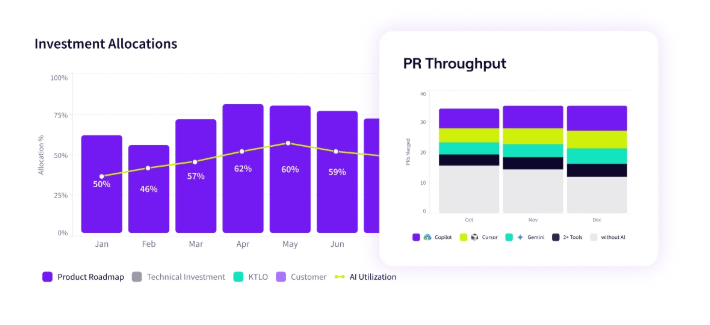
PRO TIP 💡: Jellyfish’s AI Impact dashboard tracks all of these metrics alongside delivery outcomes like cycle time and throughput in a single view. If you want to see how Claude Code’s suggestion accept rate or PR contribution data correlates with actual delivery performance, that’s where it comes together.
Additional Tracking Details You Should Know
The monitoring data in Claude Code is useful, but there are a few details that affect how you interpret it and who can access it in the first place.
On the attribution side, the system has a few built-in boundaries worth knowing about:
- The system looks at Claude Code sessions from a 21-day window before the PR merge and up to 2 days after. Anything outside that window gets excluded.
- Code that a developer rewrites considerably after Claude Code generates it (more than 20% difference) is not attributed to Claude Code.
- The algorithm doesn’t factor in PR source or destination branches.
- Certain files are excluded automatically, including lock files, build artifacts, generated code, test fixtures, and any line over 1,000 characters.
All of these push the reported numbers lower. If your team’s dashboard metrics feel conservative, that’s why.
On the access and availability side, a few limitations are worth outlining early so your team doesn’t hit them mid-rollout:
- Contribution metrics are still in public beta. They only cover users within your claude.ai organization. Usage through the API or third-party integrations won’t show up.
- Organizations with Zero Data Retention enabled get usage metrics only. No contribution data.
- Analytics are not available on individual Pro or Max plans. This is a Teams and Enterprise functionality.
- Spend figures in the Console are estimates, not billing-grade numbers. For exact costs, you need to check your billing page.
One more thing worth noting on the privacy side. OTel redacts prompt content, tool input, and tool output by default. You have to explicitly enable each one through environment variables.
Most companies will want to keep those defaults in place, but it does mean your observability dashboards will only show metadata until you decide to open up more detail.
Limitations of Claude Code Monitoring
Limitations of Claude Code Monitoring
Claude Code’s monitoring handles usage tracking well enough. The gaps start to show when engineering leaders move past adoption data and into questions about delivery impact, cost attribution, and how Claude Code compares to other tools in the stack.
Here’s where the built-in tooling has limits:
- Your AI tool stack is invisible outside Claude Code: If your team runs Copilot, Cursor, or other AI tools alongside Claude Code, the native dashboards can’t compare them. There’s no unified view of adoption, output, or cost across your full AI stack.
- Monthly resets make trend analysis difficult: Usage metrics reset at the beginning of each calendar month with no built-in way to view historical data. If you want to compare adoption or contribution trends over quarters, you’ll need to export the data manually before it resets.
- Spend can’t be broken down by team or project: You can see per-user spend in the Console, but there’s no way to roll that up by team, department, or project natively. For organizations that need to allocate AI tool costs across business units, this is a major boundary.
- Adoption metrics stop short of business impact: Proving that Claude Code optimizes engineering outcomes means connecting usage data to metrics like cycle time, defect rate, and sprint velocity. That connection doesn’t exist natively and has to be built through an external platform or manual analysis.
- Monitoring is retrospective, not proactive: The dashboards show you what already happened. There’s no built-in way to set up alerts for cost spikes, adoption drop-offs, or unusual token consumption. By the time you spot a problem, the spend has already occurred.
- Contribution metrics are GitHub-only: The PR attribution system works with GitHub Cloud and GitHub Enterprise Server. Teams on GitLab, Bitbucket, or other git providers don’t get contribution tracking at all, which removes one of the most valuable parts of the analytics.
- Cloud-hosted teams have a spend blind spot: If your org runs Claude Code through AWS Bedrock, Google Vertex, or Foundry, cost data doesn’t flow back into Claude Code’s monitoring. You’ll need an external solution to track what your team spends, and the options available haven’t been vetted by Anthropic.
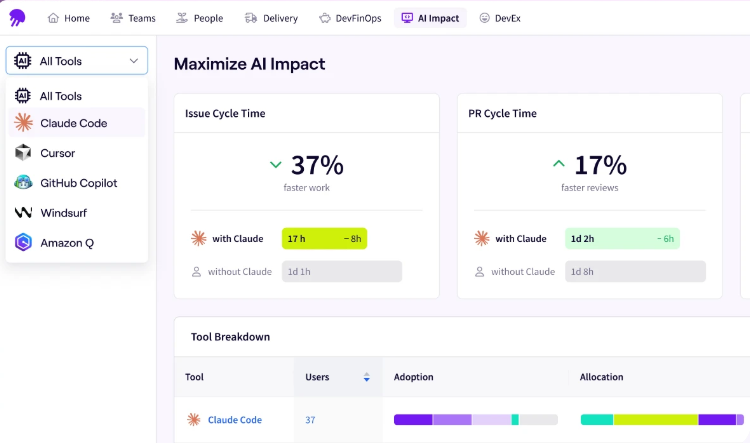
PRO TIP 💡: Most of these limitations disappear with Jellyfish’s dedicated Claude Code dashboard. It connects Claude Code adoption and spend to delivery metrics, compares performance against Copilot and Cursor, and gives leadership a single view of what Claude Code produces across the org.
Alternatives & Advanced Monitoring Solutions
Alternatives & Advanced Monitoring Solutions
Outside of the native dashboards, there’s a growing set of tools that extend Claude Code monitoring in different directions. They range from lightweight developer utilities to full engineering intelligence platforms.
For individual developers who want real-time visibility into their own usage, a couple of open-source tools are worth knowing about:
- Ccmonitor runs in the terminal and shows your token burn rate as you work. It also predicts when you’ll hit session limits, which saves you from having to check /cost manually throughout the day.
- Ccusage takes the opposite approach. It pulls from Claude Code’s local JSON cache files to generate usage and cost reports across daily, weekly, and monthly windows. Everything runs locally with no external dependencies.
For team-level monitoring and infrastructure, the options are more advanced:
- SigNoz paired with OpenTelemetry lets you build real-time visual dashboards on top of Claude Code’s OTel hooks. You can track token usage, quotas, and command durations across your team in the same observability stack you already use.
- LiteLLM fills a specific gap for teams running Claude Code through Bedrock, Vertex, or Foundry, where native cost data doesn’t flow back. It tracks API spend by project and key, giving you the cost attribution the native dashboards can’t provide.
- Bifrost offers token-level monitoring with governance controls and integration into standard observability systems. It’s one of the more complete monitoring stacks specifically built for Claude Code usage at scale.
All of these tools are good at what they do. The gap they share is that they track what happens inside Claude Code without linking any of it to how the team performs.
That’s where engineering intelligence platforms like Jellyfish come in. Its AI Impact dashboard pulls Claude Code adoption data and maps it against delivery performance across the SDLC. It also tracks how AI-assisted PRs compare to non-assisted ones on metrics like cycle time and merge rate, and it supports multiple AI tools in the same view.
The section below goes deeper into how Jellyfish handles Claude Code monitoring specifically, including what the dedicated Claude Code dashboard tracks and how it connects to delivery outcomes.
Jellyfish: Connecting AI Usage to Engineering Outcomes
Jellyfish: Connecting AI Usage to Engineering Outcomes
For teams that are still in the early stages of Claude Code adoption, the native analytics covered in this guide will take you a long way. Where most teams outgrow them is around the delivery impact, cross-tool, and cost attribution questions that keep coming up at planning and budget reviews.
Jellyfish is built for that stage. Its AI Impact platform integrates directly with the Claude Code API and pulls adoption, usage, and performance data into a single dashboard in near-real time.
There’s also a dedicated Claude Code dashboard that focuses specifically on adoption trends, agentic workflow activity, and delivery outcomes across your engineering team.
Here’s what that looks like in practice:
- System-level adoption signals: Jellyfish picks up Claude Code usage automatically from Git and workflow data. You can see which teams adopted the tool, how deeply they use it, and where adoption stalls, all without asking anyone to fill out a survey or tag their commits.
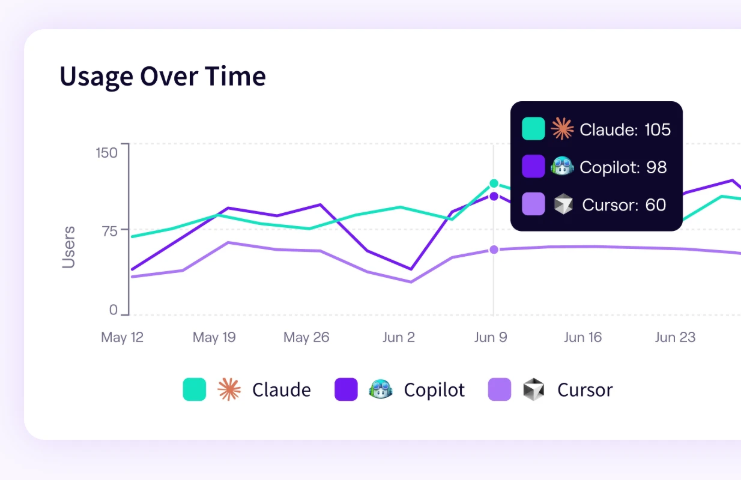
- AI activity mapped to delivery performance: The platform connects Claude Code usage to cycle time, PR throughput, and merge velocity at the team level. That lets you evaluate whether Claude Code moves work through the pipeline faster or just increases output volume.
- Track autonomous AI activity across your org: As more engineering work moves to autonomous Claude Code workflows, Jellyfish gives you a clear view of what that work produces. You can see how agentic output compares to human-assisted output on throughput, quality, and cycle time.
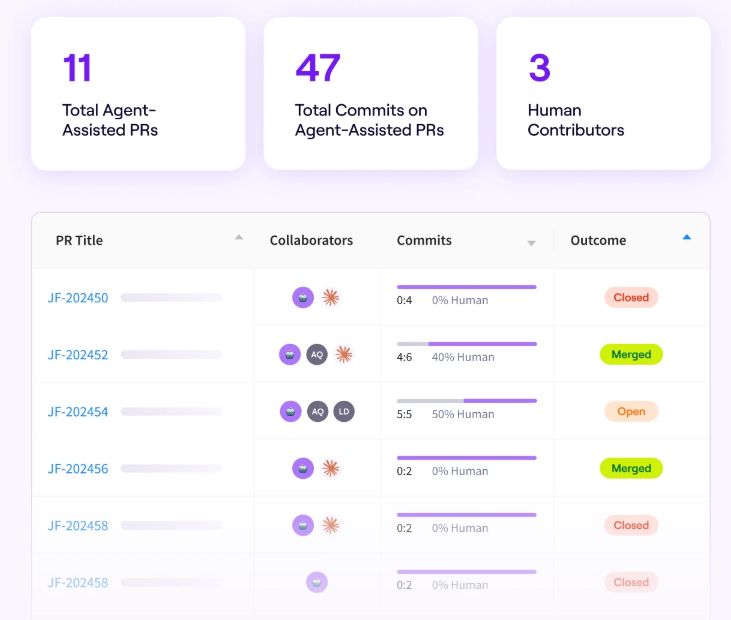
- Vendor-neutral benchmarking across tools: Jellyfish measures Claude Code performance alongside Copilot, Cursor, Windsurf, and others using a consistent set of metrics. Engineering leaders can compare tools on adoption, delivery impact, and cost without relying on each vendor’s own reporting.
- Cost data with business context: The platform tracks Claude Code costs alongside the delivery outcomes those costs produce. You can show leadership exactly what the money buys in terms of throughput, cycle time, and quality improvements.
- Auto-generated AI impact reports: Jellyfish’s auto report builder produces AI-specific reports that summarize adoption trends, delivery impact, and investment performance. These are built to go straight into a leadership deck or planning conversation without extra formatting.
The monitoring questions in this guide get harder as Claude Code scales across your org. Having delivery impact data, cost attribution, and cross-tool benchmarks in a single dashboard makes them a lot easier to answer.
Jellyfish puts all of that in one place. Book an AI Impact demo to see how it works with your Claude Code data.
FAQs
FAQs
How do you monitor token usage in Claude Code?
Developers can run /cost inside any session to check token usage, total cost, API duration, and lines changed. Max and Pro subscribers can use /stats to view usage patterns instead.
At the team level, the Console dashboard shows daily API costs alongside user count and breaks down spend per user each month. Admins can also set workspace spend limits to cap total usage across the org.
For more granular tracking, the OpenTelemetry layer exports a “claude_code.token.usage” metric that splits token consumption by type (input, output, cache read, cache creation) and by model. Teams can route this into observability tools like Datadog or Prometheus for custom dashboards and alerts.
Does Claude Code integrate with OpenTelemetry?
Yes. Claude Code exports telemetry data through OpenTelemetry, including metrics, events, and distributed traces (traces are in beta). The integration is opt-in and takes a few environment variables to set up.
How do I configure OTLP export for Claude Code on Linux or in VS Code?
Set a few environment variables to point Claude Code’s telemetry at your preferred OTLP endpoint, whether you run the CLI on Linux or through the VS Code extension.
The docs walk through each variable and its expected value. You’ll need valid API keys for your observability backend (Datadog, SigNoz, or any OTel-compatible collector), and the export covers all supported models, including Opus and Haiku.
Once the connection is live, metrics like output tokens and session cost flow into your dashboards without any manual steps.
Can I automate Claude Code usage reports with Python?
Yes. Tools like ccusage read from Claude Code’s local JSON cache, and you can wrap that data in a Python script to automate weekly or monthly roll-ups.
Common use cases include pulling cost-per-developer summaries, flagging usage limits that are close to their cap, and pushing reports into Slack or email. If you host your scripts in a shared repo, your whole team can run the same reports locally.
Can I track GitHub pull requests with Claude Code?
Yes, on Teams and Enterprise plans.
Claude Code’s contribution metrics match session activity against PR diffs and label confirmed contributions as “claude-code-assisted” in GitHub. You can see total PRs with Claude Code involvement, the percentage of merged PRs that used it, and a per-user breakdown of PR activity.
You have to install the Claude GitHub app and enable analytics in admin settings. The integration works with GitHub Cloud and GitHub Enterprise Server. Teams on GitLab or Bitbucket don’t have access to this feature.
About the author

Lauren is Senior Product Marketing Director at Jellyfish where she works closely with the product team to bring software engineering intelligence solutions to market. Prior to Jellyfish, Lauren served as Director of Product Marketing at Pluralsight.