In this article
Your engineering team probably tracks plenty already. Jira has the tickets, GitHub has the pull requests, and a dashboard can chart commit counts and lines of code. Those numbers show the team is busy, but they don’t make it clear if the team is getting more productive.
Your leadership team will ask about this sooner or later. In our 2026 State of Engineering Management report, 84% of respondents said engineering productivity is a top management concern. Activity numbers alone won’t give them that answer, especially as AI coding tools make those numbers easier to inflate.
You need a measurement approach that connects activity to quality, developer experience, and business results. The sections below show how to build one and which metrics to use.
What Is Engineering Productivity?
What Is Engineering Productivity?
Engineering productivity is how much valuable work an engineering team completes over time and how well that work holds up once it reaches customers. It includes delivery speed, quality, business impact, and developer experience, and it’s best measured at the team or organization level.
Here’s what each part includes:
- Delivery speed and flow: The time it takes work to move from idea to production, and where it waits along the way. Cycle time and deployment frequency are two common measures.
- Quality and stability: How often releases cause failures or need rework, plus how easy the codebase is to maintain. Change fail rate and defect rate give a good read on this.
- Business impact: The share of engineering time that goes to company priorities and the effect that work has on customers. Resource allocation shows where engineering time goes, while product and business metrics help assess the results.
- Developer experience: Engineers’ view of their tools, workload, and processes, and whether the pace is sustainable. Developer surveys and workload data give you that view.
Example → A team cuts its cycle time in half after it adopts AI coding tools. On paper, that’s a big productivity gain. Over the same quarter, though, its change fail rate doubles and engineers start working longer hours to handle incidents. The team ships faster, but with more failures and longer hours, it’s hard to call that a productivity gain.
Engineering efficiency is a related but narrower idea. It compares output to the cost of producing it, such as headcount or budget. A team can be productive and still inefficient if it needs far more people or budget than similar teams to get the same results.
Why Track Software Engineering Productivity?
Developer productivity metrics give you a clear record of how work moves through the team, where it slows down, and what the team spends its time on.
Here’s how different roles in the organization can use that record:
- You see how much engineering time goes to new features, maintenance, and unplanned work. If maintenance takes too much, you can move people back to roadmap work.
- Cycle time data shows which stage holds work up the longest. You know if code review, testing, or deployment needs attention first.
- Finance teams and executives get numbers they understand, such as how much of the budget goes to new work. Engineering benchmarks also show how your teams compare with similar companies.
- Engineers get proof for problems they already know about, like slow builds or long review queues. That proof makes it easier to get approval for better tools or more focus time.
- Workload data and developer surveys show when a few people handle too much of the work. Managers can then spread it more evenly before people burn out.
These benefits depend on how you use the data. If you use it to score individual engineers, people will game the numbers, and the data will no longer be accurate.
10 KPIs Every Engineering Leader Should Track
Get eBookCan You Measure Individual Developer Productivity?
Can You Measure Individual Developer Productivity?
Individual metrics can support coaching and workload decisions, but they make a poor productivity score. They show how one engineer’s work moves and where it gets stuck, but they don’t show the full value of that engineer’s contribution.
Some of the most valuable engineering work doesn’t produce tickets or commits. Mentorship, architecture decisions, and incident response all fall into that category, and a single complex pull request can take more effort than ten small ones. Developers feel this too.
In the JetBrains State of Developer Ecosystem 2025 survey of 24,000+ developers, 66% said they don’t believe, or aren’t sure, that current metrics accurately show their contribution. One developer on Reddit explained it well:
“There are so many things a developer does and so diverse that you cannot have that metric. Developing is not just closing tickets; it also means thinking, discussing, reviewing, reading articles, relaxing (in the right moment), etc. If you set up a metric, people will stop doing all of this and start scoring in your metrics, leading to a loss of productivity.”
If you use individual data, a few ground rules help.
- These numbers make the most sense as context in one-on-ones. A drop in merged pull requests can point to a blocker, a hard project, or too many meetings, and the engineer can explain which one it is.
- Compare each engineer with their own past trends. Comparisons between people ignore differences in role, seniority, and the kind of work each person takes on.
- Rankings and compensation decisions shouldn’t rely on activity counts alone. Peer feedback, project outcomes, and a manager’s direct knowledge of the work give a much fuller view.
- Engineers should see the same data their managers see. Open access builds trust and gives people a chance to point out where the data is wrong.
For most decisions, team-level data gives a more accurate view of productivity.
How to Measure Software Engineering Productivity
How to Measure Software Engineering Productivity
The steps below give you a repeatable way to measure engineering productivity, from your first baseline to regular reviews with your team.
Establish a Holistic Metrics Program
Before you set goals, you need a clear baseline of how your teams perform today. That baseline should cover speed, quality, and where engineering time goes.
Key actions:
- Current data on a few core metrics, such as cycle time, deployment frequency, and change fail rate, gives you the starting point.
- Compare your numbers with industry benchmarks to see where you stand.
- Resource allocation data shows how much time goes to new features, maintenance, and unplanned work.
Common mistake → Teams often compare their numbers with the overall industry average. A regulated fintech company and a consumer app startup release at very different speeds, so benchmark against companies with a similar size, product, and release process.
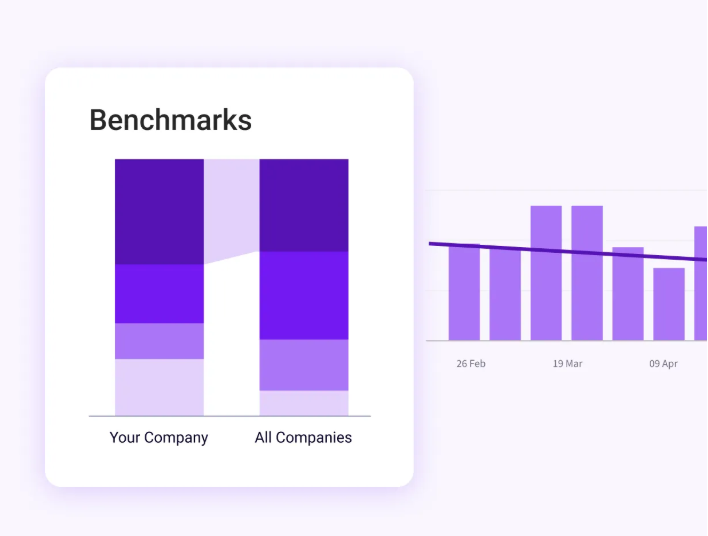
PRO TIP 💡: Jellyfish Team Benchmarks compare every metric you track with industry peers at the team, group, or organization level. That gives your baseline outside context before you set any targets.
Set Goals for Improvement and Reporting
A baseline only helps if you know what you want to change. Clear goals also make it easier to report progress to people outside engineering.
Key actions:
- Set SMART goals (specific, measurable, achievable, relevant, and time-bound) based on your baseline, such as a 20% cut in review wait time over two quarters.
- Each team goal should connect to a company objective, so engineers can see how their work supports the business.
- Reports work better when they fit the audience. Engineers need detail on flow and quality, while executives want trends tied to cost and business priorities.
Common mistake → A goal for every metric spreads attention too thin. Two or three goals per quarter are easier to focus on and report clearly.
Automate Repetitive Workflow Steps
Some delays in your metrics come from the process itself. Tests that someone starts by hand, style comments in code reviews, and manual deploys all create wait time that automation can remove.
Key actions:
- Automated tests, linters, and security scans in your CI pipeline give feedback before a teammate opens the pull request.
- Clear pull request descriptions, labels, and links to the related ticket help others understand a change faster.
- Deployment pipelines should handle routine releases end to end, so engineers spend less time on manual release steps.
Common mistake → Automated checks lose their value when nobody maintains them. Review which checks fail most often, and remove or repair flaky ones before engineers stop trusting them.
Select Meaningful KPIs and Metrics
Choose a small set of metrics tied to your goals. Lines of code, commit counts, and hours worked look precise but say little about productivity.
Key actions:
- Balance speed metrics with quality and stability metrics, so faster delivery doesn’t come at the expense of stability.
- Developer surveys capture context that system data misses, such as how engineers feel about tooling, focus time, and workload.
- Frameworks like SPACE help you check coverage. SPACE looks at satisfaction and well-being, performance, activity, communication and collaboration, and efficiency and flow.
Common mistake → Default dashboards are a weak starting point. Start from your goals, then choose the metrics that show progress toward them.
Leverage the Right Tools
Productivity data is spread across the tools your team already uses. The goal is to bring it together so you can see the full workflow in one place.
Key actions:
- Project management tools like Jira and Linear show planned work, ticket flow, and where work waits.
- Git platforms like GitHub, GitLab, and Bitbucket hold data on commits, pull requests, and code reviews.
- CI/CD and incident tools record deployments, failures, and recovery times.
- AI coding assistants like GitHub Copilot, Cursor, and Claude Code report adoption and usage, which you can compare with delivery metrics.
An engineering intelligence platform like Jellyfish brings these sources into one view, so you don’t have to stitch the data together by hand.
Common mistake → Tool data is only as accurate as the way the team uses those tools. If tickets aren’t linked to pull requests or statuses go stale, your cycle time and allocation numbers will be off.
Analyze and Interpret Data
A spike or drop in one metric rarely has an obvious cause. Before you change a process, figure out what moved the number.
Key actions:
- Trends over time give a more reliable signal than any single week, which can swing because of holidays, incidents, or a big release.
- The team can usually explain a change faster than the data can, so talk to them before you reach conclusions.
- Averages can hide outliers. One pull request that waits three weeks can skew a team’s cycle time, so check the spread as well as the average.
Common mistake → Team-to-team comparisons often mislead. A platform team and a product team work in very different ways, so compare each team with its own past results.
Foster a Culture of Continuous Improvement
Measurement only pays off when it leads to change. Review the data on a regular schedule, and involve engineers in what happens next.
Key actions:
- Short monthly or quarterly reviews keep the metrics connected to actual decisions.
- Engineers should help choose what to improve, since they see the problems up close.
- Share results openly, including the changes that didn’t work.
Common mistake → Several process changes at once make it hard to see which one worked. Change one or two things, measure the effect, and then move to the next.
14 Software Engineering Productivity Metrics Leaders Should Consider Tracking
14 Software Engineering Productivity Metrics Leaders Should Consider Tracking
You don’t need to track all 14. Start with the metrics that connect to your goals, and use the rest when a specific problem comes up.
1. DORA Metrics
DORA metrics come from Google’s DevOps Research and Assessment program and measure software delivery performance. There are five of them, grouped into throughput and instability.
- Deployment frequency: How often your team deploys to production.
- Change lead time (lead time for changes): How long a change takes to go from commit to production.
- Failed deployment recovery time: How long it takes to recover from a deployment that fails.
- Change fail rate: The share of deployments that need a rollback, hotfix, or other immediate intervention.
- Deployment rework rate: The share of deployments that are unplanned and happen because of a production incident.
Keep in mind → DORA replaced “time to restore service” with failed deployment recovery time in 2023 and added deployment rework rate in 2024. Read all five together, since faster delivery means little if stability drops.
2. Cycle Time
Cycle time measures how long a task takes from the start of work to release. Divide it into stages (coding, pickup, review, and deploy) to see where work waits.
Keep in mind → Cycle time depends on the size of the work, so track pull request size alongside it.
3. Velocity
Velocity is the amount of work a team completes in a sprint, usually counted in story points.
Keep in mind → Each team defines story points differently, so velocity can’t be compared across teams.
4. Code Quality Metrics
Code quality metrics show how reliable and maintainable your codebase is.
- Code coverage: The percentage of code that automated tests run.
- Code churn: How much recently written code gets rewritten or deleted within a few weeks.
- Static analysis findings: Issues that linters and code scanners find, such as duplicated code or security warnings.
Keep in mind → High coverage doesn’t automatically mean good tests. It shows which lines run during tests, but it can’t show if those tests check the right behavior.
5. Flow Metrics
Flow metrics show how smoothly work moves through your process.
- Work in progress (WIP): The number of tasks in progress at the same time.
- Flow efficiency: The share of total time that work is active, compared with time spent waiting.
Keep in mind → High WIP usually means people juggle too many tasks at once, which slows everything down.
6. Merge Frequency
Merge frequency tracks how often code changes merge into the main branch. Frequent, small merges usually point to short feedback loops.
Keep in mind → A high merge rate can also mean rushed reviews, so check it against change fail rate and cycle time.
7. Accuracy Scores
Accuracy scores show how closely completed work matches the plan. The main one is planning accuracy, the share of planned work a team completes in an iteration.
Keep in mind → Low planning accuracy can come from unplanned work, like urgent bugs or support requests, as well as from poor estimates.
8. Resource Allocation
Resource allocation shows how engineering time is divided across types of work, such as new features, maintenance, bugs, and unplanned tasks.
Keep in mind → No allocation mix fits every team, so judge yours against your own goals.
9. Weekly Issues Resolved per Engineer
This is the number of tickets or bugs each engineer closes in a week.
Keep in mind → Tickets vary in size and difficulty, so use this as a workload check and never as a performance score on its own.
10. Weekly Comments per Engineer
This counts the code review comments each engineer leaves in a week.
Keep in mind → The metric shows who takes part in code review, but it says little about the quality of that feedback.
11. Weekly PR Reviews per Engineer
This is the number of pull requests each engineer reviews in a week.
Keep in mind → It helps you find review bottlenecks. If two people handle most reviews, pull requests wait on them.
12. Defect Rate
Defect rate tracks how many bugs are found in a release or time period. Earlier testing, automated tests, and consistent code reviews usually bring it down.
Keep in mind → A bug found in testing costs far less than one a customer reports, so track the two separately.
13. Code Complexity
Code complexity measures how hard code is to understand and change. A common measure is cyclomatic complexity, the number of independent paths through a piece of code.
Keep in mind → Complex code leads to more bugs, slower changes, and more technical debt. Focus on the files your team changes most often.
14. Mean Time to Resolution (MTTR)
MTTR is the average time it takes to resolve a bug after someone reports it.
Keep in mind → MTTR covers all bugs, while DORA’s failed deployment recovery time only counts failures caused by a deployment.
How to Improve Engineering Efficiency Based on Your Metrics
How to Improve Engineering Efficiency Based on Your Metrics
Your metrics will point to a few places where time and effort go to waste, such as long review queues or too much unplanned work. These seven practices help you address them one at a time.
Track the Right Engineering Metrics
Start with the metric that points to your biggest problem. If customers complain about bugs, focus on quality metrics first. If features take too long to ship, start with cycle time.
What to try:
- Rank the problems your data points to by their cost to the business, and start with the top one.
- The team should agree on one or two metrics that will show progress on that problem.
- Current numbers, recorded before any change, give you a clear before-and-after comparison.
How to measure progress → Watch the metrics you chose over the next two or three months. If they don’t move after the team makes changes, either the problem is somewhere else, or the metric doesn’t measure it well.
Identify Bottlenecks and Inefficiencies
Begin with the longest stage in your cycle time. When pickup and review take up most of it, focus on the review process first.
What to try:
- A team target for first review, such as within one working day, gives reviewers a clear expectation.
- Smaller pull requests get reviewed faster, so encourage engineers to break up large changes.
- If a few people handle most reviews, spread that work across more of the team.
How to measure progress → Compare pickup and review times before and after the changes. Check change failure rate at the same time, so faster reviews don’t come at the cost of quality.
Streamline Processes and Workflows
Low flow efficiency means work spends more time waiting than moving. Some of that wait comes from steps the team no longer needs, like duplicate approvals or status meetings.
What to try:
- Map each step from ticket to release, and mark the ones that exist only out of habit.
- Approval steps that repeat the same check can usually merge into one.
- Status meetings can often move to a written update or a shared dashboard.
How to measure progress → Watch flow efficiency and cycle time for a few sprints after each change. If wait time drops and defect rate holds steady, the change likely improved the workflow without hurting quality.
Allocate Resources Effectively
Resource allocation data shows where engineering time goes. If maintenance and unplanned work take most of it, roadmap work slows down, however efficient the team is.
What to try:
- Set a target mix for new features, maintenance, and unplanned work, and review it each quarter.
- When senior engineers spend a lot of time on routine tasks, move that work to people who can grow from it.
- Teams with heavy roadmap commitments need protected focus time, such as meeting-free blocks.
How to measure progress → Compare your actual allocation with the target mix each month. A growing share of unplanned work can point to quality problems, production incidents, or changing priorities, so check which one before you act.
Foster Collaboration and Knowledge Sharing
Review data can show knowledge silos. If only one or two people review changes to a certain part of the codebase, work waits whenever they’re away.
What to try:
- Rotate code reviews so more engineers learn each part of the codebase.
- Pair programming on complex or unfamiliar areas spreads knowledge faster than documentation alone.
- Short internal docs or recorded walkthroughs help new team members get up to speed.
How to measure progress → Check how many people review each area of the codebase over time. A wider spread of reviewers means less risk when someone leaves or goes on vacation.
Continuous Learning and Improvement
Retrospectives and developer surveys often point to skills or tools the team is missing. Slow reviews in a new language or repeated defects in one area of the code are common signs.
What to try:
- Set aside regular time for learning, such as a few hours each sprint.
- Internal tech talks let engineers share what they learned with the rest of the team.
- Team standards and best practices should change as the team learns.
How to measure progress → Look for fewer repeated defects in the areas the team trained on, and check developer survey results on skills and confidence.
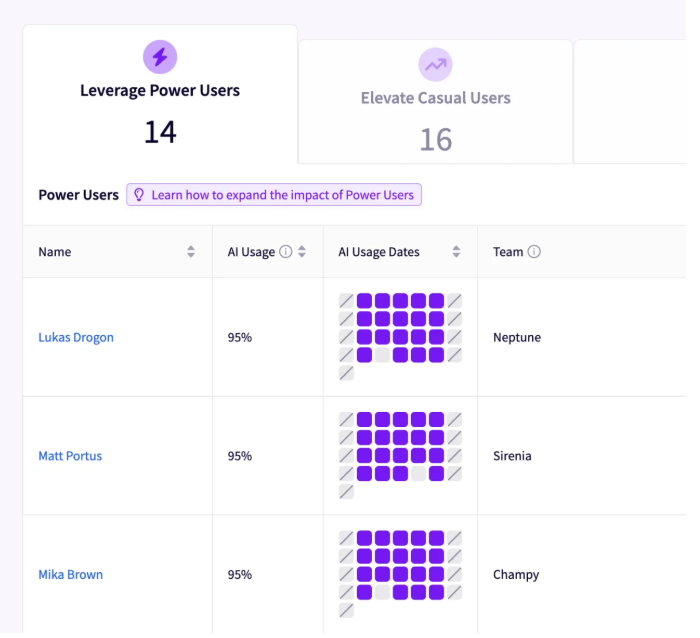
PRO TIP: If the team needs help with AI coding tools, Jellyfish Enable Teams shows how usage differs by team and role and groups users into power, active, and casual cohorts. It then suggests enablement plans based on the workflows your strongest AI users follow.
Regular Performance Evaluation and Feedback
Evaluation works best as a team conversation. Use retros to compare what the metrics show with what engineers experience, and keep individual feedback for one-on-ones.
What to try:
- Review two or three team metrics in each retro, and ask engineers what feels better or worse since the last one.
- Point out improvements the team made, so metric reviews aren’t only about problems.
- Keep individual names off the dashboards the team reviews together.
How to measure progress → Developer surveys show if engineers find these reviews fair and helpful. Team metrics should also improve over the following quarters.
Measure Engineering Productivity Across People and Agents with Jellyfish
Measure Engineering Productivity Across People and Agents with Jellyfish
The approach in this guide works best when delivery, quality, business alignment, and developer experience data are in one place. And with AI coding tools and agents handling part of the work, you also need to measure their output alongside your engineers’ work.
Jellyfish is a software engineering intelligence platform for the AI-native SDLC. It connects data from the tools your team already uses, like Jira, GitHub, and your AI coding assistants, so you can see how your people and agents build software.
Here’s how it supports the approach in this guide:
- A stage-by-stage view of your development life cycle shows where work waits, from first commit to release. You can also open individual issues and outliers to see why work went off track.
- DORA and custom metrics measure human contributors and AI agents side by side, and team benchmarks compare your results with industry peers. To create a new metric, you describe it in plain language.
- Effort data across initiatives, product lines, and types of work shows where engineering time goes. Jellyfish calculates it from your existing tools, so engineers don’t have to log time.
- Developer surveys tied to delivery data show why teams struggle and where they lose time. Jellyfish links survey results to DORA and SPACE framework metrics, tracks a single DevEx Index score over time, and suggests next steps based on what engineers report.
- For AI, Jellyfish tracks how tools and agents like GitHub Copilot, Cursor, and Claude Code affect speed, quality, and cost. It also shows token spend by tool and model, and it compares your AI use with more than 1,300 other companies.
- Jellyfish Assistant answers questions in plain language across your delivery, planning, allocation, and AI data. It also scans your engineering data on its own and points out risks and trends without a prompt.
When everyone from engineering managers to finance works from the same data, it’s easier to agree on what to improve next. Take a tour of the platform or request a demo to see how Jellyfish measures productivity across your people and agents.
Interested in learning more about Jellyfish?
See how Jellyfish helps data-driven engineering teams ship better software faster and focus on what matters most to the business.
Tour the ProductAbout the author

Lauren is Senior Product Marketing Director at Jellyfish where she works closely with the product team to bring software engineering intelligence solutions to market. Prior to Jellyfish, Lauren served as Director of Product Marketing at Pluralsight.