In this article
According to Stack Overflow’s 2025 Developer Survey, 84% of developers are already using or planning to use AI coding tools. And in most engineering teams, that adoption is happening from the ground up.
Developers are choosing their own tools and experimenting on their own time, often without formal approval. That grassroots momentum is a good sign, but it creates a problem when leadership needs to standardize on one solution.
Choosing an AI coding assistant at the enterprise level means evaluating security controls, IP protection, integration with your existing toolchain, and whether the productivity gains you’re seeing from early adopters will hold across hundreds or thousands of engineers.
This guide breaks down the criteria that matter most when making that decision at scale.
Key Features to Consider in AI Coding Assistants
Key Features to Consider in AI Coding Assistants
Before you start talking to vendors, it helps to know what your non-negotiables are. For most enterprises, the list looks something like this:
- Coverage across the full development lifecycle: Code completion alone won’t justify the cost of an enterprise license. The tool should also handle test generation, documentation, code explanations, and multi-file refactors.
- Multi-model flexibility: Developers should be able to switch between AI models depending on the task. Autocomplete benefits from fast, lightweight options, while complex reasoning needs higher-parameter models. Being locked into a single model provider limits both performance and long-term optionality.
- IDE and toolchain integration: Developers won’t change how they work to accommodate a new tool. Make sure it has solid plugin support for your primary IDEs and fits naturally into your existing code review, version control, and deployment workflows.
- Customization and codebase awareness: Generic training data produces generic code suggestions. The tool should understand your internal libraries, your coding conventions, and your architecture. Check whether it can index your private repos or accept fine-tuning on your codebase.
- Enterprise-grade security and data privacy: You need clear guarantees that your proprietary code and prompts are never used to train public models. Look for SOC 2 compliance, tenant isolation, and explicit opt-out controls before the tool gets anywhere near your codebase.
- Centralized admin controls and governance: At the enterprise level, you need to know who’s using the tool, how often, and whether they’re following your security policies. A centralized dashboard with role-based access, audit logs, and usage data makes that possible without chasing individual developers.
- Real-time security scanning: A good AI coding assistant will point out insecure patterns and exposed credentials right in the editor. This way, your security team isn’t cleaning up avoidable mistakes downstream.
- Offline and air-gapped support: If you operate in regulated industries or handle classified work, cloud-based tools may not be an option. Check whether the tool offers self-hosted or on-premise deployment that can run entirely within your network without external API calls.
| Bring this to your next vendor call (evaluation cheat sheet) →
Keep this list handy for vendor calls and RFP conversations. It covers security, data handling, governance, and the things that don’t always show up on the product page:
|
How to Choose the Right AI Coding Assistant: 5 Key Steps
How to Choose the Right AI Coding Assistant: 5 Key Steps
Every engineering team has different constraints, but the evaluation process tends to follow a similar path. Here’s a step-by-step approach that works whether you’re a 100-person team or a 5,000-person one:
Step 1: Audit Your Workflow and Match Assistant Behavior
This doesn’t need to be a formal research project. A short async survey or a few 15-minute conversations with developers across different teams and seniority levels will give you what you need.
Here’s a ready-to-use survey you can send to your engineering teams this week. Keep it short so you get a high response rate.
Workflow and pain points:
- What repetitive tasks take up the most time in your average week?
- Where do you lose focus or context-switch the most?
- What slows down your code review process?
- If you could automate one part of your daily workflow, what would it be?
Current AI tool usage:
- Are you already using any AI coding tools? Which ones, and what do you use them for?
- If yes, what do you like about them? What frustrates you?
- If not, what has stopped you from trying one?
Environment and context:
- What IDE do you use daily?
- What languages and frameworks do you work in most?
- How would you describe the size and complexity of the codebase you work in?
- What team are you on, and what’s your primary focus area (feature development process, platform, infrastructure, security, etc.)?
| A note on the sample size: How many developers you need to hear from depends on the size of your org. For a team of 50, conversations with 8 to 10 developers across different roles and seniority levels will give you a solid picture. For an org of 500 or more, especially one spread across multiple teams, offices, or time zones, the async survey works better. Aim for at least a 20 to 30% response rate to get data you can act on. |
At an enterprise scale, the answers will vary considerably across teams.
A product team pushing features every two weeks has a very different set of frustrations than a platform team maintaining shared infrastructure or a team responsible for a 15-year-old codebase. That’s expected, and the differences matter for your evaluation.
| Team type | Common pain points | Capabilities to prioritize |
| Product/feature teams | Shipping velocity, test coverage, boilerplate code | Inline completion, test generation, and multi-file refactoring |
| Platform/infra teams | System complexity, documentation debt, tribal knowledge | Deep context windows, code explanation, and private repository indexing |
| Security/compliance teams | Vulnerability tracking, audit readiness, policy enforcement | Real-time security scanning, admin controls, and audit logging |
| Teams on legacy codebases | Slow onboarding, outdated syntax, missing docs | Code explanation, documentation generation, and broad language support |
| Distributed/multi-repo teams | Cross-repo context, inconsistent coding standards | Multi-repo indexing, convention enforcement, and large context windows |
A perfect matrix isn’t the point here. The goal is a shared understanding across leadership and engineering about what the tool needs to do and for whom. That alignment makes the rest of the evaluation far smoother.
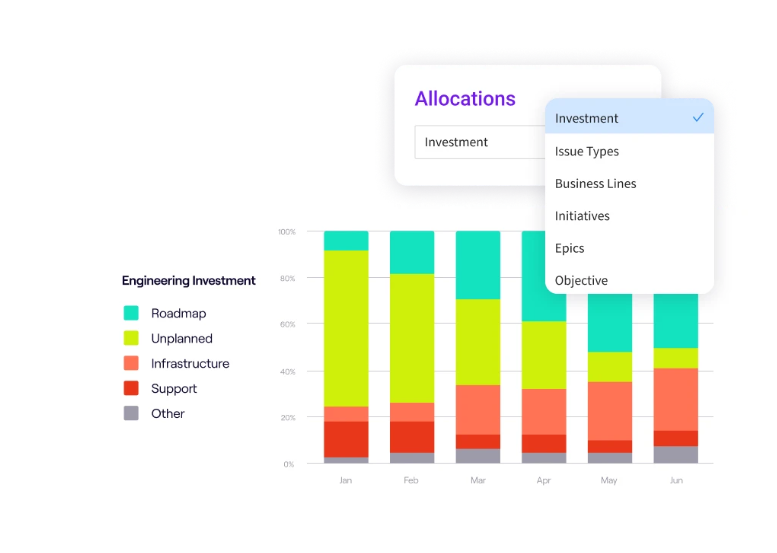
PRO TIP 💡 → Jellyfish’s resource allocation insights automatically track where engineering effort goes across roadmap work, tech debt, bugs, and KTLO without manual time tracking. Understanding your current split helps you prioritize which AI capabilities matter most. If 40% of effort goes to maintenance, you’ll want a tool strong in code explanation and refactoring, not just generation.
Step 2: Define the Required Level of AI Autonomy
The gap between an AI tool that finishes your line of code and one that autonomously opens a pull request is enormous. Both fall under the label “AI coding assistant.”
Your organization needs to agree on how much control you’re willing to hand over before you start comparing options. Here’s a simple way to think about it:
| Autonomy level | What the AI does | What the developer controls | Risk profile |
| Passive suggestions | Short inline completions, single-line predictions | The developer accepts, edits, or ignores every suggestion | Low. The developer stays fully in control. |
| Active generation | Multi-line completions, full function generation, test writing | Developer reviews output before committing | Moderate. Output needs review, but it saves a lot of time. |
| Multi-file operations | Refactors across files, generates documentation, and modifies project structure | Developer reviews changes across a broader scope | Higher. Mistakes are harder to catch across multiple files. |
| Agentic workflows | AI plans and executes multi-step tasks, opens PRs, and makes autonomous code changes | The developer reviews after the fact, approves or rejects completed work | Highest. Requires strong CI/CD, test coverage, and review processes. |
And you don’t have to pick one level for the whole org. Most enterprise teams set different autonomy levels for different tasks based on risk.
For example, you might be comfortable with active generation for unit tests and boilerplate code, but want passive suggestions only for anything that touches authentication or sensitive data handling. A team with 90% test coverage and a mature CI/CD pipeline can safely support higher autonomy than a team still working through manual deployment processes.
But keep in mind that higher autonomy only works if your engineering foundations can support it. Ask yourself these questions:
- How strong is your automated test coverage, especially on critical paths?
- Does your CI/CD pipeline reliably catch problems before production?
- Can your code review process keep up if the volume of changes increases considerably?
- Do you have rollback and incident response processes that work quickly?
- Is there a clear policy on who owns AI-generated code once it’s merged?
- Do your developers know when to override or reject AI-generated output?
If the answer to most of these is no, start with lower autonomy levels and build up over time. Giving an AI agent free rein in an entire codebase with weak test coverage and no automated checks is a recipe for problems.
It’s also worth thinking about where this space is headed. Tools like GitHub Copilot Workspace, Cursor’s agent mode, and standalone AI agents like Devin are pushing toward higher autonomy fast.
Even if your team isn’t ready for agentic workflows today, choosing a tool that supports them gives you room to grow as your processes mature and as the technology improves.
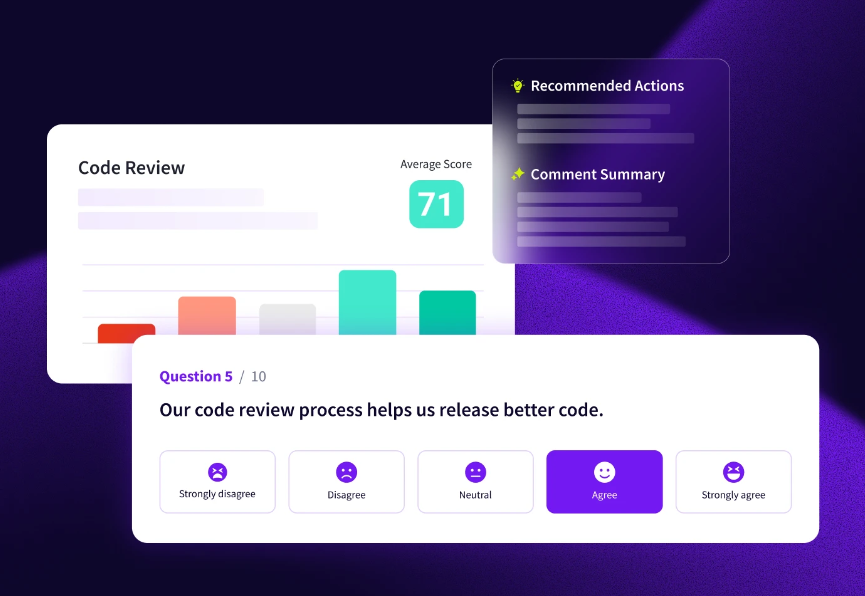
PRO TIP 💡 → Jellyfish DevEx surveys can assess developer readiness for different autonomy levels before you commit. Teams that report high friction with code reviews may benefit most from autonomous review agents, while teams struggling with context-switching might prefer inline assistants that keep them in flow.
Step 3: Evaluate Core Capabilities and Developer Experience
You can’t evaluate every capability equally and still make a decision in a reasonable timeframe. Start with the 2 or 3 capabilities that map directly to the pain points your teams flagged in Step 1, and evaluate tools against those first.
These are the core capabilities most enterprise evaluations cover, along with guidance on when to weight each one higher:
| Capability | What to look for | Weight it higher if… |
| Inline autocomplete | Speed, accuracy in your primary languages, and how often suggestions are usable on the first try | Your teams write a high volume of new code daily |
| Test generation | Can it produce meaningful tests for your existing functions, not just boilerplate stubs? | Test coverage is a known gap across your org |
| Code explanation | How well does it break down unfamiliar or complex tasks in plain language? | You have large legacy codebases or high developer turnover |
| Multi-file refactoring | Can it make changes across related files without breaking dependencies? | Your teams regularly restructure or modernize existing code |
| Documentation generation | Does it produce accurate, useful docs from your actual code? | Documentation debt is a recurring problem |
| Context awareness | Does it understand relationships between files, or does it treat every file in isolation? | Your repos are large and interconnected |
| Language and framework coverage | How well does it handle your full stack, not just the popular languages? | You run significant workloads in less common languages |
Example of why this weighting matters: Say your org runs a large Python and Java codebase with a legacy Perl layer that nobody wants to touch. You’re evaluating two tools:
- Tool A has lightning-fast autocomplete and great test generation in Python, but barely supports Perl.
- Tool B is slightly slower on autocomplete, but handles all three languages well and has strong code explanation features.
If your biggest bottleneck from Step 1 is onboarding developers onto that Perl codebase, Tool B solves a more expensive problem for your org, even though Tool A looks better on paper for day-to-day coding speed.
Step 4: Prioritize Security and Enterprise Controls
A tool can score perfectly on developer experience and still get rejected by your security team. It’s better to spend time here than to discover a dealbreaker after your team is already attached to a tool.
Most of the security conversation comes down to data handling, compliance, and admin controls. Here’s what to cover in each.
Data handling and privacy:
- Is code sent to external servers for processing? If so, where is it stored and for how long?
- Is any code or prompt data used to train or iterate the vendor’s models?
- Can you opt out of telemetry and data collection entirely?
- What happens to your data if you cancel the contract?
Compliance and legal:
- Does the vendor hold SOC 2 Type II certification? Verify the scope covers the specific product, not just the parent company.
- Depending on your industry, you may also need GDPR compliance, HIPAA readiness, FedRAMP authorization, or ISO 27001.
- Does the vendor offer IP indemnification for AI-generated code?
- How does the tool handle open-source license risk in suggestions?
Admin controls and governance:
- Can you manage access through role-based controls and enforce usage policies centrally?
- Does the admin dashboard cover audit logging, usage analytics, and policy violations?
- Can you restrict which AI models your developers access through the tool?
- Is tenant isolation available, or does the vendor use shared infrastructure?
- Does the vendor offer self-hosted or air-gapped deployment for orgs that can’t send code to external servers?
This step is a filter. A strong answer on data handling, but weak admin controls still means your security team will have concerns. The tool needs to clear all three areas before it earns a spot in the next round of evaluation.
| If you’re in a regulated industry → Financial services, healthcare, government, and defense orgs often have non-negotiable rules around data residency, encryption standards, and audit trails. If that’s you, bring your compliance team into the evaluation at Step 1, not Step 4. Involving them late is one of the most common reasons enterprise evaluations stall or restart from scratch. |
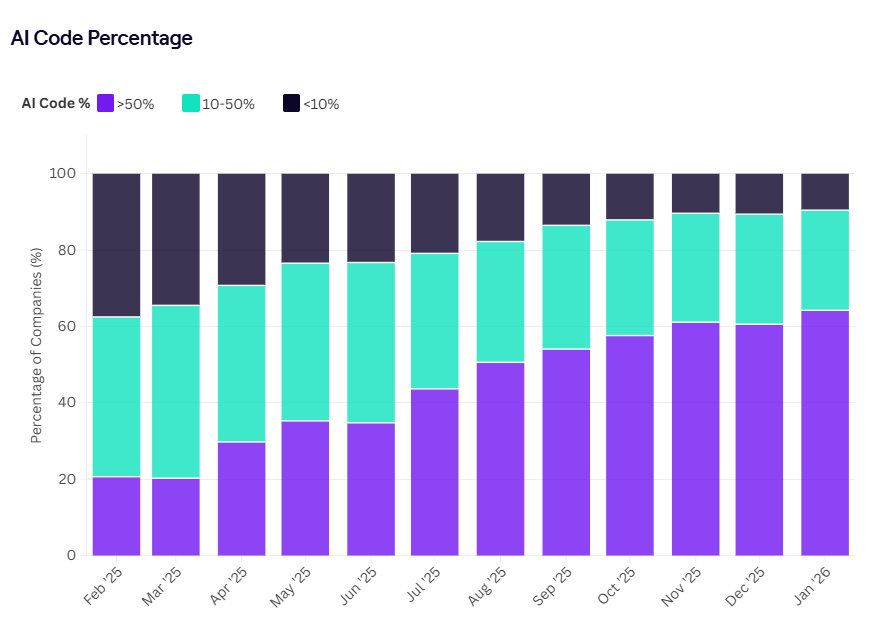
PRO TIP 💡 → Jellyfish tracks the ratio of AI-written to human-written code at the repo, team, and individual level. This visibility helps security and compliance teams audit AI-generated code separately and verify that review policies are being followed before AI-assisted changes reach production.
Step 5: Test and Integrate Responsibly
Get 15 to 25 developers on the tool for two to three weeks, spread across different teams and experience levels, and make sure they’re working on real code with production-level security settings.
And don’t overthink the trial. Let developers use the tool and check the admin dashboard at the end of each week.
These metrics will usually tell you what you need to know:
| Metric | What it tells you | What to watch for |
| Daily active users over time | Whether developers are sticking with the tool or losing interest | A sharp drop after week one means something is off. Steady or growing usage means the tool is earning its place. |
| Suggestion acceptance rate | How often developers trust the output enough to use it | Above 25-30% is healthy. Below that, developers are spending more time rejecting or rewriting suggestions than benefiting from them. |
| Features used most | What developers use the tool for day to day | Compare this to the pain points from Step 1. If your teams said test coverage was the biggest gap, but nobody is using test generation, find out why. |
| Time to first value | How quickly new users start getting useful output from the tool | If developers need more than a day of setup and configuration before the tool is helpful, that friction will slow down a full rollout. |
| Impact on code review | Whether AI-generated code is speeding up or slowing down the review process | Faster PR turnaround is a good sign. If reviewers are spending more time checking AI-generated code than human-written code, that’s a problem. |
Include mid-level developers and recent hires in your feedback conversations as well, not just senior programmers. They’ll give you a more honest picture of how the tool performs for someone who doesn’t already know what the output should look like.
And if the pilot goes well, don’t go org-wide overnight. The teams that got the most value during the pilot should go first. They’ll work through edge cases, build internal best practices, and make the case for adoption better than any top-down mandate ever could.
10 Best AI Coding Assistants to Try Right Now
10 Best AI Coding Assistants to Try Right Now
Which tool fits best comes down to your stack, your deployment requirements, and whether you need a general-purpose assistant or something more specialized.
Here’s how the major options compare across the factors enterprise buyers care about:
| Tool | Best for | Enterprise pricing | Why enterprises choose it | Why some don’t |
| GitHub Copilot | Teams already in the GitHub ecosystem | $19/user/mo (Business), $39/user/mo (Enterprise) | Most widely adopted (20M+ users), deep GitHub integration, multi-model support, and mature admin controls. | No self-hosted option. Enterprise tier requires GitHub Enterprise Cloud. Premium request overages can add up. |
| Cursor | Teams that want an AI-native editing experience | $40/user/mo (Teams), custom (Enterprise) | AI is built into the code editor, not bolted on. Strong multi-file refactoring, agent mode, and codebase-aware suggestions. | Requires switching to a new IDE. No self-hosted option. Credit-based pricing has led to unpredictable costs since mid-2025. |
| Tabnine | Regulated industries that need on-premise deployment | $59/user/mo (Enterprise) | The only major tool that has a fully self-hosted and air-gapped deployment. | Code completion quality has fallen behind competitors per recent G2 reviews. Discontinued free tier in 2025. |
| Gemini Code Assist | Teams invested in Google Cloud | $54/user/mo (Enterprise) | 1M token context window for deep codebase understanding. Private repo indexing on Enterprise. Strong compliance creds (SOC 1/2/3, ISO 27001). | Locked into Gemini models only. Best value when you’re already deep in Google Cloud. |
| Amazon Q Developer | Teams running heavily on AWS | $19/user/mo (Pro) | Tight AWS integration across console and CLI. Autonomous agents for tasks like Java upgrades. Built-in security scanning, IP indemnification, and a generous free tier. | Limited to Amazon’s own models. Less compelling if your stack isn’t AWS-heavy. Some IDE integrations still in preview. |
| Sourcegraph Cody | Large orgs that need deep code search across massive repos | $59/user/mo (Enterprise) | Built on Sourcegraph’s code search engine for unmatched repo-wide context. Multi-model support. Self-hosted option. | Cody Free and Pro were discontinued in July 2025. Transitioning to a new product (Amp). Most expensive option on this list at $59/user/mo. |
| Qodo | Teams focused on code snippet quality and review automation | $19/user/mo (Teams), custom (Enterprise) | Specializes in AI-powered review and code generation. Context Engine indexes multiple repos. Self-hosted and air-gapped available. | More of a review/testing tool than a general coding assistant. Best used alongside Copilot or Cursor, not as a standalone replacement. |
| Claude Code | Teams that want agentic, CLI-based workflows | Available through Anthropic Team/Enterprise plans | An autonomous terminal agent that can search, edit, test, and push code. Strong at complex reasoning and multi-step tasks. | CLI-only, no IDE autocomplete. Higher price point than most competitors. Newer as an enterprise product. |
| CodeGeeX | Teams that want an open-source, self-hosted option | Free / open-source | Supports 20+ languages with a local deployment option. No vendor lock-in. Good for experimentation. | Not enterprise-ready. Limited admin controls, governance, and support. Suggestion quality lags behind commercial tools. |
| Qwen3 Coder | Teams exploring locally hosted open-source models | Free / open-source | Strong benchmark performance for an open-source model. Full data control when self-hosted. | Requires ML expertise to deploy and maintain. No turnkey enterprise features. Not a plug-and-play IDE assistant. |
Also, keep in mind that many enterprise teams don’t go with a single tool. It’s common to pair a general-purpose coding assistant like Copilot or Cursor with a specialized tool like Qodo for code review or Claude Code for complex agentic tasks.
Your Step 1 audit should tell you whether one tool can cover your needs or whether a combination makes more sense.
| Editor’s note: Sourcegraph is actively transitioning Cody toward a new product called Amp, so check their latest roadmap before making a commitment. CodeGeeX and Qwen3 Coder are open-source tools that offer full data control but require internal ML expertise to deploy and maintain. They’re not direct alternatives to the commercial options above, but they’re worth exploring if vendor lock-in or cost is a primary concern. |
Measure the Impact of AI Coding Tools with Jellyfish
Measure the Impact of AI Coding Tools with Jellyfish
Choosing the right AI coding assistant is a high-stakes decision, but the work doesn’t stop once you’ve signed the contract. The harder conversation happens three months in, when leadership asks whether the investment is showing up in the work.
Jellyfish AI Impact makes that conversation easier. It measures how AI coding tools affect delivery speed, quality, and cost efficiency by pulling signals directly from Git and your planning tools.
Here’s what you can do with it:
- Compare AI tools side by side: Benchmark Copilot, Cursor, Claude Code, and other assistants against each other using the same vendor-neutral framework. You’re comparing apples to apples, not vendor dashboards to vendor dashboards.
- Connect AI usage to delivery outcomes: The platform connects AI activity to throughput, PR cycle time, quality, and cost efficiency. This is all pulled from your Git and planning data.
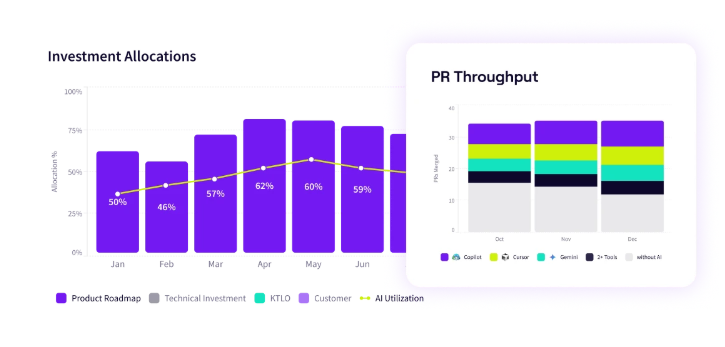
- Track adoption across the org: Jellyfish breaks down adoption by team, programming language, and developer seniority. You’ll know who’s getting value from the tools and who needs more support.
- See how AI changes where your teams spend time: Track whether AI tools are freeing up capacity for roadmap and growth work, or whether teams are just doing the same maintenance coding tasks faster.
- Build a clear ROI case for leadership: Generate executive-ready reports that break down spend, impact, and where to invest next.
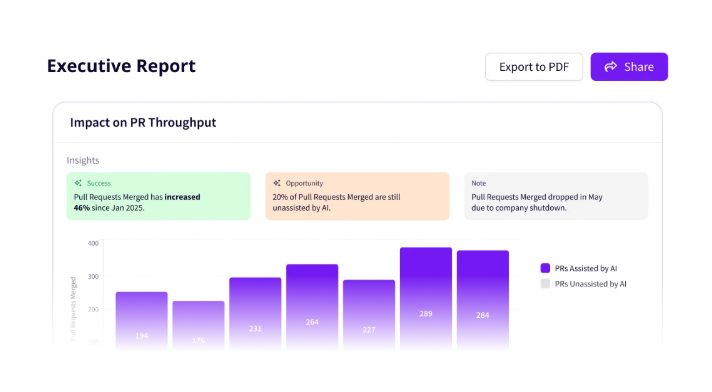
If you’ve followed the evaluation process in this guide, you already have a baseline from your pilot. Jellyfish makes sure you don’t lose that baseline once the pilot ends.
It keeps tracking adoption, delivery impact, and cost efficiency as you scale, so every decision after rollout is backed by data.
Book an AI Impact demo to see how Jellyfish can help you measure and optimize your AI coding tool investment.
FAQs
Should engineering leaders standardize on a single AI tool, or allow teams to choose different AI agents?
Many enterprise teams end up using more than one. Jellyfish’s 2025 State of Engineering Management report found that nearly half of engineering teams use two or more AI coding tools. That’s because different tools solve different problems.
A general-purpose assistant like Copilot or Cursor handles everyday code completion well, but your team might pair it with something like Claude Code for complex agentic tasks or CodeRabbit for automated code review.
Are open-source AI models secure enough for enterprise software development?
They can be, but the security model is fundamentally different from commercial tools. With open-source models like CodeGeeX or Qwen3 Coder, you get full control over your data because everything runs on your infrastructure.
No code leaves your network, and there’s no risk of proprietary code being used to train someone else’s model. For enterprises in regulated industries or those handling classified work, that level of control can be a major advantage.
The tradeoff is that you own the entire stack. That means your team is responsible for patching vulnerabilities, managing access controls, and keeping the model up to date.
Can ChatGPT or GPT-5 replace a dedicated AI coding assistant for enterprise use cases?
General-purpose models like ChatGPT and OpenAI’s GPT-5 are strong at natural language tasks and can write code, help with debugging, and generate high-quality explanations.
But they weren’t built for the enterprise coding workflow. They don’t offer inline IDE suggestions, codebase-aware context, admin controls, or the security guarantees most organizations need.
Where they work well is as a complement. Developers often use ChatGPT alongside a dedicated assistant to brainstorm approaches, troubleshoot unfamiliar errors, or get a second opinion on architecture decisions.
For day-to-day code generation, test writing, and review automation inside your IDE, a purpose-built tool will bring more consistent code quality and tighter integration with your existing workflows.
Do AI coding assistants work across all major IDEs, and are they useful for beginners?
Most commercial AI coding assistants support VS Code and JetBrains IDEs out of the box, since those cover the majority of enterprise development environments. Microsoft backs GitHub Copilot with deep VS Code integration, and tools like Cursor, Tabnine, and Amazon Q Developer also offer solid JetBrains plugin support.
As for beginners, AI coding assistants can speed up onboarding by helping newer developers write code faster, understand unfamiliar patterns, and learn conventions from the suggestions themselves. Tools like Replit have leaned into this by combining AI assistance with a lightweight browser-based environment built for prototyping and learning.
How quickly should an organization expect to see a measurable improvement in developer velocity?
Give it at least two to three months. Developers need time to learn how to prompt the tool, figure out where it helps, and adjust their workflows.
Repetitive tasks like writing tests and documentation speed up the fastest. Delivery-level improvements like cycle time and throughput take longer because they depend on consistent adoption across teams
What is the best way to ensure that AI-generated code doesn’t negatively impact quality standards?
Treat AI-generated code the same way you treat human-written code. That alone prevents most quality issues. Back it up with strong automated test coverage on critical paths so problems don’t slip through into production.
And set clear expectations with your team about where AI output is trustworthy (boilerplate, tests, documentation) and where it needs a closer look (business logic, edge cases, anything security-sensitive).
About the author

Lauren is Senior Product Marketing Director at Jellyfish where she works closely with the product team to bring software engineering intelligence solutions to market. Prior to Jellyfish, Lauren served as Director of Product Marketing at Pluralsight.