In this article
Your AI bill is one of the hardest numbers in your budget to pin down, because it moves with usage the way your other software contracts never have.
Every prompt, agent loop, and expanded context window pushes token costs higher, and that unpredictability is already burning budgets. In Jellyfish’s 2026 survey of 636 engineering leaders, rising AI tool costs ranked as the top adoption challenge, ahead of security, quality, and training.
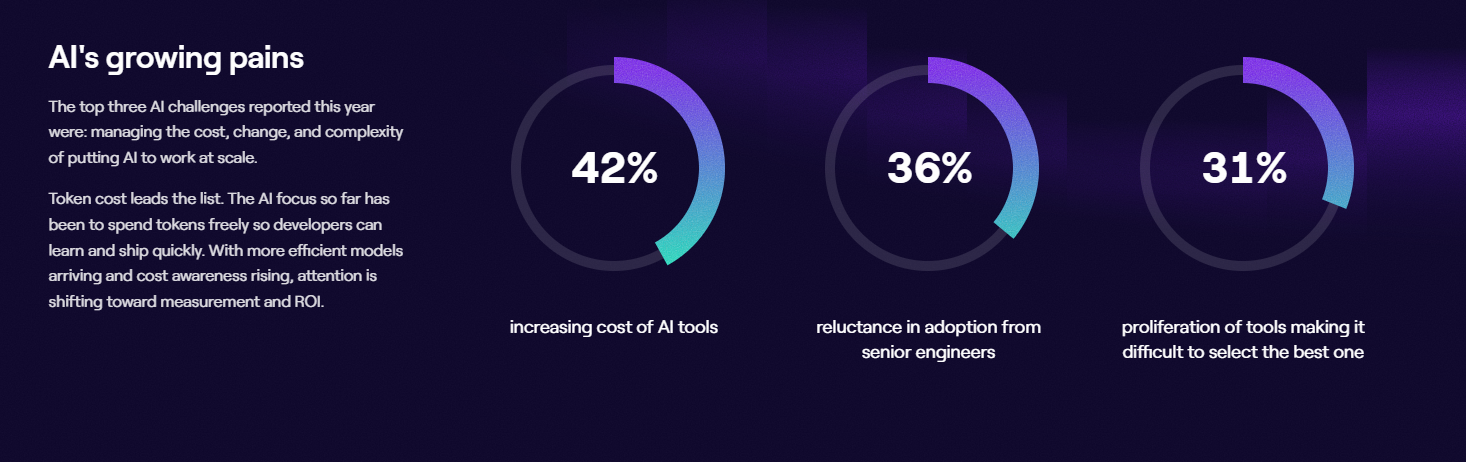
(Source: Jellyfish 2026 State of Engineering Management Report)
Control starts with visibility. Engineering leaders need to see which teams, tools, and providers generate the spend, where it turns into waste, and whether it maps to output the business can measure.
The rest of this guide covers how token costs work, why they climb the way they do, and how to keep them in check across every model and provider you run.
The Physics of Tokens: Why Traditional SaaS Cost Models Fail
The Physics of Tokens: Why Traditional SaaS Cost Models Fail
For years, software costs behaved predictably. You bought a set number of seats, and that decision locked your bill for the year, so the number on your January invoice matched the one in July.
AI changed the unit you pay for. Now you pay by the token, and no one sets that quantity ahead of time. Your teams generate it as they work, one call at a time, which makes your AI cost a running total of everything your people ask the models to do. Before you can control that total, you have to understand what you’re paying for.
A token is a small piece of text or code, often a single word or part of one. Models read your input and write their responses in these units, and each one carries a price. The budgeting problem starts with something most people overlook, which is how many tokens a single piece of work quietly burns through.
- Input tokens cover everything you send into the model. That includes the user’s query, but also the system prompt, the conversation history, any codebase context you retrieve, and the instructions wrapped around the request. Most of this is invisible to the person typing the prompt, so teams routinely pay for far more input than they think they’re sending.
- Output tokens are what the model generates back, the code or text it writes for you. These carry a premium. On most frontier models today, output runs roughly five to eight times the input price, so a verbose or reasoning-heavy response costs far more than the prompt that triggered it.
- Context windows set how much the model can hold in view at once, and modern windows are enormous, stretching into the millions of tokens. The catch is that everything you load into that window gets billed on every single call. Pass in a whole repository when a few files would do, and you pay for the whole repository each time the model runs. Cost compounds fast here.
Why agents push this into another order of magnitude → An autonomous agent loops through planning, reasoning, checking its work, and correcting course, re-sending its full context on every pass. One task can fan out into hundreds of calls, so token use climbs far faster than the number of tasks suggests.
This is why the old forecasting math fails. A SaaS bill holds steady because someone sets the seat count in advance. Token usage tracks behavior, so the same team can run up very different bills month to month depending on what they build and how much context each request carries. A spreadsheet built for fixed seats can’t see any of that, which is why controlling AI cost starts with tracking the tokens themselves.
The Organizational Chaos of Unmanaged AI Spend
The Organizational Chaos of Unmanaged AI Spend
AI spend inside a company is fragmented by default. It comes from different teams, different tools, and different providers, which leaves finance with no clean way to see the whole picture.
Three things get in the way:
- Too many sources. Developers pull from several providers (Anthropic, OpenAI, Google, Mistral) across chat, IDEs like Cursor, coding agents like Claude Code, and internal apps, and no dashboard pulls it into one place.
- A bill with no context. GCP or AWS Bedrock invoices show AI as a single line item. You see the total, but not the team, repo, or business unit behind it. The invoice was never built to map spend to engineering work.
- Nothing to allocate against. Without token-level tracking tied to teams, finance can’t build showback or chargeback, so the people driving the spend never see the bill.
Then there’s the spend that never hits a formal invoice at all. Employees expense AI subscriptions, teams sign up on company cards, and AI rides bundled inside SaaS you already pay for. That’s shadow AI, spending that never passes through procurement, and it’s one of the fastest-growing slices of the AI bill.
Quick AI Cost Optimization Tips for Engineering Leaders
Quick AI Cost Optimization Tips for Engineering Leaders
The reason generic optimization advice doesn’t help engineering leaders is that it operates one request at a time. A CTO can’t hand-tune prompts across a hundred developers.
What they can do is set the policies and architecture that decide how all those requests get routed, priced, and capped. Four of those levers do most of the work:
- Model selection policies: Route each task to the right-sized model. Send complex reasoning to frontier models like Claude Opus 4.8 or GPT-5, and hand everyday work (classification, formatting, summarization) to cheaper, faster models like Claude Haiku or Gemini Flash. The gap between tiers is often more than 10x, so this single policy moves the bill more than anything else here.
- A centralized AI gateway: Route all API traffic through one internal proxy. That gives the platform team a single place to enforce rate limits and quotas, manage unified API keys, and cache repeated system prompts so you stop paying input costs on the same context over and over.
- Environment tags and budget alerts: Tag AI usage consistently across every environment, from development through production, so each dollar of spend maps to a team, project, or stage. Stack real-time anomaly detection on top, and an agent stuck in a loop or a stray load-test script shows up as an alert long before it becomes an expensive surprise.
- Batch endpoints for non-urgent work: Route work that doesn’t need an instant answer, evaluations, bulk classification, offline analysis, through batch endpoints, which run at roughly half the cost of real-time calls. It’s a scheduling decision, so it takes almost no engineering effort to adopt.
Jellyfish advice → If you can only start with one, start with model selection policies and the gateway. That pairing saves the most for the least effort, and the gateway is what makes the other three enforceable in the first place.
PRO TIP 💡: A routing policy only saves money if the routing holds. Jellyfish tracks spend by tool and model, so you can confirm the cheaper tier is handling the work it was assigned and flag the tasks that keep escalating back to a frontier model.
AI Token Cost Management Solutions
AI Token Cost Management Solutions
No single tool covers all of this. AI cost tooling falls into four broad categories, each built for a different slice of the problem, and most organizations end up running more than one.
Here’s what you need to know about each category:
Provider-Level Dashboards (OpenAI, Anthropic)
What they do: Every major model provider gives you a usage dashboard inside its own console. Anthropic, OpenAI, and the rest show spending trends, billing totals, and active API keys at a glance. For a team running most of its workloads through a single vendor, it’s a reasonable first place to look.
The main limit: Each dashboard sees only its own traffic. It can’t weigh your Anthropic spend against your OpenAI spend or pull several providers into one view, so the moment your stack spans more than one vendor, the picture splinters. None of them connect usage to the engineering work that created it.
Examples: Anthropic, OpenAI, and Google each provide their own version through their consoles and AI platforms. They’re accurate and cost nothing extra, so they’re almost always the first tool a team reaches for. The trouble starts when a second or third provider enters the picture, and the single-vendor view stops being enough.
LLM Observability & Tracing Tools
What they do: LLM observability tools instrument your AI applications at the request level. They trace each call end to end, log prompts and responses, track token counts and latency, and score outputs against evals, so engineers can see exactly what a model did and why. For a team building and debugging LLM features, this is the microscope they work under every day.
The main limit: The audience is the issue. These platforms speak fluent engineer, in traces and spans and eval scores, and that same depth makes them impractical for financial reporting. There’s no clean path from a million request-level events up to the run-rate and allocation numbers a finance partner expects.
Examples: Langfuse and Arize are two of the names you’ll run into most, both built to help engineers trace, evaluate, and improve large language model applications in production. They’re strong at what they do, and plenty of teams rely on them daily. But their job ends where financial reporting begins.
Cloud FinOps & Spend Management Platforms
What they do: Cloud FinOps platforms bring order to cloud spending. They pull messy invoices from AWS, GCP, and Azure into one normalized view, forecast where costs are heading, and support the allocation and chargeback models finance teams run on. Any company with a mature cloud cost practice already has one, and reaching for it to cover AI is a fair first instinct.
The main limit: The gap is engineering context. A FinOps tool sees dollars leaving the account with no view into the work that spent them, so a productive team and a runaway script look identical on the report. That’s fine for accounting and thin for knowing whether the money bought anything.
Examples: Vantage is the name most associated with this category, strong at consolidating cloud cost and increasingly at tracking AI spend alongside it. It does the FinOps job well. Its view stops at the billing line, one step short of the engineering signal that explains it.
Engineering Intelligence Platforms
Why this category wins → Engineering intelligence platforms come at the problem from the other end. They start with the signals your teams already produce in Git, Jira, and CI/CD, then map AI cost onto that work. That’s what closes the gaps the other three leave open.
One view spans every provider, so multi-model spend reconciles into a single number. The output reads at the altitude a leader works at, grouped by team and outcome so it drops into a forecast cleanly. And because the data ties back to delivery, you can see whether a rising bill bought roadmap progress or churn.
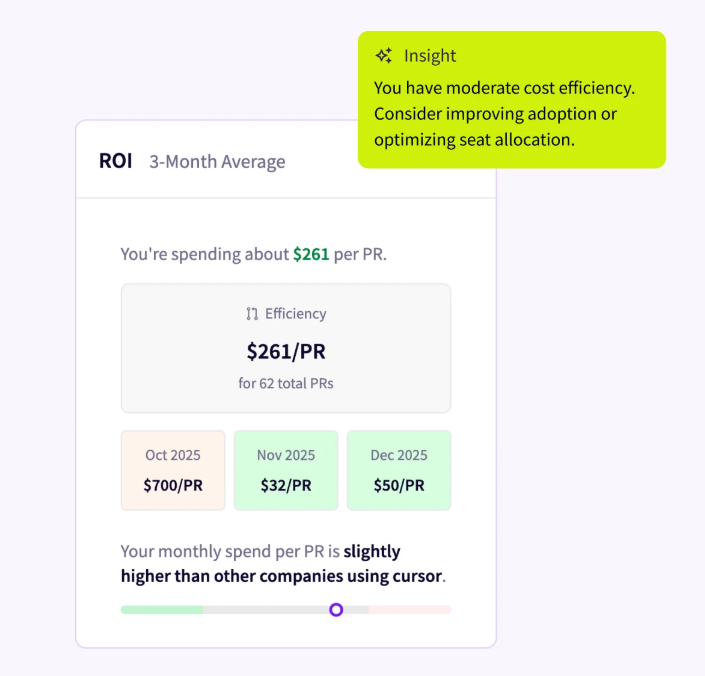
Jellyfish is one of the platforms built this way. It connects directly to the AI tools your teams already use, from GitHub Copilot to Cursor to Claude Code, and pulls token usage and cost into a single view across every tool, team, and model.
It then measures that spend against delivery output like PR throughput, so you can tell which tools earn their cost, forecast where the bill is heading, and see how AI is redirecting developer time from maintenance to roadmap work.
The screenshot below shows the idea, cost broken out by the work it funded:
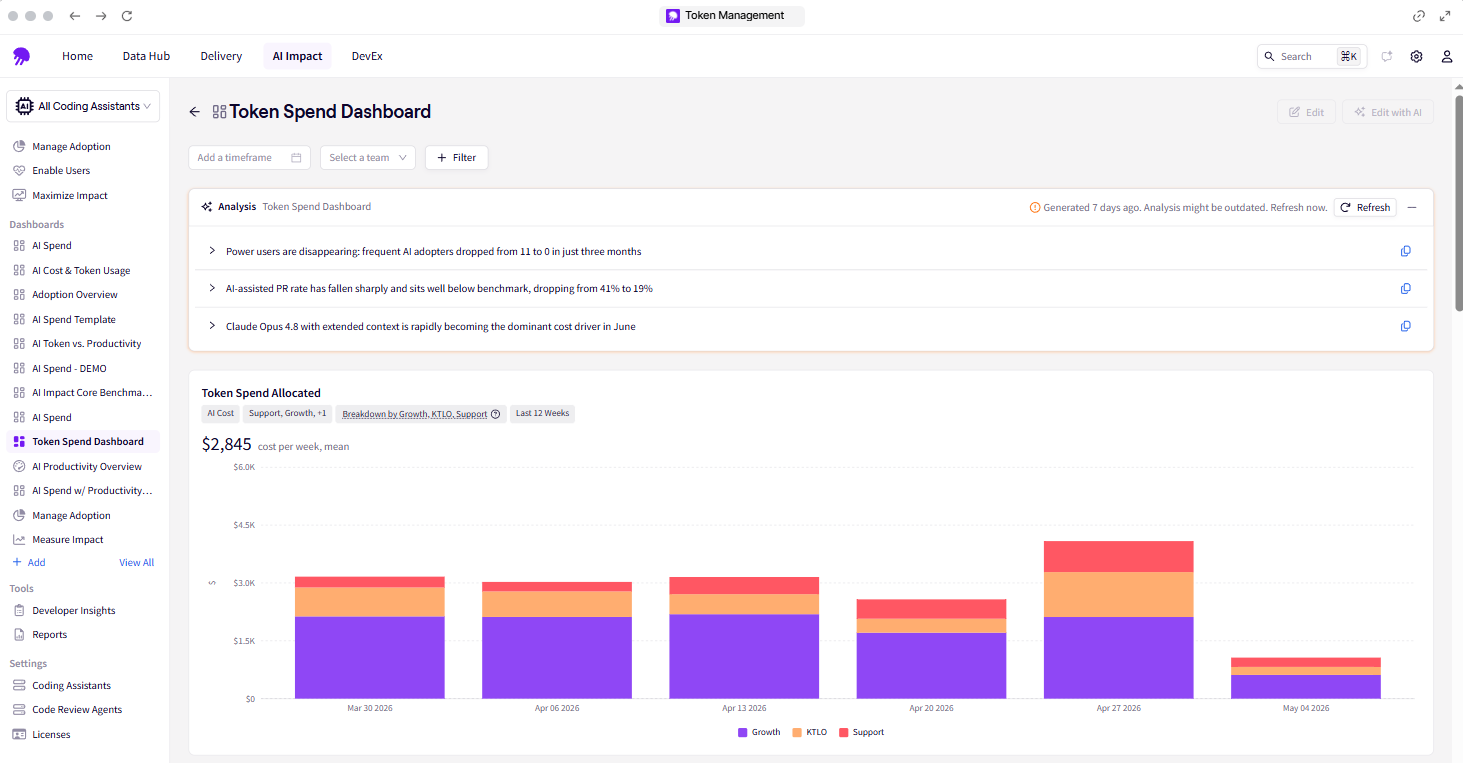
That’s the practical value of the category. Spend, the work it funded, and a forward forecast sit together, so a leader can make budget decisions without pulling data from three separate tools.
How Jellyfish Helps Leaders Manage AI Spend and Prove ROI
How Jellyfish Helps Leaders Manage AI Spend and Prove ROI
By now the through-line is clear. You can’t manage AI spend you can’t see, and you can’t judge it without knowing what work it produced. An engineering intelligence platform closes both gaps by putting cost and output in the same view.
Jellyfish is that platform. It brings token usage and cost together across every tool, team, and model, then ties that spend to the delivery output behind it. This gives engineering and finance one shared view to plan and defend AI spend from.
In practice, that comes down to six capabilities built for managing token cost:
- Centralized cost and usage tracking: Jellyfish shows token usage and cost across every tool, team, and model in one view. This removes the need to check separate provider dashboards or estimate which group generated the spend.
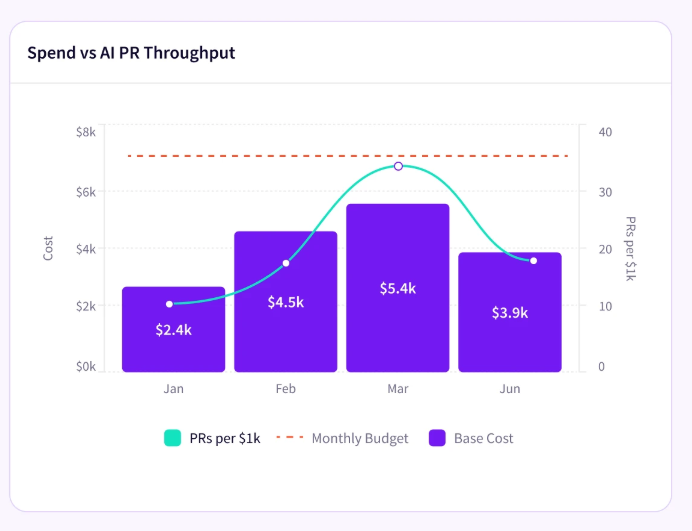
- Spend connected to output: The platform compares token spend against PR throughput over time. This shows whether an increase in cost corresponded to an increase in delivered work. Leaders can see how spending and output move together.
- Cost allocation by work type: Token spend is broken down by the type of work it funded, across roadmap (Growth), maintenance (KTLO), and Support. This shows where the budget is going at a category level, not just as a single total. It’s the view shown in the dashboard above.
- Tool-by-tool ROI: Jellyfish measures the return on each AI tool separately, across assistants like Copilot, Cursor, and Claude Code. This shows which tools contribute to output and which add cost without much return. The data supports renewal and consolidation decisions at contract time.
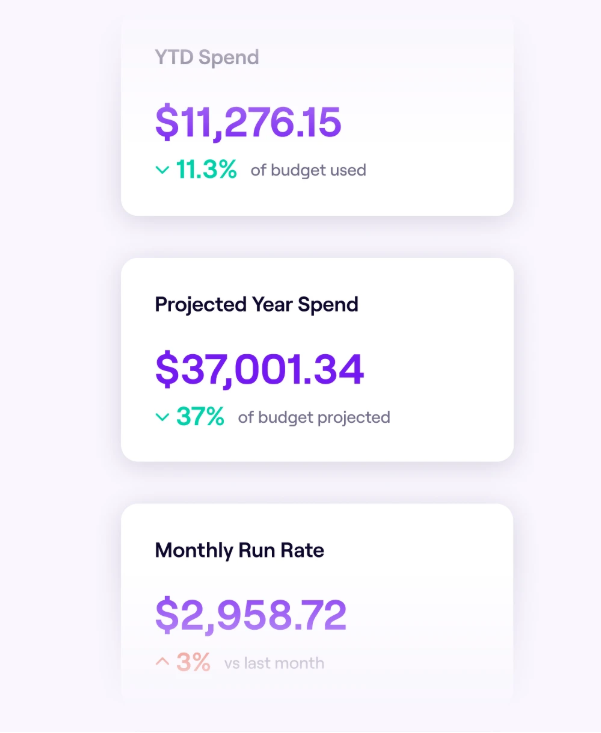
- Spend forecasting: Year-to-date spend, projected spend, and monthly run rate are tracked in one place. These figures give engineering and finance a shared basis for planning. AI budget cycles can be prepared using actual usage data.
- Direct integrations: Jellyfish connects directly to the tools teams already use, including GitHub Copilot, Cursor, Claude Code, and the associated coding and review agents. Usage data is collected at the source, which keeps the numbers accurate. Developers continue working in their existing tools without changes.
Managing token cost comes down to seeing the full picture, what you spent, where it went, and what it produced. Jellyfish puts those three things in one place, which is what makes AI spend something an engineering leader can control and defend.
Book an AI Impact demo to see your token spend mapped to the work behind it.
FAQs
FAQs
What makes one API call cost more than another?
Three things move the number:
- The first is the model you pick, since a frontier reasoning model carries a much higher price per token than a smaller one, and even a GPT-4-class model costs far more than the budget tier.
- The second is prompt length, because every token you send in counts as input you pay for, so a long prompt loaded with context costs more than a short one.
- The third is how much the model writes back, since output tokens carry their own, higher rate.
Track those three across your LLM usage, and you can predict most of your AI consumption before the bill arrives.
Does prompt engineering lower AI costs?
It helps at the margins. Careful prompt engineering and prompt design trim wasted tokens on each request, and prompt caching cuts the cost of repeated system prompts by reusing context the model has already read.
Those tactics pay off most for developers working request by request. For an engineering leader, the bigger savings come from policy, model routing, quotas, and cost control on AI agents that can loop through hundreds of calls on a single task.
About the author

Lauren is Senior Product Marketing Director at Jellyfish where she works closely with the product team to bring software engineering intelligence solutions to market. Prior to Jellyfish, Lauren served as Director of Product Marketing at Pluralsight.