In this article
The engineering landscape has rapidly evolved since the advent of Al coding assistants. Tools like GitHub Copilot ushered in a new era, promising gains in productivity and efficiency. Yet, as we stand at the forefront of this revolution, questions remain: Have these tools delivered on their promise? Are they reshaping software development in ways that lead to measurable impact?
The reality is nuanced. While progress has been significant, the potential of these tools still needs to be explored. Recent surveys indicate that three out of four developers use or plan to use Al tools in their workflows. This represents a shift in how engineers think about, write, and review code. But adoption can take many forms and is no guarantee of success. Enterprise organizations, often slower to embrace innovation, are just beginning to explore the capabilities of GenAl tools. Many run trials or proofs of concept to evaluate their impact without fully committing. Meanwhile, early adopters are pushing boundaries, experimenting with newer entrants like Codeium, Cursor, and Augment fully embracing and advocating for the adoption of GenAl more broadly. These varying levels of adoption beg the question of whether GenAl tools can consistently drive value and impact.
At Jellyfish, we set out to answer this question by developing a solution to measure the impact of Al coding tools. Today, our platform analyzes the activity of more than 15,000 engineers across 215 companies, offering insights into how GenAl is reshaping software engineering. Early findings reveal both promise and challenges. While teams using copilots see a 12.6% boost in speed, they also report an increase in system bugs, highlighting the complexity of achieving positive outcomes.
To harness the potential of GenAl tools, engineering leaders must do more than just adopt them; they must establish a clear strategy for transformation. This includes identifying the right use cases, planning for integration, and establishing metrics to measure ROI. Leaders must also address concerns such as over-reliance on Al, integration challenges, and ethical considerations. This guide offers actionable strategies, data-driven insights, and an informed perspective on navigating the opportunities and challenges of GenAl coding tools. Together, we’ll explore how to unlock their potential, overcome barriers to adoption, and drive change within your organization.
Let’s get started.
Get the Full PDF Guide
Download the AI Codegen Tool Adoption Guide as a PDF you can easily save or share.
Download NowUnderstanding and Driving Impact with GenAl Coding Tools
Understanding and Driving Impact with GenAl Coding Tools
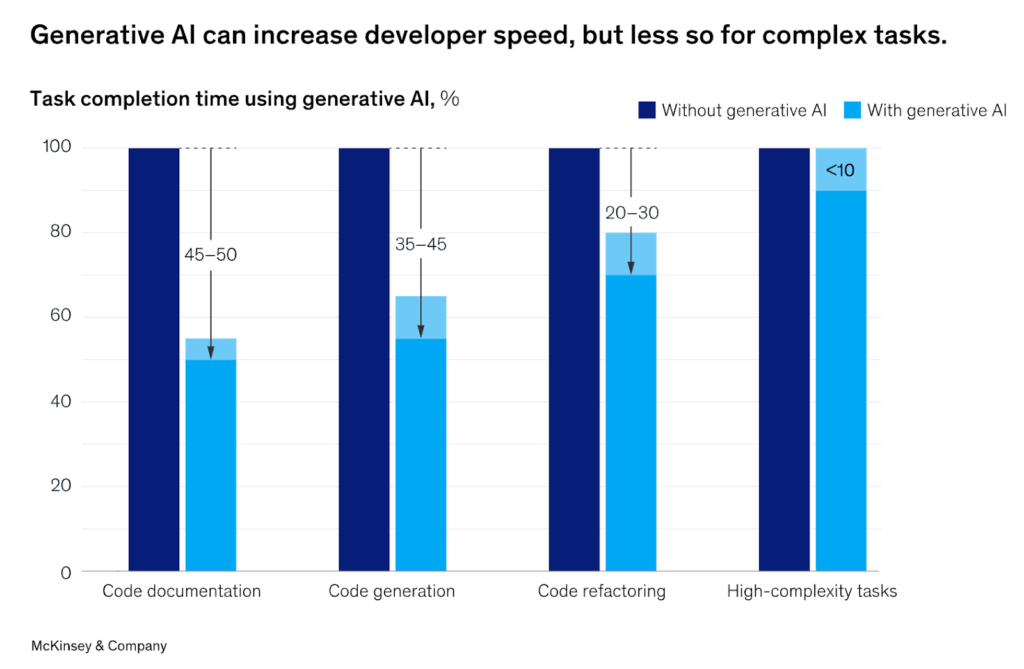
According to data from McKinsey, organizations adopting GenAl have seen significant improvements in developer productivity, with some reporting up to a 50% reduction in time spent on certain tasks. But productivity gains vary widely depending on the task.
The Benefits
GenAl coding tools leverage machine learning models to assist developers in generating, analyzing, and refining code. They automate repetitive tasks, streamline workflows, and enhance code quality to increase productivity and efficiency. Understanding these benefits requires examining the application of these tools across typical engineering workflows:
- Enhanced Productivity: Tools like GitHub Copilot provide real-time code suggestions, enabling developers to write code more efficiently.
- Improved Code Quality: By automating routine tasks, developers can focus on more complex aspects of their work, potentially leading to higher-quality code.
- Accelerated Onboarding: New team members can leverage Al assistants to familiarize themselves with codebases more quickly.
For engineering leaders, adopting GenAl coding tools represents an opportunity to improve team performance and enable developers to focus on more creative and complex challenges. For individual developers, these tools automate repetitive tasks like generating boilerplate code, debugging, and writing tests, thereby freeing up engineers to focus on higher-value work.
But seniority plays a big role in the value of these tools. In a study based on data from the Jellyfish Copilot Dashboard, we found that Copilot benefits senior developers more than their junior counterparts:
- Junior developers are delivering code 11% faster, while senior developers are delivering 14% faster (based on cycle time).
- Senior developers are spending 22% less time coding, while junior developers are only spending 4% less time coding.
The smaller productivity gains observed for junior developers may be attributed to their over-reliance on AI tooling, potentially bypassing deeper learning and the internalization of foundational concepts. Without a strong foundation, junior engineers may struggle to critically assess the quality of Copilot’s suggestions.
In contrast, more experienced developers are better equipped to use copilots effectively. They possess the expertise to formulate precise queries and rapidly evaluate Copilot’s outputs, enabling them to integrate suggestions more efficiently into their workflows. As one CTO put it, “senior developers can write better prompts.”
The Challenges
Despite their promise, GenAl coding tools bring challenges that engineering leaders must address to ensure successful adoption. Concerns about over-reliance on Al suggestions and the complexities of integrating these tools into existing processes can delay implementation. Additionally, ethical considerations, such as maintaining code security and avoiding plagiarism, add further complexity. By identifying and addressing these challenges, leaders can expand the value of GenAl tools while mitigating risks.
Taking a sober look at both the benefits and challenges of GenAl allows engineering teams to develop balanced strategies that maximize GenAl’s potential while addressing its limitations.
Assessing the Need for Your Team
Evaluating GenAl coding tools’ alignment with your team’s needs and workflows is essential. While these tools promise productivity gains, their effectiveness depends on the team’s readiness and openness to new technologies. Conducting an assessment helps engineering leaders identify where these tools will be most valuable. Here’s how to get started:
Analyze Development Workflows
A systematic review of your team’s workflows and completed projects can reveal repetitive tasks. Tracking time spent on various activities and analyzing pull requests can help identify areas where GenAI tools can streamline efforts.
- Review past work to identify frequent tasks, such as writing boilerplate code, unit tests, or performing code reviews.
- Track time on specific activities using project management tools (e.g., Jira, Trello).
- Examine pull requests to identify patterns like recurring formatting issues or repeated errors.
PRO TIP 💡: Jellyfish Deliverables view easily shows you all in-progress and completed projects in a single view.
Gather Feedback from Team Members
Your developers are closest to the work itself. Engaging them through surveys, interviews, and team discussions can uncover the tasks they find most repetitive or tedious, providing obvious targets for automation.
Developer Experience Surveys and Meetings: Ask engineers about tasks they find repetitive or tedious. Questions could include:
- “What tasks take up most of your time during development?”
- “Are there areas where you feel your efforts could be better spent?”
Conduct One-on-One Interviews: Deeper conversations can uncover frustrations or overlooked opportunities for automation. You can also ask your team members how they might already be using AI solutions both personally and professionally and take note of the most widely used providers. Leaning into what the team is already comfortable with could help speed up and smooth adoption.
PRO TIP 💡: Jellyfish DevEx makes getting qualitative feedback from your developers easy with survey templates based on the latest research.
Identify Bottlenecks in the Development Process
Recurring delays in debugging, code reviews, or QA cycles often signal tasks that could benefit from automation. Pinpointing these bottlenecks can highlight opportunities to integrate GenAl solutions.
- Look at QA and Bug Cycles: Tasks like writing test cases, debugging, or manual testing are often ripe for automation.
- Monitor Code Reviews: Identify repetitive suggestions or corrections made during code reviews that could be addressed through GenAI tools.
- Assess Onboarding Processes: Tasks frequently used to onboard new engineers, such as environment setup or codebase familiarization, can offer areas for improvement.
PRO TIP 💡: Jellyfish’s Life Cycle Explorer gives you insights into how your team progresses through their work, identifying trends and potential bottlenecks.
Categorize Tasks by Effort and Frequency
Classifying tasks based on how often they occur and their complexity helps prioritize where to apply Al tools. Focus on automating tasks that are high-frequency and low-complexity first for maximum impact.
- Low Complexity, High Frequency: Tasks that are simple but occur often, such as formatting, commenting, or minor refactoring.
- High Complexity, High Frequency: More challenging tasks that are repeated often, such as debugging or generating test cases, which could benefit from GenAI tools.
Leverage Metrics and Tools
Metrics from software engineering intelligence tools like Jellyfish, along with version control systems and project management software, can provide data-driven insights into recurring patterns, helping identify tasks as prime candidates for automation.
- Code Analysis Tools: Use tools like Jellyfish to identify patterns in code quality issues and task allocations.
- Version Control Insights: Analyze commit histories to find frequently modified files or types of changes.
PRO TIP 💡: Jellyfish provides comprehensive metrics across speed, quality, process, and more, plus software development benchmarks from over 50,000 engineers.
By combining qualitative feedback from developers with quantitative data from workflows and existing processes, software engineering teams can pinpoint the most impactful areas to streamline with AI coding tools first.
Building a Rollout Strategy
Building a Rollout Strategy
Successfully adopting GenAI coding tools requires more than just deploying them. You must integrate them into your team’s workflows. A structured rollout plan ensures that developers embrace these tools, align them with business goals, and use them to drive productivity and efficiency. This section outlines a phased approach, the importance of setting measurable goals, and the need to equip your team with the knowledge and skills to make the most of these transformative technologies.
A Phased Approach
Start with a Pilot Program
Begin by introducing the tool to a small, representative group within your team. Choose participants across skill levels and roles to understand how the tool fits into various workflows. Gather feedback on usability, impact, and challenges during the pilot. Use insights from the pilot to refine implementation plans before scaling.
Expand Gradually
Roll out the tool in stages, starting with teams or projects that will benefit the most. This approach minimizes disruption and allows for continuous iteration.
Setting Goals & Metrics
Define Success Criteria
Clearly outline what success looks like for your team. Examples include:
- Reduced cycle times for key development processes
- Increased velocity or number of completed tasks per sprint
- Improved code quality metrics such as fewer bugs
Start with a Pilot Program
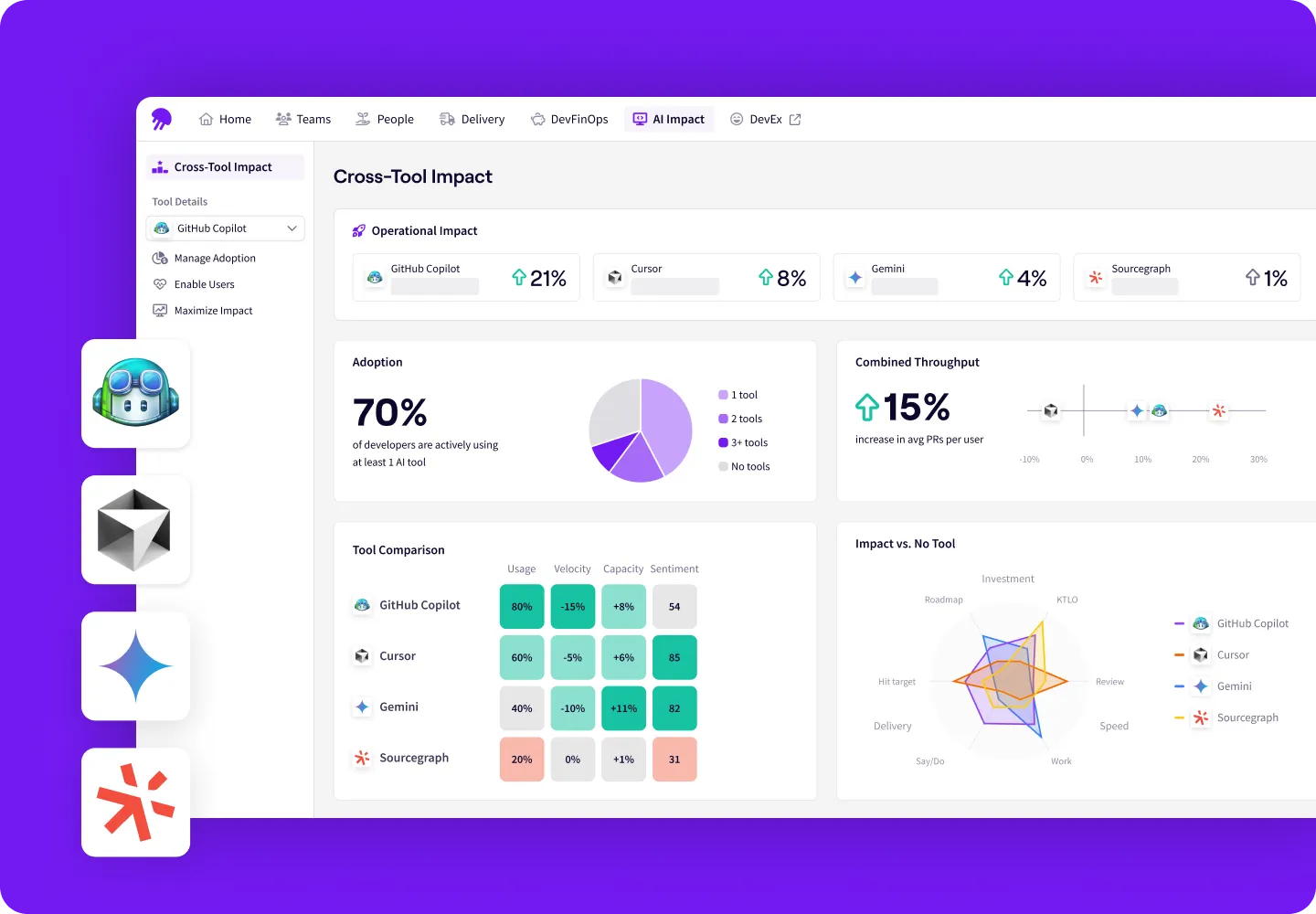
The Jellyfish AI Impact Dashboard can help you both monitor adoption and impact. Track key indicators such as time savings, developer satisfaction, and productivity gains – comparing AI and non-AI users.
Benchmark and Compare
Before the rollout, establish baseline metrics for productivity, cycle time, and / or code quality. Post-rollout, compare performance to these benchmarks to quantify the impact of your chosen GenAI tool or tools.
Training and Enablement
Organize Onboarding Sessions
Host workshops or training sessions to demonstrate how the tool works. Provide hands-on examples and tips for common use cases, such as generating boilerplate code or debugging.
Develop Documentation and Best Practices
Create a repository of resources, including user guides, FAQs, and troubleshooting tips tailored to your team’s workflows.
Foster a Collaborative Learning Environment
Encourage developers to share their experiences, tips, and challenges with the tool. Set up forums or Slack channels for open discussions and continuous learning.
to your team’s workflows.
Ongoing Support and Feedback
Provide a feedback loop where team members can share suggestions for improving adoption. Regularly revisit training needs as workflows evolve, needs change, and the tool’s capabilities expand.
Building a rollout strategy is as much about planning as it is about flexibility. A phased introduction allows teams to acclimate gradually, while well-defined goals and robust training empower developers to maximize the tool’s potential.
Overcoming Common Adoption Challenges
Overcoming Common Adoption Challenges
While GenAI coding tools offer transformative potential, their adoption comes with unique challenges. From addressing developer skepticism to ensuring ethical use and avoiding over-reliance, engineering leaders must proactively identify and mitigate these hurdles. This section outlines strategies to overcome resistance, integrate AI responsibly, and ensure that these tools enhance – rather than hinder – team workflows and productivity.
Addressing Resistance to Change
Adopting new technologies can often be met with skepticism or hesitation, especially when the tools impact daily workflows. Overcoming resistance requires clear communication, active engagement, and demonstration of value early in the process.
Communicate Benefits Clearly
Highlight the specific ways AI tools can help individual developers, such as reducing repetitive work, improving productivity, or freeing up time for creative tasks. Share real-world success stories or case studies to build trust and excitement around adoption.
Involve Developers Early
Engage the team during the evaluation and pilot phases to gather input and incorporate feedback into the rollout. This sense of ownership can foster enthusiasm and acceptance.
Focus on Complementarity
Emphasize that AI tools are designed to assist developers, not replace them. Reinforce their role in enhancing human creativity and problem-solving, not diminishing it.
Ensuring Ethical Use
The introduction of GenAI tools raises important ethical considerations, from code quality and intellectual property concerns to data privacy. Establish clear guidelines for responsible use to ensure these tools enhance workflows without compromising security or ethics.
Develop an AI Policy
Develop a clear policy on how AI tools should be used, ensuring compliance with intellectual property laws and company security standards.
Encourage Code Reviews
Mandate manual reviews of AI-generated code to ensure it meets quality and security standards. Developers should critically evaluate suggestions rather than blindly implementing them.
Protect Sensitive Data
Be cautious about sharing proprietary or sensitive information with AI tools. Use tools that prioritize data privacy and offer options for local-only processing when possible.
Mitigating Over-Reliance
While GenAI tools can significantly enhance productivity, over-reliance on them can hinder developers’ growth and critical thinking. Striking the right balance between leveraging automation and maintaining core skills ensures that AI tools augment, rather than replace, human expertise.
Promote Skill Development
Encourage developers to maintain and refine their coding skills to avoid becoming overly dependent on AI tools. This will ensure that they retain their ability to debug, problem-solve, and innovate independently.
Blend Automation with Critical Thinking
Train developers to use AI tools to complement their expertise, focusing on areas where the tools excel, such as the automation of mundane tasks or the generation of boilerplate code.
Monitor Usage Patterns
Use analytics tools to identify over-reliance, such as excessive copying of AI-generated code without modification. Address this through feedback and additional training.
Overcoming challenges in adopting GenAI tools requires a thoughtful, proactive approach. By addressing resistance, fostering responsible use, and maintaining a balance between human expertise and AI assistance, engineering leaders can ensure these tools become valuable to the team.
Measuring and Communicating Success
Measuring and Communicating Success
AI is spreading quickly throughout engineering organizations, but engineering metrics aren’t always keeping pace. Many organizations rely on surveys to track which members of their teams are using AI tools – whether that’s a license purchased for them by the company, or a free tool like ChatGPT used on an individual basis. In the best case scenario, the team may also include a qualitative question around productivity, i.e. “Do you feel AI coding tools are helping you work faster?”
Those attempts at measurement will always be imprecise, and they lack connection to actual performance and business impact. As companies commit to significant investments in AI coding tools, they need a clear view of GenAI adoption, impact, and ROI.
At Jellyfish, we recommend that organizations use the following questions to frame their impact measurements:
- Are you building software more efficiently? Compare operational metrics like cycle time to quantify the difference between engineers using AI and those that aren’t. Jellyfish’s own engineering team found that cycle time for engineers using Copilot was up to 34% faster than those not using Copilot.
- Are your initiatives more predictable? Keep track of deliverables in progress and completed, and evaluate whether teams are consistently delivering on AI-assisted projects.
- Are you focusing more on what matters? Work allocations should always play an essential role in an engineering team’s planning and evaluation. Dig into whether allocations shifted after the adoption of AI – using tools like Copilot to eliminate repetitive tasks could shift effort away from support and keeping the lights on (KTLO) and toward value-driving work on new features. With some Jellyfish customers, we’ve seen a 17% increase in effort towards growth work.
- How are engineering operations changing? We’ve seen engineering work shift up to 15% from writing code to reviewing. As a result, managers need to identify new sources of bottlenecks. Organizations with visibility into the evolving software development life cycle will be better able to effectively apply AI tools throughout the process.
Engineering leaders expect AI to make a difference. Jellyfish’s State of Engineering Management Report found that 58% of managers said AI can help alleviate burnout and enhance team well-being. But the proof will come in the form of real performance metrics. Without measurement, organizations have no way of knowing whether AI is delivering on its promise.
Continuously Improving and Iterating
Continuously Improving and Iterating
Adopting GenAI tools is not a one-time event but an ongoing process of refinement and optimization. By continuously seeking feedback, staying informed about the latest advancements, and iterating on implementation strategies, engineering teams can fully unlock the potential of these tools.
- Regular Feedback Loops: Collecting feedback from your team ensures AI tools remain relevant and effective in dynamic engineering workflows.
- Establish a Feedback Mechanism: Create regular opportunities for team members to share their experiences with the tools, whether through surveys, one-on-one discussions, or team retrospectives. Focus on what’s working, what isn’t, and how the tools can be adjusted to better support workflows.
- Analyze and Act on Feedback: Identify patterns in feedback to address common issues or uncover new opportunities for optimization. Adjust tool configurations or workflows based on the insights gathered.
- Promote Open Dialogue: Foster a collaborative environment where team members feel comfortable sharing both positive and negative experiences, knowing their input will be valued and acted upon.
Continuous improvement is the cornerstone of GenAI tool adoption. By regularly gathering feedback and staying informed about AI trends, engineering leaders can ensure their teams benefit from these tools while adapting to changes. With a commitment to iteration, teams can maintain an edge in leveraging AI to drive innovation and efficiency.
The Best Al Coding Tools for Developers in 2025
The Best Al Coding Tools for Developers in 2025
Both Al functionality and the tools on offer are constantly evolving. Here is an overview of some of the most widely adopted providers to help you choose what’s right for your organization:
Cursor AI
Cursor is a relatively new code editor built from the ground up with AI at its core. It uses a large language model (LLM) to provide advanced code generation and editing capabilities. Cursor aims to streamline the coding process by allowing developers to generate, edit, and refactor code using natural language commands.
Github Copilot
GitHub Copilot is an AI-powered code completion tool developed by GitHub in collaboration with OpenAI. It integrates directly into popular code editors like VS Code and provides suggestions as you type, helping you write code faster and with fewer errors.
Windsurf
Windsurf is an AI‑native IDE designed for flow‑state coding. It embeds an intelligent assistant directly into the development environment, enabling natural‑language prompts to generate, refactor, and preview code across files in real time—making every coding session feel seamless and powerful.
Gemini Code Assist
Gemini Code Assist is Google’s AI-powered coding tool. It’s designed to help developers write code faster and more efficiently by providing code completions, generating code from natural language descriptions, and offering assistance with debugging and refactoring.
Amazon Q Developer
Amazon Q Developer is an AI-powered coding companion developed by Amazon Web Services (AWS). It integrates with popular IDEs to help developers write, understand, and improve their code. Q Developer provides intelligent code recommendations, helps identify security vulnerabilities, generates unit tests, and offers assistance with various other coding tasks. It’s particularly well-suited for developers working within the AWS ecosystem, as it can also help with understanding AWS services and optimizing cloud resources.
Amazon Q builds upon the foundation of Amazon CodeWhisperer, incorporating its core code-focused features into a broader AI assistant. This means that many of the code generation, code suggestion, and security scanning capabilities previously associated with CodeWhisperer are now available within Amazon Q.
Claude
Claude is a large language model from Anthropic, designed with a focus on helpfulness, harmlessness, and honesty. While not exclusively a coding tool, Claude has demonstrated strong capabilities in code generation, understanding, and debugging. Its strengths lie in its ability to follow complex instructions and engage in nuanced conversations about code.
Sourcegraph Cody
Sourcegraph Cody is an AI coding assistant that leverages your entire codebase and Sourcegraph’s universal code graph to provide context-aware explanations and suggestions inside your IDE. Cody goes beyond basic code completion by offering features like code generation from natural language prompts, code explanations, and automated code refactoring.
CodeRabbit
CodeRabbit is an AI-powered code review tool that helps developers improve code quality and reduce the time spent on manual code reviews. It analyzes code, identifies potential issues, and provides actionable suggestions for improvement. CodeRabbit integrates with popular code repositories and CI/CD pipelines to automate code review workflows.
Tabnine
Tabnine is a pioneer in AI-powered code completion. It offers a lightweight and efficient solution that integrates with a wide range of IDEs and supports many programming languages. Tabnine focuses on providing private, personalized, and protected coding support.
Codeium AI
Codeium is a free, AI-powered code completion tool that aims to be faster and more powerful than other options. It boasts support for over 70 programming languages and integrates with a variety of IDEs.
GitLab Duo
GitLab Duo is a suite of AI-powered tools integrated into the GitLab platform. It includes capabilities such as AI code completion to aid developers throughout the entire software development life cycle. It aims to enhance developer workflows within the GitLab environment by providing context-aware code suggestions, automating repetitive tasks, and facilitating communication.
Replit
Replit is an online integrated development environment (IDE) that offers a collaborative coding experience and a built-in AI coding assistant called Ghostwriter. Ghostwriter provides code completions, generates code from natural language prompts, and helps with debugging. Replit’s focus on collaboration and ease of use makes it a great option for both individual developers and teams.
DeepCode AI (Snyk Code)
DeepCode, now part of Snyk Code, is an AI-driven code analysis tool that helps developers find and fix bugs, vulnerabilities, and code quality issues. It uses machine learning to analyze code and identify potential problems, going beyond traditional static analysis tools.
Sourcery
Sourcery is an AI-powered code reviewer that helps developers find bugs, improve code quality, and share knowledge. It continuously analyzes code and suggests improvements, automatically refactoring code to enhance readability, maintainability, and performance.
OpenHands (formerly OpenDevin)
OpenHands is an open-source project that aims to create an autonomous AI software engineer. It’s designed to be capable of executing complex engineering tasks and collaborating with users on software development projects. Think of it as an AI agent that can understand and respond to natural language instructions to modify code, run commands, browse the web, and even call APIs.
Augment Code
Augment Code is an AI-powered coding tool that aims to augment, not replace, developer work. Augment’s developer AI makes suggestions based on your company’s codebase and documentation so developers can work smarter and faster.
Devin by Cognition
Devin is an AI-powered, fully autonomous junior software engineer. This AI teammate is designed to help teams with tasks such as fixing frontend bugs, creating first-draft PRs for backlog tasks, making refactors, and more.
Aider
Aider is an AI coding assistant that focuses on helping developers automate repetitive tasks and generate code quickly. It integrates with popular IDEs and provides features like code completion, code generation from natural language descriptions, and automated code refactoring.
Microsoft IntelliCode
Microsoft IntelliCode is an AI-assisted development tool integrated into Visual Studio and Visual Studio Code. It uses machine learning to provide intelligent code completions, suggest relevant code actions, and guide developers towards best practices. IntelliCode aims to improve developer productivity and code quality by learning from thousands of open-source projects and the developer’s own codebase.
Perplexity Pro
Perplexity Pro is an AI-powered chatbot that goes beyond traditional search by providing concise answers and summaries to complex questions, along with citations and sources. While not exclusively a coding tool, Perplexity Pro has powerful features that can assist developers in their work, such as code interpretation, debugging assistance, and access to advanced AI models for code generation.
ChatGPT-5 (OpenAI)
While not strictly a coding copilot, ChatGPT-5 has powerful code generation capabilities. It excels at understanding natural language prompts and translating them into code snippets, functions, or even entire programs. This makes it valuable for both experienced developers seeking to automate tasks and beginners learning to code.
Al Coding Tools to Watch
The AI coding tools space is just starting to heat up. Here are several companies with tools on the horizon but not yet available for public use:
Pythagora (formerly GPT Pilot)
Pythagora aims to be a comprehensive AI developer that builds apps through natural language interaction. The company is building the AI tool on the open-source GPT Pilot. In May 2024, Pythagora announced the closure of a $4 million seed funding round. Pythagora is not yet available to the public, but developers can sign up for early V1 access.
Magic
Magic is a genAI coding startup whose tools will help developers write, review, debug, and plan code changes. While not yet available to the public, Magic recently announced a partnership with Google Cloud to develop two supercomputers.
Poolside
Poolside is an AI coding assistant startup founded by Jason Warner, formerly of GitHub, Canonical, and Heroku, and Eiso Kant, formerly of Athenian. While Poolside is not yet available to the general public, the company has been busy fundraising. Its valuation currently sits at about $3 billion.
To keep up to date on all things genAI coding tools, view this page here.
Final Thoughts: Enabling Higher-Level Work with Generative Al
Final Thoughts: Enabling Higher-Level Work with Generative Al
Adopting generative AI coding tools is a significant step for any software engineering team, offering opportunities to boost productivity, streamline workflows, and improve code quality. However, realizing their potential requires a strategic approach. From understanding their impact and evaluating team readiness to overcoming challenges and fostering improvement, every step of the journey contributes to successful integration and eventual value.
By following a phased rollout strategy, setting goals, and empowering teams with training and support, engineering leaders can ensure these tools complement human expertise and creativity rather than replace it. Addressing challenges like resistance to change, ethical concerns, and over-reliance on AI reinforces the responsible use of these technologies. Regular feedback loops, staying updated on AI trends, and fostering a culture of iteration ensure the tools evolve alongside the team’s needs and advancements in the field.
Ultimately, generative AI tools are not just about automating tasks – they’re about enabling developers to focus on higher-value work, innovate with confidence, and deliver results. With careful planning, continuous adaptation, and a focus on empowering teams, engineering leaders can leverage these tools to drive efficiency, creativity, and success in a rapidly evolving industry.
Effectively Build AI-integrated Engineering Teams
Learn more about our approach to AI measurement.
Get a Demo