In this article
The DevOps lifecycle refers to the set of practices, principles, and processes that organizations use to integrate and automate the development (Dev) and operations (Ops) aspects of software and IT systems. The goal of DevOps is to improve collaboration between development and operations teams, increase the speed of software delivery, and enhance the overall quality and reliability of software systems.
Phases of the DevOps Lifecycle
Phases of the DevOps Lifecycle
A piece of code goes through a specific chronological journey from an idea to a live product. A mature DevOps pipeline optimizes each of these distinct phases.
1. Plan
In the planning phase, engineering leaders and stakeholders define the roadmap and establish clear requirements for the software development process. This is where teams identify complex dependencies, prioritize new features based on market needs, and align the upcoming work with broader business objectives.
- Key DevOps tools: Project management platforms like Jira or Asana to track workflows, sprint cycles, and dependencies.
2. Code
During this phase, development teams write the source code for new functionality and architecture updates. To maintain a clean codebase and manage concurrent code changes effectively, developers use strict branching strategies rather than working in isolated silos.
- Key DevOps tools: Version control systems like Git, utilizing platforms such as GitHub, GitLab, or Bitbucket for secure collaboration.
3. Build
Once the new code is committed, it must be packaged into an executable artifact. The build phase compiles the application, resolves library dependencies, and validates that the code changes integrate cleanly without causing conflicts in the existing architecture.
- Key DevOps tools: CI/CD and automation tools like Jenkins, CircleCI, or GitLab CI/CD to automate the compilation
4. Test
The testing phase is critical for maintaining high-quality software and preventing future downtime. Instead of relying on manual QA bottlenecks, DevOps teams execute automated testing frameworks to run unit testing, integration testing, and security testing against the newly built artifact.
- Key DevOps tools: Test automation frameworks like Selenium, JUnit, or specialized security testing tools.
Learn more → AI in Software Testing and Quality Assurance
5. Deploy
This phase pushes the validated, tested code into the production environment so it can be accessed by end-users. A mature DevOps pipeline automates this release process through continuous deployment, ensuring that feature deployments are reliable, repeatable, and scalable rather than high-risk manual launches.
- Key DevOps tools: Containerization platforms like Docker and orchestration platforms like Kubernetes to manage scalable deployment processes.
6. Operate
Once the software is live, operations teams manage the underlying application environment. This phase focuses on maintaining system stability, ensuring high availability, and managing the server architecture efficiently by treating infrastructure as code (IaC) to automate provisioning.
- Key DevOps tools: Configuration management and IaC tools like Ansible, Puppet, Terraform, or Chef.
7. Monitor
In the final phase, teams track application performance, infrastructure health, and user experience in real-time. This continuous monitoring identifies performance issues or vulnerabilities immediately, creating a vital feedback loop that sends data directly back to the planning phase for continuous improvement.
- Key tools: Monitoring tools like Prometheus, Grafana, Nagios, or Datadog to gain deep system observability.
The 7 Cs: Core Principles of the DevOps Lifecycle
The 7 Cs: Core Principles of the DevOps Lifecycle
While the phases dictate what happens to the code, the 7 Cs dictate how it happens. These core principles ensure the entire DevOps process remains continuous, automated, and iterative.
- Continuous development: Planning and coding are never truly finished. The team operates in an agile framework, constantly mapping out and writing code for new features based on changing market demands.
- Continuous integration: Developers merge their code changes into a central repository multiple times a day. CI/CD tools like Jenkins or CircleCI automatically compile and validate the code, preventing massive integration conflicts.
- Continuous testing: Automated testing happens perpetually. By running security testing and functional checks continuously, teams ensure high-quality software without creating a manual testing bottleneck.
- Continuous deployment and continuous delivery: In continuous delivery, code is automatically prepared for a manual release. In continuous deployment, CD pipelines automate the entire release, pushing new features to production environments the moment they pass testing.
- Continuous monitoring: Teams maintain constant visibility over the live application. This ensures that any downtime or infrastructure failure is detected immediately.
- Continuous feedback: The real-time data gathered from continuous monitoring creates a constant feedback loop. User feedback and system metrics are routed directly back to the planning phase to drive continuous improvement.
- Continuous operations: By treating infrastructure as code and relying on automated provisioning, teams minimize disruptions and ensure the application remains highly available at all times.
Expanding the Pipeline: The DevSecOps Lifecycle
Expanding the Pipeline: The DevSecOps Lifecycle
As security threats become more sophisticated, the traditional DevOps lifecycle has evolved into DevSecOps. This approach ensures that security is not a final gate at the end of the process, but a continuous thread woven into every phase. By integrating security early—often called shifting left—teams identify vulnerabilities and compliance issues before they ever reach the production environment.
- Security testing in the planning phase: Teams conduct threat modeling and risk assessments to identify potential security gaps before a single line of code is written.
- Automated scanning during code and build: Static Application Security Testing (SAST) tools automatically scan the codebase for hardcoded secrets or insecure patterns as developers commit new code.
- Vulnerability management in the test phase: Dynamic Application Security Testing (DAST) and Software Composition Analysis (SCA) identify known vulnerabilities in open-source dependencies and third-party libraries.
- Compliance as code during the deployment phase: Automated checks ensure that every software release meets internal security policies and external regulatory requirements before deployment.
- Continuous security monitoring: Post-deployment, teams use real-time tools to detect unauthorized access attempts or unusual system behavior, enabling immediate incident response.
DevOps Lifecycle Best Practices and Optimization Strategies
DevOps Lifecycle Best Practices and Optimization Strategies
- Decouple deployment from release using progressive delivery: Instead of relying on rigid, monolithic deployments, use feature flags and canary releases to roll out code changes to a subset of users first. This minimizes the blast radius of potential performance issues and allows for real-time validation before a global rollout.
- Enforce GitOps for infrastructure reconciliation: Move beyond basic infrastructure as code (IaC) by implementing automated controllers that continuously monitor your production environment. These controllers instantly revert any manual configuration drift that does not match the single source of truth in your version control systems.
- Deploy policy-as-code for automated governance: Hardcode your compliance and security rules directly into the DevOps pipeline using frameworks like Open Policy Agent (OPA). This automatically fails builds that introduce vulnerabilities before they ever reach the integration testing phase.
- Govern release velocity with service level objectives and error budgets: Use system metrics to define strict error budgets; if a service consumes its error budget due to downtime or high failure rates, automated deployment processes are halted and teams must focus purely on reliability until stability is restored.
- Abstract infrastructure complexity through platform engineering: Self-service internal developer portals (IDPs) empower development teams to provision their own scalable environments and testing tools without waiting on operations teams.
Optimize the DevOps Lifecycle with Jellyfish
Optimize the DevOps Lifecycle with Jellyfish
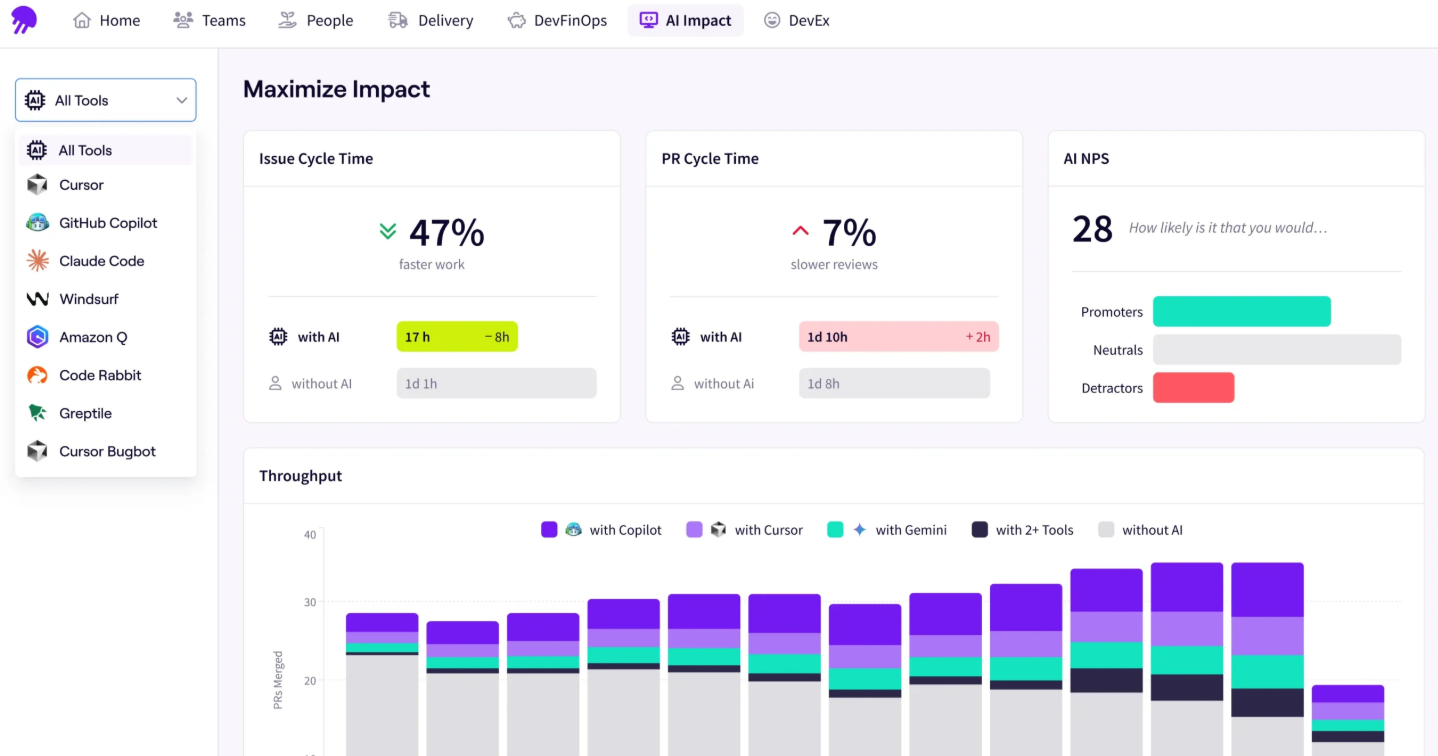
A mature DevOps lifecycle automates the flow of code from planning to production. But without an intelligence layer, engineering leaders struggle to translate that pipeline activity into predictable business outcomes.
Jellyfish is the Intelligence Platform for AI-Integrated Engineering. It unifies data across your entire software development lifecycle, shifting your focus from tracking reactive metrics to predicting delivery, all without forcing developers to change how they work.
- Align the planning phase with strategic priorities: See exactly how engineering allocation maps to business goals and rebalance workloads dynamically as objectives shift.
- Predict continuous delivery outcomes: Use historical performance patterns across your deployment pipeline to power accurate forecasts, detect risks early, and make confident release commitments to leadership.
- Measure AI impact across the development process: Compare adoption, spend, and impact of coding assistants to measure exactly how AI affects your productivity, speed, and overall software quality.
- Standardize lifecycle metrics: Build a consistent measurement strategy grounded in DORA and SPACE frameworks to benchmark trends and uncover exact friction points in your workflow.
- Automate financial reporting for operations: Eliminate manual time tracking for software capitalization and R&D tax credits with audit-ready, automated financial reports.
Industry leaders rely on Jellyfish to benchmark their DevOps practices, scale their insights, and prove the ROI of their engineering organizations:
- “Jellyfish has provided us with full visibility across our product portfolio into both execution and fundamental metrics.” — Leonid Igolnik, EVP of Engineering, Clari [Read the Full Case Study]
- “No other tool pulls together every aspect of the development process to create delivery projections of this quality. There’s nothing close on the market, nothing nearly as effective or accurate.” — Adam Odell, Director of Program Management, CHG Healthcare [Read the Full Case Study]
- “Jellyfish has helped our leaders gain insights into engineering details that were previously unavailable. The ability to view insights at the portfolio level or drill into any level of the taxonomy is very powerful.” — Ellen Yudt, VPE Technology PMO at Blue Yonder [Read the Full Case Study]
Interested in learning more? Book a demo today to see how Jellyfish brings engineering intelligence to your DevOps workflows.
About the author

Lauren is Senior Product Marketing Director at Jellyfish where she works closely with the product team to bring software engineering intelligence solutions to market. Prior to Jellyfish, Lauren served as Director of Product Marketing at Pluralsight.