In this article
GitHub has been steadily building out Copilot’s native analytics layer. Since the February 2026 GA release, engineering teams have access to usage dashboards, code generation reports, API exports, and user-level data that cover a lot more ground than what was available a year ago.
The monitoring options vary depending on your role, your GitHub plan, and how deep you need to go. And for teams that need to connect usage data to engineering outcomes, third-party platforms pick up where the native tooling leaves off.
This guide covers how to track Copilot adoption and activity across your engineering team, what each reporting option offers, and where the native tooling falls short.
Why Monitoring GitHub Copilot Matters for Engineering Teams
Why Monitoring GitHub Copilot Matters for Engineering Teams
Engineering teams that deploy Copilot across the organization need a reliable way to track usage, adoption, and value over time.
Here’s why it’s worth setting up proper monitoring early:
- Unused licenses are easy to miss: Copilot Business costs $19/user/month, and Enterprise costs $39/user/month. Industry benchmarks show organizations typically see around 80% license utilization after rollout, which means roughly 1 in 5 paid seats may go unused at any given time.
- Adoption is rarely consistent across teams: The same research shows that 81% of developers install the Copilot extension on day one, but long-term usage varies. Plus, only about 50% of developers who try Copilot continue using it regularly, which makes ongoing monitoring important for catching drop-off early.
- Leadership will ask about ROI: A Forrester TEI study on GitHub Enterprise Cloud (which includes Copilot) found a 376% ROI over three years for a composite organization of 5,000 developers. But none of that is possible to report on without a monitoring foundation underneath it.
- Acceptance rates show whether Copilot fits the workflow: The average acceptance rate across Copilot users sits around 27–30%, with variation by language and codebase. When that number starts dropping, it usually means the work has moved toward more complex or domain-specific territory, the team needs better prompting habits, or Copilot’s suggestions don’t match the stack well.
- Value varies by language, editor, and feature: Copilot generates an average of 46% of code for active users, and that number climbs to 61% for Java developers. Breaking usage down by language, editor, and feature shows you exactly which parts of your org benefit most, and which ones might need a different approach.
Quick tip on where to start → If you’re just getting started with Copilot monitoring, these four metrics give you the most signal with the least setup:
These four give you a baseline for adoption, value, and spend. The rest of this guide covers where to find them and how to go deeper. |
Understanding GitHub Copilot Analytics Monitoring Capabilities
Understanding GitHub Copilot Analytics Monitoring Capabilities
GitHub provides a built-in analytics system for tracking Copilot usage across your organization or enterprise. The system runs on IDE telemetry and collects data from code completions, chat interactions, and agent mode activity.
The Copilot analytics system went GA in February 2026. Enterprise dashboards require GitHub Enterprise Cloud, but org-level reporting works for all organization types, including Free and Team plans.
The sections below break down how the monitoring works and which metrics are available.
How GitHub Copilot Monitoring Works
Copilot’s monitoring system collects activity data from developers’ editors and CLI tools. Whenever a developer works with code completions, chats with Copilot, or uses agent mode, that interaction generates telemetry that gets sent back to GitHub for processing.
GitHub finds this data through four channels:
- The usage metrics dashboard provides a 28-day snapshot of adoption and user engagement trends at the enterprise or org level.
- The code generation dashboard tracks the volume of code Copilot has suggested, added, and deleted across all modes (completions, chat, and agent).
- The REST API gives you programmatic access at three scopes — enterprise, org, and individual user — and is GitHub’s recommended path for new integrations.
- The NDJSON export lets you pull raw data for use in external BI and analytics tools.
Enterprise owners and billing managers get access to all four by default. If you need to give visibility to engineering managers without full admin permissions, you can create custom enterprise or org roles with the “View Copilot Metrics” permission.
There are also a few data considerations worth pointing out early:
- Telemetry must be enabled: Copilot’s analytics depend entirely on data sent from the IDE. Any developer who has disabled telemetry in their editor settings is invisible to every report, dashboard, and API endpoint. This is the first thing to check when numbers look low.
- Coverage doesn’t extend to every Copilot coding interaction: The reporting system picks up activity from IDEs and the CLI. Anything that happens in Copilot Chat on the GitHub website or through GitHub Mobile falls outside what the analytics capture.
- Data isn’t available immediately: There’s a built-in processing window of two to three UTC days between when a developer uses Copilot and when that activity appears in any report. Plan your reporting cadence around that.
- The same developer can appear in multiple org dashboards: Usage is attributed based on org membership, not seat assignment. Enterprise-level reports handle this by de-duplicating across orgs.
It’s worth noting that the official docs treat disabled telemetry as an edge case, but in practice it’s more common than you’d expect.
Developers coming from privacy-conscious organizations, open-source backgrounds, or teams where telemetry was previously discouraged often have it turned off by default in their editor settings.
If you don’t audit this proactively as part of your Copilot rollout, you may end up with weeks or months of incomplete data before anyone notices. Building a telemetry check into your onboarding process for new Copilot users saves you from that blind spot.
Setup checklist → Most teams that see unexpectedly low Copilot usage data have a data quality problem. Before you draw conclusions from your first few weeks of reporting, run through these checks:
|
Overview of GitHub Copilot Metrics
Overview of GitHub Copilot Metrics
There are five categories of metrics available across the dashboards and API. Each one serves a different purpose depending on what you’re trying to evaluate:
- Adoption measures how many of your licensed developers have Copilot in their daily routine versus just having a seat assigned. DAU, WAU, and monthly active users are the core metrics here. These give you a read on whether usage is growing, plateauing, or declining over time.
- Engagement goes a step further and looks at how often and how broadly developers use Copilot’s features. Things like chat requests per user and usage across Ask, Edit, Plan, and Agent modes help you gauge whether developers are exploring what the tool offers or sticking to one feature.
- Lines of code (LoC) metrics track how much code Copilot has suggested, added, and deleted across completions, chat, and agent activity. These are useful as a directional measure of output volume, though they don’t say anything about whether the code was good.
- Acceptance rate shows whether developers are keeping or dismissing Copilot’s output. If developers are accepting a large share of what Copilot offers, the tool is doing its job well for that language, editor, or team. If they’re ignoring most of it, something isn’t clicking.
- Pull request lifecycle metrics give you a window into whether Copilot is affecting how fast code gets reviewed and shipped. The data covers PR counts, merge velocity, and review patterns, with the ability to isolate Copilot-assisted work from the rest.
Which metrics matter most depends on where you are in your Copilot rollout. Early on, adoption and seat utilization are the priority because you need to know whether developers are activating and using their Copilot licenses.
Once adoption stabilizes, you should focus on engagement, acceptance rates, and feature breadth. PR lifecycle metrics become relevant later, when you’re trying to measure whether Copilot is affecting how fast your teams deliver.
| ⚠️ Common misreads → Don’t assume high DAU means Copilot is working well. If acceptance rates are flat or dropping alongside growing active users, developers may be trying the tool without getting value from it. And lines of code metrics can be misleading on their own. A big number looks good in a slide deck, but tells you nothing about quality without PR and review data next to it. |
Limitations of GitHub Copilot Monitoring
Limitations of GitHub Copilot Monitoring
The native reporting covers a lot of ground, but there are gaps that will affect how you plan your monitoring. Here’s what to watch for:
- You can’t look back further than 28 days in the dashboard: The dashboard only covers the most recent 28 days. If you need to report on trends across a quarter or a full year, you’ll have to set up a regular cadence of pulling data from the API or downloading NDJSON exports and storing them externally.
- Usage metrics don’t connect to engineering outcomes: The data stops at activity and output. There’s no way to use the native reporting to answer questions like “are Copilot users closing tickets faster?” or “are PRs from Copilot users getting fewer revision requests?” GitHub says this is on their roadmap, but today you’d need external tooling to make that connection.
- Dashboard, API, and export numbers won’t always match: Don’t be surprised if the numbers don’t line up perfectly. The dashboard, API, and export files each aggregate data differently, so minor gaps are normal.
- Recent data may look incomplete: GitHub doesn’t process IDE telemetry in real time. It typically takes two to three UTC days for activity data to fully settle. If the last few days on your dashboard look unusually low, wait a couple of days before investigating. The data is probably still being processed.
- Some breakdowns will show “Unknown” values: Sometimes the editor doesn’t pass along enough context to classify what happened, so the system labels the language, feature, or model as “Unknown.” You’ll see this more with teams running outdated editor extensions. Newer versions send richer telemetry, so the problem shrinks over time.
- Lines of code metrics are directional, not definitive: LoC data shows volume of Copilot’s output across modes, but it says nothing about whether the code was correct, maintainable, or useful. GitHub treats these as trend indicators, not performance benchmarks.
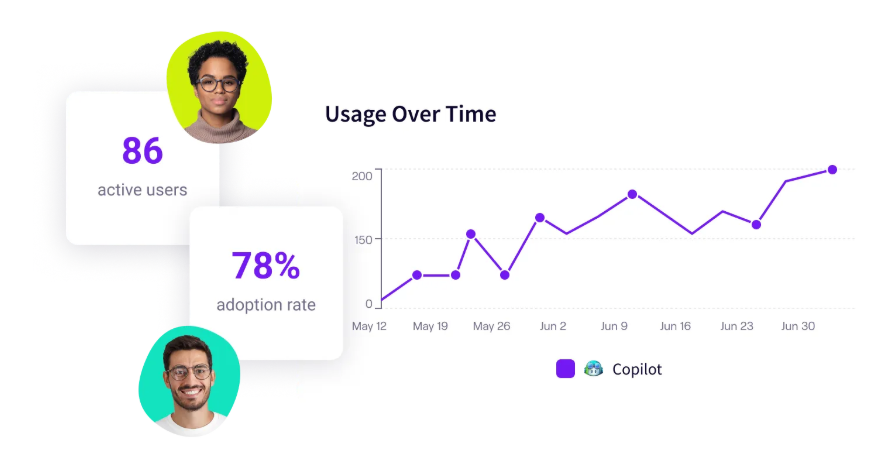
PRO TIP 💡: If the “no connection to engineering outcomes” limitation is the one that matters most to your team, Jellyfish is built specifically to close that gap. It compares delivery metrics for Copilot users against non-users across your org, giving you the before-and-after data that the native dashboards don’t provide.
Alternatives & Advanced Monitoring Solutions
Alternatives & Advanced Monitoring Solutions
For teams that need more than what GitHub’s built-in reporting provides, there are several options worth considering:
Reporting and dashboard tools:
- GitHub Copilot metrics viewer: An open-source web app that reads from the Copilot Metrics API and renders dashboards with date filtering up to 100 days, side-by-side team comparisons, seat utilization tracking (including seats assigned but never activated), and data exports. All processing runs client-side, so no data leaves the browser.
- Microsoft Copilot metrics dashboard: An accelerator from Microsoft that deploys on Azure App Service and pulls data from both the Copilot Metrics API and the User Management API. Gives you team-level filtering and more granularity than the native GitHub dashboard. A natural fit if your org already runs its infrastructure on Azure.
- Power BI templates: Several community and Microsoft-published templates connect Power BI to the REST API for custom KPI reporting. This is useful if your organization already runs its reporting through Power BI and you want Copilot data in the same place.
- Custom pipelines: Some organizations build their own storage and reporting by pulling daily data from the API into tools like Grafana or Elasticsearch. This is the main workaround for the 28-day dashboard limitation, but it needs engineering time to build and maintain.
Outcome and impact tracking:
- SEI platforms: A number of software engineering intelligence platforms now offer Copilot integrations that put usage data alongside DORA metrics, throughput, and developer productivity signals. These are useful for centralizing engineering data, but most stop at the activity layer.
- Code quality and security tools: Tools like SonarQube and Snyk Code bring a monitoring dimension that GitHub’s reporting doesn’t include. SonarQube points out duplicated logic and high complexity patterns common in AI-generated code, while Snyk runs security analysis specifically tuned for AI-assisted output.
- Jellyfish: Covers Copilot analytics alongside Cursor, Claude Code, Gemini, and several other AI coding tools in a single dashboard. Pulls usage patterns and maps it against delivery metrics from Git and Jira so you can measure whether AI models are moving the needle on cycle time and throughput.
| ⚠️ API deprecation note → The older Copilot Metrics API is scheduled for shutdown on April 2, 2026. Several community tools, including the open-source metrics viewer and some Power BI templates, were built on that API. If you’re evaluating any of these options right now, confirm they support the newer GitHub Copilot usage metrics API before investing time in setup. GitHub has recommended the newer API for all new work going forward. |
Monitor GitHub Copilot Adoption and Impact with Jellyfish
Monitor GitHub Copilot Adoption and Impact with Jellyfish
The dashboards and API covered in this guide give you strong visibility into Copilot activity across your engineering team. You can track active users, monitor acceptance rates, see which languages and editors get the most usage, and export data for custom reporting.
What you won’t get from the native tooling is a way to tie that activity to delivery speed, code quality, or return on investment. And that’s where Jellyfish comes in.
Jellyfish entered the Copilot analytics space early, shipping a purpose-built dashboard before most competitors had one. The product has since evolved into a broader AI Impact platform that spans multiple AI coding tools.
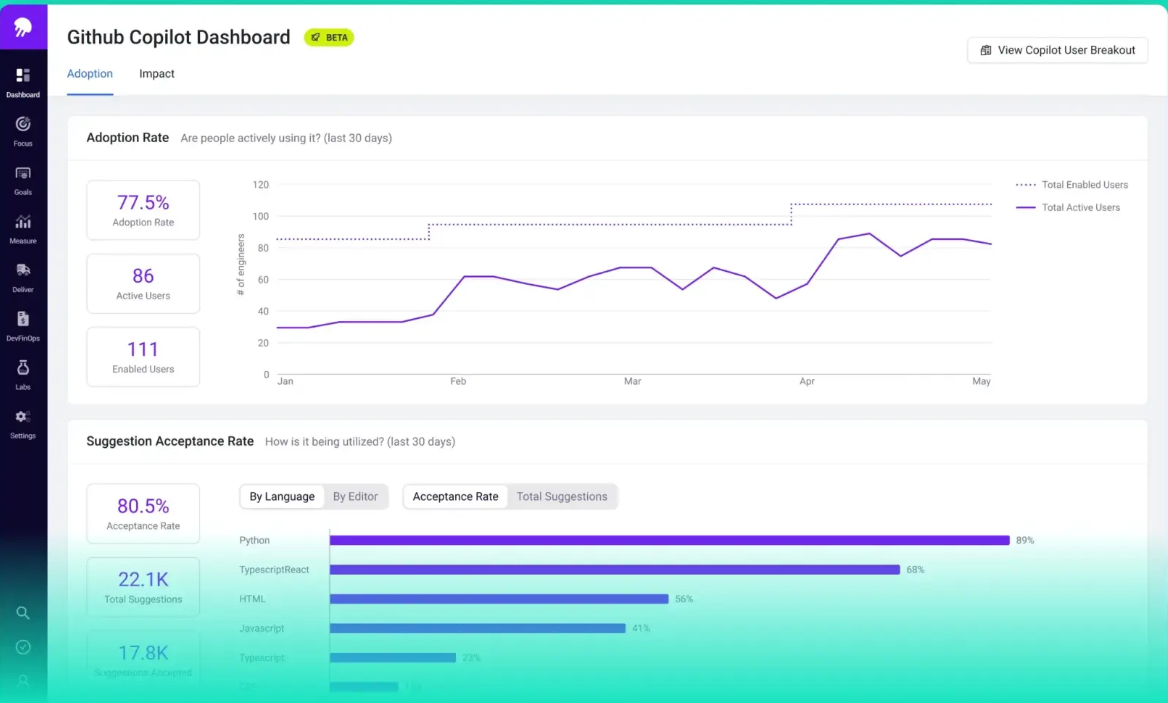
Here’s what the platform lets you do with your Copilot data:
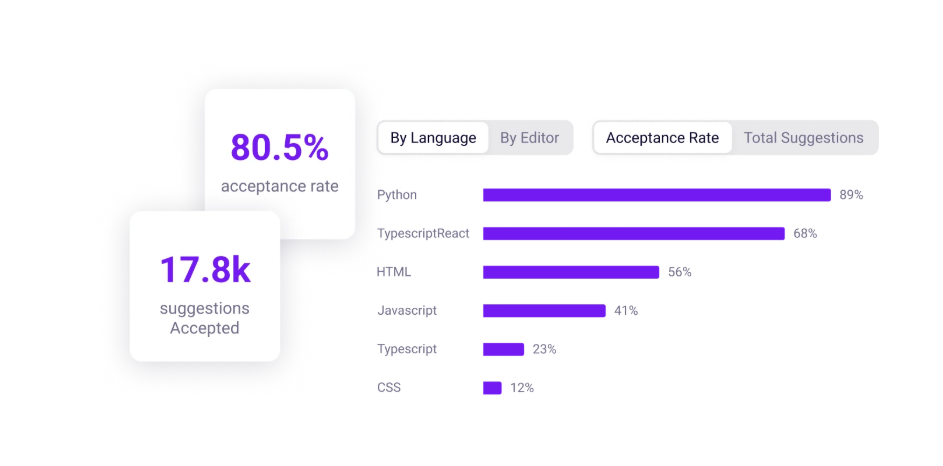
- See where Copilot has the most impact: Acceptance rate data is broken down by language and editor, so you can understand which use cases and work types benefit most.
- Measure delivery impact for Copilot users vs. non-users: The platform creates cohort comparisons between Copilot users and non-users across metrics like cycle time and PR throughput. Jellyfish ran a cohort comparison on their own engineering org and measured up to 34% faster cycle times among developers who were active Copilot users.
- Track adoption by team, segment, and usage level: The platform categorizes developers by how actively they use Copilot. It separates heavy users from occasional ones and points out engineers who have a license but haven’t activated it. You can filter this by team and business unit to see where enablement efforts should go.
- Connect AI spend to outcomes: The platform maps AI tool spend against delivery outcomes so you can see cost per PR, cost per team, and cost per initiative. When renewal conversations come up, or you need to justify expanding the rollout, the data is already there.
- Vendor-agnostic AI tool tracking: If your teams use more than one AI-powered coding agent, Jellyfish consolidates all of them into a single view. The platform currently supports Copilot, Cursor, Claude Code, Gemini, Amazon Q, Windsurf, CodeRabbit, and Greptile, with side-by-side benchmarking so you can see which tools perform best for which use cases.
- Built-in executive reporting: Jellyfish has a built-in report builder that compiles summaries of AI tool adoption, delivery impact, and spend into a format ready for leadership review. Saves engineering managers from the quarterly ritual of pulling data from five different sources and formatting it by hand.
There’s minimal setup involved. The platform reads from GitHub and your project management tool directly, so your engineering team doesn’t need to change anything about their existing workflow to start getting data.
If your team has moved past the initial Copilot rollout and needs to start reporting on impact and ROI, you should book an AI impact demo with Jellyfish.
FAQs
FAQs
Does Copilot track my code suggestions offline?
No. GitHub Copilot needs an active internet connection to generate suggestions, since it sends context to the model and receives completions back in real time.
All usage telemetry is also transmitted from the IDE to GitHub over the network. If you’re working offline, Copilot won’t generate suggestions and no activity will be recorded in the analytics.
Can I monitor usage on an individual user level?
Yes, but with some restrictions. The usage metrics API supports user-level records, so Copilot enterprise owners and billing managers can pull individual dev activity data.
Org owners, however, don’t have the same access. They can see org-level analytics but can’t drill into user-level premium request data.
Individual developers can check their own usage trends through the Copilot icon in their IDE or under Settings > Billing and licensing on GitHub.com.
How do I optimize my team’s acceptance rate?
Start by looking at where the rate is lowest. Jellyfish and GitHub’s native dashboards both let you break acceptance rate down by language and editor. If the drop is concentrated in a specific stack, the issue is likely a fit problem rather than a training one.
If it’s spread evenly, enablement is probably the lever to pull. Make sure developers are on the latest IDE extension versions, encourage writing short intent comments before tricky code blocks to improve suggestion quality, and create space for your top Copilot users to share what’s working.
Acceptance rates tend to climb once teams build muscle memory around how to get the most out of the tool.
About the author

Lauren is Senior Product Marketing Director at Jellyfish where she works closely with the product team to bring software engineering intelligence solutions to market. Prior to Jellyfish, Lauren served as Director of Product Marketing at Pluralsight.