In this article
The pace of modern software delivery has outgrown what manual testing can support. Development teams push code changes multiple times a day, and any QA stage that depends on people running tests by hand becomes the bottleneck that neutralizes the speed CI/CD was meant to deliver.
Integrating automated test suites directly into the pipeline is the only sustainable way to keep velocity and quality moving together. DORA research shows elite performers hold change failure rates between 0 and 15%, while low performers see 46% to 60% of deployments cause problems.
This article covers the main benefits of automated testing in DevOps, the changing role of QA in a pipeline-driven workflow, and the best practices that make a test suite worth maintaining.
What is Automated Testing in DevOps?
What is Automated Testing in DevOps?
Automated testing in DevOps refers to the use of scripted, machine-executed tests that validate code changes continuously as part of the CI/CD pipeline.
What makes it different from earlier forms of test automation is the trigger model. Tests run on every commit, every pull request, and every deployment, not on a scheduled cadence tied to a release date. The pipeline orchestrates the runs, the results decide whether the build moves forward, and developers see feedback within minutes of pushing their changes.
This is also a meaningful departure from the traditional QA model. In a legacy setup, QA engineers tested a stable release candidate, often days or weeks after the code was written. By then, developers had moved on to new features, the defect context was gone, and fixes were expensive.
A DevOps workflow folds the test suite into development as a continuous quality check. A failing test blocks a merge before broken code reaches main, and a passing pipeline gives engineering teams the confidence to deploy.
Example → A developer pushes a commit to a feature branch. The pipeline executes the unit and integration test suites within two or three minutes. Every test passes, the pull request opens for review, and the merge into main proceeds. A single failure blocks the merge automatically and notifies the developer who pushed the change.
Understanding the Automated Testing Pyramid
The testing pyramid is a model for how to distribute different test types across a CI/CD pipeline. Mike Cohn introduced it in Succeeding with Agile as a way to think about test coverage at scale.
The pyramid has three main tiers:
- The base holds a high volume of fast, cheap unit tests that execute on every commit.
- The middle holds a smaller set of integration tests that verify the seams between services, APIs, and modules.
- The top holds a thin band of end-to-end tests that cover full user flows from input to output.
The pyramid maps directly to a cost-versus-value trade-off. Base-tier unit tests find defects in seconds and cost almost nothing to maintain. Top-tier end-to-end tests show user-facing failures but take longer to write, execute slower, and break more often as the code evolves.
The table below shows how the main test types map onto the pyramid.
| Test type | Pyramid position | When it executes | What it catches |
| Unit tests | Base (largest volume) | On every commit | Logic errors in individual functions or classes |
| Integration tests | Middle | On every pull request or merge | Failures between services, APIs, or modules |
| Component tests | Middle | On every pull request or merge | Issues inside a single component with its dependencies mocked |
| End-to-end tests | Top (smallest volume) | Pre-deployment or on a nightly schedule | User-flow failures across the full application |
| Performance and security tests | Outside the pyramid | Pre-production or continuously | Latency issues, vulnerabilities, and misconfigurations |
Distribution matters as much as the test types themselves. Teams that invert the pyramid, with heavy reliance on end-to-end tests and thin unit coverage, end up with a test suite that is slow, brittle, and expensive to maintain. Engineers call this the ice cream cone anti-pattern, and it kills pipeline velocity.
A healthy test suite leans heavily on the base. Unit tests handle the majority of defects in seconds, integration tests cover the seams between components, and a small set of end-to-end tests confirms that critical user paths still work before code ships to production.
| A common rule of thumb → Most healthy test suites follow a 70-20-10 split. Roughly 70% of tests are unit tests at the base, 20% are integration tests in the middle, and 10% are end-to-end tests at the top. The exact ratios vary by team and codebase, but the general shape (heavy at the base, thin at the top) holds across high-performing engineering organizations. |
How Automated Testing Changes the Role of QA
How Automated Testing Changes the Role of QA
Automated testing changes the QA function from a gatekeeper at the end of the release cycle into an engineering discipline that operates alongside development.
The day-to-day responsibilities, technical skills, and success metrics all look different from the legacy model, as the table below shows:
| Dimension | Legacy QA | Modern QA in DevOps Practices |
| When QA gets involved | After development, on a release candidate | From the start, alongside developers |
| Primary activity | Manual test execution against a stable build | Test automation design, framework ownership, and pipeline integration |
| Position in the workflow | A separate phase before release | A continuous function inside the CI/CD pipeline |
| Core skillset | Manual testing, test case writing, and defect reporting | Scripting or programming, CI/CD literacy, system design knowledge |
| Success metric | Defects found before release | Pipeline reliability, test coverage, and escaped defect rate |
| Relationship to developers | Hand-off model | Embedded partnership |
Example → A QA engineer on a fintech team owns the test framework for a new payments service. They write the integration and end-to-end tests, configure the CI pipeline to execute the suite on every pull request, investigate flaky tests when they show up, and work with developers on testability from the design stage. Their success metric is pipeline reliability and escaped defect rate, not the number of bugs they file.
The skillset now overlaps heavily with software engineering. A modern QA engineer needs scripting or programming ability, working knowledge of the CI/CD toolchain, and enough understanding of the application architecture to design tests that hit the right seams. Many organizations have even renamed the role to match, with titles like SDET (Software Development Engineer in Test) or quality engineer becoming standard inside DevOps teams.
How Automated Testing Supports DevOps Processes: Key Benefits
How Automated Testing Supports DevOps Processes: Key Benefits
Automated testing produces compounding gains across a DevOps workflow. Once the pipeline owns test execution, speed improves, quality stabilizes, and QA capacity opens up for higher-value work. Eight specific benefits stand out across the research:
- Higher deployment frequency: Pipelines with strong test coverage give engineering teams the confidence to ship multiple times a day. The DORA’s 2024 State of DevOps report shows that elite performers release code 182 times more often than low performers, and automated test gates are the main reason teams can deploy on demand without breaking production.
- Lower change failure rate: Tests that execute on every commit block defects before they reach customers. The same DORA report shows that elite performers maintain an 8x lower change failure rate than low performers, which translates into fewer hotfixes, fewer rollbacks, and fewer late-night incidents.
- Earlier defect detection: Defects cost less to fix when the engineer who wrote the code is still working on it. Automated tests pull detection forward into the development phase, where the code is still in the engineer’s head, the change is small, and the fix takes minutes.
- Less manual testing burden: QA capacity opens up when the pipeline handles repetitive checks. Recent research found that 26% of teams have replaced up to 50% of their manual testing with automation, and another 20% have replaced 75% or more.
- Faster feedback for developers: The pipeline returns test results within minutes of a code push, so developers can take care of problems while the work is still fresh. Short feedback loops also keep engineers in flow and pull defect investigation back into the same working session that introduced the change.
How to Get Started with Automated Testing
How to Get Started with Automated Testing
The four steps below cover what goes into a healthy automated testing program, from a clear-eyed assessment through long-term maintenance:
1. Assess Your Current Testing and Pick the First Targets
A short assessment comes before any tool selection or test writing. The goal is to understand what testing already happens, which parts of it consume the most time, and which areas of the codebase carry the most risk.
What to look at during the assessment →
- Production defect history: Review the last three to six months of incidents and note which ones a test could have prevented before deployment.
- Manual testing hours: Find the QA tasks that consume the most time, especially regression suites that repeat every release.
- Existing test coverage: Map the current tests onto the pyramid to spot gaps, particularly thin unit coverage.
- Business-critical code paths: List the modules that handle revenue, authentication, or data integrity, since a failure there carries the highest cost.
The first wave of automation should target the work that scores highest on both repetition and risk, since that combination produces the fastest visible payoff and protects the parts of the system that matter most.
Example → A fintech team running a weekly two-day manual regression on the payment API decides that the suite is the first target. The team automates the top 30 regression cases over a sprint, cuts the manual cycle from two days to 20 minutes, and uses the freed QA time to expand integration coverage on the next service.
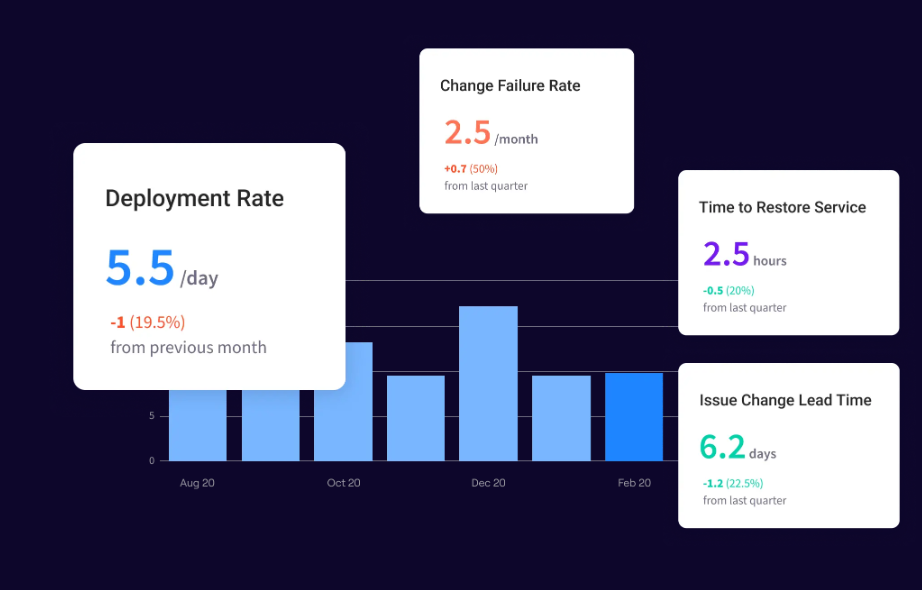
PRO TIP 💡: Jellyfish pulls incident history, pipeline stage timing, and engineering capacity allocation into a single view, which removes the spreadsheet work that usually slows the assessment phase down. The same data feeds the program through later quarters, so the baseline is still comparable even as the suite grows.
2. Choose the Right Tools and Frameworks
Once the first automation targets are set, the next decision is which tools and frameworks to build them on. The choice depends on the team’s tech stack, the test types in scope, and the CI/CD platform the suite will plug into.
Categories to evaluate →
- Unit testing frameworks are language-specific and usually built into the ecosystem (JUnit for Java, pytest for Python, Jest for JavaScript, Go’s built-in testing package).
- Integration and API testing tools handle service-to-service and API-level validation, with options like Postman, REST Assured, and Pact for contract testing.
- End-to-end and UI testing tools validate user flows in a browser, with Cypress, Playwright, and Selenium as the most common choices.
- Performance and load testing tools measure latency and throughput under stress, with k6, JMeter, and Gatling as standard options.
- Security testing tools plug into the pipeline for SAST, DAST, and dependency scanning, with Snyk, SonarQube, and OWASP ZAP as common entry points.
The best fit is usually the tool that matches the existing stack, plugs into the current CI/CD platform, and has a maintenance cost the team can absorb. Open-source frameworks save on license cost but demand more setup, while commercial tools speed up onboarding at the price of lock-in.
Example → A backend team member writing a new Go service standardizes on Go’s built-in testing package for unit tests, uses Pact for contract testing between microservices, and adds k6 to the pipeline for load testing the public API. The whole stack costs nothing in licenses and integrates natively with the team’s GitHub Actions setup, which keeps the maintenance burden low and covers the three tiers of the pyramid.
3. Build the First Test Suite and Connect It to CI/CD
This step covers the writing of the first tests and the integration of those tests into the CI/CD pipeline. Tests that aren’t connected to the pipeline produce none of the speed or quality benefits of automated testing in a DevOps workflow, so both pieces of work need to function together.
Steps to build and connect the first suite →
- Write the tests against the prioritized targets: Start with the high-repetition, high-risk areas from the assessment, and keep the first batch small enough to ship within a sprint.
- Set up a stable test environment: Use containerized environments, ephemeral databases, and seeded test data so every pipeline execution produces the same result.
- Configure the pipeline trigger: Decide when the suite executes (every commit, every pull request, every merge) and what blocks the build (any failure, certain test types, or threshold-based gates).
- Wire results back into the developer workflow: Make failed tests visible in the pull request view, with logs accessible to the developer who pushed the change.
- Tune for speed before expanding scope: A pipeline that takes 45 minutes to give feedback gets bypassed, so parallelize execution, split slow tests into separate stages, and keep the commit-stage suite under 10 minutes.
Example → A SaaS team building a user-management service writes 80 unit tests and 15 integration tests in the first sprint, all targeting the auth endpoints flagged during the assessment. The pipeline executes the full suite on every pull request in under 7 minutes, blocks merges on any failure, and posts results to GitHub, so reviewers see the status before reading the diff. End-to-end tests come in a second sprint once the foundation is stable.
4. Set Ownership and Maintenance Practices
The work doesn’t stop once the first test suite is live. A working automation program depends on clear ownership, a defined approach to flaky tests, a coverage standard, and regular maintenance of the suite as the codebase evolves.
Practices that keep a test suite healthy →
- Clear ownership per service: Assign each test suite to the engineering team that owns the underlying code, with a named primary contact for failures and a backup engineer for coverage during PTO.
- A flaky test policy: Quarantine intermittent failures within 24 hours and fix or delete them within five working days. One tolerated flaky test usually leads to a dozen.
- An enforced coverage standard: Set a defensible target (60% to 80% line coverage is a common starting point) and gate merges below the threshold automatically.
- Regular pruning of obsolete tests: Schedule maintenance work to remove duplicates, dead code coverage, and tests that no longer match the current behavior of the application.
The most durable model puts test ownership with the engineering team that owns the code. QA engineers handle framework-level work and define strategy, while developers write and maintain the unit and integration tests for their own services.
Example → A mid-size engineering org assigns each microservice a primary owner team that maintains the unit and integration tests for that service. A central quality engineering team of three owns the end-to-end framework and the shared test environment. Flaky tests get a 5-day window to fix or quarantine.
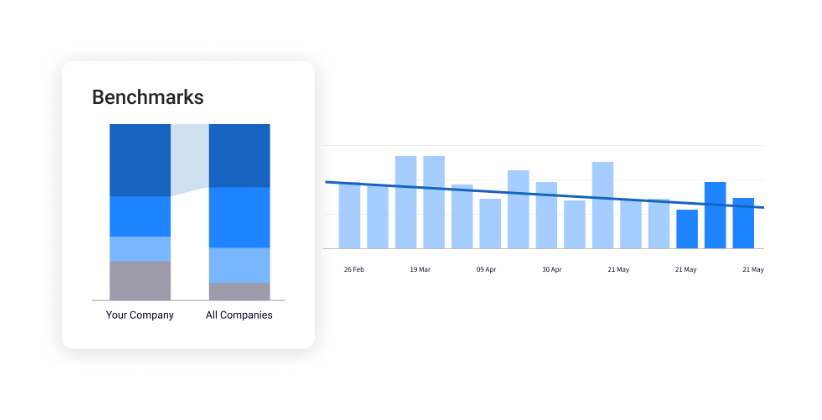
PRO TIP 💡: Most teams set coverage and flake thresholds without knowing where they fall against the rest of the industry. Jellyfish compares delivery metrics against a dataset of over 20,000 engineering teams by industry, team size, and tech stack, which gives the team a concrete benchmark to set targets against.
Best Practices for DevOps Test Automation
Best Practices for DevOps Test Automation
The four practices below cover the engineering disciplines that keep a test suite fast, reliable, and trusted as the codebase grows:
Treat Test Code With the Same Rigor as Production Code
A test suite is a piece of software that the engineering team owns and maintains for the life of the application. That makes test code subject to the same review, refactoring, and design quality standards that protect production code, since the suite degrades at the same rate as any other neglected codebase.
How to apply this in practice →
- Code review for tests matches the production-code review process, with the same approval rules and the same merge gating.
- Shared fixtures and test utilities get extracted into reusable modules early, so a fix to common setup logic improves every test that depends on it.
- Regular refactoring keeps duplicate setup, brittle assertions, and outdated helpers from accumulating into maintenance debt.
- DRY principles apply to test code, with shared fixtures, page objects for UI tests, and test utilities extracted into reusable modules.
- Linting and static analysis execute against test files with the same enforcement as production code.
Example → A SaaS team applies linting and static analysis to test files for the first time and catches 200 style violations and 15 anti-patterns in the existing suite. Cleaning them up over two sprints removes a class of flaky tests the team had been tolerating for months.
Design for Pipeline Speed From the Start
Pipeline execution time compounds across every engineer on the team. A 10-minute pipeline that grows to 30 minutes over a year costs the team thousands of engineering hours, which makes speed a first-order design decision.
How to apply this in practice →
- A time budget for each pipeline stage gives the team a concrete target, with the commit-stage suite usually capped at 10 minutes and longer suites pushed to later stages.
- Parallel execution across multiple runners cuts wall-clock time by spreading tests across machines, and most modern CI platforms support this natively.
- Test sharding by file, class, or duration balances load across runners so no single shard becomes the long pole that slows the whole stage.
- Selective test execution runs only the tests affected by a code change at commit time, with the full suite reserved for merge or scheduled stages.
Example → A platform engineering team at a B2B SaaS company hits a 22-minute commit-stage pipeline and starts losing developers to workarounds. The team parallelizes the unit suite across 8 runners, shards the continuous integration tests by duration, and moves the end-to-end suite to a post-merge stage that executes hourly. Commit-stage feedback drops to under 6 minutes, the workarounds disappear, and pipeline runs per day climb from 180 to 340.
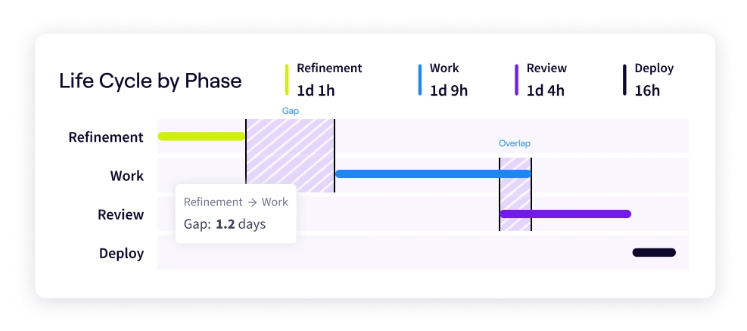
PRO TIP 💡: Pipeline speed work is hard to prioritize without a clear picture of where the time goes. Jellyfish measures how long engineering work spends at each stage of the software development lifecycle, from code review through merge to deployment, which makes it possible to target the actual bottleneck and confirm the speed at which work moves through the metric.
Build Tests Around Behavior, Not Implementation
Test durability depends on what the assertions are tied to. Tests bound to the public behavior of a unit hold up across refactors, while tests bound to internal method calls and private state break the moment an engineer reorganizes the code, even when nothing about the behavior has changed.
How to apply this in practice →
- Test the public interface of a unit. Assert on return values, observable side effects, and outputs, with internal method calls and private state left out of the test entirely.
- Use real dependencies where the cost is low. A real in-memory database or a real HTTP client gives more confidence than a mock, and only the expensive or external dependencies need to be replaced.
- Mock at architectural boundaries, not inside the unit. Mocking every collaborator inside a class produces tests that mirror the implementation and break with every refactor.
- Write tests that read as specifications. A reviewer should understand what behavior the test protects from the test name and assertions alone, with no need to trace through production code.
Example → A backend team refactors a single service and watches 40 implementation-coupled tests fail without any behavior change. The team converts those tests to assert on outputs instead of internal calls, and the next refactor of the same service breaks zero tests.
Run Security and Performance Tests Alongside Functional Tests
Security and performance issues caught in production cost the most to fix and carry the most reputational risk. Moving both into the same pipeline that validates functional behavior pulls detection earlier, when the code is fresh, and the cost to remediate is low.
How to apply this in practice →
- Static application security testing (SAST). SAST tools scan source code on every commit and post results to the pull request view alongside functional test output.
- Dependency scanning. Scanners flag known CVEs in third-party libraries on every commit, which blocks builds that introduce critical vulnerabilities.
- Secret detection. A pre-merge scan prevents engineers from accidentally committing API keys, credentials, or tokens.
- Dynamic application security testing (DAST). DAST executes against deployed staging environments to find vulnerabilities that the static analysis misses, and results gate promotion to production.
- Performance budgets and load tests. Engineering teams set thresholds for latency, throughput, and resource use, then validate against those thresholds on a defined cadence (pre-merge, nightly, or pre-deployment).
Example → A fintech engineering team adds SAST, dependency scanning, and secret detection to the existing pipeline over two sprints. Within a quarter, the pipeline blocks 14 vulnerable package versions from reaching production and prevents three accidental credential commits before merge.
Measure the Impact of Your Automated Testing Strategy with Jellyfish
Measure the Impact of Your Automated Testing Strategy with Jellyfish
The article covered the practices that produce a healthy automated testing program, from pyramid distribution to pipeline speed to ownership models. Once those practices are in place, engineering leaders need a way to measure whether the program is paying off, where it’s still slow, and how the team compares to industry benchmarks.
Jellyfish is the software engineering intelligence platform that engineering leaders use for exactly this kind of measurement. The platform tracks DORA metrics, pipeline performance, resource allocation, and engineering investment across teams and services, with all the underlying data pulled directly from the tools the engineering team already runs.
The features below apply most directly to an automated testing program:
- Automated DORA measurement: The four DORA metrics (deployment frequency, lead time, change failure rate, and recovery time) are calculated continuously from existing CI/CD and incident data. Engineering leaders can see how the automated testing investment moves those numbers over time, with breakdowns by team, service, and time period.
- Engineering investment breakdown: You can track engineering capacity across feature work, tech debt, quality, and operational toil, by team and time period. For an automated testing program, that breakdown shows exactly how much capacity flows into the testing investment and whether the QA-to-developer balance is moving in the right direction.
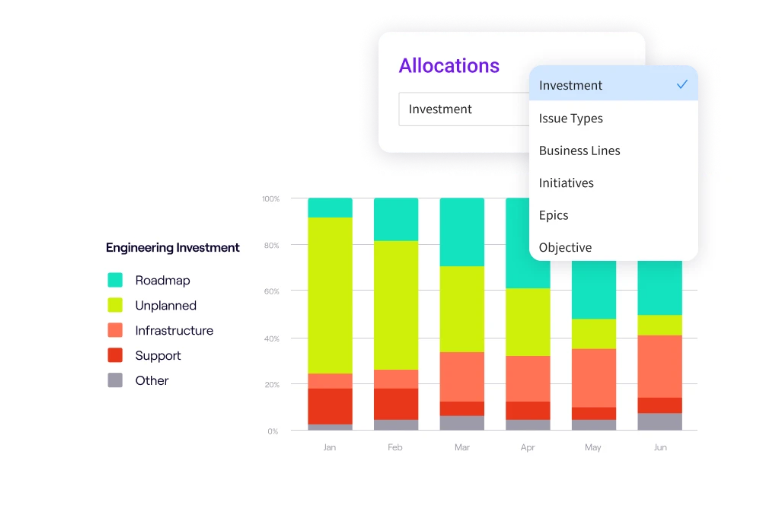
- Reports built for the executive view: Engineering leaders can present the impact of an automated testing program in the language of revenue, user experience, and operational efficiency, without rebuilding the deck each quarter.
- Quality and incident metrics: Change failure rate, incident rate, and time-to-resolution get tracked alongside delivery speed, which gives engineering leaders the full picture of how an automated testing program affects both the velocity and the reliability of releases.
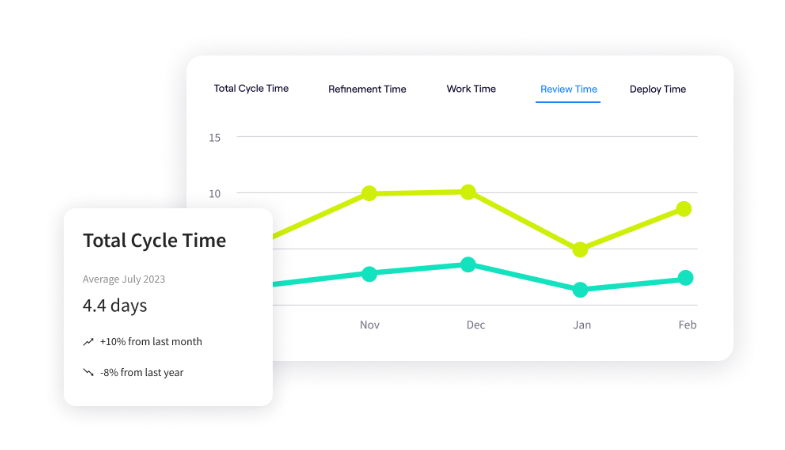
- Stage-by-stage delivery diagnostics: Time spent in code review, CI execution, test stages, environment provisioning, and deploy approval all get tracked separately. That granularity matters for an automated testing program, since it shows whether the speed work covered earlier (parallelization, sharding, selective execution) moves the metrics.
The practices covered in this article take time to implement and longer to mature. Jellyfish gives engineering leaders the visibility to track the program through every quarter of that work, from the first automated test to the metrics that prove the investment is paying off.
Book a demo to see what Jellyfish can do for your team.
FAQs
FAQs
Why should teams avoid 100% test automation?
100% automation isn’t the goal. Automation pays off on repetitive, high-volume checks like regression and unit testing, where speed and consistency matter most.
It pays off less, or not at all, on exploratory work, usability testing, and the kinds of edge cases that a tester finds by exploring the application. The two approaches solve different problems, and a healthy test strategy uses both.
What is continuous testing in DevOps?
Continuous testing executes automated test scripts at every stage of the development process, from commit to deployment. The testing process runs in real-time as developers push code, which gives QA teams immediate feedback on defects.
Traditional software testing follows a slower cadence, with test runs scheduled around release dates. In DevOps environments, tests run on every change, and the results gate the path to continuous delivery.
How do automated testing tools reduce human error?
Manual regression testing depends on people executing repetitive checks across long sessions, which is time-consuming and produces inconsistent results.
Automated testing tools execute the same checks the same way every time, which removes the human error that creeps in during a manual cycle.
The move produces high-quality software at the speed modern release schedules demand, and it frees QA teams to focus on exploratory testing and the edge cases that need human judgment.
How do you scale automated testing across web applications?
Scalability across web application portfolios depends on shared automation frameworks, consistent quality assurance standards, and a test management approach that works across teams.
Platforms like GitLab give engineering organizations a single CI/CD foundation that connects every project, which makes it easier to standardize the testing process and run a comprehensive test suite at scale.
The methodology matters as much as the tools, since shared fixtures, common reporting, and unified ownership rules optimize the suite and streamline maintenance across services. There is a learning curve when teams adopt these patterns for the first time, but the real-world payoff is faster cycles and lower defect rates.
How do you choose a test automation tool?
Tool choice depends on four things:
- The language and framework of the application under test, since most unit and integration testing platforms are language-specific.
- The CI/CD platform already in use, since the tool has to integrate cleanly with the pipeline.
- The test types the team needs to cover first, since unit, integration, and end-to-end tools rarely overlap.
- The team’s appetite for setup and maintenance work, since open-source tools usually demand more of both than commercial ones.
A tool that matches all four almost always outperforms a tool chosen on feature lists.
About the author

Lauren is Senior Product Marketing Director at Jellyfish where she works closely with the product team to bring software engineering intelligence solutions to market. Prior to Jellyfish, Lauren served as Director of Product Marketing at Pluralsight.