In this article
Engineering leaders face more pressure to ship faster than ever, and the path from commit to production rarely makes it easy. Manual handoffs slow releases to a crawl, brittle deployments pull half the team into war rooms, and every new push threatens production stability.
DevOps is the operational answer. It breaks down the dev-ops divide, automates the manual steps in between, and shortens the distance from commit to customer.
The ROI difference shows up clearly in the data. DORA research puts elite DevOps teams at lead times measured in hours, while low performers run between one and six months for the same release work.
This guide is the complete blueprint, from the foundations through implementation, measurement, and what’s coming next with AI.
Definition of DevOps
Definition of DevOps
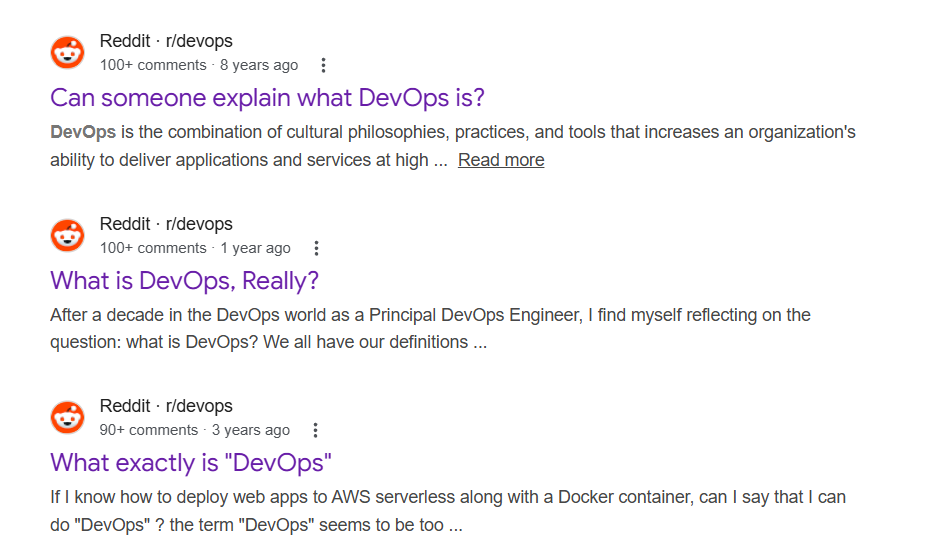
A decade into mainstream DevOps adoption, the most upvoted r/devops threads still ask the basic question of what DevOps even means. The blur is a sign of how loosely the term gets used across the industry.
Before defining DevOps, let’s first clear up what it’s NOT. DevOps isn’t a job title, a tooling category, or a team you stand up between development and operations, even though plenty of organizations treat it as all three. Each of those approaches produces the same outcome, which is the same dev-ops silo with a new label on it.
Definition 📚 → DevOps is a software development methodology where development and operations work as one team on one delivery process, with automation handling the manual work between them.
Three pillars hold the methodology together:
- Culture → Shared ownership between development teams and operations teams, where engineers care about how their code runs in production, and operations contributes to design decisions early.
- Practices → The workflows that make collaboration repeatable, including continuous integration, continuous delivery, infrastructure as code, automated testing, and observability.
- Tools → The systems that make the practices scalable, from build platforms and deployment pipelines to monitoring stacks, version control systems, and incident management software.
The term traces back to 2009 and the first DevOpsDays conference in Ghent, where Belgian engineer Patrick Debois brought together developers and operations professionals tired of working around each other. The grassroots movement that followed has matured into the operating model most modern engineering organizations now run on.
DevOps vs. Agile Software Development
Agile comes upstream of DevOps in the software delivery process. The two methodologies were developed independently but address connected problems, and engineering organizations that run mature versions of both see the strongest results across the full software lifecycle.
- Agile → Defines how engineering teams plan and build software, through iterative cycles, customer collaboration, and short feedback loops that keep teams focused on the right work.
- DevOps → Carries the work from a finished build into production, with automated pipelines, continuous delivery, and the operational practices that keep the software running for end users.
In practice → A feature gets scoped in an Agile sprint, the team builds it across a few iterations with customer feedback, and the DevOps pipeline takes the finished code, deploys it to production, and monitors how it runs for users.
Platform Engineering vs. DevOps
Platform engineering is how mature DevOps organizations scale the methodology across larger engineering teams. The two are connected but solve different problems, and engineering leaders need to know which is which before they invest in either.
- DevOps → The methodology that governs how engineering organizations deliver software, with the culture, practices, and tools that connect development and IT operations into a single delivery system.
- Platform engineering → The discipline that packages DevOps as a product inside the organization, through an internal developer platform that gives engineering teams self-service access to the tools, infrastructure, and workflows DevOps requires.
In practice → DevOps comes first. Most engineering organizations adopt the methodology, hit a scaling ceiling once enough teams are running it, and then invest in a platform to remove the friction that comes from every team rebuilding the same workflows.
Site Reliability Engineering vs. DevOps
SRE is one specific way to put DevOps principles into practice, with a stronger focus on reliability. The two overlap heavily on culture and goals, but SRE comes with concrete practices that DevOps doesn’t define on its own, and engineering leaders need to know where each one fits.
- DevOps → The broader methodology that brings development and operations together across the full software lifecycle, from how teams plan and build to how they deploy and run software in production.
- SRE → The practice of treating reliability as an engineering problem, with specific tools like service-level objectives, error budgets, and the reduction of manual operations work to make reliability a measurable target.
In practice → Most modern engineering organizations run both, with DevOps covering how software gets delivered and SRE covering how reliable that software has to be once it’s running. The two work best when reliability standards from SRE feed back into the development practices DevOps governs.
| Worth knowing 💡: SRE originated at Google in 2003, predating the DevOps term by six years. The two disciplines evolved in parallel and converged in practice. |
How Does DevOps Work? Understanding the DevOps Lifecycle
How Does DevOps Work? Understanding the DevOps Lifecycle
You’ll find the DevOps lifecycle drawn as an infinity loop with eight stages in almost every article on the topic. The diagram works as a mental model, but real engineering organizations don’t run the lifecycle in a clean sequence. The stages overlap, work in parallel, and pass information back and forth through handoffs and feedback channels that the loop never shows.
The cleanest way to think about the lifecycle is in three phases that move in sequence. “Develop” is where the work starts, with planning and code that produce a build ready to ship.
“Deliver” picks up from there to get the build into production, and “Operate” handles everything that happens once the software is running for users, including the feedback that informs what the team builds next.
| Phase | Stages it covers | What the phase produces | Common breakdown point |
| Develop | Plan, Code, Build | A tested, production-ready build ready for delivery | Unclear priorities or missing test coverage that pushes broken code downstream |
| Deliver | Test, Release, Deploy | Software running in production with minimal manual intervention | Manual software release gates and brittle deployment scripts that slow the path to production |
| Operate | Operate, Monitor | A reliable production environment and the data that informs the next development cycle | Poor observability that hides problems until customers report them |
The loop closes when data and feedback from the Operate phase inform the next round of planning. A latency spike caught in monitoring becomes a Plan item the next week, and the cycle starts again with the data the last one produced. That continuous flow separates DevOps from older delivery models, where each release stood on its own.
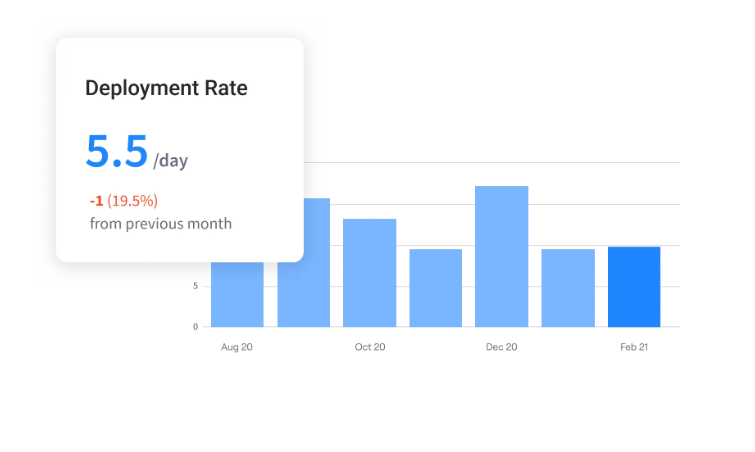
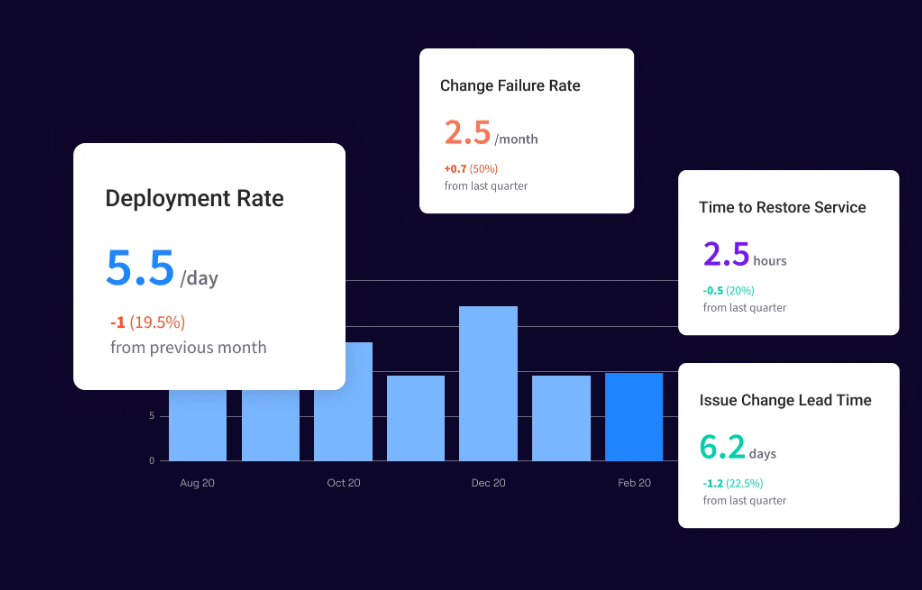
PRO TIP 💡: The DevOps lifecycle only produces compounding gains when teams can measure what’s moving through each phase. Jellyfish tracks all four DORA metrics (deployment frequency, lead time, change failure rate, recovery time) automatically across every team and service, which gives the loop from Operate back into Plan a clear data foundation to run on.
DevOps Implementation: Key Steps & Successful Examples
DevOps Implementation: Key Steps & Successful Examples
The order of DevOps implementation matters as much as the steps themselves. Teams that automate before they restructure usually end up with faster delivery of the same dysfunctional system.
The table below walks through the six DevOps framework steps in order, with a practical example of each one:
| Step | Description | What it looks like in practice |
| 1. Baseline before you change anything | Measure current performance against DORA metrics like deployment frequency, lead time, change failure rate, and recovery time. Without a baseline, the DevOps transformation can’t prove progress to the business 18 months in. | A 30-day measurement window before the first investment, so the engineering leader has a credible starting point to compare every future quarter against. |
| 2. Fix culture and structure first | Reorganize teams around shared ownership of products and outcomes, with the same group accountable for both building and running the software. Tooling investments come after the structure is in place. | Capital One reorganized engineering around product teams with full ownership of their services before investing heavily in DevOps tooling, which became the foundation for its cloud transformation. |
| 3. Automate the highest-friction parts | Build CI/CD pipelines, automated testing, and infrastructure as code into the parts of the development process that consume the most engineering time. Start where the manual work hurts most. | A two-week release cycle compressed to under a day once CI/CD replaces the manual approval gates and ticket-based deployments that used to slow it down. |
| 4. Build the platform as a product | Treat internal developer platforms with the same product rigor as external-facing software, with dedicated platform teams responsible for them and engineering teams as the customer base. | Netflix built a federated console that integrates dozens of internal tools into one interface, cutting cognitive load for engineers running services at scale.
Spotify built Backstage, an internal developer portal that measurably improved velocity and reliability before the company open-sourced it. |
| 5. Embed security from the start | Move security testing, automated scans, and policy enforcement into the delivery pipeline as a continuous practice. Security teams work alongside engineering across the lifecycle. | Automated security scans run on every commit, with policy checks that block any release violating the security baseline before it reaches production. |
| 6. Track delivery and business outcomes together | Track DORA metrics for engineering performance alongside business KPIs like time to market, customer satisfaction, and operational cost. | A dashboard reviewed quarterly that shows DORA metrics on one side and time to market, customer satisfaction, and operational cost on the other. |
Engineering teams running DevOps day to day often describe the work in much simpler terms. A Reddit comment on r/devops sums it up better than most formal frameworks:
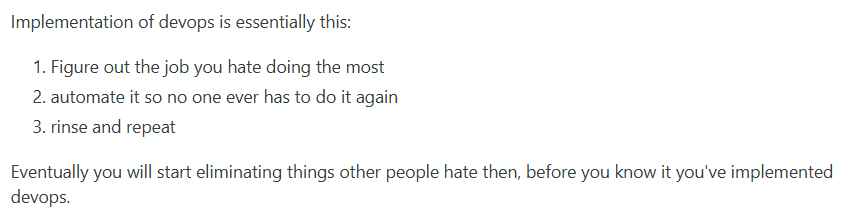
The simplicity is the point. Implementation works when teams stay focused on removing the work that slows them down, not when they try to roll out every DevOps practice at once.
| Keep in mind → The benefits arrive on different timelines. Delivery and stability improvements show up in the first year, while the platform and security work pay off over a longer horizon as the engineering organization matures. |
8 DevOps Best Practices for High-Performing Engineering Teams
8 DevOps Best Practices for High-Performing Engineering Teams
DevOps covers a wide range of engineering practices, and not all of them carry the same weight. The nine below are the ones with the strongest connection to delivery speed, system stability, and developer productivity:
- Keep deployments small: Small, frequent deployments produce fewer bugs and easier rollbacks than large, infrequent ones. Engineering teams that ship in small batches catch problems faster and recover from incidents more quickly because each change affects a smaller part of the system.
- Use trunk-based development: Trunk-based development means developers commit small, frequent code changes to a shared main branch and avoid long-lived feature branches. The approach reduces merge conflicts, shortens integration cycles, and pairs naturally with continuous integration pipelines.
- Manage infrastructure as code: Infrastructure as code means defining servers, networks, and cloud resources in declarative configuration files using tools like Terraform or Pulumi. The approach makes infrastructure changes reviewable, repeatable, and version-controlled, and it removes the configuration movements that come with manual server management.
- Invest in observability early: Observability covers the logs, metrics, and distributed traces that show what’s happening inside a production system. Standardizing observability tooling across services from the start gives engineering teams the visibility they need to diagnose incidents quickly and understand performance under load.
- Put developers on call for their own code: When developers handle alerts for the code they wrote, they have a direct incentive to streamline reliability, observability, and error handling. The model also shortens incident response because the engineers who built the system are the ones diagnosing it in real-time.
- Keep pull requests small and reviewed quickly: Pull requests with fewer than around 400 lines of code get reviewed faster and produce fewer bugs than larger ones. Engineering teams that hold themselves to small PRs and a same-day review target see shorter lead times across the board.
- Run blameless post-incident reviews: The format examines what the system did, where the process broke down, and what conditions allowed the incident to reach production, without assigning fault to specific engineers. Better learnings, more honest reporting, and stronger follow-through come out of reviews run this way.
- Use feature flags to separate deployment from release: Feature flags let engineering teams ship code to production without exposing the new functionality to users until they’re ready. The separation removes most of the risk from deployment itself, since code can be merged and shipped continuously while user-facing rollouts are controlled independently.
DevOps Tools: Key Categories & Selection Criteria
DevOps Tools: Key Categories & Selection Criteria
Seven categories cover the bulk of DevOps platforms, from how code gets stored and built to how production systems get monitored and managed:
| Category | What it covers | Common tools |
| Version control | Stores source code and infrastructure definitions, with branching, code review, and history. Forms the foundation that every other DevOps tool integrates with. | Git, GitHub, GitLab, Bitbucket |
| CI/CD | Automates the build, test, and deploy pipeline that moves code from a commit to production. The category most often called “DevOps tooling” by people outside the field. | Jenkins, GitHub Actions, GitLab CI, CircleCI, Buildkite |
| Infrastructure as code | Defines servers, networks, and cloud resources in declarative configuration files that get versioned and reviewed like application code. | Terraform, Pulumi, AWS CloudFormation, Ansible |
| Containers and orchestration | Packages applications into portable containers and runs them across clusters of machines. The default deployment model for modern cloud-native services. | Docker, Kubernetes, Amazon ECS, Google GKE |
| Observability and monitoring | Collects logs, metrics, and distributed traces from production systems to give engineering teams visibility into how the software is running. | Datadog, New Relic, Grafana, Prometheus, Honeycomb |
| Incident management | Handles alerting, on-call rotations, and incident coordination when something breaks in production. Often integrated with observability tooling. | PagerDuty, Opsgenie, FireHydrant, incident.io |
| Internal developer platforms | Centralizes the tooling, documentation, and self-service DevOps workflows that engineering teams use day to day. Treats internal engineers as the customer. | Backstage, Port, OpsLevel, Cortex |
The categories show what’s available, but there’s also the question of how the stack fits together. On one side, open toolchains pull best-of-breed products from different vendors, and trade integration work for flexibility.
On the other hand, all-in-one DevOps platforms consolidate the stack under a single vendor and trade flexibility for simpler operations. Most large organizations run a mix.
Within either model, the same five criteria apply when evaluating a specific tool:
- Integration with the existing stack: A tool fits when it connects cleanly to the rest of the toolchain already in production. The cost of ripping out other tools to make a new one fit usually outweighs the new tool’s benefit.
- Total cost of ownership: The full cost of a tool includes licensing, the operational work to run it, training time for the team, and the platform engineering hours to keep it maintained.
- Team maturity fit: Some tools need engineering teams with specific skills, headcount, and supporting practices in place. A tool that assumes a higher level of maturity than the team has reached can produce worse outcomes than a simpler option, at least in the near term.
- Vendor lock-in: Every tool creates some dependency on a vendor, and the depth of that dependency varies between products. Estimating the cost of switching in two or three years is part of evaluating the decision today.
- Security and compliance: Tools need to meet the security and compliance standards the organization is required to maintain, including audit logging, access controls, and relevant certifications. Tools that fall short on this dimension can be blocked at procurement regardless of their other strengths.
Most engineering organizations adjust their tooling stack multiple times as the team grows and the practices mature. The right tool today may be the wrong one in three years, which makes flexibility and switching cost more important than feature parity at the point of evaluation.
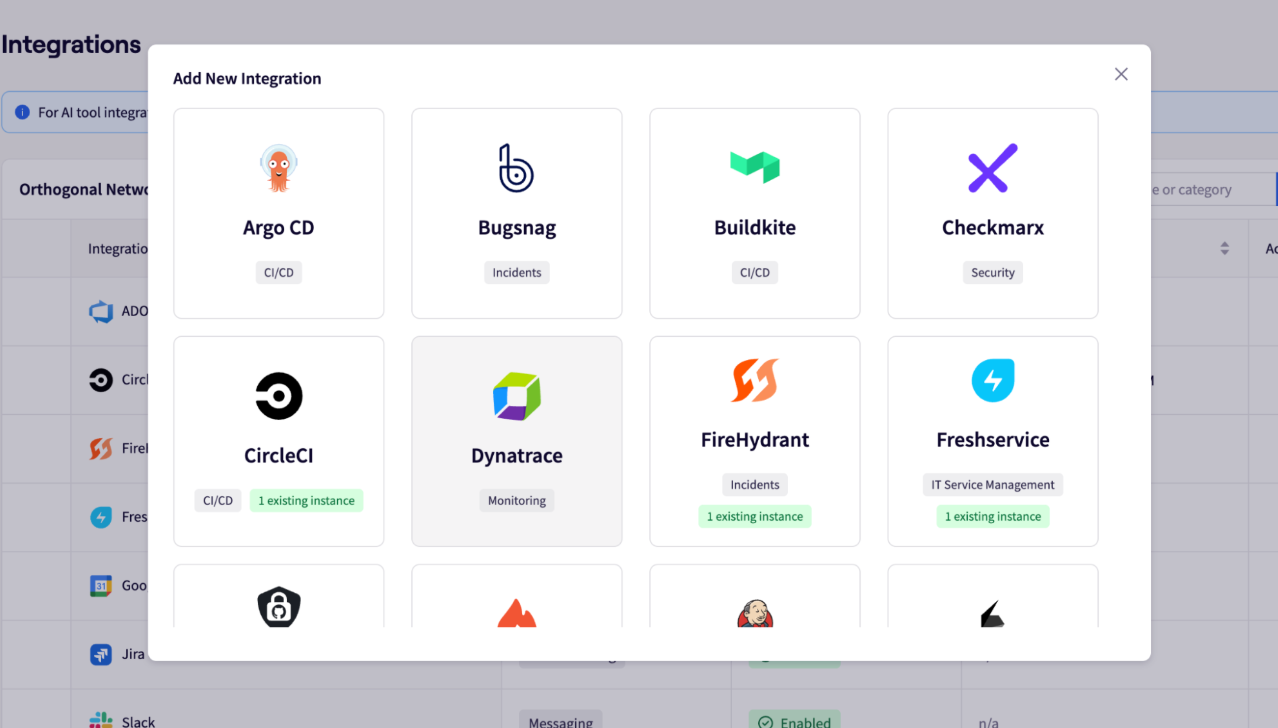
PRO TIP 💡: The manual work teams do to bridge tools that don’t smoothly connect to each other is often one of the most expensive parts of a DevOps stack. Jellyfish has integrations with Git, project management, CI/CD, and deployment systems, while the combined data shows where the toolchain works well and where it’s quietly slowing teams down.
DevOps Use Cases Across Industries
DevOps Use Cases Across Industries
DevOps started in software-native companies, but the methodology now runs across industries with very different operational pressures. Some organizations adopt the DevOps model to meet regulatory demands, others to handle scale, and others to keep pace with software-first competitors.
The six industries below cover where DevOps adoption has the strongest documented track record and the clearest business case:
- Healthcare and life sciences: HIPAA compliance and legacy clinical systems make healthcare slow to modernize, which is why DevOps focuses on safe delivery, automated security scans, and infrastructure as code that meets regulatory standards. For example, NHS England runs the NHS App and supporting services on continuous delivery practices that let engineering teams update patient-facing features without disrupting the system tens of millions of people rely on.
- Ecommerce and retail: Peak load events and continuous A/B testing make e-commerce a natural fit for DevOps. Etsy built one of the earliest public DevOps cultures and deployed production changes more than 50 times a day at the peak of its adoption.
- Media and streaming: Global content delivery and unpredictable load need the automation and observability that the DevOps approach brings to engineering organizations operating at scale. Disney rebuilt configuration management, deployment automation, and team structures across its technology divisions so the engineering organization could handle the scaling demands of Disney+ and operate thousands of services without manual coordination.
- Software and SaaS: SaaS customers expect new features and bug fixes constantly, without any downtime. DevOps practices give engineering teams the continuous delivery, feature flagging, and observability they need to meet those expectations and the SLAs customers are paying for.
- Government and public sector. Cloud-first mandates and digital service teams have brought DevOps into public sector technology, where automation cuts cost and risk on large projects. The UK Home Office runs CI/CD pipelines and platform engineering teams across the digital services British citizens interact with every day.
- Automotive and manufacturing: Modern vehicles run on software that updates continuously, with release cycles that have more in common with cloud platforms than traditional car production. Tesla ships updates to its fleet through automated pipelines, and Ford, GM, and Volkswagen have invested in DevOps to support their own software-defined vehicle work.
Common DevOps Challenges for Engineering Managers (and How to Solve Them)
Common DevOps Challenges for Engineering Managers (and How to Solve Them)
The same obstacles show up in most DevOps adoptions, regardless of industry or company size. The seven challenges below are the ones engineering managers see most often, paired with the approaches that work to clear them:
- Cultural resistance from teams that built the current system: Senior engineers and operations staff who built and ran the existing delivery process often see DevOps as an attempt to make their expertise obsolete, which slows or blocks adoption from the inside. Solution → Treat the experienced operations engineers as platform engineers in the new model rather than legacy staff to manage around. The skills transfer cleanly when the role transition is named explicitly.
- Tooling sprawl without integration: Engineering organizations end up running 15+ DevOps tools that don’t connect to each other, with platform teams stretched thin to glue them together. Solution → Map the toolchain end-to-end before adding anything new, and then consolidate around the smallest stack that covers the work.
- Skill gaps in operations and platform engineering: Most engineering organizations have plenty of developers and fewer engineers with deep operations or platform engineering skills, which becomes the bottleneck once tooling complexity grows. Solution → Hire deliberately for platform and operations roles with a clear product mindset, even when developer headcount is the more visible need.
- Over-investment in tooling, under-investment in practices: Engineering organizations spend heavily on CI/CD platforms, observability stacks, and IaC tools but skip the cultural and structural work that makes those tools pay off. Solution → Split the budget intentionally between tooling and practice maturity, and track adoption of practices alongside tool rollouts.
- Pressure to show ROI before the practice has matured: Executives want quarterly proof that the DevOps investment is paying off, but the strongest gains compound over 18 to 24 months. Solution → Build the executive reporting around two or three metrics the CEO already cares about, with DORA metrics as supporting evidence.
PRO TIP 💡: Most failed DevOps adoptions look fine on paper because the tools rolled out on schedule. The real change happens at the practice level, where teams either adopt new ways of working or quietly fall back to the old ones. Jellyfish tracks DORA metrics across every team and service, which shows engineering leaders where DevOps practices are producing results and where teams have the tools but not the performance to match.
The Role of AI in DevOps
The Role of AI in DevOps
AI has spread quickly across DevOps practices, with most engineering organizations now using AI somewhere in their delivery pipeline. The 2025 DORA report, based on responses from nearly 5,000 technology professionals, found that AI acts as a multiplier on existing engineering conditions.
That means that teams that already run a mature engineering practice get the most out of AI. However, the same tools fall short when the practices and platforms underneath aren’t ready for them.
AI shows up most clearly in three parts of the DevOps stack right now:
- AI-assisted code generation: Tools like GitHub Copilot, Cursor, and Claude Code are now part of the daily software development process for most engineering teams. Empirical research published in 2024 found average productivity increases of 24% across developers using GitHub Copilot, with junior developers seeing gains of up to 44%.
- AIOps and observability: AI inside modern monitoring stacks detects anomalies, groups related alerts, and helps on-call engineers find the signal in production faster than they could manually.
- Automated testing and incident response: AI generates test cases, classifies incidents, and shortens the time it takes to find the root cause when production breaks.
For engineering leaders, the practical work now is scaling AI from individual developer use to organizational practice. DuploCloud’s 2026 DevOps report found 67% of teams increased AI investment in the past year, and the engineering organizations getting the most out of it pair AI tools with mature platform engineering, automated testing, and observability.
Where this is heading → The next phase looks different from the current one. AI is moving past code generation into orchestration of the delivery pipeline itself, with agents that run tests, manage deployments, and handle parts of incident response with limited human oversight. Most of the major CI/CD platforms, observability tools, and internal developer platforms are already building agentic AI features into their roadmaps, with rollouts accelerating through 2026 and 2027.
The Engineering Intelligence Behind High-Performing DevOps
The Engineering Intelligence Behind High-Performing DevOps
A lot of the work covered in this guide ties back to measurement. DORA metrics, AI impact, resource allocation, and the connection between engineering performance and business outcomes all show up across modern DevOps practices. Engineering leaders need one place to track them, and most still don’t have it.
Jellyfish fills that role. The software engineering intelligence platform brings everything engineering leaders need into one view, from DORA metrics and AI impact tracking to resource allocation and executive reporting. Native integrations with Git, project management, and deployment tools mean teams can get started without a long setup project.
Here’s exactly what Jellyfish brings to modern DevOps practices:
- DORA metrics out of the box: Deployment frequency, lead time, change failure rate, and recovery time get tracked automatically across every team and service, with no manual setup or custom data pipelines. The metrics come with industry benchmarks built in, which makes the conversation with executives much easier.
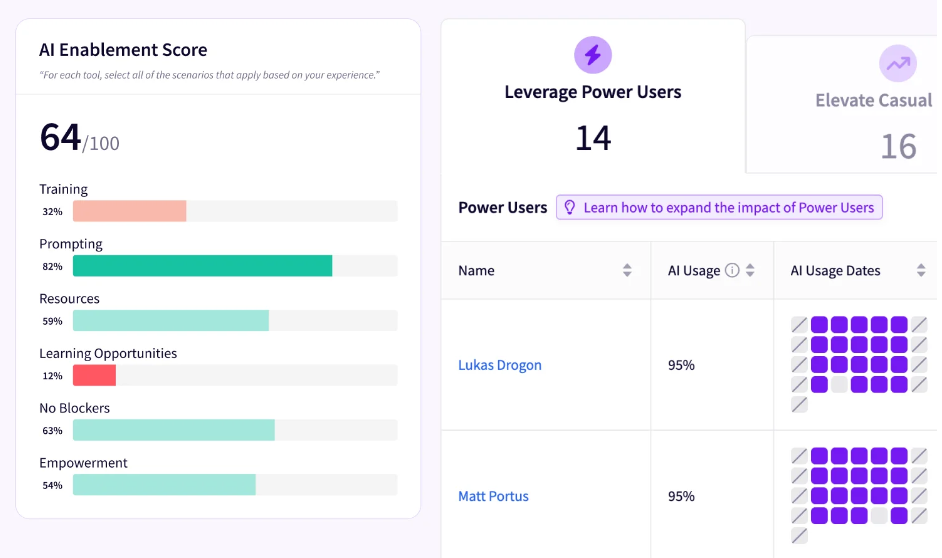
- AI impact measurement: Jellyfish shows how AI coding tools affect productivity, delivery speed, and software quality across teams, with the data broken down by team, role, and time period. Some teams ship 30% faster after rolling out AI coding tools, others see no change, and the breakdown tells you exactly which is which inside your own organization.
- Executive-ready reporting: The platform packages engineering performance data into reports that fit alongside revenue, customer, and product metrics in standard executive reporting. The same metrics work for day-to-day engineering management and for the conversations that happen above the engineering function.
- Developer experience and team health surveys: Survey responses from developers run alongside system data from Git, project management, and deployment tools, with both sources visible in the same workflow.
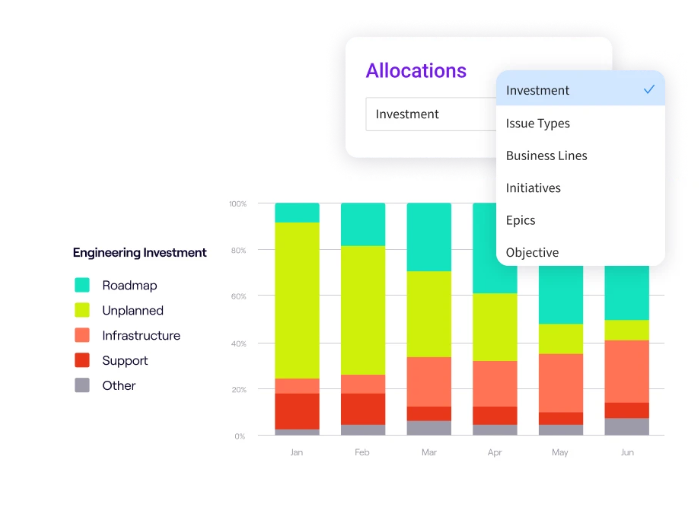
- Resource allocation in real-time: The platform shows exactly how the team’s time gets distributed across products, projects, and strategic campaigns. You can catch misalignment between engineering capacity and business priorities while it’s still fixable, not after a quarter has slipped.
- Deep integrations across the DevOps stack: Native connections to Git platforms, project management tools, CI/CD pipelines, and deployment systems mean the data flows in without manual entry or custom scripts. The platform fits an existing toolchain with no need to replace anything.
DevOps performance only matters when teams can prove what it’s doing for the business. Jellyfish gives you the metrics, reporting, and visibility to do that work credibly.
Book a demo to see how the platform fits your organization.
FAQs
FAQs
What does a DevOps engineer do across the software development lifecycle?
A devops engineer connects development and operations across the full software development lifecycle, with hands-on work that covers provisioning infrastructure, writing scripting frameworks for repeatable tasks, and configuring automated tools that move code from commit to production.
The role also owns continuous monitoring of production systems, so the engineer catches reliability issues before users do. Most DevOps engineers stay close to the full application lifecycle, from the build pipeline through runtime operations.
What’s next for DevOps?
Four trends look the most grounded right now:
- Platforms as the operating model: Gartner predicted that by 2026, 80% of large software engineering organizations will run dedicated platform teams, up from 45% in 2022.
- Open observability standards: Engineering teams are moving past proprietary monitoring tools toward open standards like OpenTelemetry, which lets organizations pick tools on features and price rather than existing instrumentation.
- GitOps and supply chain security: GitOps continues to take root as the default deployment model for cloud-native systems, with SBOM generation and container signing now baseline expectations under regulatory pressure.
- DevSecOps fades back into DevOps: The split is starting to collapse as security tooling moves natively into delivery pipelines and security engineers join product teams.
The trends above all point in the same direction. DevOps over the next few years gets cleaner, more standardized, and more deeply integrated with security, observability, and platform practices.
What are the benefits of DevOps?
Five benefits stand out across delivery, stability, and business performance:
- Faster software delivery: 49% of respondents in Atlassian’s DevOps Trends survey reported faster time to market with DevOps, driven by automation that replaces manual handoffs and smaller release batches that move faster through the pipeline.
- Higher software quality: In the same Atlassian survey, respondents named higher quality deliverables as the top benefit of DevOps adoption. Automated testing, continuous integration, and shared ownership across a mature DevOps pipeline all reduce defects before code reaches production.
- More frequent deployments: DORA research shows a 182x gap in deployment frequency between top and bottom performers, with smaller releases that are easier to debug and roll back when they break.
- Better developer experience: Puppet’s 2024 State of DevOps Report found that engineers at mature DevOps organizations report higher productivity, better workflow standards, and shorter lead times, with self-service tooling that takes manual handoffs off their plate.
- Lower operational costs: Google Cloud’s analysis of DORA research estimates a DevOps transformation produces $10 million to $259 million in annual savings for a large enterprise, through less rework, fewer incidents, and engineering hours reclaimed from manual coordination.
How does DevOps support microservices and containerization?
Modern application development runs on microservices that ship independently and containerization that packages them for consistent deployment across environments.
DevOps practices give engineering teams the pipelines and platforms to operate that model at scale, with open-source tools like Kubernetes and Docker handling orchestration, and Microsoft Azure DevOps, GitHub Actions, and Visual Studio Code covering large portions of the toolchain.
The combination produces high-quality releases that move through the pipeline faster than monolithic systems allowed.
How does the shift left approach improve quality assurance and user experience?
The shift left approach moves quality assurance earlier in the development lifecycle, so engineers catch vulnerabilities and defects during code review and automated testing instead of after deployment.
The earlier teams find issues, the cheaper and faster they fix them, which drives continuous improvement across releases. The downstream effect shows up in user experience, where fewer production incidents and faster feature delivery optimize how customers interact with the software.
About the author

Lauren is Senior Product Marketing Director at Jellyfish where she works closely with the product team to bring software engineering intelligence solutions to market. Prior to Jellyfish, Lauren served as Director of Product Marketing at Pluralsight.