In this article
If you’ve looked at any DevOps roles lately, you’ve seen how often Kubernetes appears in the requirements. That’s left a lot of engineers asking whether every team genuinely needs it, or whether smaller companies are paying for complexity they could skip.
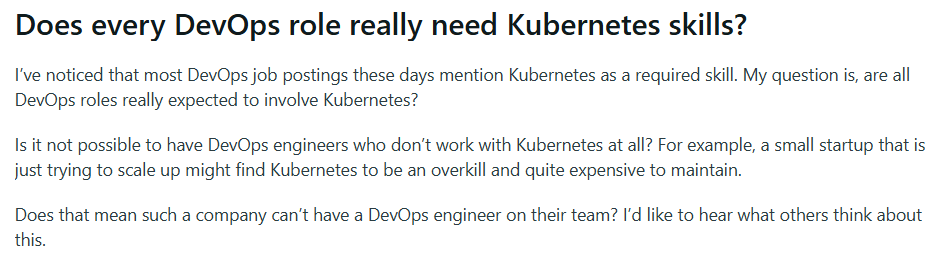
It’s a reasonable thing to ask, but the data shows that Kubernetes has clearly won over most of the field. In CNCF’s 2025 survey, 82% of container users reported running Kubernetes in production, compared with 66% in 2023.
This guide explains what Kubernetes brings to DevOps and how teams put it to work without overcomplicating their setup.
What is Kubernetes and Why Is it Essential for DevOps?
What is Kubernetes and Why Is it Essential for DevOps?
Containers changed how teams ship software. They bundle an application with everything it needs to run, so it behaves the same on a developer’s laptop, a staging server, or in production.
The troubles start at scale. Managing a handful of containers is simple enough, but tracking hundreds across many servers by hand is a different story.
Kubernetes handles exactly that. It’s an open-source platform that automates how containerized applications get deployed, scaled, and kept running across a cluster of machines.
Google created the original system to manage its own services, and then donated it to the Cloud Native Computing Foundation. There, it has grown into the standard way to run containers in production.
That standardization is exactly what draws engineers to it. A developer on a Reddit thread described the appeal this way:
It solves a lot of thorny problems elegantly. It also abstracts the hardware. Lastly, it runs everywhere, so you could theoretically build your Helm chart to run in EKS, AKS, GCP, or on-prem with a few changes. It’s like the MS-DOS of the early computer era. If you wrote your shit to run on MS-DOS, you were golden.
That portability is a big part of the appeal. Teams write their configuration once and run it across different cloud providers or their own servers with little rework, so they avoid lock-in to a single vendor.
Its value to DevOps ties back to what DevOps is after. Teams want quick, reliable releases and close alignment between developers and operations. But manual infrastructure work gets in the way. Kubernetes lets teams define infrastructure as a declarative configuration they can version and automate, which removes much of that manual overhead.
Several Kubernetes functionalities carry most of that weight:
| Kubernetes capability | What it does for DevOps teams |
| Declarative configuration | Teams describe the desired state in version-controlled files, which plugs straight into CI/CD and GitOps workflows and makes deployments repeatable. |
| Self-healing | Failed containers restart and reschedule on their own, so reliability stops depending on someone watching dashboards. |
| Automated scaling | Workloads scale up or down with demand, so traffic spikes don’t pull ops into manual firefighting. |
| Consistent environments | Apps run the same way from software development through production, which cuts the “works on my machine” handoffs that stall releases. |
| Rolling updates and rollbacks | Releases go out gradually and revert in seconds if something breaks, which makes continuous delivery far safer. |
For DevOps teams, that means less time lost to repetitive infrastructure work and one shared way for developers and operations to run software. That mix is why Kubernetes has become a core part of how modern teams build and ship.
Core Kubernetes Concepts Every DevOps Engineer Should Know
Core Kubernetes Concepts Every DevOps Engineer Should Know
Kubernetes has its own vocabulary, and the terms can feel like a lot at first. The good news is that most day-to-day work comes down to a handful of building blocks.
Once you understand how they fit together, the rest of the platform makes far more sense because nearly everything else builds on these five.
Here’s a quick reference before we go deeper on each one.
| Kubernetes capability | What it does for DevOps teams |
| Declarative configuration | Teams describe the desired state in version-controlled files, which plugs straight into CI/CD and GitOps workflows and makes deployments repeatable. |
| Self-healing | Failed containers restart and reschedule on their own, so reliability stops depending on someone watching dashboards. |
| Automated scaling | Workloads scale up or down with demand, so traffic spikes don’t pull ops into manual firefighting. |
| Consistent environments | Apps run the same way from development through production, which cuts the “works on my machine” handoffs that stall releases. |
| Rolling updates and rollbacks | Releases go out gradually and revert in seconds if something breaks, which makes continuous delivery far safer. |
1. Clusters and Nodes
A cluster is the full set of machines Kubernetes runs your applications on. Those machines are called nodes, and they come in two types.
Worker nodes run your actual workloads, while the control plane manages the cluster and decides what runs where. A node can be a physical server or a virtual machine.
How it works → Say you deploy a web app and ask for five copies of it. The control plane looks at your available worker nodes, places those copies across them, and keeps track of where each one runs. If a node fails, the control plane notices and reschedules its workloads onto healthy nodes.
Why it matters → For a DevOps engineer, the cluster is the unit you plan capacity and reliability around. You add nodes when you need more room, and Kubernetes spreads workloads across them so the loss of one machine doesn’t take an app down.
2. Pods
A pod is the smallest unit you deploy in Kubernetes. It wraps one or more containers that share the same network and storage, and Kubernetes treats the pod as a single thing it schedules, starts, and stops. Most pods run a single container, though some pair a main container with a helper.
One developer in a Reddit thread explained the relationship well:
Kubernetes by itself doesn’t know how to run containers, and containers are technically not a “unit” of the Kubernetes makeup (API). The smallest “unit” is a Pod, and Pods are used to run one or more containers. A Pod is like a container house. You manage the container via the Pod. Containers that run in Pods are still built via container images.
That framing gets the key idea across. You don’t manage containers directly in Kubernetes. You manage pods, and the containers run inside them.
How it works → When you deploy an app, Kubernetes wraps it in a pod and assigns that pod to a node. Containers inside the same pod share a network and reach each other over localhost. Pods are disposable by design. If one dies, Kubernetes won’t patch it up. It spins up a replacement instead.
Why it matters → That disposability changes how you build for reliability. Experienced teams never lean on a single pod or keep important data inside one. They let the controllers above pods maintain the right count, which is what the next concept handles.
3. Deployments and ReplicaSets
A ReplicaSet keeps a set number of identical pods running at all times. A Deployment works one level above it and manages ReplicaSets for you, which is what handles updates and version changes. In day-to-day work, you write Deployments, and the ReplicaSet runs quietly underneath.
How it works → Say you want five copies of your app online. You define a Deployment that asks for five, and the ReplicaSet makes sure five pods keep running. If one pod dies, it starts another to get back to five. When you ship a new version, the Deployment releases it gradually, swapping old pods for new ones a few at a time. If a release goes wrong, you return to the previous version with a single command.
Why it matters → This is where much of the reliability comes from. You declare the state you want, and Kubernetes maintains it, so releases stay safe, and recovery happens on its own. Engineers get predictable deployments with no manual steps, which maps directly onto the continuous delivery that DevOps depends on.
4. Services and Ingress
A Service is a fixed address for a set of pods. Since individual pod IPs keep changing, the Service gives callers one reliable place to reach them. Ingress handles traffic from outside the cluster and sends each request to the correct Service by URL or path.
How it works → Let’s take an example where you run five pods for your app. A Service groups them under one address and spreads requests across all five, so no caller needs to know which pod answers. Traffic from the public internet hits Ingress first, which then forwards it to the right Service. One Ingress can route to many Services.
Why it matters → This keeps networking dependable while pods churn underneath. Apps reach each other through Services with no hardcoded addresses, and Ingress gives you one clean place to manage external access, TLS, and routing.
5. ConfigMaps and Secrets
A ConfigMap holds configuration data your app needs, things like settings, file paths, or environment variables. A Secret does the same job for sensitive data such as passwords, API keys, and tokens. Both keep that information out of your container images, so the same image runs anywhere with different settings.
How it works → Take an app that needs a database URL and a password. You store the URL in a ConfigMap and the password in a Secret, then reference both from your pod. At runtime, Kubernetes passes the values into the container as environment variables or mounted files. A later change means editing the ConfigMap or Secret, never the image.
Why it matters → This keeps config separate from code, which is a core practice in any solid DevOps setup. The same image moves from dev to production untouched, sensitive data gets handled with more care than plain config, and engineers change settings without a rebuild.
Integrating Kubernetes into CI/CD pipelines
Integrating Kubernetes into CI/CD pipelines
On its own, Kubernetes doesn’t build or test your code. That work happens in a CI/CD pipeline, often built with Jenkins, GitLab, or GitHub, which compiles the app, runs the tests, and packages everything into a Docker image. Kubernetes takes over at deploy time and gives each release a consistent target, so every run looks the same.
In practice, a code change moves through the pipeline like this:
- A developer pushes code to the repository.
- The pipeline builds a Docker image from that code.
- Automated tests run against the image to catch problems early.
- The pipeline pushes the finished image to a container registry.
- The pipeline updates the Kubernetes Deployment, and the cluster pulls the new image to release the version across its nodes.
The result is a clear, repeatable route from commit to running pod. Each step happens automatically, and Kubernetes handles the release with the rolling updates and health checks built into a Deployment. This way, a bad version never takes the whole app down at once.
Many teams now take this a step further with GitOps. The model changes how updates reach the cluster:
- The pipeline stops pushing changes to the cluster directly.
- A tool such as Argo CD or Flux watches a Git repository that holds your desired state.
- When that state changes, the tool pulls the update into the cluster on its own.
With this setup, Git holds the single source of truth for production, and every change leaves a clear trail. The same CNCF survey we referenced earlier put GitOps use at 58% among the most mature cloud native teams, compared with 23% of less mature ones.
Underneath all of this is the cluster itself. It has to exist before any pipeline can deploy to it, and most teams provision it with infrastructure as code. Terraform and Ansible let you define and scale the cluster in version-controlled files, so building one on AWS or Azure stays automated and repeatable from one environment to the next.
Put together, CI/CD, GitOps, and infrastructure as code give you a release process that’s automated, auditable, and easy to reproduce, which is what makes Kubernetes and modern pipelines such a natural fit.
| Heads up → A pipeline that deploys to your cluster needs credentials to do it. Store those secrets in a proper secrets manager and never commit them to your Git repository, even a private one. |
Real-world Kubernetes Deployment Strategies
Real-world Kubernetes Deployment Strategies
Not every release should reach all users at once. Kubernetes gives you several ways to roll out a version, each with a different tradeoff between risk, cost, and downtime.
These four cover the choices you’ll make most often:
1. Rolling Updates
How it works → A rolling update replaces pods gradually. Kubernetes brings up new pods, checks that they’re healthy, and retires the old ones a few at a time. Because some pods always stay up, the app never goes down. This is what a Deployment does by default.
When to use it → Rolling updates fit most everyday releases, especially for stateless web apps and APIs where a gradual swap carries little risk. The trade-off is that two versions run side by side for a short window, so the new code needs to stay compatible with the old during the rollout.
Example → Picture a Deployment running ten pods. Kubernetes spins up two new pods, confirms they’re healthy, then retires two old ones, and keeps going in pairs. Throughout the process, at least eight pods keep serving traffic, so the app never goes dark.
2. Recreate
How it works → The recreate strategy shuts down every old pod first, then starts the new ones. There’s no overlap between versions, which means the app goes offline for the gap between the old pods stopping and the new pods passing their health checks. It’s the simplest strategy and the bluntest, since nothing serves traffic during the switch.
When to use it → Recreate fits cases where two versions can’t run at the same time, like an app tied to a database schema change that breaks the old code. It also works for internal tools or batch jobs where a short outage costs nothing. For anything user-facing with uptime expectations, the other strategies serve you better.
Example → Let’s use the same ten-pod Deployment example. Kubernetes terminates all ten at once, then brings up ten new pods on the new version. Until those pass their checks, the app returns errors, so the window matters, and you’d schedule it for a quiet period.
3. Blue-Green
How it works → Blue-green relies on two parallel environments. Blue carries production traffic while you deploy and verify the new version on green. When green looks good, you redirect every request to it at once. Rollback means nothing more than sending traffic back to blue.
When to use it → It suits high-stakes releases that need a fast, all-or-nothing rollback and no mixed versions. That price is the downside, as running two complete environments at once nearly doubles resources for the length of the release.
A common case comes up with breaking database changes. One engineer in a r/kubernets thread shared this:
If the new version changes the database schema in a way that’s not compatible with the old version, then all instances of the app under one color may need to be completely shut down to complete the upgrade.
Blue-green handles that cleanly. You migrate the schema and bring up the new version on green, switch traffic over once it’s stable, then upgrade the other color, all without visible downtime.
Example → With blue handling ten pods of live traffic, you stand up an identical green set on the new version. After it passes testing, a single switch sends users to green, and blue stays on standby for a quick rollback.
4. Canary
How it works → A canary release sends the new version to a small share of users first. Kubernetes routes most traffic to the current version and a slice, say 5 or 10 percent, to the new one. You watch how the canary behaves, and if the metrics hold, you raise its share step by step until it handles everything.
When to use it → This fits high-traffic or high-stakes apps where a quiet, gradual check beats a full switch. It carries the least risk, as only a few users meet a faulty release. The price is operational, since Canary depends on fine-grained routing and good observability to work.
Example → Say you’re routing 10 percent of users to two new pods while eight keep running the old version. You track error rates and latency on the canary, and once it proves stable, you move more traffic across until all ten pods run the new build.
Best Practices for Kubernetes Management and Workflows
Best Practices for Kubernetes Management and Workflows
A few practices do most of the work in keeping a Kubernetes cluster stable and easy to manage. These four address resources, pod health, security, and monitoring:
Set Resource Requests and Limits for Every Pod
A resource request tells Kubernetes how much CPU and memory a pod needs to run, and a limit caps how much it can consume. Together, they let the scheduler place pods sensibly and stop any single workload from hogging a node.
How to do it →
- Measure how much CPU and memory the app uses before you set anything
- Give memory a limit with headroom above its busiest moments
- Go easy on CPU limits, since a hard cap throttles the app and drags performance
- Use a tool like the Vertical Pod Autoscaler to recommend values from real usage data
- Apply defaults at the namespace level so no pod ever ships without any limits at all
Example → A team runs a pod with no memory limit, and one day a memory leak lets it consume everything on the node. Every other pod on that machine gets evicted, and a small bug turns into a cluster-wide outage. A sane limit would have killed and restarted just the one bad pod.
Add Health Probes to Catch Failing Pods
A health check, or probe, lets Kubernetes judge the real state of a pod, both whether it’s running and whether it can serve requests. With no probe in place, Kubernetes calls a container healthy as long as the process exists, even if the app has hung or is still starting up.
How to do it →
- Set up a liveness probe, so Kubernetes restarts a pod when the app hangs or deadlocks
- Use a readiness probe, so traffic reaches a pod only once it can handle requests
- Add a startup probe for slow-booting apps so they aren’t killed before they finish loading
- Tune timeouts and thresholds so a brief blip doesn’t cause a needless restart
Example → A pod takes 40 seconds to boot, but its liveness probe begins checking after 10 and fails. Kubernetes kills the pod, it restarts, fails again, and drops into a crash loop that never lets the app come up. A startup probe with the right delay would have given it room to boot.
Secure the Cluster with RBAC and Network Policies
Kubernetes gives you fine-grained control over who and what can do what inside a cluster, but little of it is locked down by default. Good security comes from setting those controls deliberately, so every user and service gets only the access it genuinely needs.
How to do it →
- Use role-based access control to grant each user and service account the minimum permissions needed
- Run containers as a non-root user so a breakout has less to work with
- Apply network policies to control which pods can talk to each other, since by default they all can
- Keep secrets in a proper secrets manager and avoid including credentials in images or manifests
- Scan images for known vulnerabilities before they reach the cluster
Example → A team gives every developer full admin access because it’s easier than scoping roles. Months later, a leaked credential hands an attacker the entire cluster. With RBAC and least privilege, that same credential would have unlocked only one small namespace, and the damage stops there.
Monitor Cluster Health with Prometheus and Grafana
A running cluster produces a steady stream of signals about its own health and your apps. Observability means pulling those metrics and logs into one place, so you catch trouble early and can trace what failed when something breaks.
How to do it →
- Use Prometheus to scrape metrics from your pods, nodes, and the cluster itself
- Visualize them in Grafana dashboards that anyone on the team can read
- Centralize logs from every pod so you aren’t chasing them across nodes by hand
- Set alerts on error rates, memory pressure, and pod restarts
- Watch the four golden signals (latency, traffic, errors, and saturation)
Example → A pod starts restarting every few minutes, but without monitoring, no one notices until users report errors. With Prometheus tracking restarts and an alert wired up, the team gets paged the moment the pattern starts and fixes the cause before most users feel a thing.
PRO TIP 💡: Prometheus and Grafana show how your cluster is performing, but not how fast your team ships. A platform like Jellyfish fills that gap by tracking delivery metrics like deployment frequency and lead time, so you can tell whether your Kubernetes investment improves output at the team level, not just the infrastructure.
Optimize Your Deployment Velocity with Jellyfish
Optimize Your Deployment Velocity with Jellyfish
The architectural complexity Kubernetes introduces is the cost of its flexibility. With so many parts in motion, engineering leaders often lack a single view of how it all affects delivery speed.
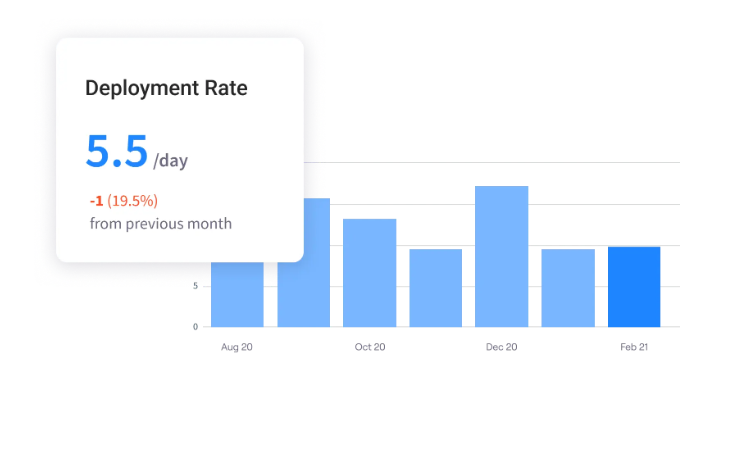
That single view is what Jellyfish provides. It’s a software engineering intelligence platform that connects to the tools you already use, like GitHub, GitLab, Jira, and your CI/CD system, and measures how work moves from code to production. The metrics that show delivery speed, such as cycle time, deployment frequency, and recovery time, all appear in one dashboard.
Here’s what it does for teams running Kubernetes:
- Automated DevOps metrics: Tracks the four DORA metrics, deployment frequency, lead time, change failure rate, and recovery time, calculated automatically from your pipeline data. These show whether your Kubernetes setup helps you ship more often and recover faster.
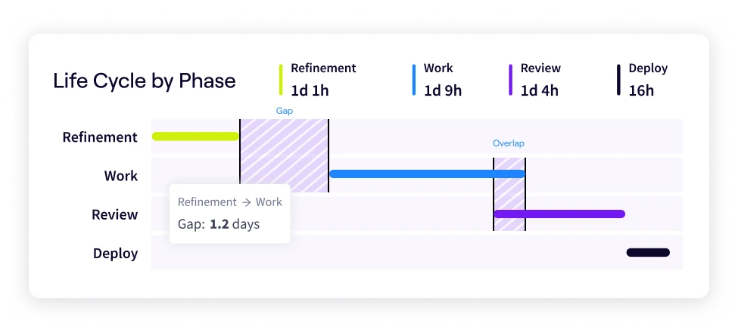
- Life Cycle Explorer: Breaks engineering work into stages like refinement, active work, review, and deployment, then shows how long issues wait at each step. That makes it clear whether your delays come from the pipeline itself or the steps around it.
- Out-of-the-box integrations: Connects to the tools already running your pipeline, including GitHub, GitLab, Jira, and your CI/CD and incident systems. It pulls the data in the background as the team works, so engineers log nothing and change no part of their routine.
- AI impact measurement: Kubernetes has become the default home for AI workloads, and teams are adding AI coding tools just as fast. Jellyfish measures whether that investment shows up in faster, healthier delivery, so you can tell which tools earn their place.
- Performance benchmarks: Compares your DORA metrics against industry standards for elite, high, medium, and low performers. As you mature your Kubernetes pipeline, you can see whether your deployment frequency and lead time move you up a tier or hold you in place.
Kubernetes gives your team the machinery to deploy often and recover fast. Jellyfish shows whether that machinery pays off, and where your pipeline still loses time.
Book a demo to see how your Kubernetes pipeline measures up.
FAQs
FAQs
What is the role of Kubernetes in DevOps?
Kubernetes automates how containerized apps get deployed, scaled, and kept running, so DevOps teams spend less time on manual infrastructure work. It gives developers and operations one consistent way to run software from testing through production.
It also handles releases with rolling updates and rollbacks, restarts failed containers on its own, and scales workloads with demand. Because it runs from declarative config that teams version and automate, it fits straight into CI/CD pipelines.
How does Kubernetes handle scalability and high availability?
Kubernetes scales workloads up or down as demand changes and keeps apps online even when a machine fails. It leans on replicas, where a Deployment runs several identical pods at once, and on load balancing, where a Service spreads incoming requests evenly across them.
If a node goes down, the control plane reschedules its pods onto healthy ones, which gives you high availability with no manual intervention.
You track resource usage in real-time through your monitoring stack and add capacity before traffic outgrows the cluster. This automatic approach to scalability is a big reason teams reach for Kubernetes over hand-managed servers.
What are YAML files used for in Kubernetes?
Kubernetes reads its configuration from YAML files that describe the state you want, such as how many replicas to run or which image to deploy. You apply that YAML with kubectl, the command-line tool that talks to the cluster, and the control plane works to match reality to your spec.
Many teams keep these files as reusable templates and manage them as infrastructure as code (IaC) with tools like Terraform, so the same setup builds across every cluster. This declarative model ties Kubernetes directly into automated software delivery, since each change goes through version control like any other code.
How does Kubernetes support a microservices architecture?
A microservices architecture breaks an app into many small services that deploy and scale on their own, and Kubernetes gives each one a stable home.
As a container orchestration platform, it handles the orchestration these designs demand, placing containers, restarting failed ones, and wiring them together. Service discovery lets one microservice reach another through a fixed Kubernetes Service address, even as the pods behind it churn.
This fits common use cases like high-traffic APIs and event-driven systems. The wide Kubernetes ecosystem rounds out the rest, covering monitoring and troubleshooting across all your Kubernetes environments, from local dev to production.
How do Docker and Kubernetes work together?
Docker packages an app and its dependencies into a container that runs the same way anywhere. Kubernetes then takes those containers and runs them across a cluster of machines, where it handles scaling, networking, and recovery.
Put simply, Docker builds and runs the containers, and Kubernetes manages them at scale. A team uses Docker to create the image, then Kubernetes to deploy and operate it in production.
What is GitOps in Kubernetes?
GitOps is a way to manage your cluster where Git holds the desired state of everything running in it. You make changes by editing files in a Git repository, not by pushing commands to the cluster directly.
A tool like Argo CD or Flux watches the repository and applies each change on its own, which keeps Git as the single source of truth and gives every change a clear history.
About the author

Lauren is Senior Product Marketing Director at Jellyfish where she works closely with the product team to bring software engineering intelligence solutions to market. Prior to Jellyfish, Lauren served as Director of Product Marketing at Pluralsight.