
In this article
Shipping a single feature now involves more tools, services, apps, and dependencies than entire products did a decade ago. But the deadlines haven’t gotten more forgiving.
Engineering leaders are caught in the middle, which is why so many have started treating developer experience as a strategic priority.
It’s an easy case to make. Developers who aren’t battling their own tools do better work and stay longer. The problem is execution. Studies say that roughly 75% of engineering leaders say their DevEx strategy isn’t where it needs to be (mature enough).
This piece goes over four challenges you’re likely dealing with and practical ways to handle each one.
1. Tool Sprawl and Legacy Infrastructure
1. Tool Sprawl and Legacy Infrastructure
The problem: Most engineering teams don’t have just one or two tools to manage. They have dozens, often stitched together over the years without a coherent ecosystem plan.
Port’s 2024 survey found that the average enterprise developer switches between 7.4 different tools every day. And nearly all teams surveyed (94%) said they’re unhappy with how their tooling fits together.
Why it matters: Every tool switch is a small interruption. Multiply that across a full team and a full week, and you’re losing significant time to context switching alone. Legacy systems make it worse. They’re often poorly documented, hard to maintain, and slow to work with, but too embedded to easily replace.
How to fix it:
- Audit your current stack and see which tools are actively used, which overlap, and which create the most friction
- Consolidate where you can by retiring redundant tools and standardizing on fewer platforms that cover more ground
- Create a deprecation plan for legacy systems rather than letting them linger indefinitely without ownership
- Assign clear ownership for each major tool or platform so someone is accountable for its maintenance and improvement
- Build a single entry point like an internal developer portal so engineers aren’t jumping between a dozen tabs
2. Complexity of Modern Stacks & Workflows
2. Complexity of Modern Stacks & Workflows
The problem: Tech stacks have gotten more complicated over the years. You’ve got microservices, Kubernetes, CI/CD pipelines, cloud infrastructure, multiple programming languages, and plenty more, depending on the team. Most engineers understand the parts they work with, but not the whole thing.
Why it matters: Complex systems slow everything down. Debugging is slower, onboarding takes longer, and people hesitate before making changes. Many engineering teams say they spend over 20% of their time on architecture maintenance alone.
How to fix it:
- Keep architecture docs visual and up to date so engineers can see how things connect without reverse-engineering the system
- Standardize the common tasks like deploys and rollbacks so engineers aren’t figuring it out from scratch every time
- Build onboarding around the full stack, not just the codebase, so new hires understand how the environment works
- Remove abstraction layers that don’t earn their keep instead of letting them stick around because they’ve always been there
- Schedule regular architecture check-ins to prevent accidental complexity from piling up over time
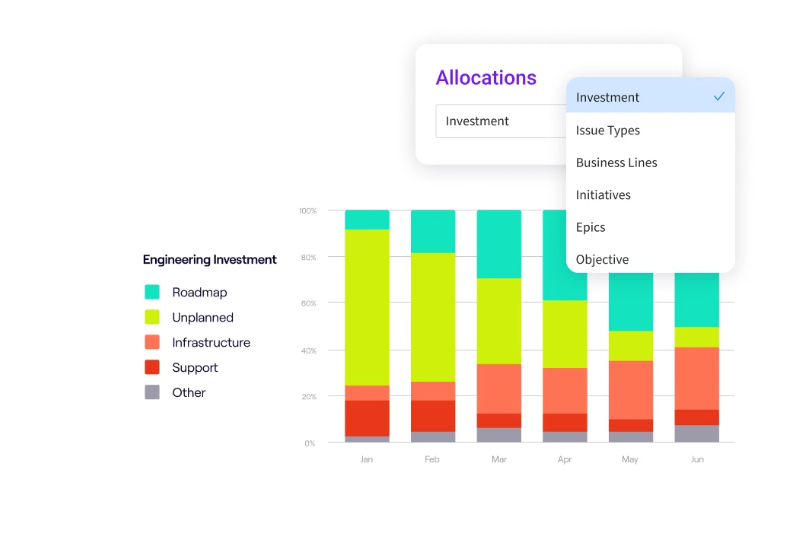
PRO TIP: Jellyfish’s resource allocation insights show the true cost of complexity. You can track how much time goes to unplanned work and maintenance versus roadmap priorities, and use that data to justify investments in reducing technical overhead.
3. Friction from Security and Compliance Hurdles
3. Friction from Security and Compliance Hurdles
The problem: Nobody argues against security and compliance, but the processes around them often get in the way of actual work. Developers wait on access requests, navigate unclear policies, and deal with approval chains that slow everything down.
A 2025 industry survey found that 51% of developers ranked security as their top software development challenge, with data privacy also ranking high.
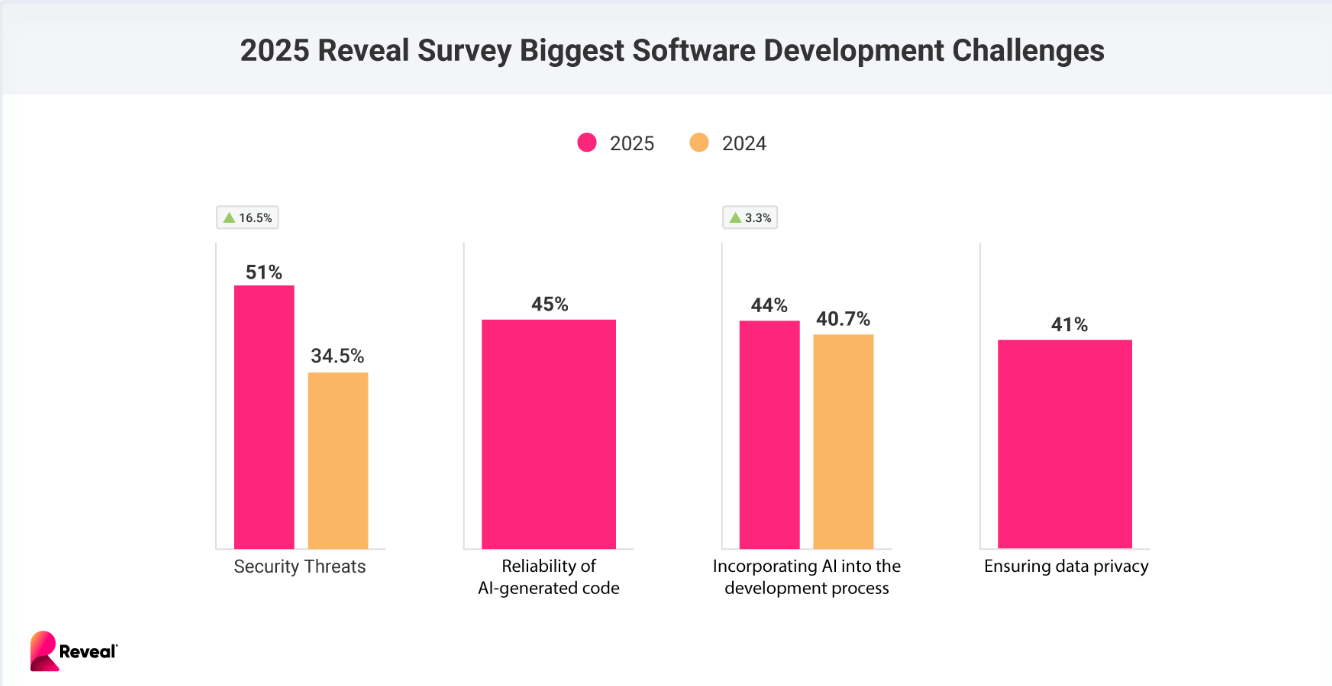
(Source: Reveal)
Why it matters: When security processes are slow or unclear, developers either wait around or find workarounds. Neither outcome is good. Waiting kills momentum and delays releases. Workarounds create risk and defeat the purpose of having controls in the first place. The goal should be security that works with developers, not against them.
How to fix it:
- Automate access requests and streamline approvals so developers aren’t stuck waiting days for permissions they need to do their jobs
- Create self-service options for common requests like work environment access or credential rotation, so developers can move without filing tickets
- Write clear, accessible documentation for compliance requirements so engineers understand what’s expected without chasing down answers
- Include security teams from the start of a project, not just at the end, when it’s too late to change things the easy way
- Revisit security workflows on a regular basis to remove bottlenecks that slow teams down without improving protection
4. Unclear Requirements and Workflow Interruptions
4. Unclear Requirements and Workflow Interruptions
The problem: Developers often start work without a clear picture of what they’re supposed to build. Requirements are vague, acceptance criteria are missing, and questions don’t get answered until the work is already underway.
In a Stack Overflow survey, 33% of developers said that unclear requirements were their biggest challenge.
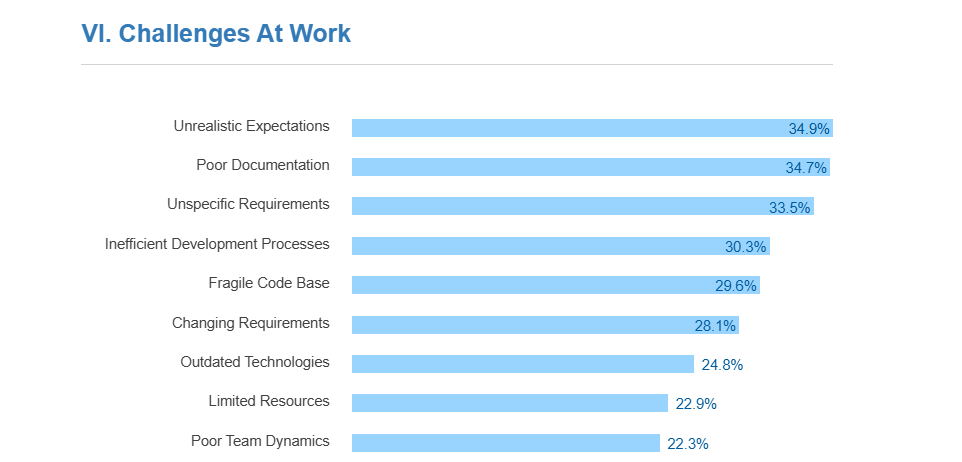
(Source: Stack Overflow)
Why it matters: Without clear requirements, developers fill in the blanks themselves. Sometimes they get it right, often they don’t. The result is extra rounds of revisions and time lost to work that has to be redone.
How to fix it:
- Write clear acceptance criteria before the development process starts, so engineers know what they’re building toward
- Make it easy to reach product and design when developers need a quick answer to keep moving
- Use structured templates for new feature specs to make sure the basics are covered before a ticket moves to development
- Batch questions and feedback into scheduled check-ins instead of scattering them across the day as interruptions
- Document decisions as they happen so context doesn’t get lost, and the same questions don’t come up again later
Strategic Investments to Enhance DevEx
Strategic Investments to Enhance DevEx
Solving individual problems helps, but improving developer experience in a lasting way often means stepping back and investing in some foundational changes.
Here’s what you should pay attention to:
Invest in Automation and Standardization
Without some level of standardization, things spiral. Every team ends up with its own stack, pipeline, and way of doing things. That might feel like flexibility at first, but over time, it becomes a burden. Here’s how this Reddit engineer explained it:
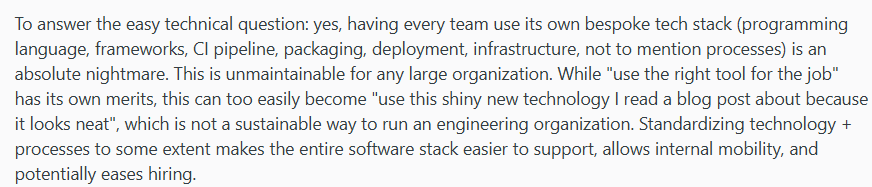
Standardization makes everything easier to manage and maintain. It also sets the stage for automation. When processes are consistent, you can automate them once and apply that work everywhere.
This is especially relevant now that AI-assisted development tools are becoming mainstream. McKinsey research found that developers using generative AI tools can complete coding tasks up to twice as fast.
But keep in mind that kind of acceleration depends on having well-defined, repeatable developer workflows in place. The more standardized your environment, the more value you get from automation of any kind.
The point isn’t to lock everything down. It’s to create sensible defaults that reduce overhead, and then let automation take care of the repetitive work.
Here are a few areas where this tends to have the most business impact:
- Standardized CI/CD pipelines and DevOps practices that work the same way across the org and make automation easier to maintain
- Service templates and starter scaffolding that give teams a consistent foundation for new projects
- Automated quality gates for testing, linting, and security that don’t need any manual steps
- Artificial intelligence (AI) coding assistants integrated into common workflows for faster code generation and code review
- Clear rules, methodologies, and frameworks for when it’s okay to deviate, so exceptions are deliberate rather than accidental
The two go hand in hand. Standardization creates the foundation, and automation keeps things running smoothly without constant manual effort.
Build a Centralized Developer Portal
Without a single place to go for information, developers end up jumping between tools constantly. They check the wiki for docs, a different system for service ownership, another for deployment status, and another for on-call schedules.
Each switch takes time, and the cost adds up. Research by Dr. Gloria Mark found that it takes over 23 minutes on average to fully regain focus after an interruption. And even small context switches chip away at productivity throughout the day.
A developer portal brings all of this into one place. Instead of bouncing between tools, engineers have a single starting point. As one engineer pointed out, it also changes how new team members get up to speed:

If we look at the day-to-day, a well-built portal becomes the first place engineers go when they need answers. Here’s how another engineer on Reddit broke down the practical benefits:
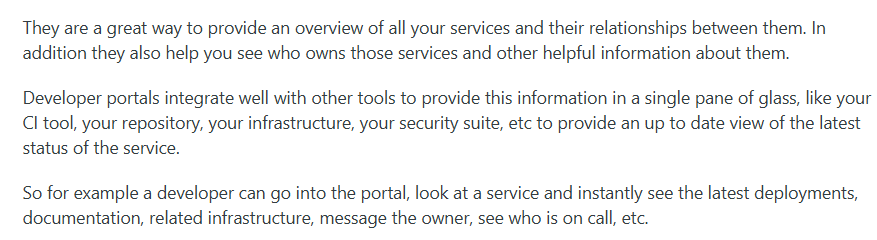
What goes into a portal depends on the org, but there are a few things that tend to show up in most good implementations:
| Component | Purpose |
| Service catalog | Shows what services exist, who owns them, and how they relate |
| Pipeline and infra links | Lets developers check deployments and infrastructure in one place |
| Documentation | Keeps docs searchable and tied to the services they cover, including API references |
| Starter templates | Gives teams a consistent foundation for new services |
| Ownership and on-call | Makes it obvious who to reach when something goes wrong |
A good portal earns its place by being genuinely useful. Once developers trust that they can find what they need there, it becomes the default starting point for everything.
PRO TIP: Pair your portal rollout with Jellyfish DevEx surveys to get direct feedback on what’s working and what’s not. Combine that with adoption and delivery metrics to see the full picture of how the portal is affecting your teams.

Foster a Culture of Internal Collaboration and Continuous Learning
Many teams are set up like an assembly line. Product figures out what to build, design mocks up, and engineering builds it. It’s a tidy way to organize people, but it’s not how high-performing teams actually operate. One engineer put it this way:
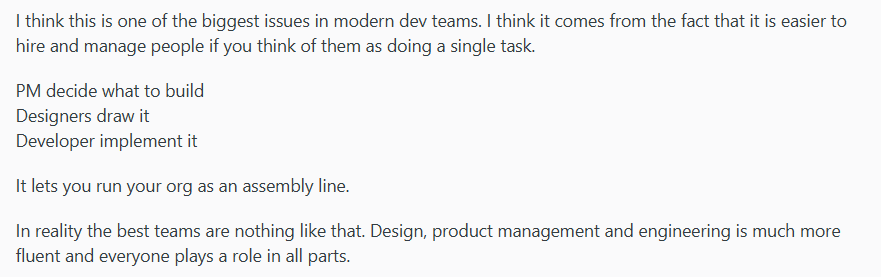
In practice, the best teams don’t follow a strict handoff model. Engineers contribute to product thinking, while designers factor in technical constraints. But none of that happens automatically. It has to be supported at the org level.
The same goes for learning. When developers have room to grow, share knowledge, and adopt new technologies, they do better work and stick around longer.
A Forrester-commissioned study found that organizations with strong DevEx see 74% improved productivity and 81% better ability to attract and retain talent.
A few ways to make this part of how your team works:
- Bring engineers into product conversations early instead of handing them a finished spec to implement
- Set up regular knowledge-sharing moments like tech talks, demos, or informal architecture walkthroughs
- Senior developers can mentor newer team members through tech talks, demos, or informal architecture walkthroughs
- Give developers dedicated time to learn through courses, conferences, or just time to explore new tools
- Make cross-team communication easy with open Slack channels, office hours, or internal Q&A forums
- Recognize teammates who help others, so collaboration is valued as much as shipping functionalities
It’s not flashy, but it works. And it costs less than replacing developers who got frustrated and left.
Why Investing in DevEx is an Investment in the Business
Why Investing in DevEx is an Investment in the Business
Developer experience can feel like an internal concern, something that matters to engineers but doesn’t show up on a balance sheet. But there’s more data on this than most people realize.
The link between developer experience and business outcomes is well documented at this point:
- Individual performance: A Microsoft study found that improved DevEx leads to better job performance, creativity, and learning at the individual level. Engineers who aren’t fighting their development environment have more capacity to do their best work and maintain their well-being.
- Retention: According to Atlassian’s 2024 State of Developer Experience report, 63% of developers say DevEx is essential when deciding whether to stay at their current job. That makes it one of the biggest levers for keeping your best people and preventing burnout.
- Code quality: Teams with strong DevEx produce high-quality code and accumulate less technical debt. That means fewer bugs, less rework, faster time-to-market, and a healthier codebase over time.
- Speed and output: Teams with top-quartile developer experience scores perform 4-5x better on development speed and quality than those in the bottom quartile.
- Cost of turnover: Losing a developer costs 1.5-2.5x their annual salary once you account for hiring, training, and ramping up. Good DevEx helps you avoid paying that tax repeatedly.
Good DevEx isn’t “charity” for engineers. It’s how you get more out of the team you already have while delivering better results for end users.
Gain Visibility into DevEx with Jellyfish
Gain Visibility into DevEx with Jellyfish
Improving developer experience sounds straightforward until you try to figure out where to start. Most orgs don’t have good answers on what’s slowing development teams down, where time truly goes, or how developers feel about the way things work.
Jellyfish helps engineering leaders and stakeholders close that gap. It’s a software engineering management platform that connects quantitative data from your existing tools with qualitative feedback from developers.
The result is a clear view of how your teams operate, where friction shows up, and what’s worth prioritizing.
Here are just some of the key capabilities:
- Developer experience surveys: Run surveys that get to the root of developer sentiment on tooling, processes, and day-to-day work. Built-in segmentation shows you how different teams and roles experience things differently.
- DORA metrics and delivery tracking: Pull deployment frequency, lead time, change failure rate, and MTTR directly from your CI/CD and incident tools. No manual tracking needed.
- Life Cycle Explorer: Outline where delays happen in the engineering life cycle. Understand the root causes and take action to improve flow across teams.
- Resource allocation insights: Understand how your team’s effort maps to business priorities. Jellyfish shows the breakdown between strategic work, tech debt, and reactive tasks in real time.
- AI impact measurement: Track how AI coding tools like GitHub Copilot affect productivity across your org. Teams can measure adoption and see whether the investment is paying off.
Better developer experience starts with understanding what’s happening across your teams. Jellyfish makes that possible.
Book a demo and see how it can help your organization.
FAQs
FAQs
How does improving DevEx directly impact developer productivity?
DevEx enhancements target the things that slow developers down:
- Less time waiting on builds and deployments
- Fewer context switches between tools
- Clearer ownership and faster answers
- Simpler onboarding for new team members
Remove enough friction and productivity follows.
With limited resources, how should a CTO prioritize DevEx improvements?
You should prioritize based on impact and effort. Look for high-pain, low-cost fixes first. Things like better documentation, streamlined access requests, or standardized workflows.
Then use developer feedback to guide where to invest, and revisit priorities as you learn more. This way, you can iterate based on real-time development cycle data.
What role does automation play in solving DevEx challenges?
Automation takes repetitive developer work off your team’s plates. Things like builds, tests, deployments, and access requests. The less manual work in the process, the smoother things run, and the more time goes toward actual building.
Learn More About Developer Experience
Learn More About Developer Experience
- Developer Experience (DevEx): The Modern Guide for 2026
- How AI is Enhancing Developer Experience and Boosting Productivity
- How to Improve Developer Experience for Remote Engineering Teams
- 14 Best Developer Experience (DevEx) Tools Heading Into 2026
- 15 Developer Experience Best Practices for High-Performing Engineering Teams
- How to Improve Developer Experience: 16 Proven Strategies and Methods
- How To Create an Effective Developer Experience Survey
- 15 DevEx Metrics for Engineering Leaders to Consider: Because 14 Wasn’t Enough
About the author

Lauren is Senior Product Marketing Director at Jellyfish where she works closely with the product team to bring software engineering intelligence solutions to market. Prior to Jellyfish, Lauren served as Director of Product Marketing at Pluralsight.