In this article
| 🪼THE QUESTION THIS GUIDE ANSWERS:
Does Copilot improve team-level delivery at scale, and can you prove it with data that justifies the investment? |
GitHub Copilot is not hard to justify when you are talking to developers. Many teams can feel the benefit quickly. Coding gets faster, some work gets easier, and the tool becomes part of the daily workflow.
But once you move from individual experience to organization-level investment, the question gets harder. Leadership wants to know whether Copilot’s impact is improving delivery in a way that justifies the spend.
That question matters because at $19-39 per developer monthly, Copilot costs hundreds of thousands annually for mid-sized engineering orgs.
And once you factor in rollout overhead, training, ongoing enablement, and adoption management, the total investment becomes much larger than the sticker price.
Investments at that scale require you to justify the ROI. You need data showing Copilot adoption correlates with faster feature delivery, improved cycle times, or reduced engineering costs in your specific environment.
GitHub’s native analytics barely helps in this case. At best, you get usage metrics showing acceptance rates, lines of code generated, and daily active users.

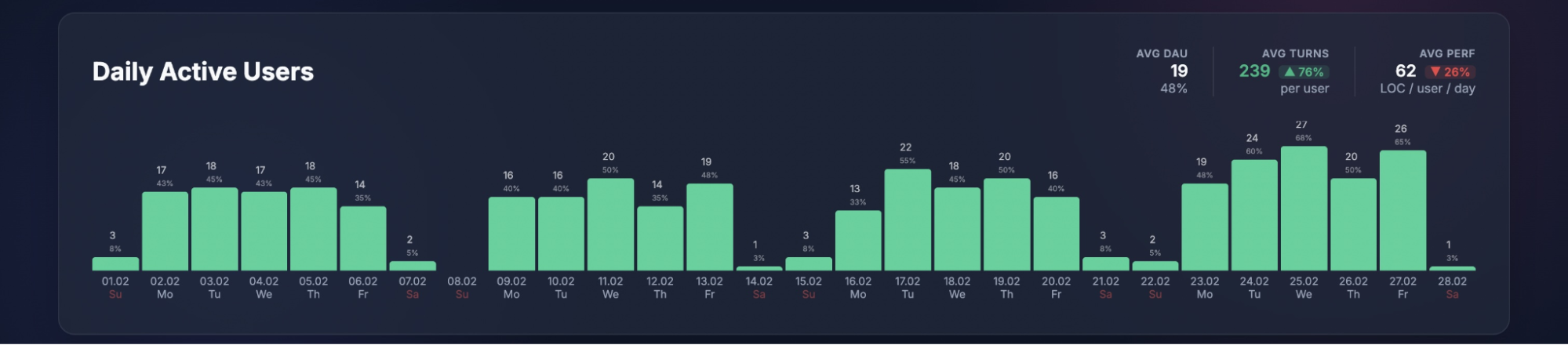
But you still don’t know whether that AI-assisted code helped teams ship faster, reduced cycle time, improved delivery predictability, or increased output from the same engineering spend.
In this guide, we’ll break down how to measure Copilot’s real impact, what GitHub’s dashboard can and cannot tell you, and how to build a more credible ROI case for leadership.
GitHub Copilot Overview
GitHub Copilot Overview
What is GitHub Copilot?
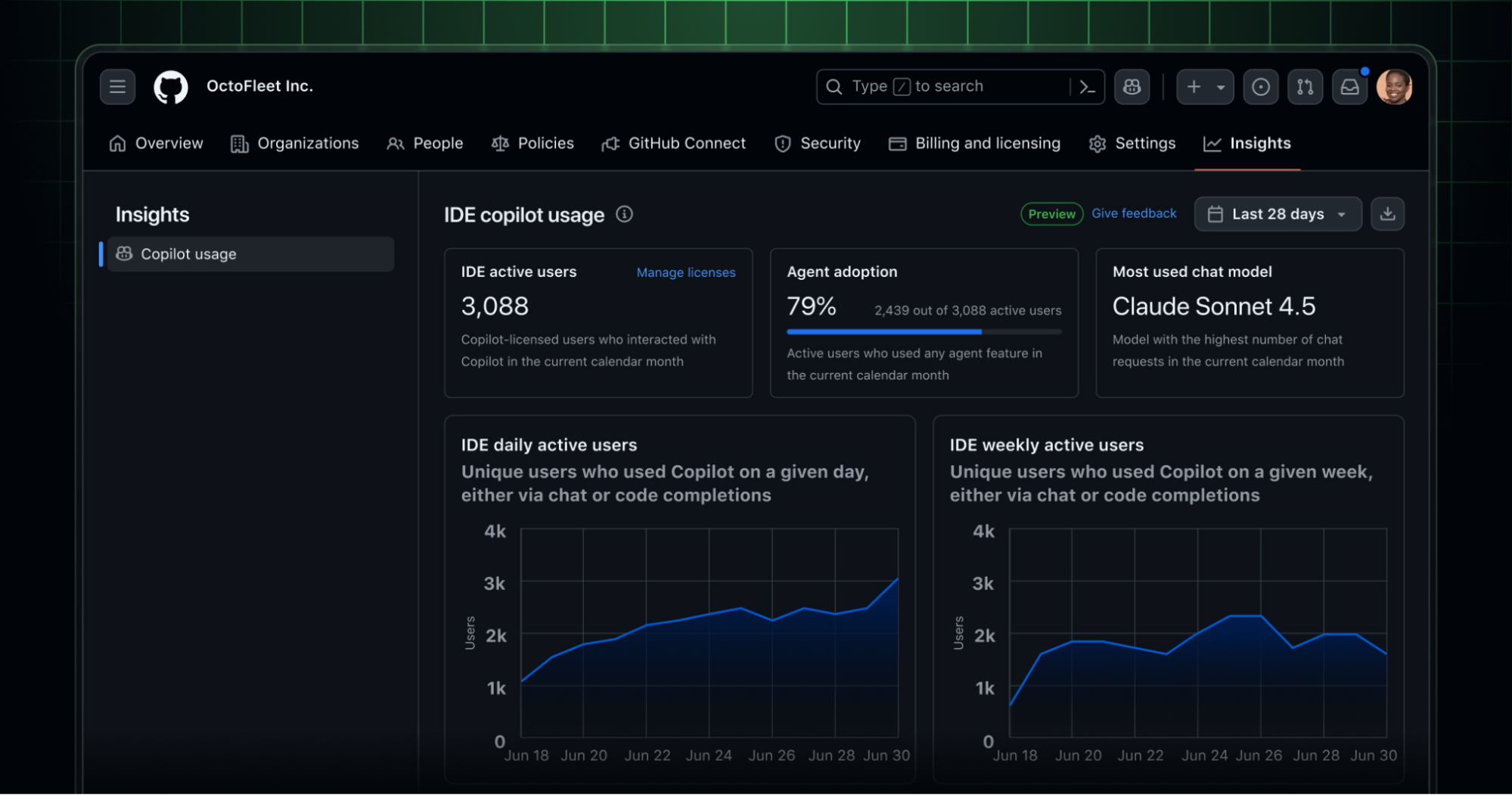
GitHub Copilot is an AI coding assistant built into the developer workflow.
It helps developers write, edit, and understand code by providing inline suggestions, conversational help, and task-oriented assistance directly inside supported development environments.
With Copilot, developers can generate code faster, ask questions about unfamiliar logic, refactor existing files, and get help with repetitive implementation work without constantly leaving the IDE.
How GitHub Copilot works
GitHub Copilot runs inside supported environments such as VS Code, Visual Studio, JetBrains IDEs (IntelliJ, PyCharm, WebStorm), Eclipse, Xcode, and Neovim, although feature availability differs by IDE.
Once installed and authenticated, it integrates directly into the developer’s workflow, continuously analyzing the code context and generating suggestions in real time.
The interaction model in Copilot operates through two primary modes: inline suggestions and chat-based assistance.
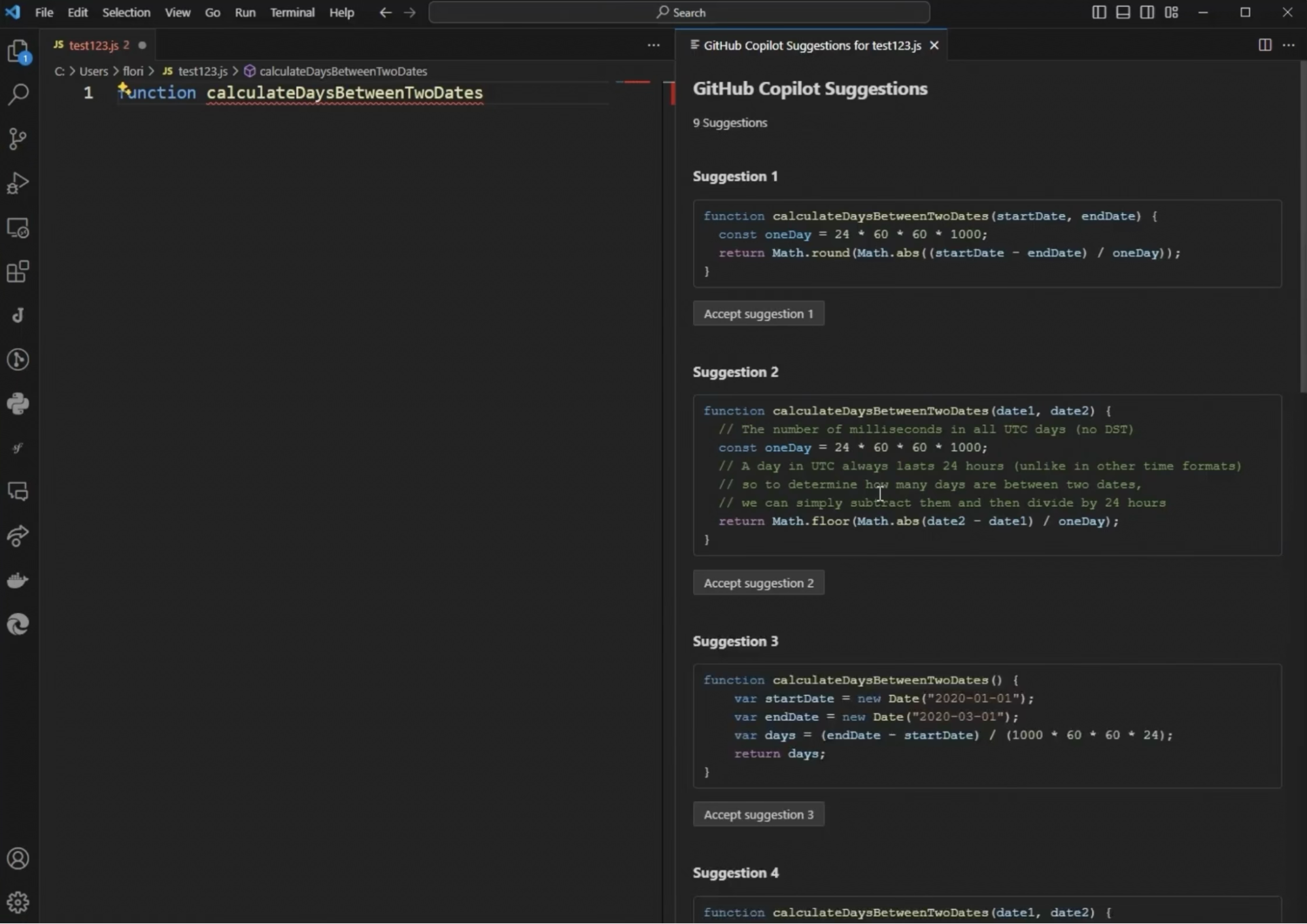
- Inline suggestions appear as developers type and can be accepted with Tab, ignored, or partially used.
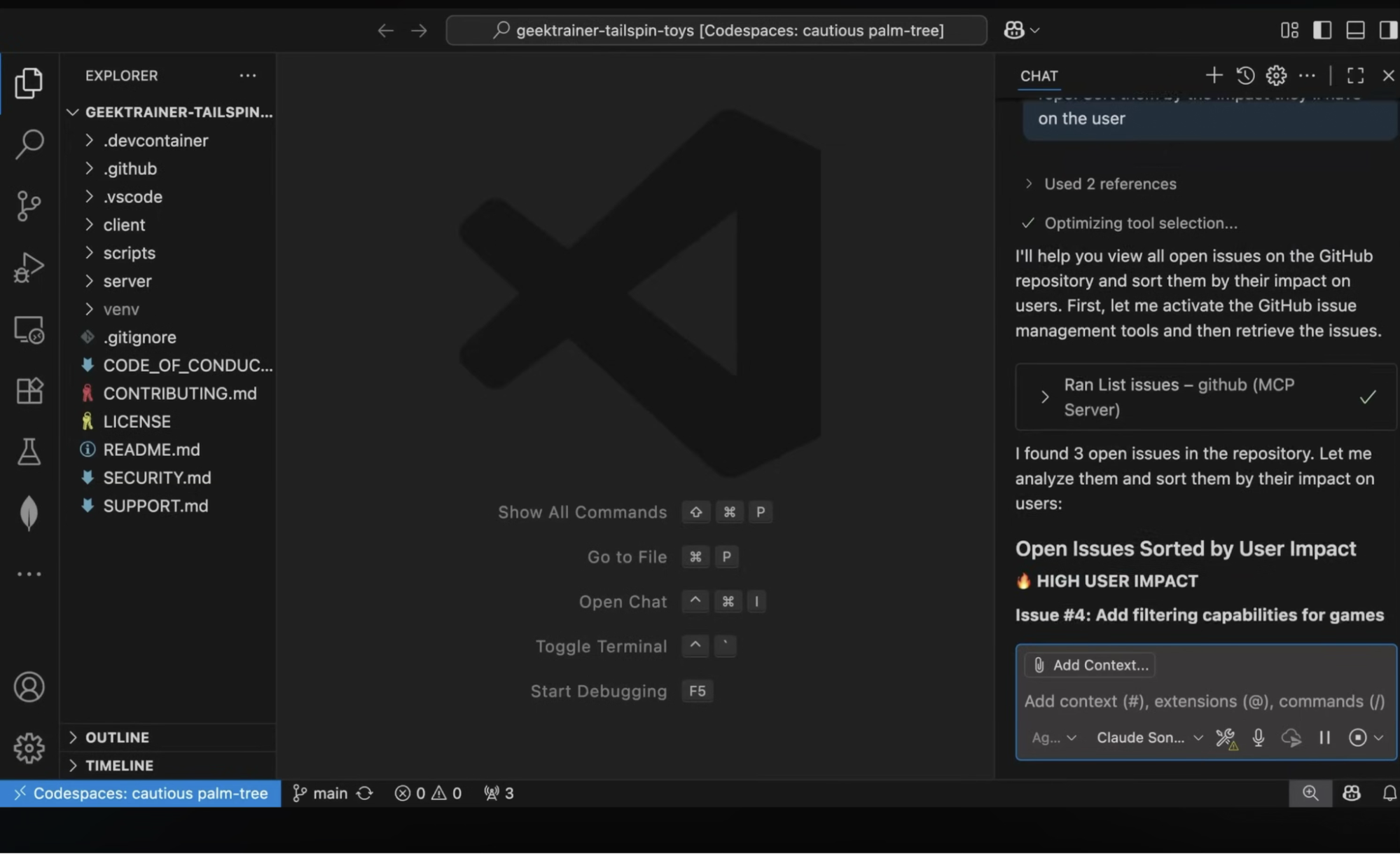
- Chat gives developers a conversational interface for asking coding questions, requesting explanations, debugging issues, or generating edits across one or more files. In supported IDEs, Copilot Chat can also operate in Ask, Edit, Agent, and Plan modes.
Copilot also uses the context around the developer’s current task. It can take into account the code in the active file, surrounding project structure, imported libraries, existing functions, and natural-language instructions such as comments or prompts.
That allows it to suggest code that is often more relevant than a generic autocomplete tool, especially for repetitive patterns like API calls, CRUD logic, test scaffolding, and boilerplate setup.
| 🪼Jellyfish notes: Modern GitHub Copilot deployments can use multiple AI models, with support varying by feature and environment. That gives organizations more flexibility to balance latency, quality, and governance requirements when deciding how Copilot should be used across teams.
|
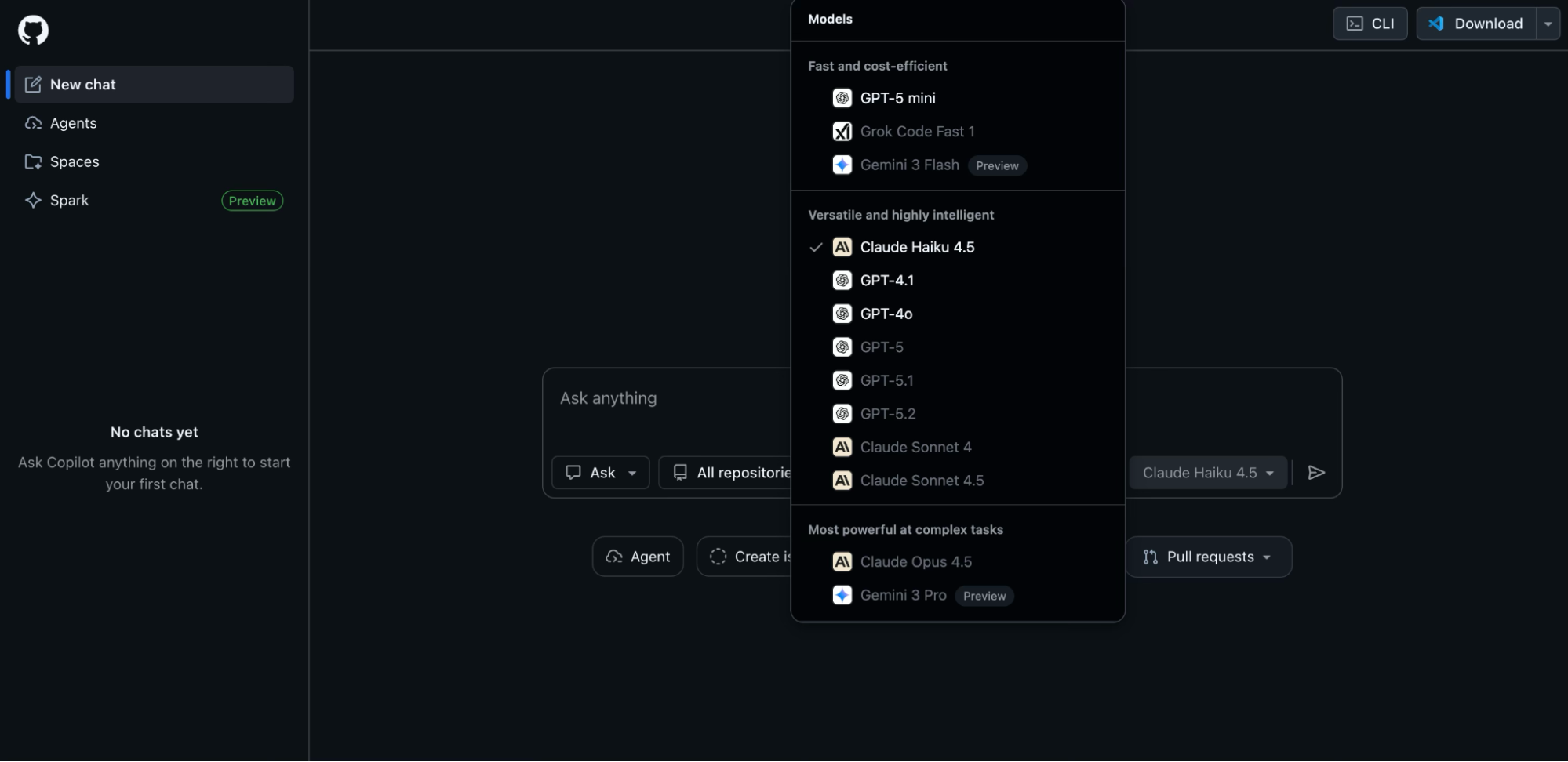
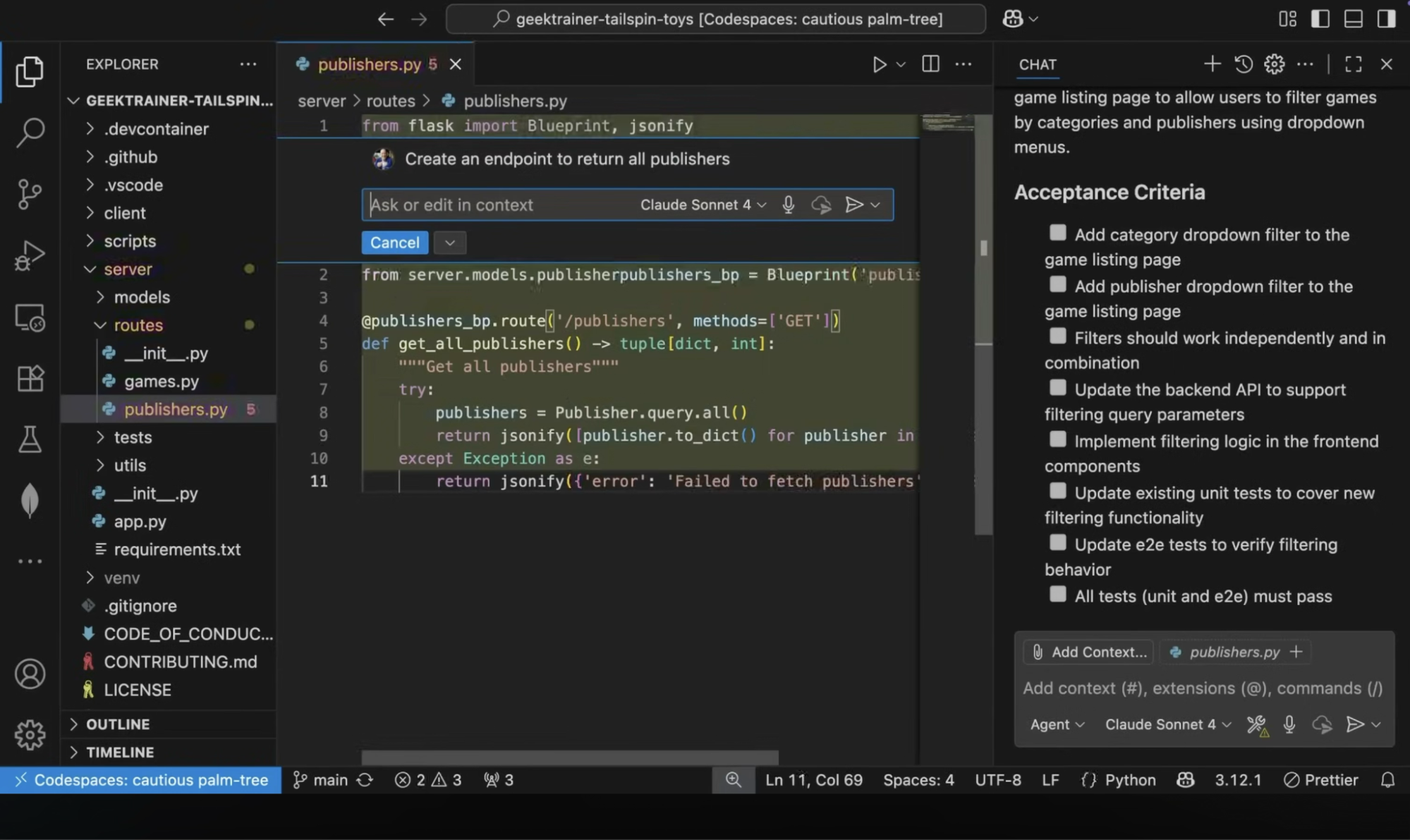
Key features of GitHub Copilot
- Test generation and documentation: Automatic creation of unit tests based on your function Similarly generates docstrings, comments, and README documentation that explains what code does in styles matching your project’s documentation standards.
- Slash commands for specific actions: Shortcut commands within chat like /explain to get code explanations, /fix to suggest bug corrections, /tests to generate test cases, or /doc to create documentation.
- Code review assistant and pull request summaries: AI-powered analysis of pull requests that generates human-readable summaries of changes. It can also identify potential issues or bugs, suggest improvements, and draft review comments.
- Agent mode and coding agent: In supported workflows, Copilot can take on more autonomous tasks such as planning changes, editing across files, or carrying out implementation steps with agent-style behavior.
- Custom instructions: Supports personal, repository, and organization-level instructions, which helps teams steer how it responds.
GitHub Copilot pricing
- Free: At $0, this tier provides individuals with 2,000 completions and 50 agent mode or chat requests per month.
- Pro: At $10/month, this tier targets individual developers with unlimited code completions and an allowance of 300 premium requests.
- Business: At $19/user/month, this is the standard entry point for engineering teams, adding centralized policy management, and organization-wide usage analytics.
- Enterprise: At $39/user/month, this tier is built for large organizations, adding fine-tuned models based on your specific repositories, GitHub Spark, and advanced pull request
Microsoft also offers GitHub Copilot as part of their broader developer tooling ecosystem, with tight integration across Azure DevOps, Visual Studio, and VS Code.
Does GitHub Copilot Improve Productivity?
Does GitHub Copilot Improve Productivity?
The short answer is yes—GitHub Copilot often improves developer productivity, especially at the individual and task level.
The data is consistent across multiple studies and enterprise deployments. Teams write code faster, complete tasks quicker, and spend less time on repetitive work.
According to a Forrester Total Economic Impact study, organizations deploying Copilot at scale report up to 376% return on investment (ROI), with a payback period of under six months [*].
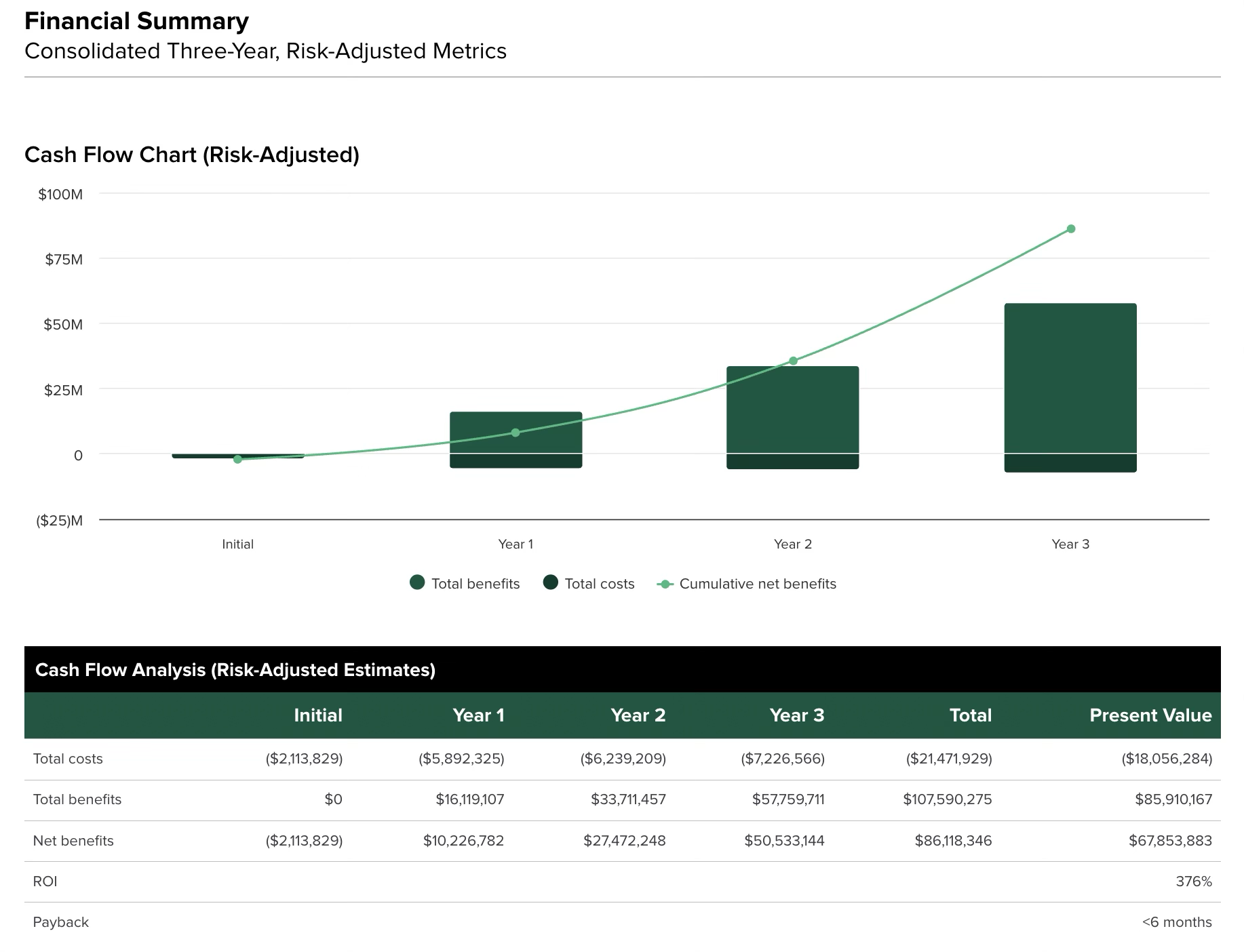
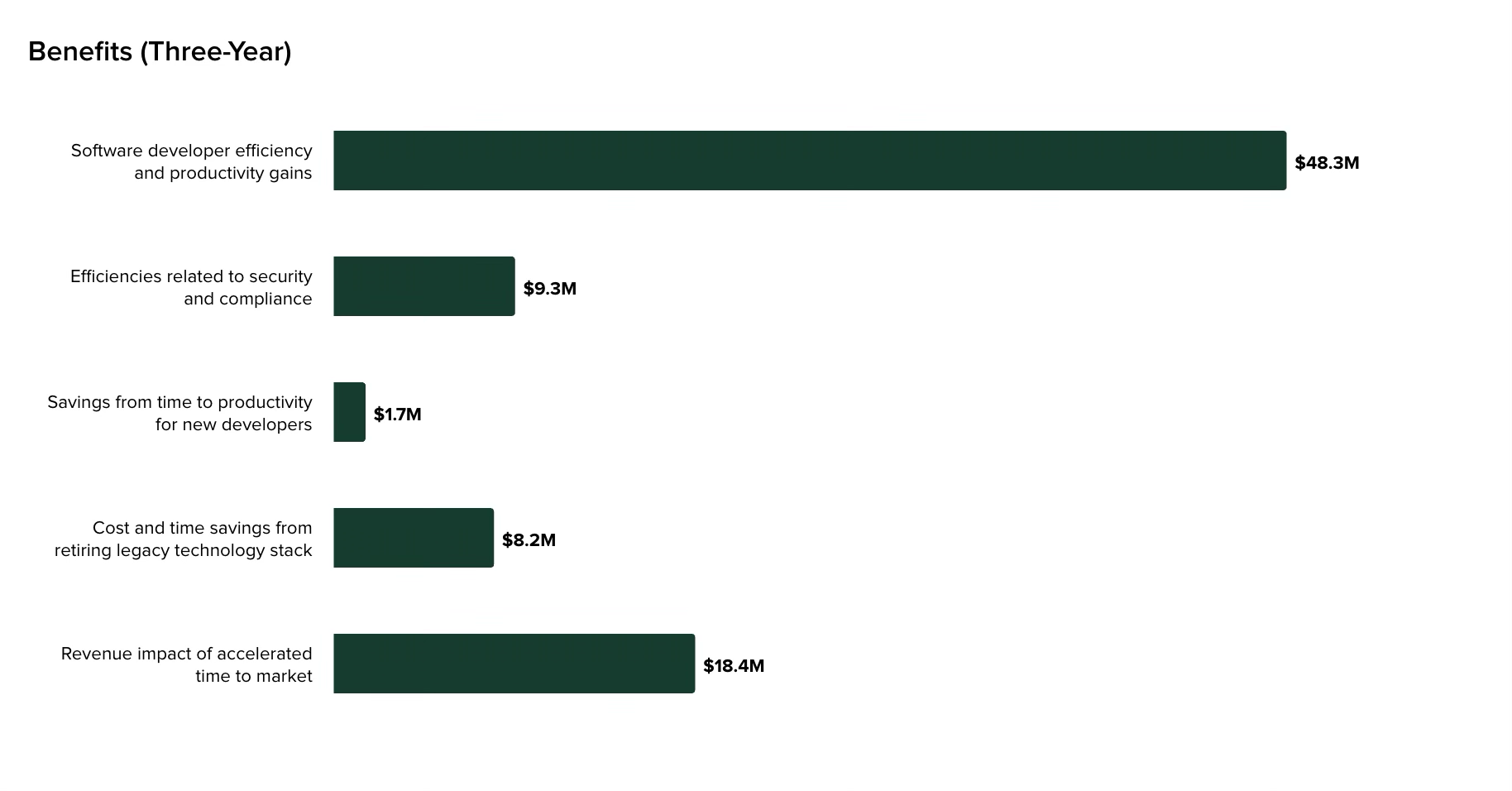
However, those numbers only tell part of the story. To understand Copilot’s real impact, you need to break down where the gains come from, what’s being measured, and total cost.
Recommended → How To Measure Developer Productivity (+Key Metrics)
Where Copilot Delivers Measurable Gains
Faster code production
The most immediate and visible impact of Copilot is on how quickly code gets written. For many teams, that is where the clearest time savings first show up. Developers spend less time on boilerplate, repetitive patterns, and predictable implementations.
Instead of manually writing out API handlers, validation logic, or test scaffolding, they can generate a working version almost instantly and refine it.
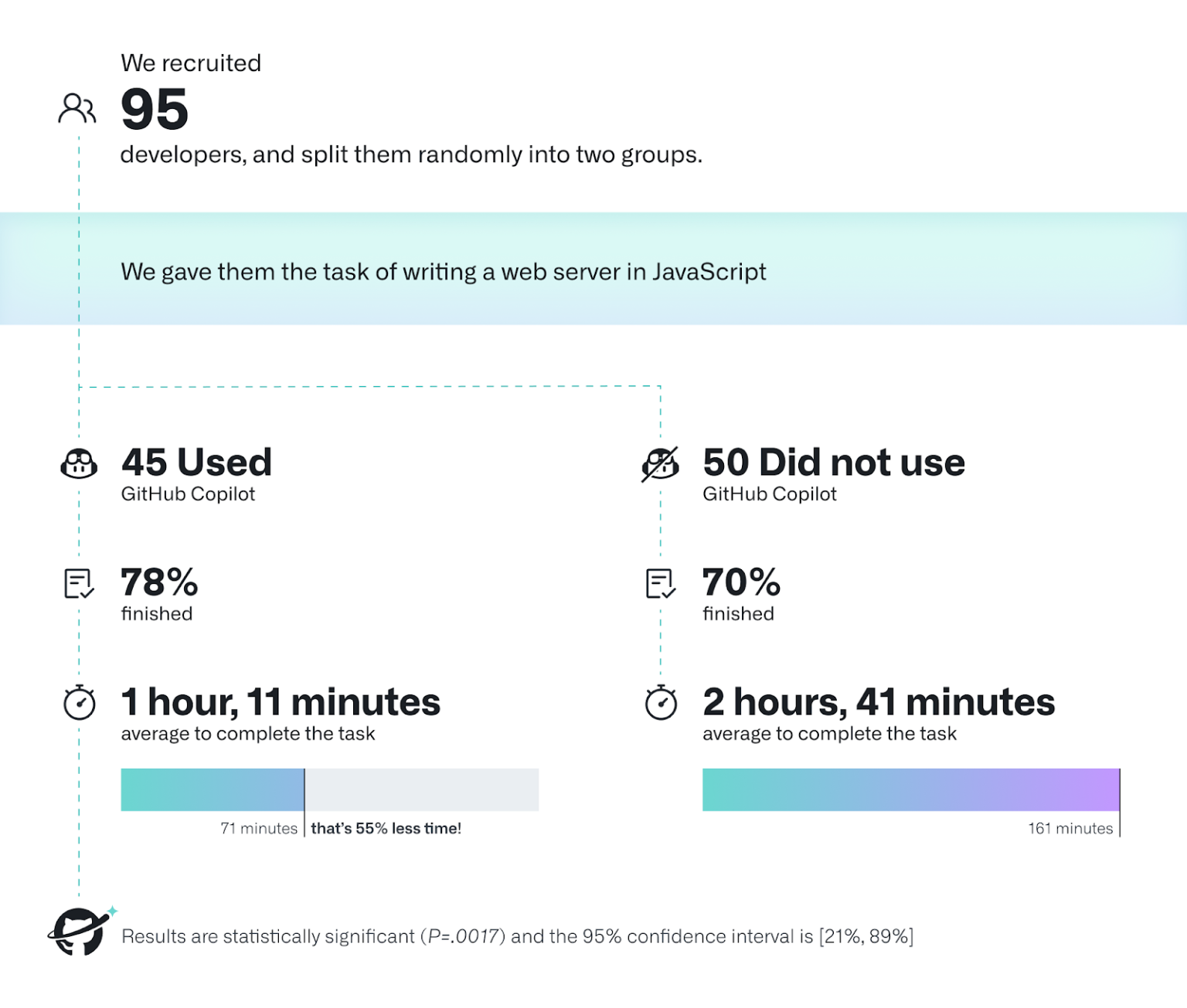
GitHub’s own study involving 95 professional developers tasked to write an HTTP server in Javascript also confirms this. Developers using Copilot saw 55% increase in task completion speed [*].
Faster iteration and review cycles
Because developers can generate more complete implementations upfront, pull requests tend to be more substantial and closer to a finished state. This reduces back-and-forth during reviews and shortens the time between submission and merge.
Teams like Duolingo report significantly faster review turnaround times and improved merge rates [*]:
- Code review turnaround times drop by up to 67%.
- Pull request merge rates improve by around 70%.
Reduced onboarding time
Copilot changes how new developers learn a codebase. Instead of relying entirely on documentation or asking senior engineers for guidance, they can generate working examples directly in context.
This shift shows up clearly in the data. In one study, 86% of developers reported faster learning and knowledge acquisition, making it the single most impactful benefit of AI coding assistants [*].
For more specificity, GitHub’s case study on TELUS shows saving ‘entire days’ during the onboarding process of new developers [*].
But there is a tradeoff here. Faster onboarding does not always mean deeper understanding. Developers may produce correct-looking code without fully understanding system architecture, dependencies, or long-term implications.
Over time, this can create shallow familiarity with deep systems, which becomes a risk in complex environments.
Improved developer satisfaction (DevEx) and flow state
Beyond measurable output, Copilot has a consistent impact on how developers experience their work.
A significant portion of development time is traditionally spent on context switching. Developers leave the IDE to search documentation, look up syntax, debug small issues, or reference previous implementations.
Copilot reduces much of that friction by keeping developers inside the IDE and providing answers inline.
In the longitudinal Copilot case study modeled on the SPACE framework, developers often felt more productive even when commit metrics did not materially change, which matters because DevEx is not fully captured by output metrics alone.
That same study found developers linked Copilot’s value to reduced frustration, less time stuck, and smoother daily workflow, with one senior developer saying it made his day “flow” better [*].
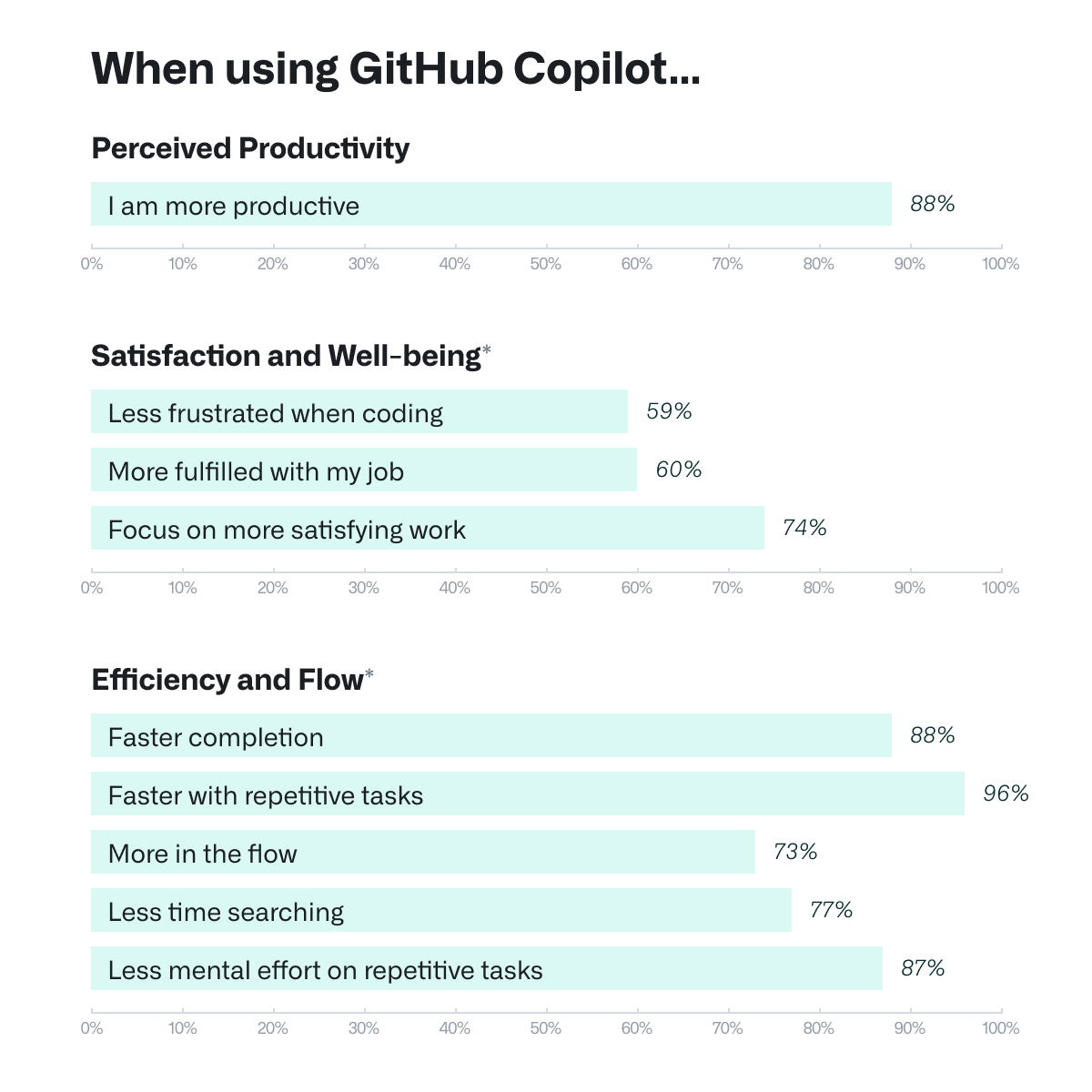
GitHub’s recent report also puts a number on this:
- 88% feel more productive.
- 74% spend time focusing more on satisfying work.
- 87% less mental effort on repetitive tasks.
Recommended → Developer Experience (DevEx): The Modern Guide for 2026
Code quality (when supported by strong systems)
There is a common concern that faster code generation leads to lower quality. That’s not entirely true, and the data proves it.
In a randomized controlled trial with Accenture’s developer team, GitHub reported an 84% increase in successful builds, suggesting higher code quality as assessed by human reviewers [*].
This makes sense because developers can iterate faster, generate tests more easily, and follow consistent patterns suggested by the model.
What the Studies Are Actually Measuring
Most Copilot productivity studies measure individual, workflow or task-level output:
- how fast a developer completes a given coding task,
- how quickly a PR moves through review,
- how developers feel about their workflow,
- or whether documentation quality improves.
Those are valid signals, but they are not the same as proving that the engineering organization is delivering more business value per dollar.
That is a much higher bar that depends on your codebase, review process, CI reliability, rollout quality, and how broadly the tool is adopted across the team.
So the Forrester 376% ROI figure should be treated as a directional benchmark, not proof of realized ROI in your environment. It is useful as a reference point, but it is not derived from your deployment, your pipeline constraints, or your actual engineering economics.
Why Individual Gains Don’t Always Become Team Gains
Copilot makes individual developers faster at writing code. What it doesn’t do automatically is make teams ship faster. Those are different problems.
Code still has to be reviewed, tested, integrated, and deployed after it’s written. If those stages aren’t equally optimised, faster code generation just means more work in progress. That’s more PRs open, more changes in the pipeline, but not necessarily more features in production.
Teams that see the clearest Copilot ROI are the ones where the whole delivery system was already reasonably healthy.
In DORA’s study, experts found that while higher AI adoption improved code review speed by 3.1% and code quality by 3.4%, it was still associated with a 1.5% drop in delivery throughput and a 7.2% drop in delivery stability when core delivery fundamentals were weak [*].
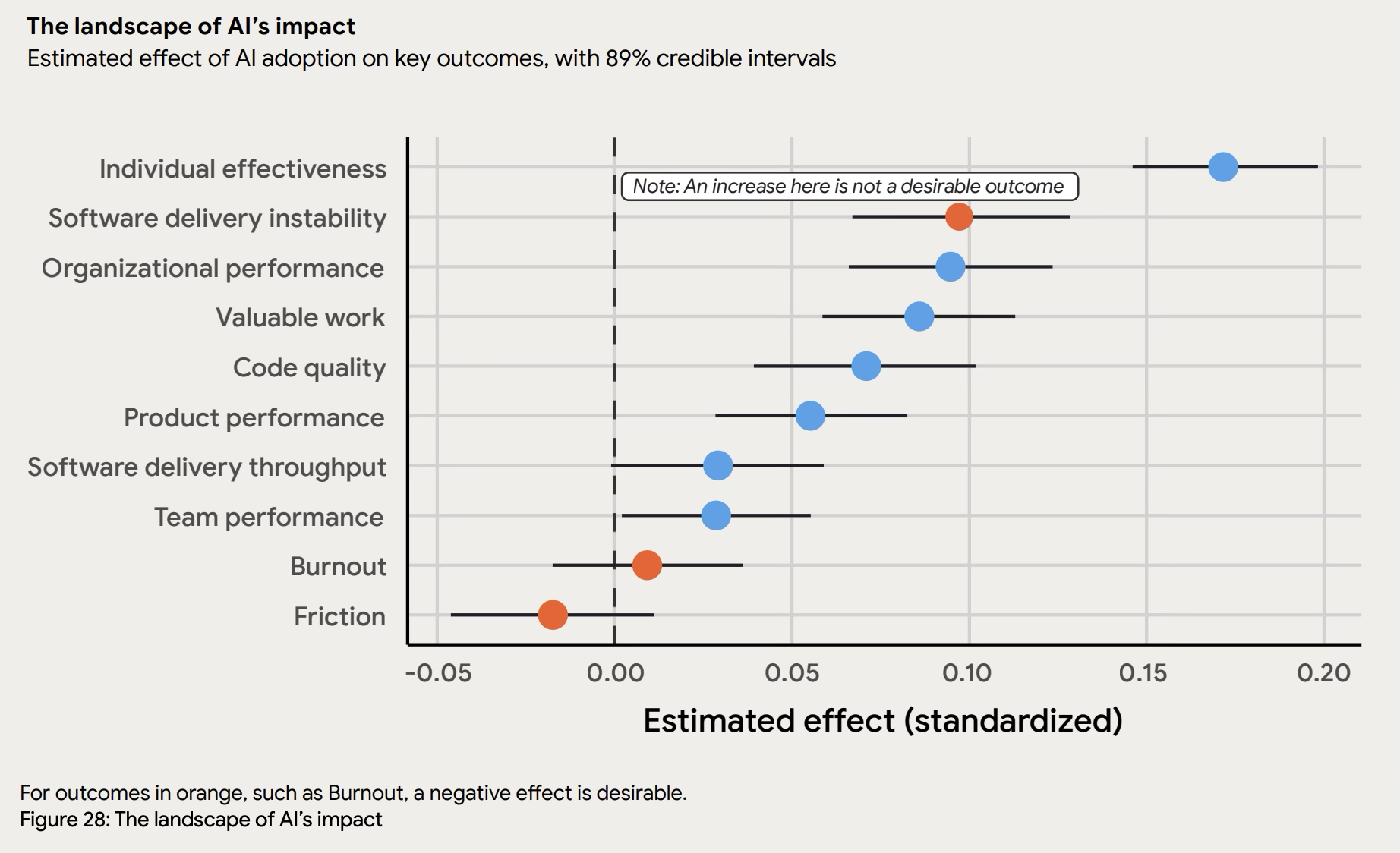
In practice, that means review bottlenecks, flaky CI, and other workflow friction can absorb Copilot’s gains before they show up in shipped features or faster lead times.
| 🪼Jellyfish notes: This is also why developer satisfaction data (as compelling as it is) doesn’t close the ROI argument on its own.
88% of developers feeling more productive is meaningful for retention and morale. It isn’t a capital allocation argument. |
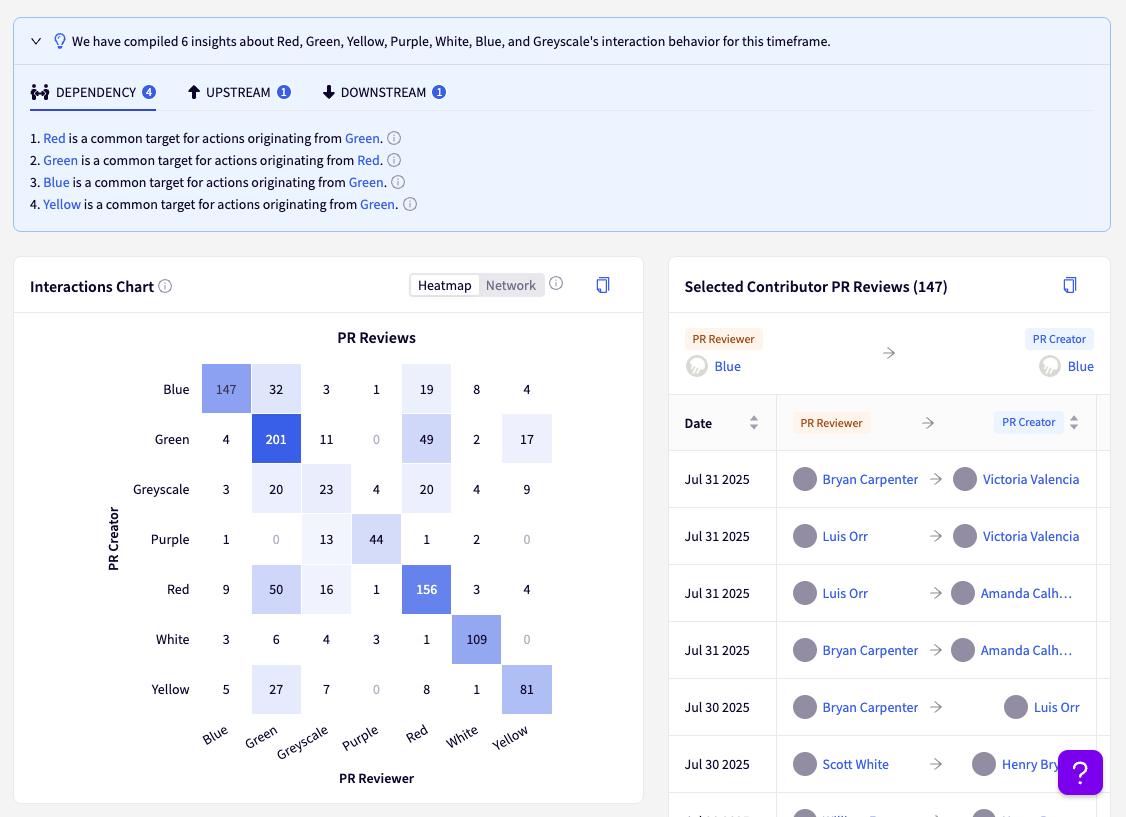
| Explore team distribution balance with Jellyfish to see how evenly you distribute work across team members.
|
The Total Cost Reality
The productivity gains above are real. But the total cost of Copilot adoption is higher than license fees alone.
Enterprise rollout requires structured onboarding, a genuine team ramp-up period, and ongoing management long after launch. That is why usage metrics such as acceptance rate or daily active users are useful, but still not enough to prove business-level ROI.
Adoption comes with a ramp period
Even when the tool is useful, teams do not become efficient with it overnight.
Developers must develop new workflows. This includes learning when to trust AI suggestions versus when to reject them, understanding how to provide context that generates better completions, recognizing patterns where AI assistance helps versus hinders.
This learning curve manifests as temporarily slower development while teams adjust, which planning must account for if you’re committing to delivery timelines during rollout periods.
Thomson Reuters, for example, ran a seven-week GitHub Copilot pilot involving 100+ engineers, and participants were expected to spend four hours per week coding with Copilot and providing weekly feedback before broader scaling [*].
Training and verification add real overhead
You cannot assume developers will automatically use Copilot well, safely, or consistently.
Stack Overflow’s 2024 developer survey found that only 43% of respondents felt good about the accuracy of AI output, while 31% were skeptical [*].
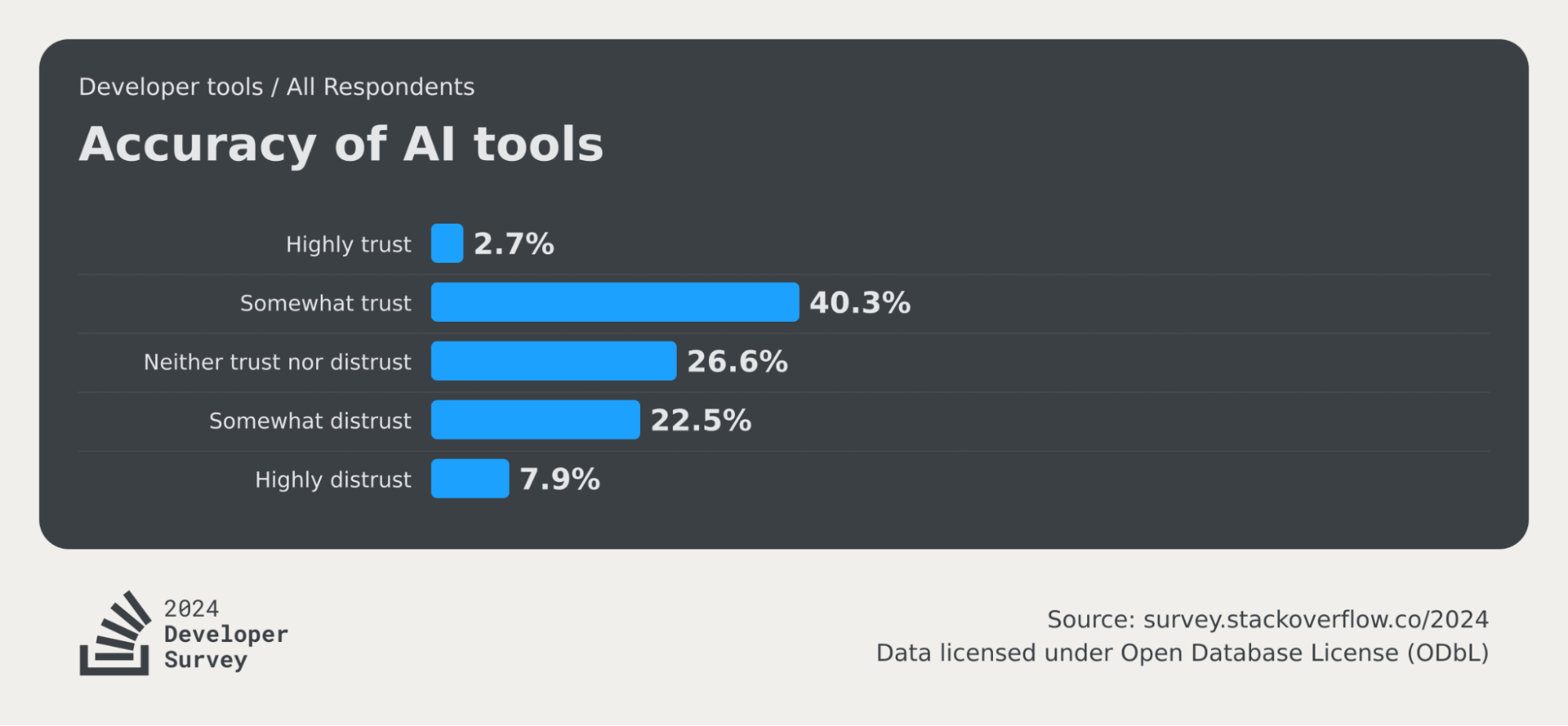
That trust gap matters because when developers are unsure what to trust, they spend more time validating suggestions, discarding weak completions, and double-checking generated code.
Management costs continue after rollout
The costs do not stop once the pilot ends. GitHub’s enterprise documentation shows that organizations still need to manage adoption, engagement, acceptance rates etc.
This means someone has to own licensing, usage monitoring, internal support, and policy enforcement after launch. That ongoing operational load is one reason the real cost of Copilot adoption is higher than the sticker price alone.
The Gap This Creates
This is where the measurement problem starts. You can have real productivity gains happening at the developer level, and a CFO asking for a business-level ROI number.
Meanwhile, GitHub’s native metrics sit in the middle measuring neither one directly. They track things like usage patterns, acceptance rates, lines of code suggested or accepted, and pull request lifecycle metrics.
Those signals are useful for understanding adoption and engagement, but they do not, by themselves, prove whether the engineering organization is delivering more business value per dollar than before.
That gap is what the rest of this guide aims to solve.
Recommended → How to Measure Engineering Productivity (+ Key Metrics)
Understanding Native GitHub Copilot Analytics
Understanding Native GitHub Copilot Analytics
What GitHub Copilot tracks out of the box
| Metric | What It Tells You |
| Acceptance rate | The share of AI suggestions developers are accepting. A proxy for how well Copilot is fitting their workflow |
| Suggestions shown vs. accepted | Volumes of AI output generated and the rate at which it’s used |
| Lines of code written with AI assistance | Raw output volume attributable to Copilot |
| Active Copilot users | Seat utilization across the org. |
| Language and IDE breakdown | Where adoption is concentrated by stack and tooling |
GitHub also notes that a healthy WAU-to-license ratio above 60% indicates strong ongoing usage, which makes these metrics particularly useful during rollout and enablement [*].
| 🪼Jellyfish notes: For more granular tracking, engineering teams can use the Copilot usage metrics API to export NDJSON data.
This allows stakeholders to filter the data by enterprise, organization, or user level to identify power users and target areas for further enablement and training. |
Limitations of GitHub Copilot Analytics
None of GitHub’s Copilot metrics can prove that the code it helped write get delivered faster, with fewer defects, and at lower cost. And here’s why:
- A developer accepting 35% of Copilot’s suggestions looks productive in the dashboard. But if their PR cycle time hasn’t changed and their deployment frequency is flat, the ROI case doesn’t hold.
- Acceptance rate doesn’t capture whether accepted code passed review, passed tests, or made it to production.
- Lines of code generated says nothing about lines of code that shipped, or whether they introduced regressions.
- Daily active users only measures access. So, a developer who opens Copilot once a day and ignores every suggestion still counts.
| 🪼Jellyfish notes: GitHub’s dashboard was built to measure tool engagement. Your ROI case requires measuring delivery impact. These are fundamentally different questions, and no amount of acceptance rate data will answer the second one. |
Recommended → What Jellyfish AI Impact Delivers (That Native Dashboards Can’t)
How to Measure the ROI of GitHub Copilot
How to Measure the ROI of GitHub Copilot
A credible Copilot ROI case requires three layers of evidence: adoption, delivery impact, and business outcomes.
Each layer answers a different question, and none of them is sufficient on its own.
Layer 1: Adoption Metrics (Tool Usage)
Before you can measure ROI, you need to know whether developers are actually using Copilot.
In most mid-to-large engineering organizations, leadership often assumes that once licenses are assigned, adoption follows. In practice, adoption is usually uneven.
At this layer, you are trying to answer a simple question: Is the tool being used enough, and broadly enough, for ROI measurement to even matter yet?
What to track:
- Active users vs. licensed seats: The ratio tells you whether you have a rollout problem or a utilization problem.
- For example, 500 seats with 180 active users isn’t a Copilot ROI problem yet; it’s an adoption problem that needs solving before you can measure anything else.
- Acceptance rate: The share of AI suggestions developers are actually accepting.
- Persistently low acceptance rates can indicate that Copilot’s suggestions are not fitting the codebase, the language, or the developer’s workflow.
- Seat utilization by team: Org-wide averages hide the teams that are driving value and the teams that are ignoring the tool.
- Language and IDE breakdown: Copilot usage varies by stack and tooling, so adoption should be segmented accordingly.
- A Python-heavy team and a legacy Java team will have materially different acceptance rates for reasons that have nothing to do with effort or intent.
| Where to find it: GitHub’s Copilot dashboard and admin center surface most of this natively. |
Layer 2: Delivery Metrics (Engineering Output)
Once adoption is real, the next question is whether Copilot usage is changing delivery performance.
This layer should be anchored in DORA metrics, because they are the closest thing the industry has to a standard set of software delivery performance measures.
DORA currently groups delivery performance around deployment frequency, change lead time, change failure rate, failed deployment recovery time, and deployment rework rate.
What to track:
- Change lead time: Whether work is moving from commit to production faster.
- Deployment frequency: How often teams are shipping to production. More isn’t always better, but a flat deployment frequency after months of Copilot usage suggests the bottleneck moved downstream, not that it was solved.
- Change failure rate: The share of deployments that cause a production incident or require a hotfix. This one cuts both ways on Copilot.
- Teams with strong review practices often see this hold steady or improve.
- Teams that let AI-generated code through lighter scrutiny sometimes see it creep up. Best approach is to watch it closely in the first 90 days.
- Failed deployment recovery time: Whether incidents are being resolved quickly when changes do go wrong.
- Deployment rework rate: Whether teams are having to spend more time on unplanned corrective deployments.
You can support these with internal workflow diagnostics like PR cycle time and code review throughput. These are not DORA metrics, but they help explain where gains are being absorbed.
For example, if Copilot is improving coding speed but PR cycle time does not improve, the gains are probably getting stuck in review, testing, or release processes.
The comparison that makes your ROI case
Most teams default to reporting an org-wide average, but that average hides the variance. The stronger approach is to compare high-adoption teams against low-adoption teams over the same time window.
Here’s an example:
| Team | Acceptance Rate | Cycle Time Change (QoQ) | Interpretation |
| Team A (high adoption) | 68% | Down 22% | Strong sign that usage is translating into workflow improvement. |
| Team B (low adoption) | 12% | No meaningful change | Adoption problem, not proof that Copilot lacks value. |
| Org average | 40% | Down 11% (misleading) | Masks the difference between where value exists and where rollout is failing. |
The cohort approach gives you a path forward. Once you understand why Team A’s adoption is high and Team B’s isn’t, you can design targeted enablement to close the gap rather than running another org-wide training that lands unevenly.
This is also why baselining matters. If you didn’t capture cycle time, deployment frequency, and change failure rate before rollout, you’re trying to measure a change with no starting point.
| Where to find it: Pull historical data from your Git and CI/CD pipeline, engineering intelligence platforms (e.g., Jellyfish) going back at least one quarter before deployment and lock it in as your benchmark. |
| 🪼Jellyfish notes: The most common mistake at this layer is measuring too early. Most teams need 60-90 days post-adoption before Layer 2 metrics start reflecting Copilot’s influence.
The data in the first month is almost always poor. Developers are learning when to trust the suggestions, building new workflows, and sometimes slower than baseline. If you’re running a 30-day pilot and evaluating ROI from that window, you’ll likely undercount the benefit or, worse, conclude it isn’t working. |
Recommended → How to Build a Developer Productivity Dashboard: Metrics, Examples & Best Practices
Layer 3: Business Outcome Metrics (Value Delivery)
This is the layer leadership ultimately cares about most, even though it is the hardest one to isolate cleanly.
Adoption and delivery improvements matter, but they only become an ROI story when they show up in more roadmap output, faster time-to-market, or better use of engineering spend
What to track at this layer:
- Feature delivery rate: How many roadmap items are shipping per quarter compared to pre-Copilot.
- This is the most direct line from Copilot adoption to business value. If teams are shipping more features in the same time with the same headcount, that’s a concrete return.
- Time-to-market on roadmap items: How long from a feature being scoped to it being in production.
- If Copilot’s productivity gains are real, this should compress over time.
- If they’re not, the gains are being absorbed somewhere in the delivery chain and you need to find where.
- Engineering cost per deployment: An internal efficiency metric that estimates total engineering spend relative to the number of deployments in a given period.
- If Copilot is working, you’d expect this number to fall over time as output increases without a proportional headcount increase.
- Output per FTE: A useful internal productivity-per-dollar metric. If the team is shipping more with the same headcount, that strengthens the ROI case.
| Where to find it: Engineering intelligence platforms (e.g., Jellyfish) that correlate with product and roadmap data. |
| 🪼Jellyfish notes: Layer 3 is also where attribution gets genuinely hard. Copilot is rarely the only variable that changes in a quarter.
You may have also hired, reorganized, shipped a new CI/CD pipeline, or changed your sprint cadence. Isolating Copilot’s specific contribution to feature delivery rate is not enough. The stronger move is to present the correlation clearly across all three layers. The argument builds like this:
|
How to Present GitHub Copilot ROI to Different Stakeholders
How to Present GitHub Copilot ROI to Different Stakeholders
Each stakeholder needs a different cut of the same underlying data. The mistake most engineering leaders make is presenting the VP-level metrics to the CFO or the manager-level metrics to the board. The data is right but the framing is wrong.
ROI Metrics by Stakeholder
For the CFO or finance team
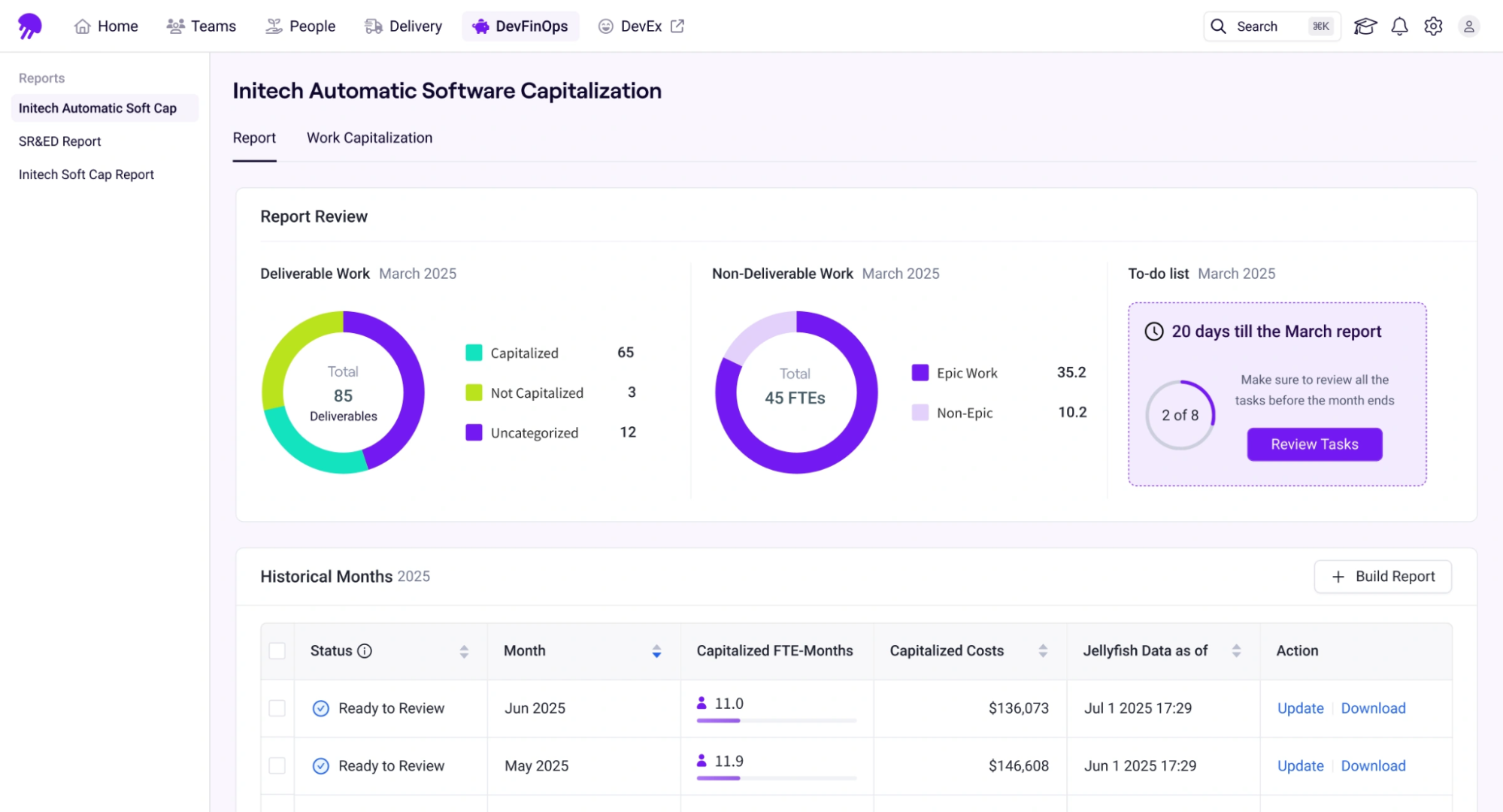
Finance wants to know if they’re getting more output per dollar than they were before. As such, you need to frame everything in cost efficiency terms.
Lead with metrics like engineering cost per deployment, output per FTE, or changes in feature delivery relative to headcount growth.
- If your engineering spend held flat while deployments increased 30% post-Copilot, that’s a clear cost efficiency story.
- If headcount stayed the same while feature delivery rate went up, that’s a leverage angle. This means you’re getting more from the same base without proportional hiring.
| 🪼Jellyfish notes: Leave out acceptance rates, tool engagement metrics, and most of the delivery-framework detail unless they directly support the cost argument.
Finance does not need to learn DORA to understand whether the spend is paying off. |
For the CEO or board
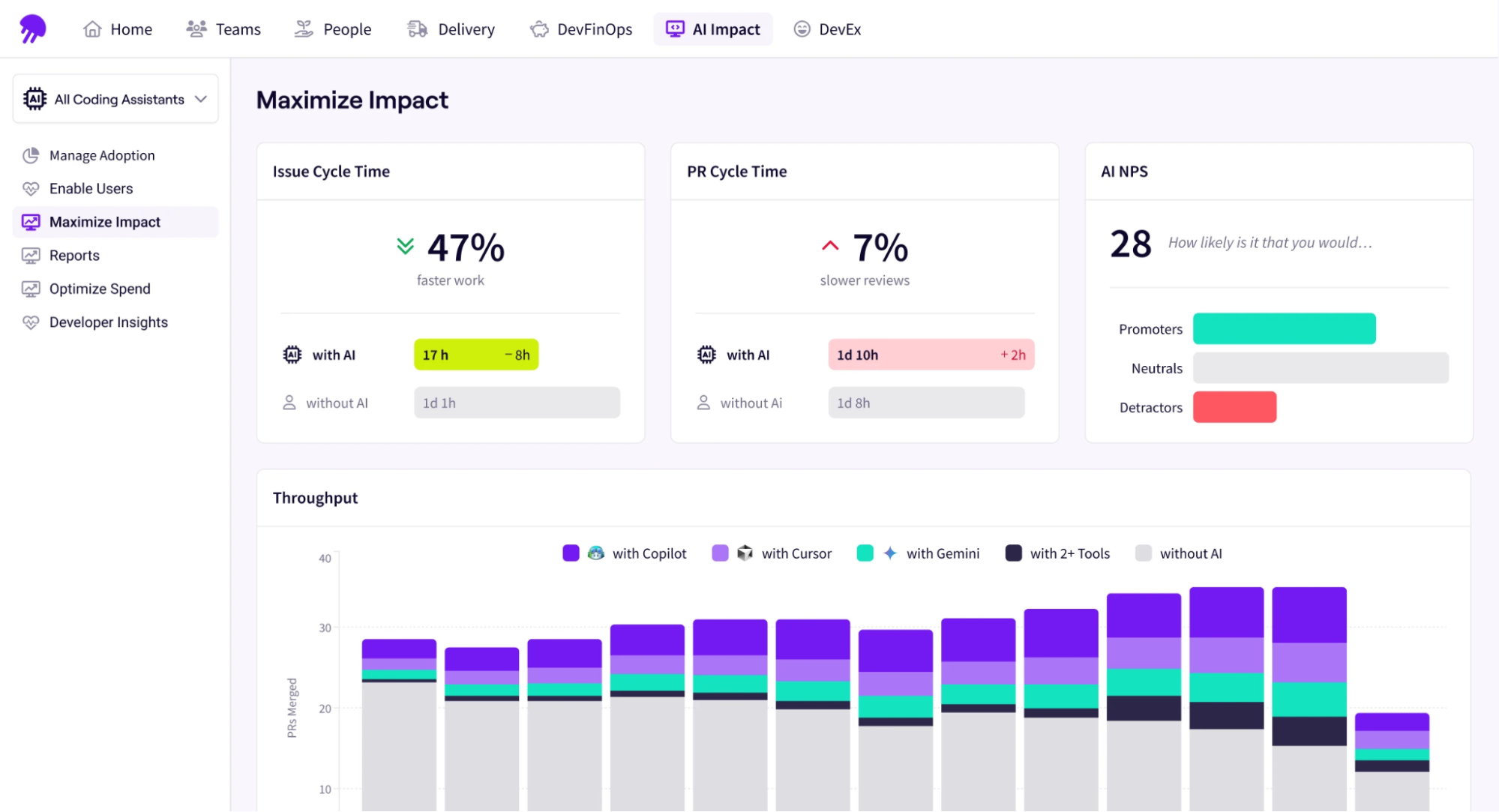
They want to know if the company is shipping faster than before and if you’re able to take on more roadmap without adding headcount.
Focus on time-to-market on roadmap items before and after Copilot adoption, segmented by high-adoption teams. If the line goes down meaningfully, that’s the story.
For the Engineering Manager
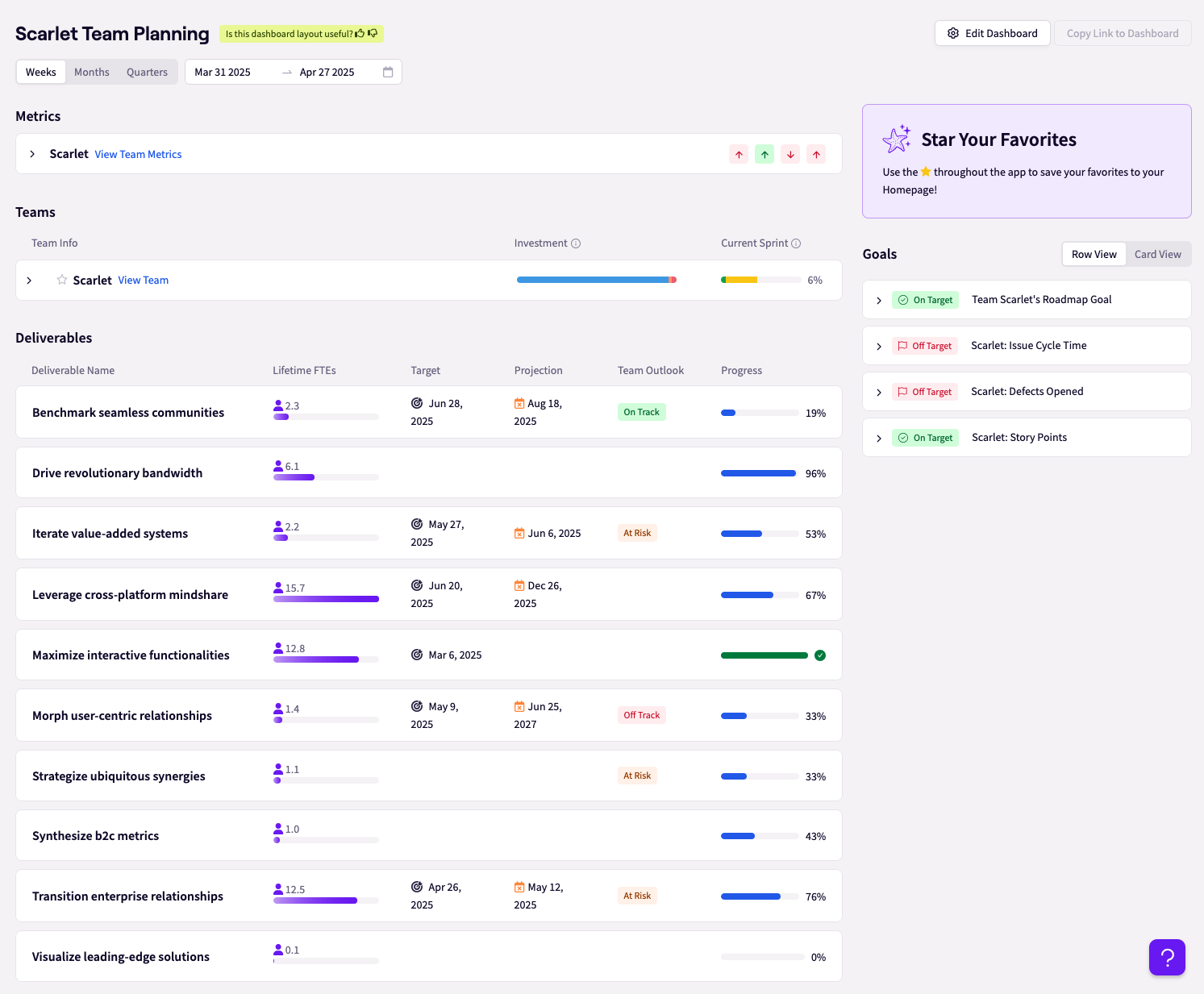
Managers need the most granular view because they are the ones expected to close the gaps. They need team-level insight they can actually act on.
Give them team-level data like squad acceptance rate, PR throughput, review load, and how that compares to other teams.
Recommended → Team Productivity: An Engineering Manager’s Guide to Measuring Outcomes – Jellyfish
For the VP Engineering
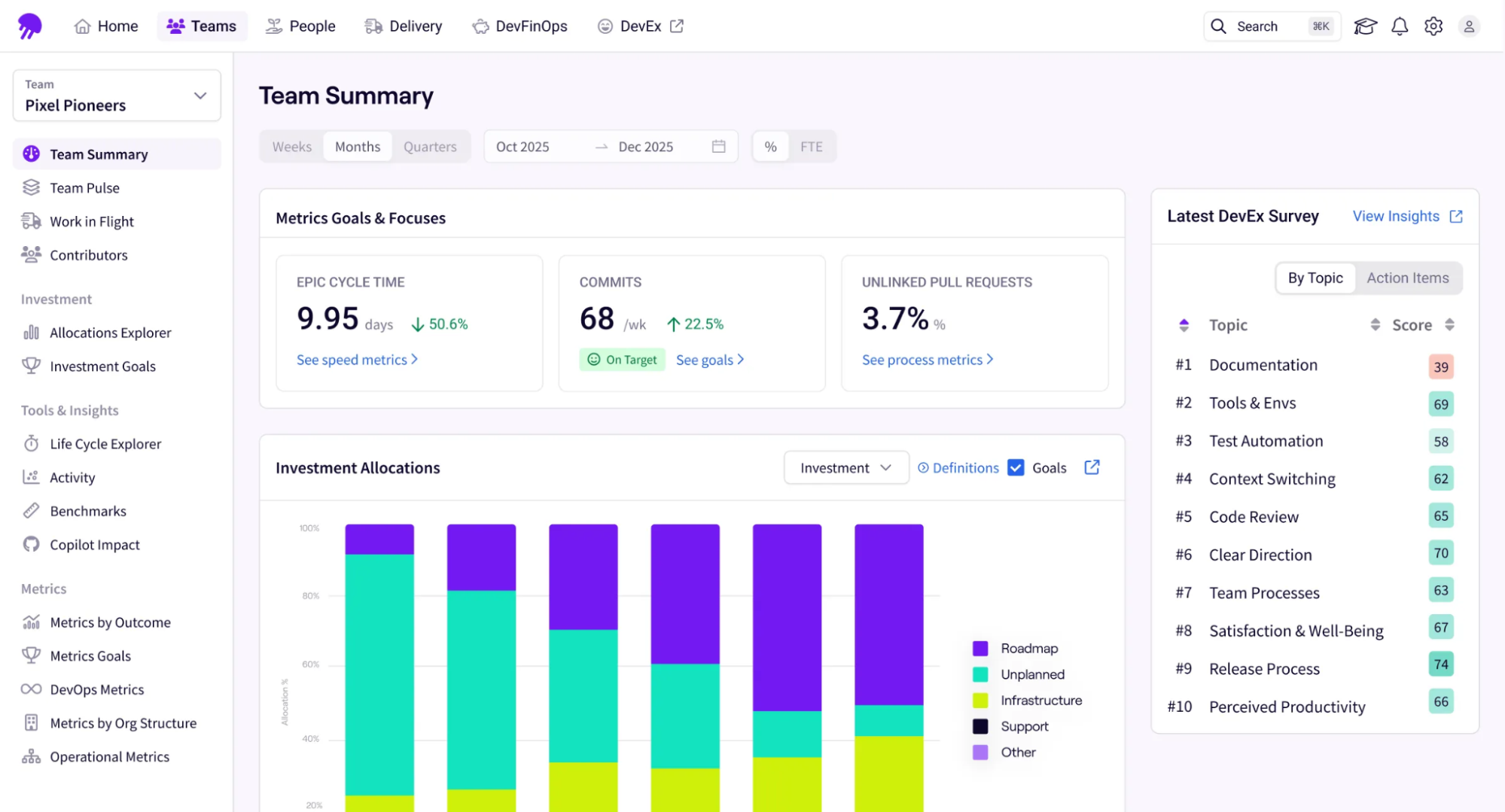
This is where Layers 1, 2, and 3 connect. A VP of Engineering needs to see how adoption, delivery performance, and business outcomes connect.
This is the audience for cohort comparisons, DORA delivery metrics, and supporting diagnostics like PR cycle time or review throughput.
The key here is showing the cohort comparison clearly. Show high-adoption teams vs. low-adoption teams on the same metrics over the same window. Then layer in what you think is driving the variance— e.g., tech stack differences, tenure with the tool, enablement gaps.
Below is a simplified table to help you out:
| Stakeholder | What They Care About | Lead With |
| VP Engineering | Throughput, delivery predictability | Cycle time trend, deployment frequency delta |
| CFO / Finance | Cost efficiency, headcount leverage | Eng cost per deployment, output per FTE |
| CEO / Board | Speed to market, competitive execution | Feature delivery rate, time-to-market trend |
| Eng Manager | Team health, individual productivity | PR throughput, review load, acceptance rate by team |
The underlying data doesn’t change across any of these conversations. What changes is which frame you lead with and how much context you provide.
But instead of building four separate reports, simply build one data model (Layer 1 through Layer 3). Then, segment by team and time window, and pull the right view for each stakeholder.
| If you’re doing this manually, it’s a significant lift. Pulling Git data, correlating it with Copilot usage, mapping it to roadmap delivery—that’s exactly the aggregation problem an engineering intelligence platform is designed to solve.
That’s why teams using Jellyfish can generate these stakeholder views without rebuilding the analysis from scratch every quarter. Embed video → Developer insights |
Measure the True ROI of GitHub Copilot with Jellyfish
Measure the True ROI of GitHub Copilot with Jellyfish
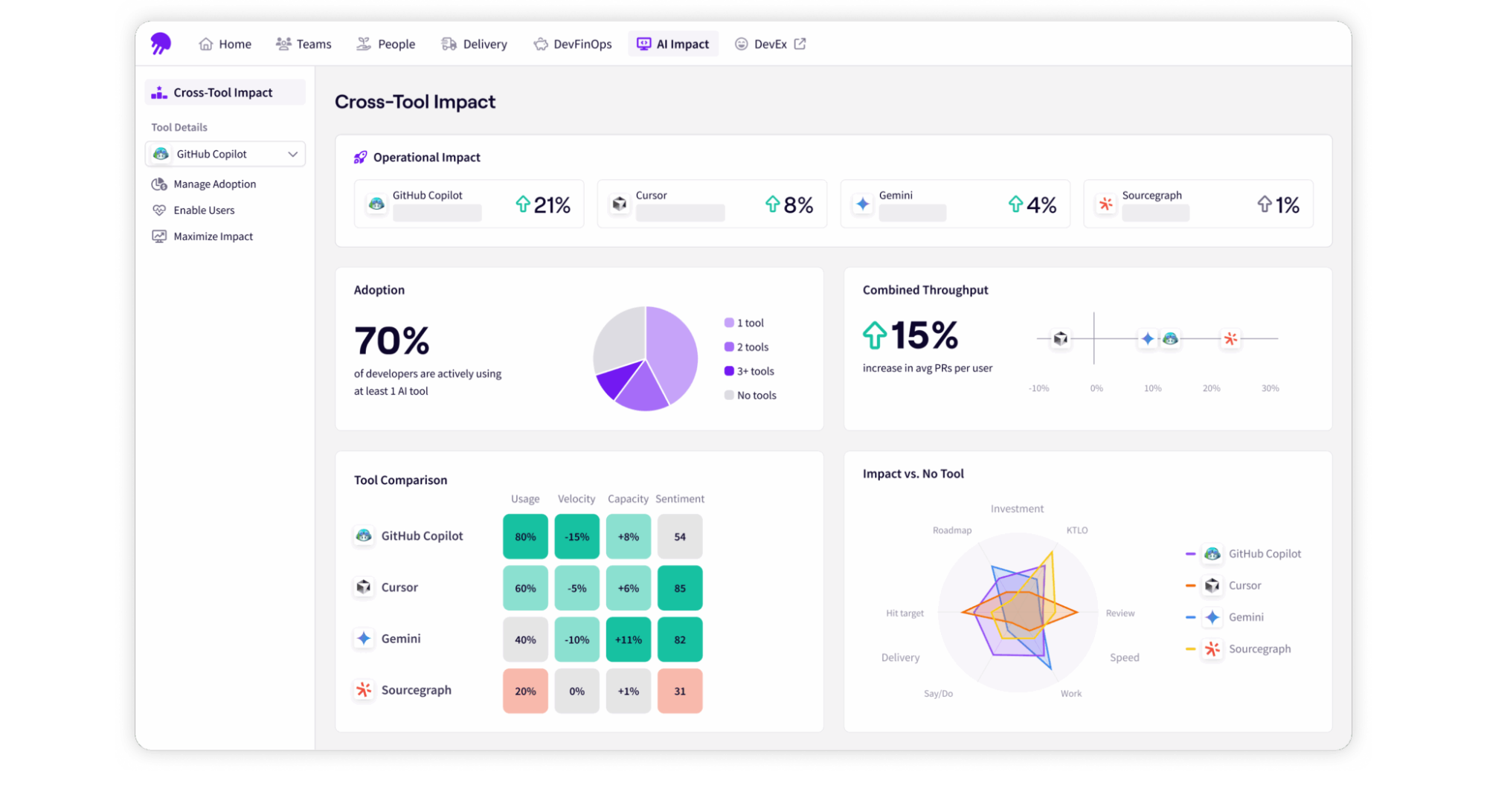
To capture the benefits of AI coding assistants without the operational overhead of manual tracking, leaders must correlate IDE activity directly with downstream engineering metrics.
Jellyfish acts as the automated bridge between raw Copilot usage and real-world business outcomes.
How Jellyfish automates measurement:
- Connect activity directly to delivery: Link GitHub Copilot’s telemetry natively to Jira and your codebase to definitively prove that Copilot adoption accelerates feature delivery and business value.
- Monitor downstream quality and pipelines: Track pull request merge times and change failure rates in real-time to ensure that increased code generation isn’t breaking your pipelines or overwhelming the code review
- Automate your benchmarks: Instead of rebuilding an ROI calculator every quarter, Jellyfish automatically compares cycle time and throughput across teams using different AI tools, giving you a live view of what’s working and where the gaps are.
- Validate real business value: Ensure the optimization achieved by power users is actively redirected toward strategic roadmap initiatives rather than debugging AI-generated functions.
| “Jellyfish assists our leadership team by verifying that engineering efforts align with expected investment categories.”
Regis Martini, Engineering Manager at Perk. Read the full story → How Perk became 30% more focused on roadmap work. |
| “Jellyfish helps us have more confidence in our commitments. We expect teams to deliver upwards of 90% of what they commit to a roadmap on a quarterly basis.”
Will Mora, Head of Engineering at Ada. Read the full story → How Ada uses Jellyfish to align on business objectives and track Copilot success. |
If you’re building the business case for Copilot and need a way to connect usage data to engineering output, see how Jellyfish gives engineering leaders the visibility to measure what actually matters.
| Use Jellyfish to measure what Copilot is really moving → |
About the author

Lauren is Senior Product Marketing Director at Jellyfish where she works closely with the product team to bring software engineering intelligence solutions to market. Prior to Jellyfish, Lauren served as Director of Product Marketing at Pluralsight.