In this article
Not long ago, integrating code was an event that teams dreaded. Developers spent weeks heads-down on separate branches, then merged everything at once and watched their changes collide head-on.
What followed was integration hell. Merge conflicts piled up, builds broke, and days disappeared into untangling work that should have fit together cleanly. Slack’s engineering team once estimated that merge conflicts were their single most expensive pain point, at roughly $2.4 million a year per 100 developers.
Anyone who worked through that era remembers it well, as one engineer put it on Reddit:
We now have engineers in this industry too young to remember when ‘software release day’ was a normal thing. When the build was a manual, hours or days-long process. When build errors and test failures are found on launch day. When rooms of engineers stayed up late eating pizza and frantically fixing problems.
Continuous integration (CI) was built to put an end to this. Developers integrate small changes constantly, and an automated pipeline tests each one the moment it arrives. This guide covers how CI works in DevOps, why it matters, and how to measure whether it is paying off.
What is Continuous Integration?
What is Continuous Integration?
Continuous integration is a development practice where engineers merge their code into a shared repository frequently, often several times a day.
Every time someone pushes a change, an automated process builds the application and runs a battery of tests against it. If something breaks, the team finds out within minutes, while the change is still small and fresh in the author’s mind.
A typical CI workflow runs the same loop every time a change is committed.
- Trigger → A developer pushes code to the shared repository, which automatically starts the pipeline.
- Build → The system compiles the code and assembles the application, so any build-breaking change is flagged right away.
- Test → Automated unit and integration tests run against the new build to confirm nothing existing has broken.
- Report → The result comes back to the team fast, with a clear pass or fail and the detail needed to fix a failure.
One developer on Reddit framed the value in broader terms than just catching bugs:
“Also its about transperency and (like the name suggests) integration. You transform test results, code coverage and code quality into a metric, giving you and your team insights. Also, you ensure that on every change that is checked into your VCS, all tests run and validate functionality across the work of different team members.”
The point about a consistent environment is easy to miss. CI runs every test in the same place every time, so a change is judged the same way, no matter whose machine it came from. It also takes the burden off any one developer to remember to run the suite, since the pipeline does it on every commit and flags anyone who skipped it.
It helps to think of CI as a discipline as well as a tool. Platforms like Jenkins, GitHub Actions, GitLab CI, and CircleCI run the pipeline. The practice itself depends on team habits, frequent small commits, a reliable test suite, and a shared agreement to fix a broken build before other work continues.
Example → Take a team of three working on the same service. Each engineer commits small changes throughout the day, and every commit triggers a fresh build and test run. When one change breaks a shared component, the pipeline flags it right away, so the author fixes it before the other two ever pull the broken code.
CI vs. Delivery vs. Deployment
CI vs. Delivery vs. Deployment
Continuous integration, continuous delivery, and continuous deployment form three stages of the same pipeline, and each stage automates one more step toward production. They build on each other in sequence, so a team needs solid CI in place before the other two become practical.
The table below lines them up across the points that matter most:
| Continuous Integration | Continuous Delivery | Continuous Deployment | |
| In one line | Merge and test code changes automatically | Keep every passing build ready to release | Release every passing build automatically |
| What it automates | Building and testing each commit | Packaging and staging builds for release | The release to production itself |
| Where the pipeline ends | A tested, integrated build | A build that can deploy on demand | Changes running live for end users |
| Manual approval before production | Not applicable | Required | None |
| Primary goal | Catch integration problems early | Keep software releasable at all times | Shorten the path from commit to user |
| What you need first | Version control and a reliable test suite | Working CI | Working CI, strong coverage, and monitoring |
Teams usually adopt these in sequence. CI comes first and pays off on its own. Delivery follows once the test suite is trusted enough to gate releases, and deployment fits once a team has the coverage and monitoring to let changes reach users without a manual check.
Many teams choose to stop at delivery and keep that final approval for regulatory or risk reasons.
| Worth clearing up → Both continuous delivery and continuous deployment abbreviate to CD, which is where most of the confusion starts. They describe the same pipeline up to the final step. Delivery stops at a build that is ready to release on demand, and deployment ships it automatically. |
How Continuous Integration Pipeline Works
How Continuous Integration Pipeline Works
A CI pipeline is the automated sequence that runs every time a developer commits code. Each stage has to pass before the next one starts, so a failure stops the line and the team hears about it right away.
The exact steps vary by tool and team, but most pipelines follow the same path:
- Commit: A developer commits a change to the shared code repository, and the pipeline starts on its own. A webhook or a polling check spots the new commit and kicks off the run, with no manual step involved.
- Build: The pipeline assembles the code and its dependencies into a working build. A break at this stage typically signals a syntax error or a dependency problem, and it ends the run early, so no test time goes to broken code.
- Automated tests: The pipeline runs the test suite against the build, from quick unit tests through slower integration tests. This step carries the core value of CI, because it verifies that the change works and that nothing already in place broke.
- Code analysis: Static analysis and security scans check the change for quality problems, style violations, and known vulnerabilities. Many teams set thresholds here, so the pipeline fails when coverage drops or a critical issue appears.
- Artifact creation: After a build clears every check, the pipeline bundles it into a versioned artifact and saves it to a registry. The next stages, delivery or deployment, draw on that artifact downstream.
- Feedback: The pipeline sends the result to the team through the repository, a chat tool, or a dashboard. A green run approves the change for merge, while a red run shows the author what broke and where.
The value of this whole sequence comes down to the speed of feedback. A developer learns within minutes whether a change is safe, while the work is still fresh and the fix is cheap.
Pipelines that stretch to thirty or forty minutes lose that advantage, because engineers switch to other tasks and lose the context that made the early catch useful in the first place.
Example → Take a developer who fixes a bug in the checkout flow. She commits the change, and the pipeline compiles it in under a minute. Unit tests pass, but an integration test catches that her fix broke the discount calculation. Within four minutes of her commit, the pipeline marks the run red and points her to the failing test. She corrects the logic, pushes again, and the second run goes green, so the bug never reaches the main branch or her teammates.
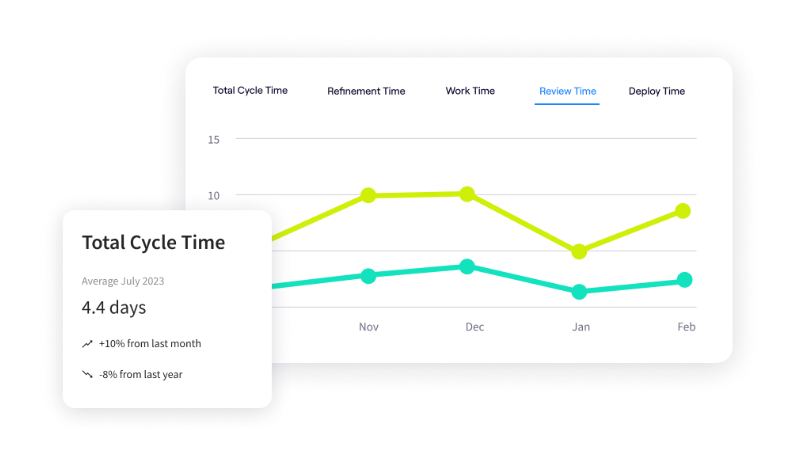
PRO TIP 💡: A slow pipeline often traces back to work stalling elsewhere, like a long review queue. Jellyfish’s Life Cycle Explorer breaks a change into stages and shows where it sits idle, so the real bottleneck has a name.
Continuous Integration Benefits
Continuous Integration Benefits
The benefits of CI build on each other. Each one looks modest alone, but together they change how fast and how safely a team ships. Here are the main ones:
- Earlier bug detection: CI tests every commit the moment it arrives, so a new defect appears almost immediately. The developer fixes it while the change is fresh, at a fraction of the cost a buried bug would carry. The break also stays off the main branch, so it never blocks anyone else.
- Shorter path to production: Small, pre-tested changes clear the pipeline with far less issues, which shortens the path from commit to production. DORA names continuous integration among the capabilities that drive higher deployment frequency, and its research puts elite teams at 182 times more deployments than the lowest performers.
- Faster root-cause analysis: When a CI run fails, it points to one small change, and so the team pins down the cause in minutes. Big, infrequent merges bury the culprit under weeks of work, and CI clears that haystack away. The same advantage shortens recovery when something does slip into production.
- Fewer painful merges: Frequent integration holds each branch near the main line, so conflicts stay small and easy to clear. On large projects, one study measured that 10 to 20 percent of all merges end in a conflict a developer has to resolve by hand. CI works against that number directly, since changes that merge early have far less room to collide.
- More stable releases: Automated tests gate the main branch, so regressions get stopped before they reach users. CircleCI benchmarks a healthy pipeline at a default-branch success rate above 90 percent, which depends on exactly that kind of automated gate. The payoff is fewer production failures, fewer rollbacks, and a release schedule a team can plan around.
- Less time lost to firefighting: Stripe’s Developer Coefficient put the average developer at more than 17 hours a week on maintenance work like debugging and refactoring. Most of it comes down to problems found too late. CI spots them early, before they grow into something more painful. The hours a team reclaims go back into feature work, where it creates value.
Best Practices for Adopting Continuous Integration
Best Practices for Adopting Continuous Integration
CI works only as well as the discipline around it. A pipeline can run on every commit and still fail the team if branches drift, builds drag, or tests cannot be trusted.
These DevOps practices address the problems that most often get in the way:
1. Adopt Trunk-Based Development
Have each developer merge to the main branch at least once a day, and keep feature branches small enough to close out within a day or two.
Long-running branches are the root cause of the integration pain that CI sets out to prevent. The longer a branch stays apart from the main line, the further it drifts from everyone else’s work, and the harder the merge becomes.
How to apply it →
- Merge your work to the main branch at least once a day.
- Break large tasks into small pieces that you can finish and merge quickly.
- Keep the number of active branches to three or fewer.
- Hide unfinished features behind feature flags so you can merge code before users see it.
- Keep code reviews short and fast so they never hold up a merge.
- Sync with the main branch often to avoid surprises later.
Example → A team rebuilds its billing page, a job big enough to keep a branch open for ten days. Each developer merges small pieces every day and wraps the new page in a feature toggle while the work continues. By launch day, there is no risky merge, because the code has been part of the main branch all along.
2. Keep the Pipeline Fast
Keep the time from commit to result short, with around ten minutes as a common target. Past that point, developers tend to context-switch while they wait, and the value of early feedback drops. As a project grows, run times tend to climb, so this needs ongoing attention.
This tension shows up even on pipelines a team has already tuned hard, as one developer described on Reddit:
You make a nice little change, push, and gleefully resume your day. Unbeknownst to you, it breaks a very central piece of your application.
I encounter bugs that CI tests don’t pick up, but CI has caught a decent amount of nasty issues. And after optimizing the heck out of them, the tests still take 6 minutes (used to take 45), so I don’t want to wait for them.
The tests do their job and catch problems, the team cuts the run from 45 minutes to 6, and the developer still resists the wait. That resistance is the risk, because once people stop waiting for a run, they stop acting on its feedback.
How to apply it →
- Run quick unit tests first and save slow integration tests for later.
- Split the work across parallel machines to cut the total time.
- Re-use cached dependencies and build layers between runs.
- Fail fast and skip the remaining steps when an early one breaks.
- Push long-running test suites to a scheduled job outside the commit path.
- Watch your pipeline duration over time and fix it when it creeps up.
Example → An engineering team notices its twenty-minute pipeline is the reason fixes stall all afternoon. They cache dependencies, run independent jobs side by side, and stop each run as soon as a core test fails. Runs settle around eight minutes, and the queue of waiting changes clears up.
3. Protect the Main Branch
When a build fails on the main branch, fixing it becomes the team’s first priority over new work. A broken main branch blocks everyone, since other developers pull from it and build on top of it. The common rule is to revert the change quickly when a proper fix will take more than a few minutes, then sort out the main fix afterward.
How to apply it →
- Make a broken main branch the team’s first job before new work.
- Roll back the change fast when the fix is not quick.
- Test every change before the merge, so breaks get caught earlier.
- Send build failures to a channel the whole team watches.
- Hold off on new merges while the branch is red.
- Write a quick note on repeat breaks so the same cause does not return.
Example → A developer merges a change that breaks the main branch late in the afternoon. The build failure posts to the team channel, and since the fix is not obvious, she reverts the commit within minutes to clear the branch for everyone else. She reworks the change on her own branch and merges it again the next morning once it passes.
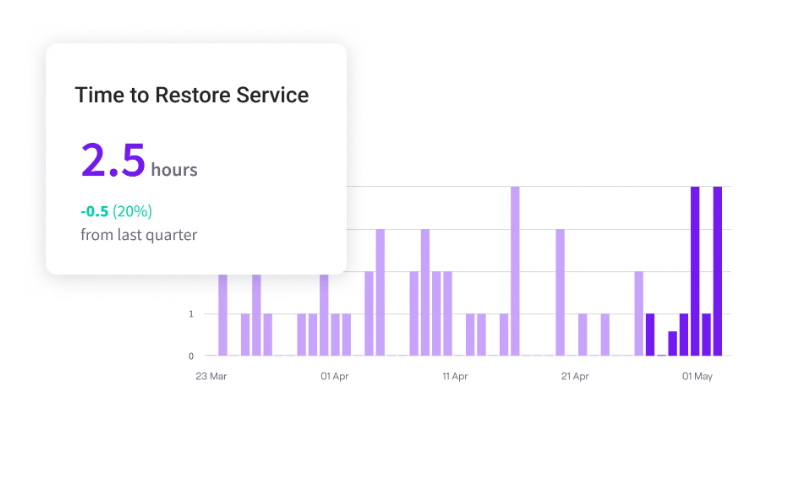
PRO TIP 💡: A broken main branch is a recovery problem, and recovery speed is measurable. Jellyfish tracks mean time to restore, so you can see whether your team clears red builds in minutes or lets them sit.
4. Build a Test Suite You Can Trust
The value of CI rests on a test suite that returns the same answer every run. The biggest threat is a flaky test, since a result that changes at random teaches the team to wave off failures and trust drains away. Keeping the suite reliable and relevant is what holds the practice together.
How to apply it →
- Pull flaky tests out of the main run the moment you spot them, then fix them separately.
- Keep most tests at the unit level for speed and steady results.
- Set up a test for every new feature and every fix before it merges.
- Remove dead tests that no longer protect anything.
- Hold the suite to a coverage target, the pipeline checks on every run.
Example → Developers on one team begin ignoring red builds, because a few tests fail for no clear reason most days. The team pulls those tests into a quarantine run, tracks down the timing problems causing them, and restores them once they pass reliably. Over time, the team rebuilt its confidence in the pipeline.
Popular Continuous Integration tools
Popular Continuous Integration tools
CI tools fall into three broad categories. Which one fits depends mostly on where your code is hosted, how big your team is, and how much of the system you want to run yourself.
Here is how the three compare:
| Category | How it works | Best fit | Main tradeoff | Examples |
| Code-host-native CI | Built into the platform that already holds your repositories | Teams that want CI running with little setup and no extra integration | Less flexible for complex pipelines, and tied to your code host | GitHub Actions, GitLab CI/CD, Bitbucket Pipelines |
| Standalone cloud CI | A hosted service that connects to any code host | Teams that want fast builds and no infrastructure to manage | An ongoing subscription and another vendor in the stack | CircleCI, Travis CI, Buildkite |
| Self-managed CI servers | Software you install and run on your own infrastructure | Larger teams with staff to manage and customize the system | Full maintenance and operational overhead fall on your development team | Jenkins, self-hosted GitLab, TeamCity |
There is no single best category, only the one that fits your setup. Most teams start with whatever their code host offers, since it needs the least work to get running, and move to a standalone or self-managed option only when their pipelines outgrow it.
Whichever you run, the value comes from visibility into how the pipeline performs over time, which is where engineering intelligence tools like Jellyfish help.
Optimize Your CI/CD Metrics with Jellyfish
Optimize Your CI/CD Metrics with Jellyfish
A CI pipeline records detailed information about how a team builds, tests, and ships software. That information is split across the CI system, the issue tracker, and the incident tool, so most teams never compile it into anything they can use.
Producing a clear view of delivery means pulling those sources together, which is manual work few teams sustain. An engineering management platform handles that integration and reports on delivery in one place.
Jellyfish is one of them. It hooks into the tools your team already has, your pipeline, your code host, your issue tracker, and pulls everything into one set of clear software delivery metrics. There’s no new process to follow and nothing for the team to do differently.
A handful of its features speak directly to what we’ve talked about here:
- Automatic DORA metrics from your pipeline: Jellyfish reads your CI/CD pipeline and incident data and calculates the four DORA metrics on its own, then segments them by team, service, and even individual pull request. You get deployment process frequency, lead time, change failure rate, and time to restore from work your team already does.
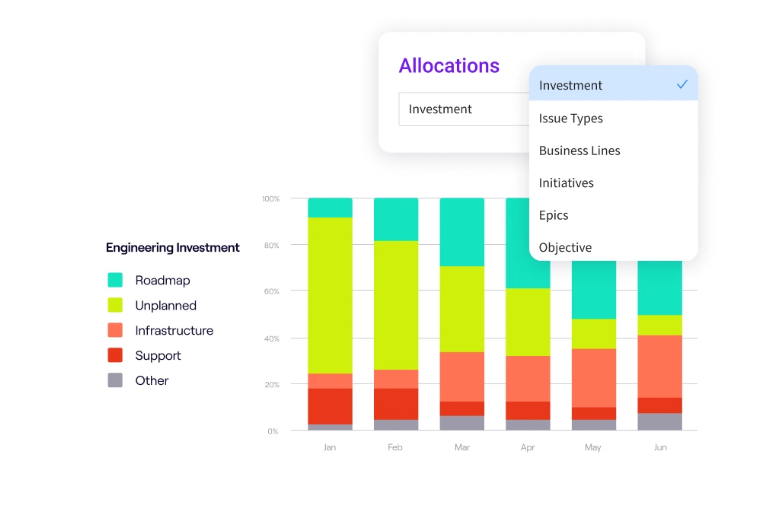
- Investment allocation across the team: Jellyfish maps how a team’s effort divides among new features, tech debt, bug fixes, and infrastructure work. A leader can see, for example, that maintenance has crept up to 40 percent of capacity over two quarters. That makes it possible to defend the CI investment or argue for shifting where the team spends its time.
- Cycle time breakdown: The platform measures how long a change spends in each phase on its way to production. A team can finally tell whether the wait comes from coding, from picking the work up, from review, or from the deploy itself. That breakdown replaces a vague sense that things feel slow with a clear target.
- AI’s effect on your delivery: As AI tools generate more code, teams need to know whether it speeds delivery up or backs it up. Jellyfish tracks AI’s impact alongside your delivery metrics and gives a direct read on quality and pace.
- Benchmarks for context: The platform sets your metrics against a wider field, both your industry and companies of similar size. You learn whether your lead time or failure rate is ahead of the pack or behind it. Without that comparison, a raw figure is hard to judge.
To put any of this into practice, you need to see your own numbers, not benchmarks from a report. Jellyfish builds them from your existing tools and keeps them current.
Book a demo to get started.
FAQs
FAQs
What is the difference between Git and CI?
Git and CI do different jobs and work together. Git tracks changes to your code and lets a whole team work on it without overwriting each other. CI automatically builds and tests that code every time someone commits.
In short, Git stores and manages the code, and CI checks that it still works after each change. The two connect directly, since a push to Git triggers the CI run.
Can you do Continuous Integration without automated testing?
Technically yes, but it defeats the purpose. You can set up CI to merge code and run a build on every commit without any tests attached. The build confirms the code compiles, but nothing checks whether it truly works.
Automated testing is what makes CI valuable. Without it, broken logic and regressions pass straight through, and the team loses the fast feedback loop that justifies the practice. So while CI can run without tests, almost no team treats a test-free pipeline as real CI.
Does CI work with Docker and Kubernetes?
Yes, and most modern pipelines build on them.
A CI run can package your source code into a Docker image, then test that image in a staging environment built to mirror the production environment. Teams on Kubernetes usually have the pipeline build the image, push it to a registry, and hand it off downstream.
Because the container carries the code and its dependencies together, the automated build behaves the same on a laptop, on AWS, or on a hosted runner like Microsoft’s Azure DevOps. That consistency is what keeps the pipeline scalable as the team and the repo grow.
How does CI fit into DevSecOps?
DevSecOps folds security into the same pipeline that already builds and tests your code. Every commit triggers a scan of the codebase for known vulnerabilities, right next to the unit tests. A flaw in new code shows up in minutes, while the change is small and cheap to fix.
This makes security a standard step in the software development lifecycle, handled on every commit. A push to your version control system starts both the build and the scan, so the check never rests on human error or someone remembering to run it.
Why does CI matter for DevOps teams?
CI is one of the fundamentals of DevOps, because it gives developers and operations teams a shared, real-time view of whether the latest change is safe.
Frequent code integration keeps branches close to the main line, so the team can iterate in small steps and avoid the big risky merge. That rhythm streamlines the whole software development process, from the first commit to release.
The payoff is less downtime, since regressions get caught before they reach users, and a faster overall pace of software development.
About the author

Lauren is Senior Product Marketing Director at Jellyfish where she works closely with the product team to bring software engineering intelligence solutions to market. Prior to Jellyfish, Lauren served as Director of Product Marketing at Pluralsight.