In this article
AI coding assistants have completely changed how fast developers write software. In a 2026 Sonar survey, more than 1,100 developers estimated that 42% of the code they commit is AI-assisted, and they write it faster than ever.
That output has to go somewhere. Every new commit hits the same build, test, and release machinery teams that stood up for a slower era, and it cannot keep pace.
Pipelines that once handled a steady stream of changes now face a flood, and the gap between how fast teams write code and how fast they can safely ship it keeps widening.
DevOps has to evolve to close that gap. This guide covers the practical use cases, tools, and best practices that help teams match their delivery pipeline to the pace of AI-assisted software development.
What is AI in DevOps?
What is AI in DevOps?
AI in DevOps refers to the integration of machine learning and generative AI into the software delivery life cycle to automate, optimize, and secure how teams build and ship software.
The two technologies handle different jobs:
- Machine learning studies historical pipeline data, telemetry, and incident records, so it can predict failures, detect anomalies, and recognize patterns a human reviewer would miss.
- Generative AI creates new artifacts on demand, including code, tests, configuration files, documentation, and pull request summaries.
Together, they reach every stage of the lifecycle. During planning and coding, generative models draft code and suggest fixes. Across build and test, AI picks which tests to run, writes new ones, and predicts which changes carry the most risk.
At release, it studies change history to recommend safer rollout windows. In production, machine learning watches metrics and logs to catch incidents early and trace their root cause.
Traditional DevOps automation follows fixed rules that engineers write by hand. AI extends that foundation with prediction and generation, so the DevOps pipeline adapts to new conditions on its own rather than waiting for someone to rewrite a script.
AI in DevOps vs. AIOps vs. MLOps
AI in DevOps vs. AIOps vs. MLOps
Before mapping use cases and tools, it helps to know which category a given tool belongs to. AI in DevOps, AIOps, and MLOps solves related but separate problems, and vendors rarely draw the line for you.
Here is how the three compare:
| Term | What it applies AI to | Primary focus | Example tasks |
| AI in DevOps | The full software delivery life cycle | Faster, safer delivery across the whole pipeline | Code generation, test selection, risk prediction, rollout recommendations |
| AIOps | IT operations and production systems | Keeping running systems healthy and resolving incidents | Anomaly detection, event correlation, alert noise reduction, root cause analysis |
| MLOps | The machine learning life cycle | Shipping and maintaining ML models in production | Model versioning, deployment pipelines, drift monitoring, and retraining |
These are not competing choices. A team can run all three at once, with AI in DevOps speeding up delivery, AIOps keeping production stable, and MLOps managing any models in the mix. The labels mark different jobs, not rival approaches.
| Where teams get it wrong ❗ → MLOps is the odd one out. AI in DevOps and AIOps both point AI at software and infrastructure, while MLOps points DevOps practices at machine learning models. If a tool manages models, it is MLOps, whatever the vendor calls it. |
How AI is Currently Used in DevOps
How AI is Currently Used in DevOps
AI does not spread across DevOps processes evenly. It concentrates on where work piles up, like slow builds, noisy alerts, stalled reviews, and security findings that come up late.
Each workflow below targets one of those bottlenecks and gives the team back time or lowers risk:
- Intelligent CI/CD and test automation: AI catches builds headed for failure before they finish and runs only the tests likely to expose a regression in a given change. The pipeline spends its time on risky changes rather than rerunning everything on every commit.
- Smart code review routing: AI routes each pull request to the reviewers who know that code best, which trims the back-and-forth and shortens merge times. PRs reach the right people on the first pass.
- Root cause analysis and anomaly detection: Machine learning monitors logs and metrics to catch anomalies early, then traces a live incident back to its cause as soon as it fires. What used to mean an hour of cross-referencing graphs now arrives with the alert.
- DevSecOps and vulnerability summaries: AI scans cloud infrastructure and dependencies for security flaws as they appear, then explains each finding in plain language and recommends a fix. Engineers get a clear next step they can act on right away.
- Infrastructure and configuration generation: From a short prompt describing the infrastructure, generative models produce Terraform, Kubernetes manifests, and pipeline configs. The team gets a working baseline to refine in minutes.
- Flaky test detection: Models flag tests that fail inconsistently and pull them out of the blocking path until they get fixed. Developers stop burning time on failures that were never about their code.
Key AI Tools and Technologies for DevOps Engineers
Key AI Tools and Technologies for DevOps Engineers
Plenty of tools claim an AI angle now, so it helps to group them by the job they do. The table below covers the main categories, with providers worth evaluating in each:
| Category | Example tools | What it does for DevOps |
| Generative AI coding assistants | GitHub Copilot, Claude Code, Cursor | Draft and autocomplete code, write tests, and produce first-pass pull request reviews |
| AI-augmented CI/CD platforms | Harness, GitLab Duo, CircleCI | Predict build failures, optimize test selection, and speed up delivery |
| Cloud-native AI services | AWS, Microsoft Azure, Google Cloud | Right-size resources, automate provisioning, and tune infrastructure deployment |
| AI-powered observability platforms | Datadog, Dynatrace, New Relic | Monitor Kubernetes and container workloads, catch anomalies early, and trace root cause |
| Infrastructure as code optimizers | Snyk IaC, Checkov, Terraform scanners | Scan Terraform and manifests for misconfigurations and security flaws before deployment |
These categories work together more than they compete. A typical setup pairs a coding assistant with an observability platform and an IaC scanner. Start with the stage that costs the team the most time right now.
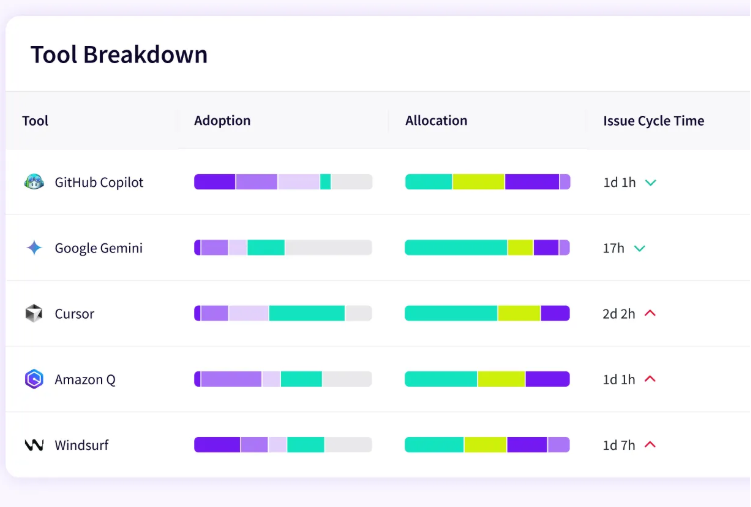
PRO TIP 💡: Comparing assistants by hand gets messy once a team runs more than one. Jellyfish’s multi-tool comparison feature scores them all on one neutral model, so you can see which tool delivers for which team and put the budget behind what works.
The Benefits of AI-driven DevOps
The Benefits of AI-driven DevOps
The benefits of AI in DevOps show up across the whole pipeline, from writing code to running it in production. These five stand out:
- Rapid code generation: Developers describe what they want in plain language, and AI writes the code, tests, or Terraform to match, the workflow is now often called vibe coding. In a controlled study from Microsoft Research, GitHub, and MIT, developers using an AI assistant finished a build task about 55% faster than those working unaided. The coding stage stops being the limit on how fast a team ships.
- Higher-quality delivery: Pushing more code faster only helps if it holds up, so AI catches problems earlier through generated tests and pre-merge checks. In GitHub’s field study with Accenture developers, teams using Copilot saw an 84% increase in successful builds, so fewer changes broke the pipeline on the way through.
- Stronger, earlier security: AI scanners read code, dependencies, and cloud configs as changes land, and then explain each risk in plain language with a fix attached. IBM’s 2025 Cost of a Data Breach report found that organizations using AI and automation across security operations contained breaches 80 days faster and saved an average of $1.9 million per breach.
- Faster incident resolution: Once software runs in production, AIOps tools correlate alerts and point to a likely root cause in seconds. Meta reported that its internal AIOps platform cut mean time to resolution for critical alerts by roughly half across more than 300 engineering teams.
- Better developer experience: Speed counts for little if it burns the team out, and AI removes the dull work first. In a GitHub survey of more than 2,000 developers, 87% reported less mental effort on repetitive tasks and 74% said they could focus on more satisfying work.
What DevOps Teams Need to Be Ready for DevOps AI?
What DevOps Teams Need to Be Ready for DevOps AI?
AI rewards teams that were already in good shape and exposes the ones that were not. Drop it onto a manual, low-visibility pipeline, and very few changes. Get the basics right and the benefits compound.
It starts with the technical groundwork. AI works on top of existing automation and data, so both need to be in good shape before it adds anything. Drop it onto manual builds and patchy monitoring, and the models have nothing reliable to learn from. Three things make up that base:
- An automated CI/CD pipeline is already running. AI improves automated steps, so any build or deploy still done by hand needs sorting out first.
- Clean, reachable data. Machine learning and AIOps learn from past pipeline runs, logs, and metrics, so that history has to exist and be easy to pull.
- Observability across the stack. AI can only connect what it can see, so unified telemetry comes before anomaly detection or root cause analysis pays off.
The second layer is the process. Faster output means more chances for something to slip through, so the controls deserve as much attention as the tools. IBM’s 2025 report found that 63% of organizations have no governance policies for managing AI, which leaves a wide opening for mistakes and leaks.
Three things keep that risk in check:
- An acceptable-use policy for AI models. Without one, shadow AI spreads, and sensitive code can end up inside external models.
- Review and testing that scale with the new volume. More AI-generated code means more to check, and studies have found it carries more vulnerabilities than human-written code, so the safeguards have to keep up.
- A human in the loop on high-risk actions. Deployments, production changes, and anything hard to reverse still need a person to sign off.
Then there is the team itself. AI changes how engineers work day to day, and that shift only goes well if the people are brought along with it. Two things make the difference:
- Hands-on enablement. The teams that gain the most train people on how to prompt AI and review what it produces. Handing out licenses and hoping leaves most of the value untouched.
- A measured baseline before rollout. Without before-and-after numbers on throughput, lead time, and quality, a team cannot tell whether AI is helping or only feels fast.
Plenty of teams already use AI without most of this in place, which is exactly why results vary so widely. The tools spread faster than the foundation, the guardrails, and the skills to use them well.
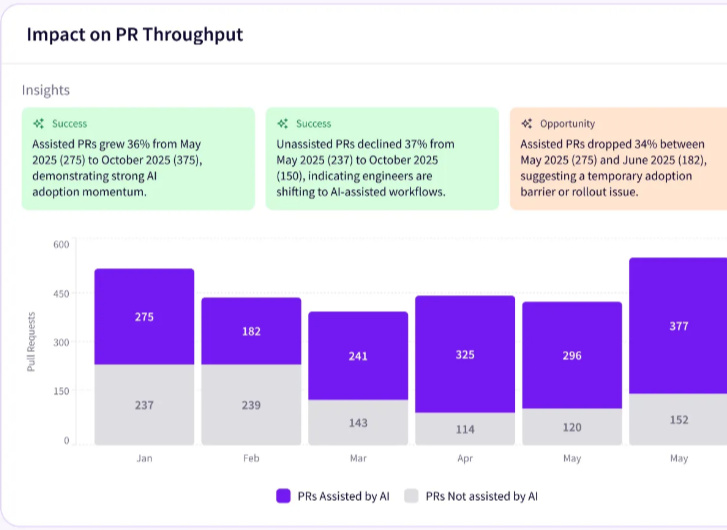
PRO TIP 💡: Jellyfish’s Impact Insights gives you that baseline with no manual tracking. It links AI usage to throughput, cycle time, and code quality from the data already in your pipeline, so the before-and-after that proves a rollout worked is right there when you need it.
How to Implement AI in DevOps? Key Steps & Best Practices
How to Implement AI in DevOps? Key Steps & Best Practices
Rolling out AI is as much a process problem as a technical one. As one engineer explained on Reddit:
DevOps is rarely about solving pure technical problems, in my experience. It’s primarily about process analysis and improvement.
The same holds for adopting artificial intelligence. A good rollout follows a rough order. You pick a use case, wire it into the pipeline, keep people in control of the risky parts, then expand once it proves out.
Each step below covers one:
1. Pick the Right First Use Case
A good first use case has a clear problem behind it and a low cost of failure. That lets the team see a result quickly and learn from it before moving on to higher-stakes workflows.
Key actions →
- Look for a workflow the team already complains about, since the need is proven and the improvement gets noticed.
- Favor a task with a measurable before-and-after, like review time, build duration, or escaped defects.
- Stay away from anything that touches production directly on the first try.
- Check that the data or tooling the use case needs is already in place.
- Keep the scope small enough to ship and evaluate within a few weeks.
Example → Flaky tests are a common first pick. They waste developer time every week, the fix is easy to measure in failed builds and reruns, and quarantining a test wrongly costs almost nothing. A team can show the time saved within a sprint or two.
2. Integrate AI into the Existing Pipeline
AI gets used when it appears inside the tools that developers already work in. The aim is to fit it into the current workflow, so it brings help with no extra steps to remember.
Key actions →
- Connect the AI to the IDE, pull request, and CI stages where the work already happens.
- Trigger checks and suggestions on commit or merge, so they run with no manual prompting.
- Send AI output into the channels the team already watches, like pull request comments or Slack.
- Set sensible defaults so the tool helps from day one and stays adjustable later.
Example → A team connects an AI code reviewer to GitHub through the integrations it already runs. The assistant posts inline comments on each pull request and triggers on merge, so it slots into the existing review step. Developers treat it like one more reviewer, and usage holds steady after the first week.
3. Keep Human Oversight on Risky Actions
AI handles the volume, and people handle the judgment calls. Anything that touches production or cannot be undone still needs a person to approve it.
Key actions →
- Reserve full automation for changes that carry little cost if they go wrong.
- Keep a person on anything that reaches production or handles sensitive data.
- Give reviewers the context behind a recommendation, not the recommendation alone.
- Keep an audit trail of every AI action for review and debugging.
- Define the line between what runs automatically and what waits for approval.
Example → A team lets AI merge documentation and dependency-bump PRs automatically, since those are low risk. Anything that changes application code or production config waits for a developer to approve it. The split keeps the routine fast and the risky parts under human control.
4. Track Impact and Expand
This is where the baseline from step one pays off. With before-and-after numbers in hand, you can separate a measurable win from a vague sense of progress, and decide what to scale.
Key actions →
- Compare before-and-after numbers on the metric the use case set out to move.
- Track the costs that come with the win, like more code to review or higher spend.
- Ask the team how it is working, since steady use is its own signal.
- Repeat the approach on the next workflow once the numbers back it.
Example → A team measures its review pilot and finds cycle time down but review load up, since the AI pointed to more comments to address. They adjust the settings, confirm the net gain, and then extend it to other repos. The second-order check kept a partial win from looking like a clean one.
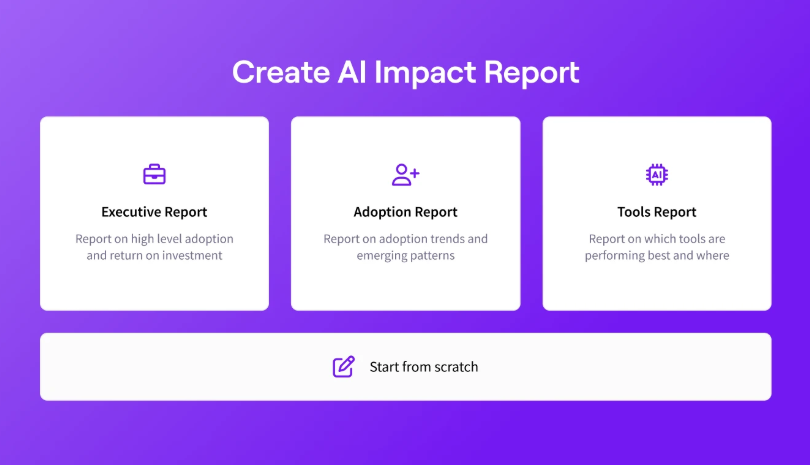
PRO TIP 💡: Once you have the numbers, the auto report builder turns them into a leadership-ready summary of what worked and where to invest next. That makes the case for expanding to the next workflow, with no deck to build by hand each quarter.
How AI Will Impact the Future of DevOps
How AI Will Impact the Future of DevOps
The shift underway is from AI that helps to AI that acts. Each trend below extends something teams already do today, so none of it is far-off speculation. Together, they point to a pipeline that runs with far less manual work.
The Move to Autonomous Agents
The state now: AI mostly suggests while a person acts. A copilot drafts code, recommends a fix, or answers a query, and the developer decides what to do with it.
Where it’s heading: That balance is likely to tip toward agents that handle work end-to-end. Early ones already open pull requests, run multi-step deployments, and resolve incidents with little prompting. As trust builds on low-risk tasks, they will probably take on more, from managing credentials to running rollouts to closing compliance gaps.
Self-Healing Infrastructure
The state now: AIOps tools already watch metrics and logs, catch anomalies early, and point to a likely root cause when something breaks. For now, most still stop at the alert and leave the fix to an on-call engineer.
Where it’s heading: The next step is systems that act on what they detect. They will diagnose the cause and apply the fix on their own, rolling back a bad deploy, rerouting traffic, or scaling a resource before users notice. Early self-healing setups already handle the routine cases, and the range will likely widen as the automation earns trust.
AI Securing AI-Written Code
The state now: More code is AI-written every quarter, and it carries more security holes than human code does. AI scanners catch a lot of them early, though a security engineer still works through the findings.
Where it’s heading: As AI writes more, the security side has to match its pace, since manual review cannot scale to that volume. Expect AI that vets dependencies before they merge, patches common flaws in generated code, and defends pipelines against AI-driven attacks. People will set policy and handle the threats that automation has not seen.
The Changing Role of the DevOps Engineer
The state now: A lot of the job is still hands-on. Engineers write pipeline scripts, wire up integrations, chase down failures, and tune infrastructure by hand, much of it routine work that fills the day.
Where it’s heading: As agents and self-healing systems absorb the routine work, the role moves up a level. Engineers will spend less time writing boilerplate and troubleshooting line by line, and more time designing architecture, setting the policies that govern what AI can do, and overseeing the automated systems doing the work.
The job moves toward judgment over execution. Engineers working through this change describe it the same way. One put it like this on Reddit:
AI isn’t replacing DevOps workflows, but it’s shifting where you spend your time. The grunt work (boilerplate Terraform, debugging YAML, writing runbooks) is getting automated in real-time. But someone still needs to understand why the infrastructure is shaped the way it is, and that’s where experience matters more, not less.
Get a Clear View of AI's Impact with Jellyfish
Get a Clear View of AI’s Impact with Jellyfish
AI now touches every stage of the pipeline, from the first commit to the production fix, and it keeps taking on more. The effect on delivery is harder to pin down. Teams can see the activity, but not what it did to throughput, quality, or cost.
Measuring that impact is what Jellyfish is built for. The software engineering intelligence platform brings signals from your tools, pipelines, and workflows into one place, then ties them to delivery and business outcomes.
With its AI Impact product, that same visibility extends to AI, tracking how coding assistants and agents affect speed, quality, and productivity.
In practice, that visibility breaks down into a few core functionalities:
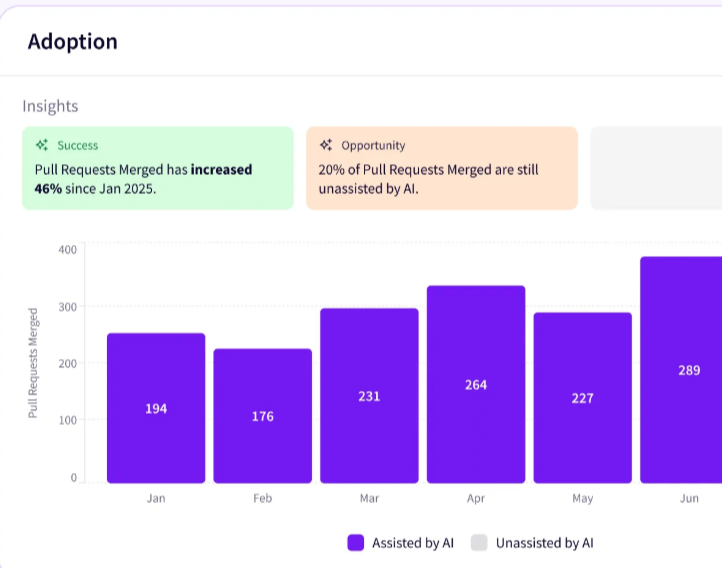
- Adoption insights: Jellyfish reads your system signals to show who uses which tool and how often. Adoption rarely matches the number of seats a team paid for. You can see where AI took hold and where it stalled, team by team.
- Multi-vendor comparison: Most teams run a few assistants at once, and Jellyfish compares them on one neutral model. You can see which tools work for which teams, then back the winners and drop the rest. It pulls a scatter of vendor dashboards into one view you can trust.
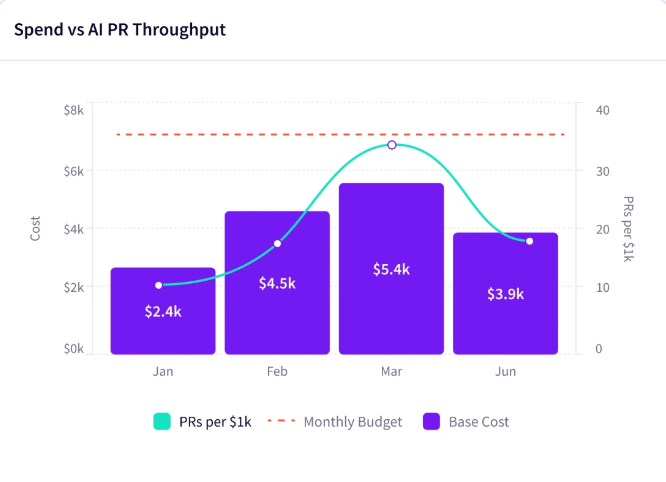
- AI spend insights: Jellyfish breaks down AI spend by tool, team, or project and ties each dollar to results. As costs rise, you can tell which spend pays off and which leak the budget. Few finance or engineering teams connect cost to outcomes this clearly on their own.
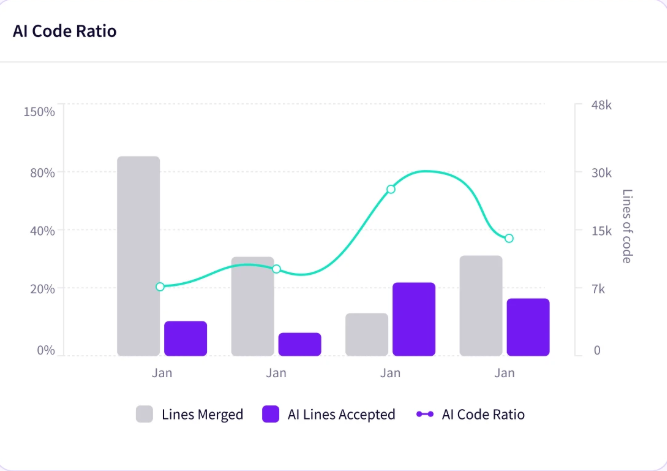
- Impact insights: How teams use AI is connected to how fast and how well they ship. You move from watching activity to measuring results. When leadership asks whether AI paid off, you have an answer backed by your own data.
- AI workflow insights: Pipeline signals, agent results, and developer feedback come together so you can see how AI reshapes the work. You learn whether review agents help or clog the pipeline, and what the team thinks of them. That mix of numbers and sentiment guides your next move.
- Auto report builder: Leadership-ready AI reports get written for you, covering wins, gaps, and next bets. The manual version eats a chunk of every quarter. This hands you something clear to share upward in minutes.
AI is now part of how most teams build software, and Jellyfish helps them track what that involvement returns. You can compare tools, tie spend to outcomes, and report results with data from your own systems.
Book a demo to see how it works.
FAQs
FAQs
What is vibe coding in DevOps?
Vibe coding is the practice of prompting an AI in plain language and letting it generate the code or configuration you need.
In DevOps, teams use it for Terraform, Kubernetes manifests, pipeline configs, and scripts. You describe the goal and refine what comes back.
How does AI streamline CI/CD pipelines?
AI makes CI/CD faster and more focused. It finds builds headed for failure early, runs only the tests that matter for a given change, and filters out flaky results. The pipeline spends its time on risky changes and returns feedback sooner.
How do DevOps teams use generative AI?
DevOps teams use generative AI to draft code, infrastructure files, and documentation from plain prompts. It handles tests, pipeline configs, changelogs, and incident summaries, saving time on work that used to be manual. But every draft still goes through review.
What AI technologies do DevOps teams rely on?
Two families do most of the work. Large language models (LLMs) read natural language prompts and generate code, tests, and configuration, while machine learning algorithms study past pipeline data to power predictive analytics that flag risky changes before they ship.
Most AI technologies in DevOps combine the two. The model drafts the artifact and the analytics guide decision-making about where to apply it, so the pipeline puts its effort where the risk is.
How does AI shorten development cycles and protect quality?
AI compresses the development process at two points:
- During continuous integration, it runs automated testing scoped to each change and catches failures early, so development cycles stay short.
- During continuous delivery, it studies change history to recommend safer release windows.
The checks protect quality at the same time. Teams ship high-quality code at a faster pace, and the steady feedback feeds continuous improvement across the pipeline.
How does AI reduce downtime in production?
AI watches running systems and acts before small problems grow. Continuous monitoring of logs and metrics catches anomalies early, traces them to a root cause, and in newer setups triggers remediation on its own, which cuts downtime for operations teams.
It also tunes the infrastructure underneath. AI right-sizes container workloads across Docker and orchestration platforms, so resource allocation matches demand. That tighter resource management keeps cloud spend in check, and clean data quality in the pipeline history is what makes any of it reliable.
Is human intervention still required in AI-driven DevOps?
Yes. AI handles more of the routine work, but a person still owns the high-risk decisions. Deployments, production changes, and anything hard to reverse need human sign-off, and AI-generated code still needs review, since it can carry bugs or security gaps.
About the author

Lauren is Senior Product Marketing Director at Jellyfish where she works closely with the product team to bring software engineering intelligence solutions to market. Prior to Jellyfish, Lauren served as Director of Product Marketing at Pluralsight.