In this article
Most engineering orgs budget for AI coding tools the same way they budget for Jira or Datadog. Count the developers, multiply by the seat price, and carry the figure into the annual plan.
That method undercounts now. Cursor moved to credit-based billing in 2025, Windsurf reworked its plans in March 2026, and GitHub moved every Copilot plan to usage-based billing on June 1. In each case, a seat includes a monthly credit allowance, and how fast a developer empties it depends on which models they pick and how much agent work they run.
Gartner reported in June 2026 that nearly a quarter of technology leaders already spend between $200 and $500 per developer each month on AI coding tokens. Around 6% spend more than $2,000.
This guide covers vendor pricing, the gaps in native dashboards, and how to reach a defensible number.
How AI Coding Tool Pricing Works
How AI Coding Tool Pricing Works
The price of an AI coding tool comes in two parts. You pay a monthly fee for every developer’s seat, and each seat includes an allowance of AI usage.
The seat fee covers access and admin features, and it costs the same whether a developer uses the tool once or all day. The allowance covers the work a developer sends to the model, and how fast it empties depends on that developer’s habits.
Seat fees are the easier half to plan around. Vendors sell them in three tiers, and each step up brings more administrative control.
- Individual plans, $10 to $20 per month. Built for one developer. You get autocomplete, chat, and agent access, billed to a personal card. There is no admin console, no way to see usage across a team, and no contract your security team can review.
- Team plans, $19 to $40 per user per month. The first tier that works for an engineering org. Billing runs through one invoice, an admin can add and remove users, and the vendor commits in writing to keeping your code out of public training data.
- Enterprise plans, $39 per user per month and up. Adds the controls large organizations need before rollout. SSO and SCIM handle provisioning, audit logs record who used what, zero data retention satisfies compliance reviews, and the vendor can index your private repositories for better context.
Those bands cover standard seats. Several vendors introduced premium seat types in 2026 for developers running agents all day, and those push team pricing well past $40. The table below shows what the major tools charge, along with the usage each seat includes.
| Tool | Individual | Team | Enterprise | Included usage |
| GitHub Copilot | $10/mo (Pro) | $19/user/mo | $39/user/mo | Org plans include credits equal to seat price. Completions unmetered |
| Cursor | $20/mo | $40/user/mo Standard, $120 Premium | Custom | Separate pools for first-party and third-party models |
| Claude Code | $20/mo (Pro) | $100 to $125/seat (Premium) | ~$20/seat plus API usage | Shared with Claude chat usage |
| Windsurf | $20/mo | $40/user/mo | Custom | Daily and weekly quotas. Tab completions unmetered |
Quick disclaimer → Two notes on the table. Copilot Business and Enterprise credits pool across the organization instead of locking to individual seats, so a team of 50 on Enterprise shares $1,950 in monthly credits and heavy agent users draw from the same balance as everyone else. Claude Code works differently, appearing only on Premium seats within a Team plan. Standard seats cost $25 and exclude it, though you can mix both types in one organization and buy Premium only for developers.
The last column moves your invoice. Autocomplete does not count against the allowance at almost any vendor, so a developer who accepts inline suggestions all day costs you the seat fee and nothing more. Chat and agent work consume the allowance, and most vendors meter it on tokens.
That counts the context a developer sends, the output the model returns, and in some cases the cached content reused between calls. Prompt size matters as much as prompt count, which is why an agent reads twenty files before editing one bill for all twenty.
Running out has different consequences depending on the vendor. Some keep the developer working and bill the overage at API rates. Others stop them until the quota resets, and the cost moves from your budget to your delivery schedule.
The limit of these numbers → Numbers like these are enough to negotiate a contract. They cannot tell you what last month cost. For that, you need to see usage developer by developer, which is what sends most leaders to the vendor dashboard.
Why Native Dashboards Fail to Show Real Cost of AI Coding Tools
Why Native Dashboards Fail to Show Real Cost of AI Coding Tools
A vendor admin console tracks adoption. It shows how many seats are active, how often developers accept suggestions, how many requests each person sends, and how much of the credit allowance remains.
Cost per developer is not on that list. Vendors build these consoles to manage a product, and budget reporting was never part of the requirement.
Four problems follow from that:
- No vendor reports past its own product: A backend squad on GitHub Copilot, a frontend team on Cursor, and a platform engineer billing Claude Code to an API key produce three separate reports. Each uses its own unit of measurement, so credits, quotas, and accepted suggestions cannot be summed into a single figure.
- Usage and billing run as separate systems: The console tracks credits consumed. Finance receives an invoice weeks later, aggregated at the account level. Connecting a specific developer’s token consumption to a specific line on that invoice means exporting both and matching them by hand.
- Console reporting does not match your budget structure: Vendors group usage by individual users and by organization. Engineering budgets run by team, by product line, or by cost center. Producing a number your finance partner recognizes requires rebuilding that mapping manually, and it breaks whenever someone changes teams.
- Consumption appears without output: The console tells you a developer consumed heavily last month. It cannot tell you whether that consumption reduced cycle time, cut review load, or increased throughput, because it has no access to your Git history or your issue tracker.
Gartner reported the same problem in June 2026. Many vendors give limited visibility into how token usage gets measured and billed, which makes it harder for organizations to forecast spend or judge return. The same research found that these platforms include few built-in cost optimization features, so monitoring falls to the customer.
The number you need does not exist in any single system. Building it means pulling from the vendor consoles, your invoices, and your own delivery data, then reconciling all three yourself.
How to Actually Measure AI Cost Per Developer
How to Actually Measure AI Cost Per Developer
Most orgs can produce a total AI spend figure quickly. The per-developer number takes more work, because the total arrives aggregated and you have to reconstruct who consumed what before you can judge whether it was worth it.
The three steps below cover that reconstruction:
Audit Every Input That Reaches Your AI Line Item
This step finds every charge that reaches your AI budget in a month. Some of it falls outside the vendor relationship entirely, on API keys, cloud bills, and expense reports, which is why a license totally understates what most orgs spend.
How to do it →
- Export the billing statement from every AI vendor, including overage charges past the included allowance
- Search your expense system for AI coding assistant subscriptions charged to personal cards
- Pull usage reports for any API keys developers billed directly to a model provider
- Check cloud billing for compute tied to self-hosted or locally run models
- Ask procurement for contracts signed outside the engineering budget
Example → A 40-developer org on Copilot Enterprise pays $1,560 a month in licenses, or $39 per developer. Once you count $2,100 in overages, $480 for a squad running Cursor, $1,400 on a platform team API key, and $300 in expensed subscriptions, the monthly total comes to $5,840, or $146 per developer.
Attribute Spend to Teams
Pooled credits and shared API keys produce one number covering everybody, which is fine for paying the bill and useless for allocating it. This step splits that number across the teams that generated it.
How to do it →
- Export per-user consumption reports from every vendor console for the same month
- Map each user to a team, product line, or cost center using your HR or identity system
- Split shared API key spend by the team that owns the key or the service it runs against
- Assign expensed personal subscriptions to the team the developer belongs to
- Rank teams by cost per developer and flag anyone consuming several times the median
Example → A frontend team of 18 and a platform team of 6 share one Copilot invoice. Licenses cost $702 for frontend and $234 for platform. When you split the consumption data, the platform team accounts for $3,100 in overages from agent work on infrastructure repos. Per developer, that is $556 for platform and $61 for frontend.
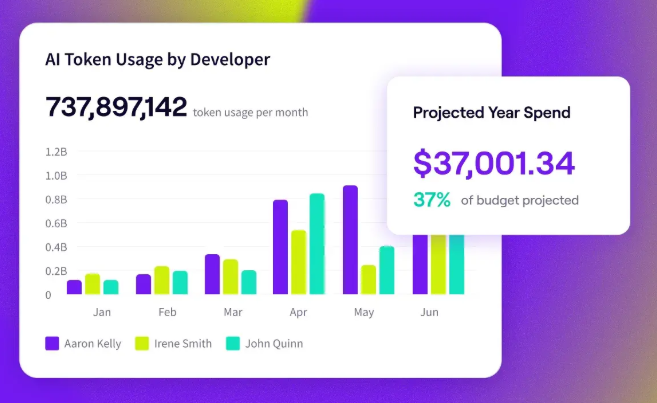
PRO TIP 💡: Team membership changes, and every change breaks last month’s mapping. Jellyfish’s AI token spend dashboard splits usage and cost by tool, team, or initiative on its own, so the attribution holds without anyone rebuilding it.
Compare Spend Against Delivery Data
A high cost per developer is not a problem on its own. Teams doing migration work or clearing technical debt should consume more than teams on steady feature delivery, so the number only means something next to what the team shipped.
How to do it →
- Pull cycle time, PR throughput, and review load per team for the same month
- Compare each team’s consumption trend against its delivery trend over three to six months
- Check whether AI-assisted changes generate more review cycles or more post-merge fixes
- Separate teams doing migration or modernization work, where high consumption is expected
- Review the outliers with their engineering managers before drawing conclusions
Example → Two teams both double their AI spend in a quarter. One cuts cycle time from nine days to five while review load holds steady. The other keeps cycle time flat and sees revert rates climb, which points to code moving faster into review and slower out of it.
Best Practices for Optimizing AI Coding Tool Costs per Developer
Best Practices for Optimizing AI Coding Tool Costs per Developer
Provisioning and usage habits are the two levers that move cost per developer. The practices below cover both, and most take effect inside one billing cycle:
- Assign seat tiers by usage pattern: A default enterprise seat for every developer overpays for the ones who only use autocomplete. Sort your engineers by how they work, then provision to match. Reserve high-allowance tiers for the people who run agents daily.
- Set hard caps and alerts: Spend caps prevent the failure mode that produces the worst invoices. Configure a per-user alert partway through the allowance and a hard limit at the top. Both take minutes to set up in most vendor consoles.
- Match models to task complexity: Frontier models cost several times what small models cost per token. Set a default model for routine work like formatting, test drafting, and small fixes. Keep the expensive models for multi-file architectural changes.
- Narrow the context developers send: Prompt size drives cost as much as prompt count. A developer who sends focused context spends a fraction of what a colleague spends on the same task with the whole repository attached. Make scoping part of how your team works.
- Reclaim inactive seats: Run a monthly cleanup against your own usage reports. Any seat with no activity for 30 days goes back into the pool. Many organizations find enough dormant licenses to cover their next round of requests.
- Consolidate vendors: Vendor sprawl carries two costs, the duplicate licenses and the reconciliation work. Pick the tools your teams genuinely prefer, retire the rest, and use the consolidated seat count as leverage at renewal.
- Classify work by agent involvement: Agent-led work costs the most because every step in the loop bills again. Define which categories of work justify that cost before developers decide case by case. Gartner recommends the three-way split of developer-led, developer-with-agent, and agent-led.
Manage AI Coding Tool Cost Efficiently with Jellyfish
Manage AI Coding Tool Cost Efficiently with Jellyfish
Running that framework by hand is a project with no owner. Each vendor reports on its own product in its own units, your finance system holds billing records with no connection to Git or Jira, and somebody rebuilds the mapping every month. Custom pipelines solve it until a vendor changes its pricing model or introduces a new credit system, and then they break.
Jellyfish reports AI spend and engineering output through one model. The platform pulls from your AI tools alongside the systems your engineers already work in, and then normalizes everything into a view that covers the full stack.
Here are some specific things you can track with Jellyfish:
- AI token spend dashboard: Breaks spend and token usage out by tool, team, or initiative, which handles the attribution step from the framework above. Year-to-date spend, projected spend, and run rate turn that history into a forecast you can defend in a budget review.
- Vendor comparison: Benchmarks assistants, agents, and review tools against one consistent model. Consolidation decisions depend on this, because a squad on Cursor and a squad on Copilot generate numbers that do not compare on their own terms.
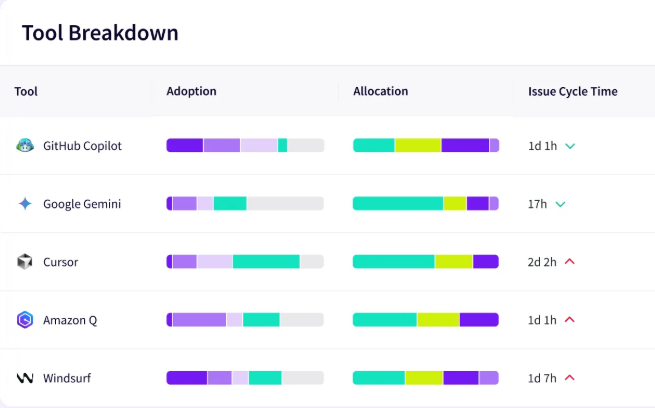
- Impact insights: Links AI spend to delivery outcomes through data your repositories and planning tools already generate. This covers the third step of the framework, showing whether a team’s consumption moved throughput or quality, with PR-level detail behind each figure.
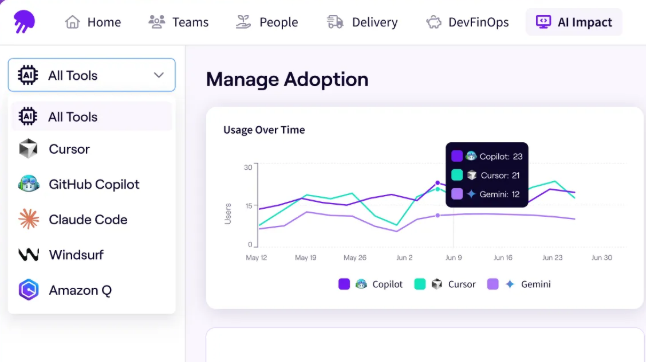
- Adoption insights: Shows AI usage per developer and per tool from signals the platform picks up automatically. Dormant seats come up without anyone running a report, which makes the reclamation practice above something you sustain.
- Auto report builder: Somebody rebuilds this deck by hand every month. This generates it from your data, per tool or across the whole stack, adjustable for whoever is asking.
Agent adoption will push consumption higher through next year, and vendors will keep adjusting how they meter it. Measurement is what keeps that manageable, because a cost per developer only means something next to what the spend produced.
Book an AI Impact demo to see the numbers behind your AI line item.
FAQs
FAQs
Do AI coding tools offer volume discounts?
Yes. Most vendors negotiate per-seat pricing at enterprise scale.
Consumption is usually excluded, so token and credit usage stays metered at published rates even under a discounted contract. Push for a larger pooled allowance alongside the seat discount if your teams run agents daily.
Is there a viable free tier for enterprise developers?
No. Free plans limit agent sessions and premium model access, and they lack IP indemnity, zero data retention, and admin controls.
Your security team has nothing to review, and your code may train public models.
What is the difference between cloud agents and local models?
Cloud agents call a model provider’s API and charge per token consumed. Local models run on your own hardware, so the marginal cost per request drops to electricity and the fixed cost moves into GPUs and maintenance.
Most teams run cloud agents for complex work and reserve local models for high-volume routine tasks where the quality gap is less important.
What is the total cost of ownership for an AI coding tool?
Your TCO covers subscription fees, token overages, direct API billing, and compute for any self-hosted models. The hidden costs show up outside those lines, in review time spent on AI-generated code, personal subscriptions expensed back, and the engineering hours somebody spends maintaining reporting pipelines.
A complete ROI calculation measures that total against delivery data, so you compare spend to productivity gains in cycle time and throughput instead of self-reported time savings.
Why do two developers on the same plan get different bills?
Vendors meter input tokens and output tokens separately, and both pull from the same pool of AI credits.
A developer who fills the context window with a whole directory or several attached knowledge bases pays far more per request than one who scopes to the files a task touches.
Agent work compounds the difference, because every step in the loop resends context. Configure budget alerts per user to catch token overages before the invoice arrives.
Are AI-native IDEs more expensive than extensions?
AI-native IDEs like Cursor and Windsurf are VS Code forks that replace your editor, and their subscription prices land close to what extensions charge. The difference appears once usage starts.
Tools like Aider, Cline, and OpenAI Codex often run on API billing through your own key, which removes the subscription and makes every request billable at published rates.
Power users pay for consumption either way, so the choice comes down to whether you want a predictable monthly fee or metered usage you control directly.
About the author

Lauren is Senior Product Marketing Director at Jellyfish where she works closely with the product team to bring software engineering intelligence solutions to market. Prior to Jellyfish, Lauren served as Director of Product Marketing at Pluralsight.