In this article
Engineering leaders now face more AI tool options than any team could trial. In our 2026 State of Engineering Management report, three AI tools finished within nine points of each other at the top, and respondents named twelve more behind them. The category also extends well past the IDE, with AI products for planning, code review, testing, security, and incident response.
More options also mean more ways to invest in the wrong part of the pipeline. When pull requests already wait two days for review, a faster coding assistant only adds more work to the same queue.
This guide covers the best AI SDLC tools by phase, what each one does well, and a framework for choosing the ones that fix your team’s biggest constraint first.
What Are AI SDLC Tools and What Is Their Role?
What Are AI SDLC Tools and What Is Their Role?
AI SDLC tools are software products that use large language models (LLMs) and machine learning to assist with or automate work across the software development lifecycle.
The category includes IDE extensions, terminal-based coding agents, pull request reviewers, test generators, security scanners, and analytics platforms that connect data from across the engineering toolchain.
The main difference from traditional DevOps automation is context. A CI pipeline executes the same predefined steps every time, while an AI tool reads the surrounding code, tickets, and logs and produces output that fits the specific change in front of it.
AI SDLC tools also vary in how much they do on their own.
- Assistants suggest code or text and wait for a developer to accept it. Inline code completion and chat-based help inside the IDE fall into this group.
- Agents take a task, plan the steps, edit multiple files, execute tests, and open a pull request with little human input.
Agentic AI use is climbing quickly. According to our AI Engineering Trends data, agents now generate about one in five pull requests at the median company, and more than half at the top 10% of AI adopters.
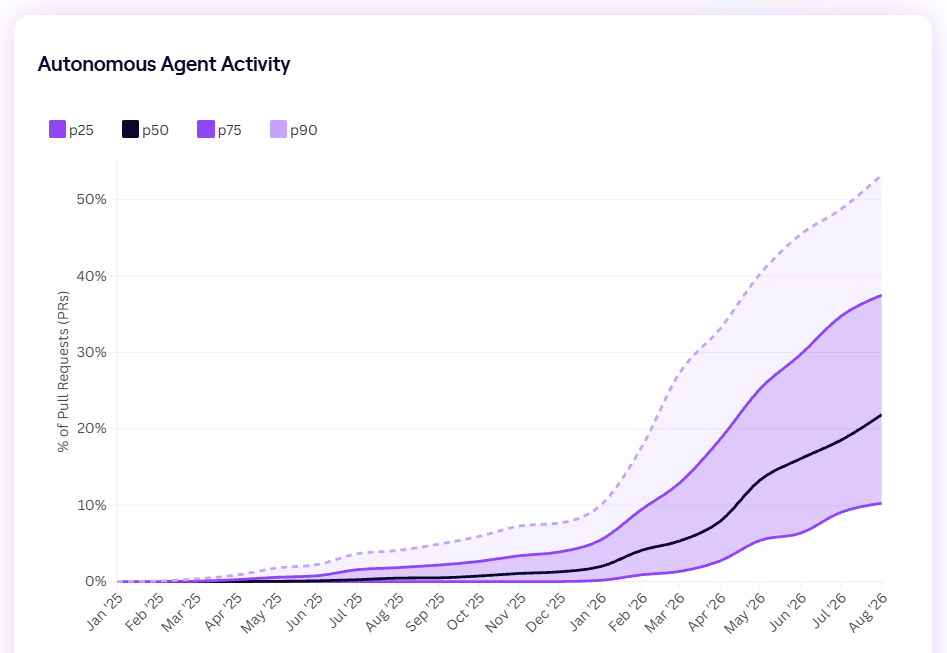
Share of pull requests created or generated by AI agents. The black line is the typical company, and the top dashed line is the top 10% of companies.
Across the lifecycle, these tools play four main roles:
| Role | What it looks like | Example task |
| Augmentation | Helps engineers with routine work inside their existing workflow, such as code completion, ticket summaries, and first drafts of documentation. | A developer accepts an inline suggestion for a data validation function. |
| Automation | Handles repeatable tasks end to end, such as generating unit tests, scanning dependencies for vulnerabilities, or refactoring legacy modules. | An agent writes unit tests for every new endpoint in a pull request. |
| Orchestration | Connects context across systems so work moves between phases with fewer manual handoffs. | An agent picks up a Jira ticket, writes the code, and opens a PR linked to the original issue. |
| Measurement | Tracks how AI and other tools affect the flow of work, using data from Git, issue trackers, and CI/CD. | An engineering leader compares cycle time for AI-assisted and non-AI pull requests. |
None of these roles removes the need for engineering judgment. AI development tools take on repetitive execution so engineers can spend more time on architecture, system design, and business logic.
AI tools also magnify the habits an organization already has. Google’s 2025 DORA research found that AI makes high-performing teams stronger and makes the problems of struggling teams worse. Before you choose a tool, it helps to know which part of your process needs the most support.
The Best AI SDLC Tools to Consider
The Best AI SDLC Tools to Consider
The AI SDLC market is organized around phases. Some vendors focus on the IDE, others on pull requests, testing, or production systems, and a few connect data across all of them.
The sections below follow the lifecycle in order, with the most widely used tools for each phase and what sets them apart.
| Tool | Phase | Best for | Standout AI capability |
| Jellyfish | Engineering intelligence (all phases) | Measuring AI ROI across every tool and connecting it to business outcomes | End-to-end view of AI’s impact on speed, quality, and cost, with side-by-side comparison of every assistant and agent your teams use |
| Atlassian Rovo | Requirements and backlog | Enterprise teams that plan in Jira and document in Confluence | Breaks down work, summarizes tickets, and assigns tasks to AI agents inside Jira |
| Linear | Requirements and backlog | Fast-moving teams that want planning and agent-driven work in one tool | Triage Intelligence and an agent that can take a bug from triage to a reviewed fix |
| Productboard Spark | Requirements and backlog | Product teams that start from customer feedback | Groups feedback into themes and drafts specs coding agents can read |
| Claude Code | Coding assistants and agents | Autonomous refactors, new features, and multi-step work | Plans, writes, and tests code across files, and opens pull requests |
| Gemini Code Assist | Coding assistants and agents | Organizations on Google Cloud | Agent mode with plan approval, plus suggestions based on private codebases |
| GitHub Copilot | Coding assistants and agents | Teams that manage code, issues, and reviews in GitHub | Cloud coding agent that turns assigned issues into pull requests |
| Cursor | Coding assistants and agents | Developers who want an AI-native editor | Multi-file editing, background agents, and its own Composer model |
| OpenAI Codex | Coding assistants and agents | Teams in the OpenAI ecosystem | Parallel cloud agents that work in isolated environments |
| CodeRabbit | Code review and security | Fast first-pass reviews on any major Git platform | Codebase-wide semantic index that finds cross-file issues |
| Qodo | Code review and security | Large orgs that need consistent standards across repos | Self-learning rules system with multi-agent review |
| Graphite | Code review and security | Teams with high PR volume, especially on Cursor | Stacked PRs with the Diamond AI reviewer |
| Snyk | Code review and security | Security scanning for human and AI-written code | Agent Fix, which verifies each generated fix with a new scan |
| Harness | Test automation and CI/CD | Teams that want AI test selection built into CI/CD | Test Intelligence and automatic flaky test quarantine |
| CloudBees Smart Tests | Test automation and CI/CD | Smarter test selection without replacing current CI tools | Predictive test selection and failure grouping by root cause |
| mabl | Test automation and CI/CD | End-to-end coverage with less maintenance | Self-healing tests and automated failure triage |
| Diffblue | Test automation and CI/CD | Large Java codebases that need more unit test coverage | Reinforcement learning test generation, deployable on-premises |
| Datadog | Observability and incident response | Teams already monitoring with Datadog | Bits Investigation, which investigates alerts as they trigger |
| PagerDuty | Observability and incident response | Teams that manage on-call through PagerDuty | SRE Agent that joins on-call schedules as a virtual responder |
| incident.io | Observability and incident response | Teams that manage incidents in Slack | AI SRE that investigates and reports findings in Slack |
| Dynatrace | Observability and incident response | Large enterprises that need explainable root cause analysis | Deterministic causal AI based on a real-time topology map |
| DX | Engineering intelligence | Atlassian-centric orgs focused on developer experience | Developer surveys combined with system metrics |
| LinearB | Engineering intelligence | Productivity metrics plus automated PR workflows | AI Analytics comparing AI-assisted and human work |
Phase 1: Requirements and Backlog Tools
The planning phase is where teams decide what to build and write it down as requirements and tickets. AI tools here help product managers and engineers organize customer feedback, write clearer requirements, and keep the backlog up to date.
Well-written tickets also make later phases easier, especially for coding agents that rely on ticket details to understand the task.
Popular tools to consider:
- Atlassian Rovo in Jira: Rovo is Atlassian’s AI assistant, built directly into Jira and Confluence. It helps teams break large pieces of work into tasks, summarize long tickets, and assign routine work to AI agents inside existing Jira workflows. Its main advantage is context, since Rovo uses everything a team already keeps in Jira and Confluence and can share that context with external coding agents through the Rovo MCP Server. Best for: Enterprise teams that already plan in Jira and document in Confluence.
- Linear: Linear is an issue tracker and product development system for software teams. It sorts incoming issues by suggesting owners and labels, links duplicates automatically, and hands off routine triage and follow-up work to Linear Agent. Teams choose it for speed, since planning in Linear is lightweight and its agent can take a bug from triage to a reviewed code fix without the work leaving the tool. Best for: Fast-moving product and engineering teams that want planning and agent-driven work in one tool.
- Productboard Spark: Spark is Productboard’s AI agent for product managers. It analyzes customer feedback from every channel, groups it into themes, and drafts specs tied to the roadmap. Spark is strongest at the earliest stage of planning, and it passes finished specs to coding agents like Claude Code, Codex, and Cursor through Productboard’s MCP server. Best for: Product teams that start from customer feedback and need a clear path from insight to spec.
Common limitations: AI planning tools learn from existing tickets, so new workspaces and messy backlogs get weaker suggestions. AI-drafted specs and tickets still need review from someone who knows the product, since unclear requirements lead to rework later. Rovo and Spark also work best inside their own ecosystems, which makes them harder to adopt for teams that use several planning tools.
Signs the tool is paying off: The clearest sign is a shorter path from idea to ready ticket, meaning less time between a feature request and a well-defined item engineers can start on. Tickets should also need fewer clarifications once work begins, with fewer reopened, rescoped, or split items mid-sprint. Over a few cycles, teams should see more accurate sprint plans, with a larger share of planned work completed on schedule and fewer unplanned additions.
Phase 2: Coding Assistants and Agents
Coding is where most teams start with AI, and it’s still the most common use case. Code writing is the top use case at 53% in our State of Engineering Management report. Tools in this phase range from inline completion inside the IDE to agents that take a task, work across the codebase, and open a pull request.
The market has also changed quickly. A year ago, GitHub Copilot was the clear leader at 42%, and this year it ranks third. Claude Code is now the most popular AI coding tool, followed by Gemini Code Assist and GitHub Copilot, and no tool dominates the way Copilot once did.
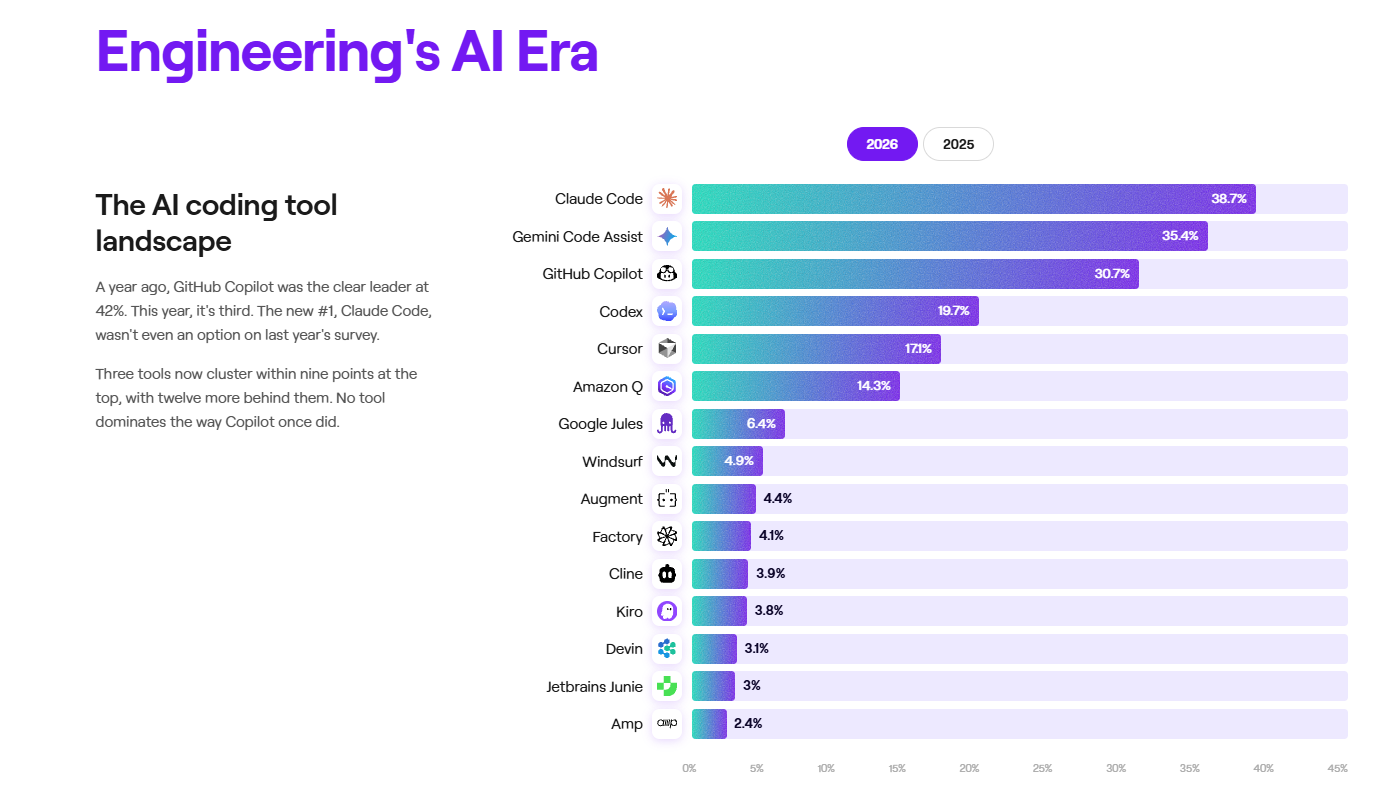
Share of engineering professionals using each AI-assisted coding tool in 2026.
Popular tools to consider:
- Claude Code: Claude Code is Anthropic’s agentic coding tool, available in the terminal, IDEs, a desktop app, and the web. It plans changes, writes code, tests it, and opens pull requests, and it can split bigger tasks across several agents. It’s strongest on long-running work like refactors and new features, where the engineer sets the direction and reviews the result. Best for: Teams that want an autonomous agent for refactors, new features, and other multi-step work.
- Gemini Code Assist: Gemini Code Assist is Google’s AI coding assistant for VS Code, JetBrains IDEs, and Android Studio. It completes and generates code, answers questions about the project, and in agent mode shows a plan for approval before making multi-file changes. The Enterprise edition adds suggestions based on a company’s private codebase, which makes it a strong fit for Google Cloud teams. Best for: Organizations on Google Cloud that want coding help tied to their private codebase.
- GitHub Copilot: GitHub Copilot started as inline code completion and now includes chat, an agent mode, and a cloud coding agent. Developers can assign it a GitHub issue, and it writes the code, tests it, and opens a pull request in the background. The tight connection to GitHub is the key reason to choose it, since coding, reviews, and issues all stay in one workflow. Best for: Teams that manage code, issues, and reviews in GitHub.
- Cursor: Cursor is an AI-first code editor built on VS Code. It understands the whole codebase, makes changes across multiple files, and lets developers hand tasks to background agents while they keep working. It also supports a broad choice of models, including its own Composer model tuned for agentic coding. Best for: Developers who want an AI-native editor with strong multi-file editing and model choice.
- OpenAI Codex: Codex is OpenAI’s coding agent, available as a CLI, IDE extensions, a desktop app, and a cloud agent in ChatGPT. It works on each task in an isolated environment, edits the code, tests it, and returns a diff for review. Codex is built for delegation, since developers can hand off several tasks at once and keep working locally. Best for: Teams in the OpenAI ecosystem that want to hand off background work to cloud agents.
Common limitations: Coding agents can only work with the context they can access, so results vary with codebase structure. Our State of AI in Software Engineering research found that centralized and balanced codebases saw roughly 4x returns on AI adoption, while the most fragmented setups saw a 0.9x return.
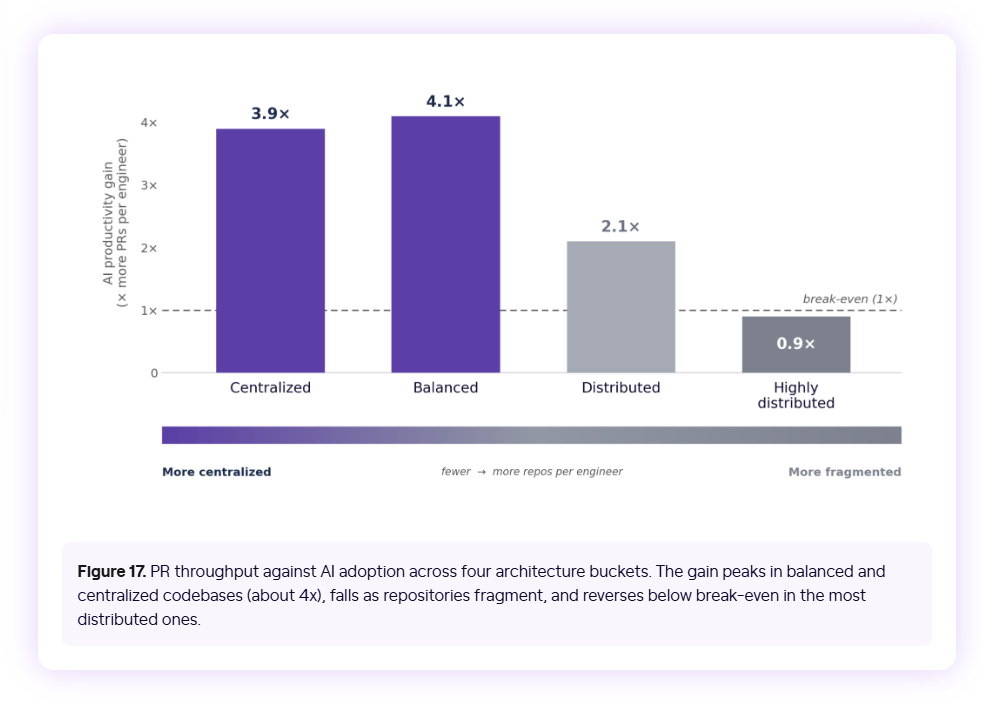
Productivity gains from AI adoption by codebase structure, measured in PRs per engineer. Centralized and balanced codebases saw about 4x gains, and the most fragmented ones fell below break-even.
Cost is the second issue. In the same engineering management survey mentioned above, token cost led the list of AI challenges, and agent-heavy workflows may consume budget faster than inline completion. AI-generated code also needs careful review, since code that looks correct can hide subtle bugs, and more code means more work for reviewers.
Signs the tool is paying off: The first sign is a drop in coding time, meaning less time between a pull request’s first and last commit. PR throughput per engineer should also increase, and overall cycle time should fall with it. The key check is quality. Those gains only hold up if the change failure rate, revert rate, and review time stay steady as output grows.
Phase 3: Code Review and Security Tools
Code review is where the extra output from AI coding tools piles up. Every pull request an agent opens still needs a reviewer, and senior engineers often end up carrying most of that load.
AI review and security tools handle the first pass by summarizing changes, checking them against team standards, and catching bugs and vulnerabilities before a human reviewer steps in.
Adoption in this category has grown quickly. In our State of Engineering Management report, code review ranked at the bottom of AI use cases at 20% in 2025. In 2026, it’s second at 49%, behind only code writing.
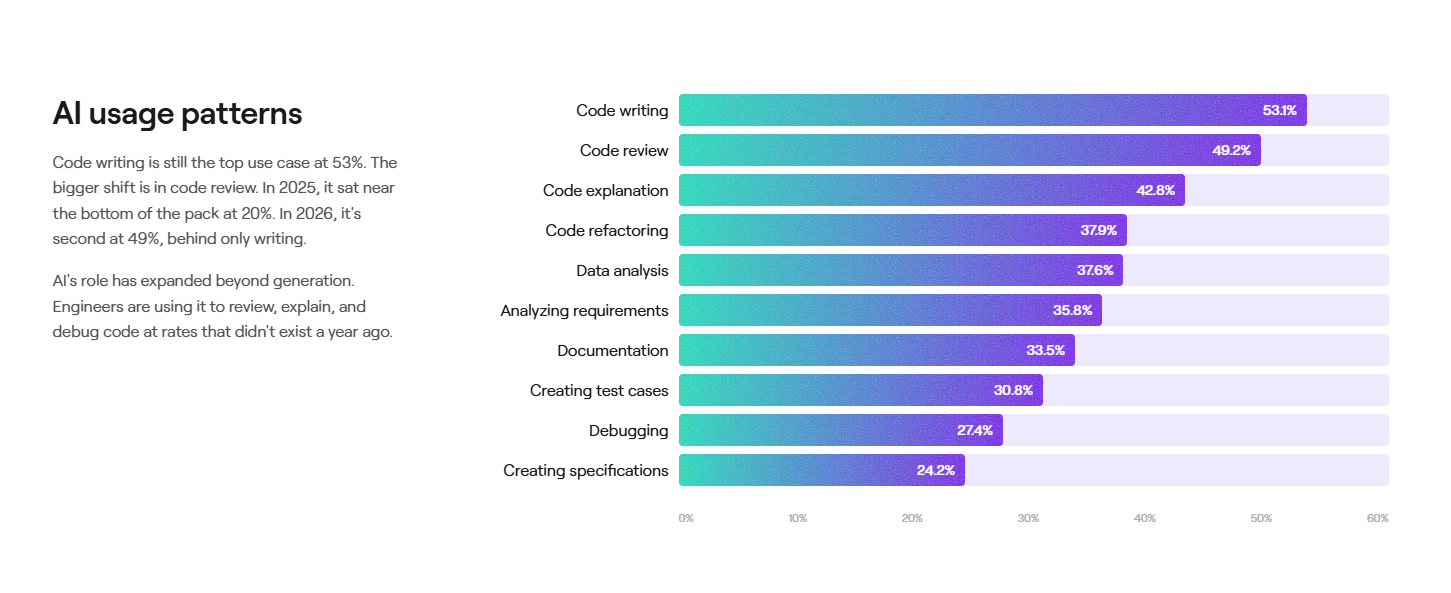
Share of engineering professionals using AI for each task in 2026.
Popular tools to consider:
- CodeRabbit: CodeRabbit is an AI code review tool that works with GitHub, GitLab, Azure DevOps, and Bitbucket. When a PR is opened or updated, it posts a plain-English summary, line-by-line comments on bugs, security, and performance, and one-click fix suggestions. CodeRabbit stands out for context, since it builds a semantic index of the entire codebase and can detect cross-file bugs where a change affects another module. Best for: Teams that want fast, automated first-pass reviews on any major Git platform.
- Qodo: Qodo (formerly CodiumAI) is an AI code review platform that uses specialized agents with full codebase context, PR history, and organization-specific rules. Its rules system discovers standards from the codebase and PR history, converts existing rule files into structured standards, and enforces them during PR review. Qodo is built for governance at scale, with centralized visibility into quality, compliance, and rule adoption across teams and repos. Best for: Larger engineering organizations that need consistent standards across many teams and repositories.
- Graphite: Graphite is a code review tool built around stacked pull requests, with a merge queue and an AI reviewer called Diamond. Cursor bought Graphite in December 2025, and by March 2026, Cursor’s cloud agents could open PRs, get them reviewed, and merge them without leaving Graphite. Graphite’s edge is workflow, since stacking splits large changes into smaller pieces that people and AI can review more easily. Best for: Teams with high PR volume, especially those already using Cursor.
- Snyk: Snyk is a developer-first security platform. Snyk Code scans source code, and its AI agent, Snyk Agent Fix, generates and validates fixes as code is written, whether by humans or AI. What sets Snyk apart is verification. If a generated fix fails a Snyk Code scan, the system analyzes the error, feeds it back into the model, and generates a corrected version, and Snyk doesn’t use customer code to train its models. Best for: Teams that want security scanning and automated fixes for both human-written and AI-generated code.
Common limitations: The value of an AI reviewer depends on how relevant its comments are, and too many low-value suggestions make developers skim past all of them. These tools detect bugs and rule violations well but can’t judge whether a change matches the product’s goals or the system’s design, so a human reviewer still approves the merge. Independence is another factor. Cursor owns Graphite, and GitHub offers both Copilot’s coding agent and its code review, so some teams choose a separate vendor for review.
Signs the tool is paying off: Review time should drop, with pull requests reaching their first review sooner and merging faster after the last commit. Senior engineers should spend fewer hours on routine reviews, and a high share of AI comments that developers accept or act on shows the tool is producing signal over noise. For security tools, watch time to remediate vulnerabilities, and make sure the change failure rate holds steady or improves as reviews speed up.
Phase 4: Test Automation and CI/CD Tools
AI coding tools send more code into CI pipelines, and every change still has to pass the test suite. If the suite takes hours or fails at random, faster coding only creates longer queues. AI tools in this phase generate tests, select which tests each change needs, and diagnose failures, so pipelines can handle the extra volume.
Testing has also been slower to adopt AI than coding. In the same State of Engineering Management survey, about 31% of respondents use AI to create test cases, compared with 53% who use it to write code.
Popular tools to consider:
- Harness: Harness is a CI/CD platform with AI features across build, test, and deployment. Its Test Intelligence maps every test to the code it exercises and executes only the tests affected by each change, and it automatically detects and quarantines flaky tests. The value comes from having everything in one pipeline, where test selection works alongside parallel execution and coverage thresholds that block a PR when coverage drops. Best for: Teams that want AI test selection built into their CI/CD platform.
- mabl: mabl is an agentic testing platform for web, mobile, and API testing. It generates tests from natural-language instructions or Jira requirements and triages failures automatically with root cause insights. Maintenance is where mabl saves the most time, since tests self-heal during execution and adjust to UI changes without human intervention. Best for: QA and engineering teams that need end-to-end coverage with less time spent maintaining tests.
- CloudBees Smart Tests: Smart Tests (formerly Launchable) uses machine learning to pick the tests most relevant to each code change and groups failures by root cause so teams know which to fix first. It connects to Jenkins, GitHub Actions, GitLab, and Bitbucket through a CLI or API. The appeal for many teams is control, since they set the confidence thresholds, review every recommendation, and keep full audit visibility. Best for: Teams that want smarter test selection without replacing their current CI tools.
- Diffblue: Diffblue builds AI agents for Java unit testing. Diffblue Cover uses reinforcement learning to generate unit tests that Diffblue guarantees will compile and pass, and its newer Testing Agent works with GitHub Copilot and Claude Code to generate verified tests across entire codebases. Diffblue suits security-conscious enterprises, since Cover can be deployed fully on-premises and proprietary code never leaves the company’s infrastructure. Best for: Enterprises with large Java codebases that need to raise unit test coverage, especially before modernization projects.
Common limitations: Test selection tools learn from historical test data, so they work best for teams with established suites and a steady build history. Skipping tests also carries some risk, which is why CloudBees recommends running the full suite later in the pipeline, for example after a PR merges.
AI-generated tests have limits too. Regression tests capture how the code behaves today, which means they can lock in existing bugs, so teams still need tests written against intended behavior. End-to-end platforms like mabl also bring recurring costs and a degree of vendor lock-in compared with code-first frameworks.
Signs the tool is paying off: Pipeline speed shows the impact fastest. CI build times should fall, and developers should get test results on their PRs sooner. Fewer flaky failures and reruns mean the test suite is becoming more reliable, and coverage on new code should rise without extra manual effort. Over time, change failure rate and the number of bugs reaching production should hold steady or drop as more code goes through the pipeline.
Phase 5: Observability and Incident Response Tools
The operating stage begins once code is live, and it covers monitoring, alerting, and incident response. For many teams, the slowest part of an incident is the investigation itself, since on-call engineers have to piece together dashboards, logs, and recent changes before they know where to look.
AI tools in this phase take on that first round of investigation automatically, correlate signals across the stack, and propose likely root causes within minutes. Reliability also protects gains from earlier phases. Time spent on incidents comes out of roadmap work, so a faster, calmer on-call process keeps more of the time that AI saves elsewhere.
Popular tools to consider:
- Datadog: Datadog is an observability and security platform for cloud applications. Its AI agent, Bits Investigation, looks into alerts as soon as they trigger, follows the team’s runbooks, and identifies likely root causes. It can also page engineers, create incidents, and open Jira tickets. Datadog’s edge is data, since Bits works from the same metrics, logs, and traces the team already sends to the platform. Best for: Teams already using Datadog for monitoring that want alerts investigated automatically.
- PagerDuty: PagerDuty is an incident management and on-call platform. Its SRE Agent works as a virtual responder that joins the team’s on-call schedules and escalation policies, identifies anomalies through AIOps, and performs diagnostics before a human is paged. PagerDuty also pushes incident data back to developers and coding agents, which helps teams fix root causes in the codebase so the same incidents don’t repeat. Best for: Organizations that already manage on-call through PagerDuty and want an AI first responder.
- incident.io: incident.io is an incident management platform built around Slack. Its AI SRE triages and investigates alerts, analyzes the root cause, and recommends whether to act now or defer, connecting telemetry, code changes, and past incidents along the way. Because the investigation happens inside Slack, responders get findings in the same channel where they coordinate the incident. Best for: Teams that manage incidents in Slack and want investigation and coordination in one place.
- Dynatrace: Dynatrace is an observability platform whose AI identifies root causes across large volumes of events and ranks each problem by its impact on customers. It takes a different approach from most AI SRE tools. Davis AI performs deterministic causal analysis by tracing the Smartscape real-time topology map, which makes each conclusion easier to explain and verify than an LLM-only guess. Best for: Large enterprises with complex cloud environments that need explainable root cause analysis.
Common limitations: An AI investigator can only work with the telemetry it receives, so gaps in instrumentation, missing traces, or inconsistent service tagging lead to weaker root cause suggestions. Teams should also keep humans in charge of production. Several AI incident vendors now follow the same approach, with agents investigating on their own and a person approving any action that changes production, and a sensible adoption path starts with read-only investigations before any automated remediation.
Cost and tool overlap also need attention. Observability, on-call, and AI SRE tools increasingly offer similar features, so teams should compare the full stack before adding another tool.
Signs the tool is paying off: Compare incident data from before and after adoption. Mean time to resolve should fall, and so should the number of responders pulled into a typical incident. A lighter on-call load is another good indicator, since fewer pages and fewer after-hours escalations mean the tool is filtering noise and handling routine issues. Teams should also see less engineering time lost to unplanned work, which gives the roadmap more capacity.
Phase 6: Engineering Intelligence and Measurement
The first five phases each come with their own AI tools, and each tool reports its own activity metrics. Software engineering intelligence (SEI) platforms connect those separate data sources, including Git, issue trackers, CI/CD, and AI tools, into one view of how work moves through the lifecycle. That view shows where work slows down, how AI adoption affects throughput and quality, and whether the investment pays off.
This kind of visibility grows more important as AI budgets increase. Research from Harvard Economics, based on our data from 100,000 engineers across 500 companies, found that AI tools are making coding faster, yet those gains haven’t translated into business outcomes like more features shipped. SEI platforms help leaders pinpoint where that value drops off between the IDE and the business.
For this kind of analysis, Jellyfish offers a single platform that connects engineering data with business outcomes. It combines signals from Git, issue trackers, CI/CD, and AI tools to show how AI adoption affects throughput, quality, and cost across the lifecycle. It’s also vendor-neutral, so teams can compare Copilot, Cursor, Claude Code, and agentic systems on the same metrics.
Jellyfish fits mid-size and enterprise engineering teams that have moved past AI pilots and now need to manage adoption, spend, and results at scale. The same data also supports conversations with finance and executive teams, from AI budget reviews to board reporting.
Other SEI platforms to consider:
- DX (now part of Atlassian): DX is a developer productivity platform that Atlassian acquired for about $1 billion. It combines qualitative and quantitative data, connecting developer surveys with system metrics to measure AI adoption and impact. As part of Atlassian, DX now connects with Rovo Dev, Jira, and Bitbucket in the same ecosystem. Best for: Atlassian-centric organizations that put developer experience surveys at the center of their measurement program.
- LinearB: LinearB is an engineering productivity platform. Its AI Analytics links AI activity to commits and PRs, so teams can compare AI-assisted work against human work across the codebase. LinearB also acts inside Git, where code governance policies and a code review agent analyze pull requests before merge. Best for: Teams that want productivity metrics and automated PR workflows in one tool.
Common limitations: Like any analytics tool, an SEI platform depends on clean inputs, and inconsistent Jira habits can make trends harder to read. Teams also build more trust when they use metrics to improve workflows at the team level and combine them with developer feedback.
Signs the tool is paying off: Better decisions are the main return. Leaders should be able to show which AI tools improve cycle time and quality, reduce spend on unused seats, and move budget toward the phases where work waits longest. Board and finance reporting should also get faster, with AI results backed by data from across the lifecycle.
How to Choose Your AI SDLC Tools
How to Choose Your AI SDLC Tools
Tool proliferation is now one of the biggest AI challenges for engineering teams. Engineering leaders in our State of Engineering Management survey ranked it among their top three, alongside rising costs and hesitation from senior engineers. A reliable selection process starts with your own engineering data.
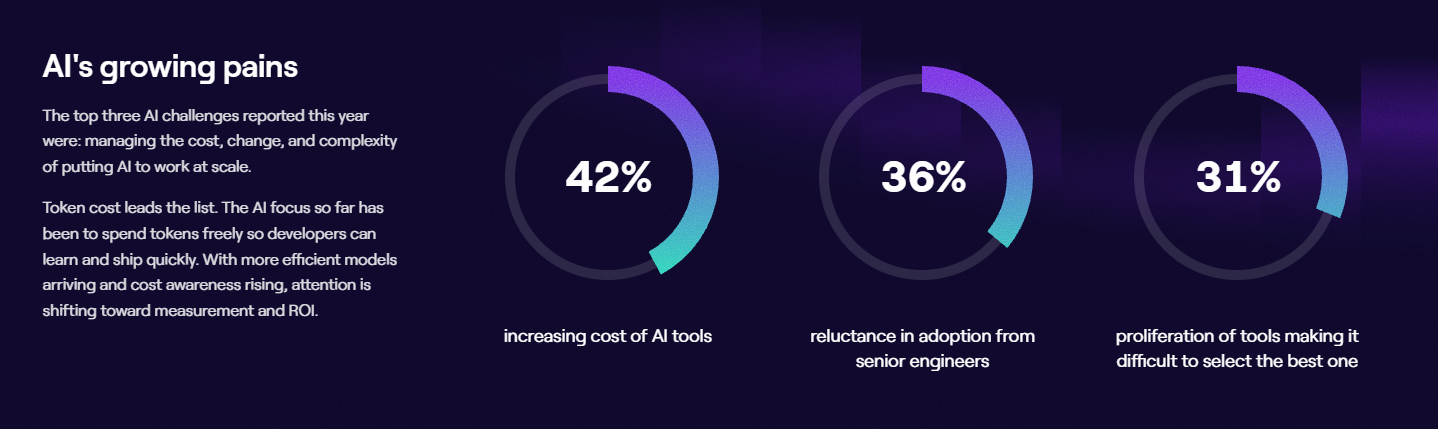
Top three AI challenges reported by engineering professionals in 2026: rising AI tool costs (42%), reluctance from senior engineers (36%), and too many tools to choose from (31%).
Before evaluating any vendor, record how your team performs today. Cycle time (split into coding, review, and deployment time), PR throughput, change failure rate, and recovery time give you a baseline to compare against later.
The same data also shows where work waits longest, which is the phase where a new tool will have the biggest effect. A few common patterns:
- Pull requests that wait days for a first review point to AI code review.
- Long build times and frequent reruns usually trace back to the test suite, where test selection and AI testing tools help most.
- Tickets that get reopened or rescoped mid-sprint suggest the problem starts in planning.
- High time to resolve incidents is a case for AI SRE and incident response tools.
Once the constraint points you to a phase, check how much context each candidate tool can access. An AI tool works only with the code, tickets, documentation, and pipeline data it can reach, so integration depth has a direct effect on output quality.
Your own investment counts too. Our State of AI in Software Engineering research found that each doubling of context investment returned about 29% more merged PRs per developer per week, which puts rules files, prompt libraries, and documentation into the buying decision.
Security review belongs at the start of the evaluation. Every vendor on the shortlist should be able to document:
- Where your code is sent and how long it’s retained
- Whether customer code is used to train models
- SOC 2 compliance, SSO support, and access controls
- Deployment options for sensitive codebases, such as private cloud or on-premises
Pricing models deserve as much attention as features. AI pricing is moving from simple per-seat plans toward usage-based billing, especially for agents. A single agent session can use far more tokens than inline completion, and parallel agents multiply that spend, so it helps to model costs at full adoption and track usage by team from day one.
For example, one platform leader in our survey described Claude Code use taking off across teams in January 2026, with clear gains in velocity. By the end of the month, token costs had grown enough that leadership pulled back access and replaced the tool with a rate-limited alternative.
Every AI tool also needs clear limits on what it can do without human approval. A common starting point lets agents open pull requests, generate tests, and investigate incidents, while people keep approval over merges to protected branches, production deployments, and any fix that changes live systems. Branch protection rules and code owners make those limits enforceable.
Before expanding any tool, pilot it with a few trained teams and compare their results against your baseline. Only 10% of the engineering leaders we surveyed reported both strong enablement and high adoption, so training makes a big difference in how a tool performs.
Following this sequence ties each purchase to a measurable problem and gives you the data to decide which tools to expand, which to replace, and where to invest next.
Measuring Your AI-Driven SDLC ROI with Jellyfish
Measuring Your AI-Driven SDLC ROI with Jellyfish
AI now touches every phase of the SDLC, from planning and coding to review, testing, and incident response. Each tool in this guide can speed up part of that work, but the overall return depends on how well those gains carry through the full lifecycle. The only way to know which tools are helping is to measure the full pipeline.
Jellyfish makes that measurement possible without extra manual work. The platform pulls signals from the systems teams already use, including Git, issue trackers, CI/CD pipelines, and AI coding tools, and connects them to business context. Engineering leaders get a clear, data-backed picture of how their teams work and where AI makes a difference.
Here’s how Jellyfish supports each stage of an AI tool investment:
- Engineering Metrics: Jellyfish tracks DORA metrics and custom DevOps metrics across teams, which gives you the baseline every tool decision should start from. The same view makes it easy to share engineering performance with business stakeholders in terms they trust.
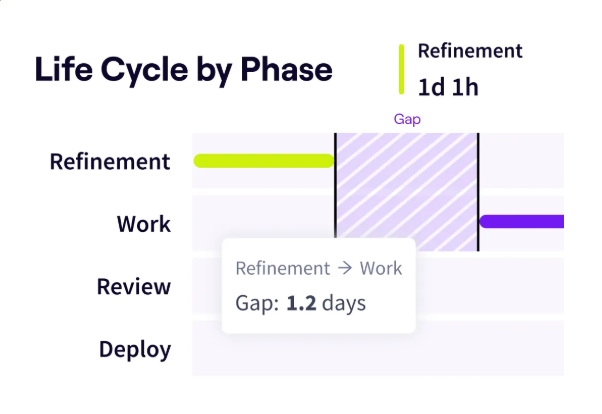
- Life Cycle Explorer: Life Cycle Explorer breaks down how long work spends in each stage of development, from planning to release. Teams can drill into individual issues and outliers to see what slowed them down, then use those findings to decide which phase needs AI support first.
- Team Benchmarks: Benchmarks put your metrics in context by comparing them with data from across the industry. They’re available for every metric Jellyfish tracks, so you can tell whether a slow review cycle is unusual for teams like yours or typical for your industry.
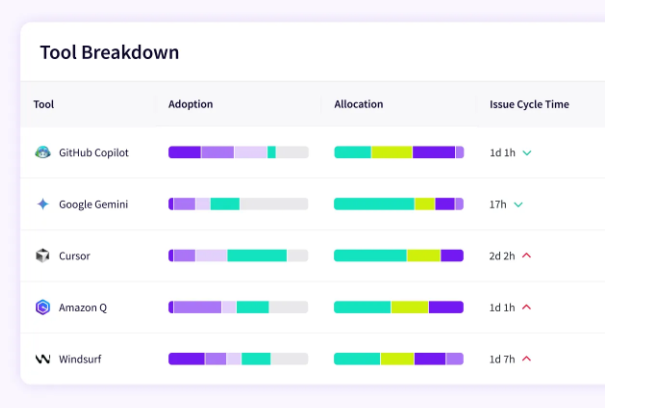
- Vendor Comparison: Jellyfish measures assistants, code review agents, and autonomous agents with one consistent, vendor-neutral model. Leaders can compare cycle time, throughput, and quality signals across tools, see which ones perform best for writing, reviewing, or testing, and include developer feedback alongside the numbers.
- Impact Insights: Impact Insights compares delivery speed and PR cycle time with and without AI, using before-and-after data from your own teams. It also shows how AI changes where teams spend time, from roadmap and innovation work to keeping the lights on.
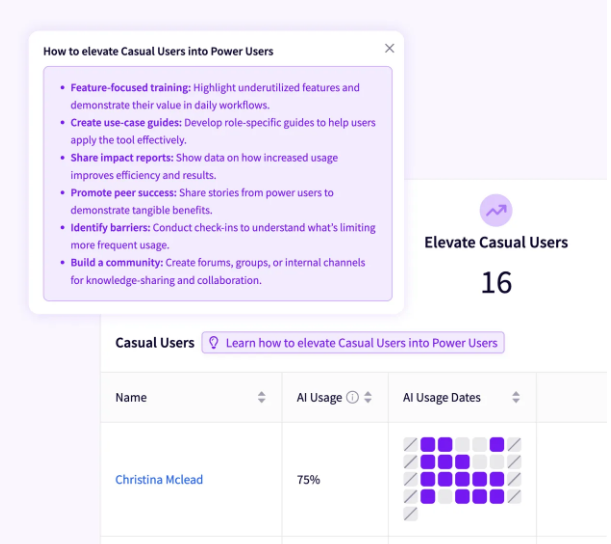
- AI Enablement: Enable Teams sorts engineers into power, active, and casual AI user cohorts, which shows leaders where adoption is strong and where it needs work. Tailored recommendations help each group adopt the workflows that work best for top users, and the AI Enablement Score tracks satisfaction and confidence across teams.
- AI Token Cost Management: Token usage and costs are tracked across every tool, team, and model in one place. Jellyfish benchmarks spend against output and brings year-to-date totals, projected spend, and run rate, so finance and engineering can plan AI budgets with the same numbers.
A strong AI SDLC is built one informed decision at a time. Jellyfish helps you find the constraint, test the right tools, and track results long after the first purchase.
Schedule a demo and see how your engineering organization can get more from every AI investment.
FAQs
FAQs
What is the difference between vibe coding and spec-driven development?
With vibe coding, developers describe what they want in plain language and let a generative AI model write the code, with little upfront design. It’s fast and great for prototypes, though the code can drift from your architecture over time.
Spec-driven development puts a plan in place first. Kiro, AWS’s agentic IDE, writes requirements, a design doc, and a task list before it touches the code. The open-source BMAD method works the same way, with AI agents that play roles like product manager and architect.
How do AI coding agents help with code, tests, and refactors?
AI coding agents take a task and work through it on their own. For code generation, an agent reads the codebase, plans the change, edits the files, and opens a pull request.
The same agents can handle test generation for untested code and large code refactoring jobs across many files. Since these tools act more like autonomous systems than assistants, keep a human in charge of merges and production changes.
How do AI SDLC tools fit into existing CI/CD pipelines?
Most tools connect through native integrations, APIs, or webhooks, so you don’t need to replace your current setup.
AI review bots comment on pull requests, test tools pick the tests each change needs, and observability platforms use anomaly detection to spot production issues early.
Jellyfish also pulls data from CI systems like CircleCI and Jenkins, so you can see how AI-assisted development affects build times and change failure rate.
Should we buy an all-in-one platform or build a specialized stack?
No single vendor leads every phase of AI-powered software development yet, so many teams mix specialized tools. That’s starting to change as GenAI vendors move into new areas.
Copilot now reviews pull requests, Cursor owns Graphite, and Linear’s agent writes code. Use that overlap to simplify your toolset where it helps, and keep an independent way to measure what each tool adds.
About the author

Lauren is Senior Product Marketing Director at Jellyfish where she works closely with the product team to bring software engineering intelligence solutions to market. Prior to Jellyfish, Lauren served as Director of Product Marketing at Pluralsight.