In this article
The debate over whether AI coding tools belong in engineering workflows is settled. Median adoption has hit 67%, according to the Jellyfish AI Engineering Trends Report. But widespread use does not automatically mean widespread gains.
The same research found that top AI adopters see 2x the PR throughput compared to low-adoption teams. For engineering leaders who have rolled out Cursor, those numbers should feel both encouraging and urgent.
The potential is there, but so is the pressure to prove it. And when the time comes to justify the investment, most teams only have seat counts and license dashboards to point to.
This guide walks through what Cursor offers out of the box, where its native analytics leave gaps, and how to measure the full impact of your investment.
Cursor AI Overview and Pricing
Cursor AI Overview and Pricing
Cursor is an AI-native code editor built on top of VS Code. It connects to frontier models from OpenAI, Anthropic, and Google and supports features like AI-powered autocomplete, inline edits, agent workflows, and multi-file generation.
The VS Code foundation keeps the learning curve low, which is why so many developers have picked it up organically. But bottom-up adoption means costs can creep up before anyone builds a business case.
For startup and growth-stage teams, that makes the ROI question even more pressing. By the time leadership gets involved, there are already seats to justify.
For individual developers, there are four options:
| Plan | Price | What you get |
| Hobby | Free | Limited agent requests and tab completions |
| Pro | $20/mo | Extended agent limits, access to frontier LLM providers, MCPs, skills, hooks, and cloud agents |
| Pro+ | $60/mo | 3x usage on all OpenAI, Claude, and Gemini models |
| Ultra | $200/mo | 20x usage on all models and priority access to new features and use cases |
For teams and larger organizations, Cursor offers two business plans with added controls and admin features:
| Plan | Price | What you get |
| Teams | $40/user/mo | All Pro features plus team-level admin controls, shared chats and rules, usage analytics, centralized billing, RBAC, and SAML/OIDC SSO |
| Enterprise | Custom | Everything in Teams plus pooled usage, invoice and PO billing, SCIM seat management, AI code tracking API, audit logs, granular admin and model controls, and priority support |
The price gap between Pro and Pro+ is noticeable, and so are the usage limits. Developers who use Cursor heavily throughout the day often run into daily caps and queue delays on the Pro plan, especially on larger projects.
The frustration shows up regularly in places like Reddit and developer forums:
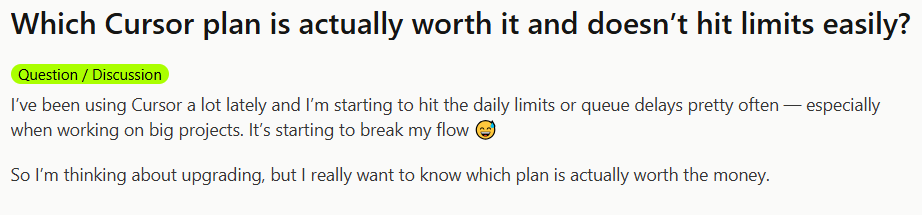
These dynamics make the ROI question unavoidable. Yes, costs are easy to add up. But what most teams lack is a clear way to measure whether that investment translates into faster delivery or better engineering outcomes.
Why Measuring Cursor AI Adoption Matters
Why Measuring Cursor AI Adoption Matters
The more Cursor spreads across a team, the more important it becomes to understand what it truly changes. Here is why:
- Developers overestimate their own speed gains: The METR randomized controlled trial found that experienced developers believed AI tools made them 20% faster, while the data showed they were 19% slower on familiar codebases. That 39-point perception gap means you cannot rely on self-reported feedback to evaluate Cursor’s impact.
- Faster coding can create new bottlenecks downstream: Jellyfish analyzed telemetry from over 200,000 engineers across 700+ companies and found that high AI adoption led to a 2X increase in PR throughput. But more throughput means more code to review which can introduce downstream bottlenecks. Without understanding and configuring AI to work across the full delivery lifecycle, speed gains in one area can quietly create slowdowns in another.
- Higher output does not guarantee higher quality: AI-assisted PRs carry 1.7x more issues than human-written code, according to CodeRabbit research. That does not mean AI output is bad across the board, but it does mean quality tracking has to keep pace with adoption. Without it, teams can ship more code while quietly accumulating more problems.
- Delivery stability can drop as AI usage scales: The DORA 2024 report found that a 25% increase in AI adoption correlated with a 7.2% drop in delivery stability and a 1.5% drop in throughput. Teams that scale Cursor without adapting their review, testing, and deployment processes risk trading speed for reliability.
- Most developers do not trust AI-generated output: The Stack Overflow 2025 Developer Survey found that only 33% of developers trust AI-generated results, and 46% said they do not trust them at all. If your team uses Cursor heavily but most engineers still review and rework the output, the time savings on paper shrink fast in practice.
- AI-generated code can introduce cognitive fatigue over time: A March 2026 Harvard Business Review report found that 14% of workers experienced mental fog from constant interaction with AI-generated output. But when AI handled repetitive tasks, burnout dropped 15%. The difference depends on how the tool is woven into daily developer workflows. That is hard to evaluate without structured measurement.
Signs your team has a Cursor measurement gap →
|
Understanding Native Cursor Analytics
Understanding Native Cursor Analytics
Teams and Enterprise plans come with a native analytics dashboard that logs AI activity from the editor and makes it available to admins. The data falls into four categories:
- Adoption and activity: The dashboard tracks weekly and monthly active users, with daily activity split across Tab, Agent, Background Agent, CLI, and Bugbot. A leaderboard ranks individuals by chat volume, completions, and agent-produced lines of code. Cursor only counts a developer as active if they used an AI functionality that day. An open editor with no AI interaction does not register.
- Code output: Admins see AI-produced lines added and removed per user per day, alongside total line changes that combine AI and manual work. The dashboard also shows the percentage of committed code attributed to AI, broken out by repository. Acceptance rates come from the ratio of suggestions shown to suggestions accepted, split across Tab and Agent edits.
- Model and feature usage: The dashboard logs which models developers select, how frequently each one gets used, and how messages break down across modes like Agent, Ask, and Cmd+K. Admins can also see which MCP tools the team uses and which servers they connect to. This data helps admins make decisions about model access and cost control.
- Cost and spend: Each user’s premium request count feeds straight into the billing total. Team-level spend on usage-based pricing is visible from the dashboard. Enterprise admins can also pull token-level usage data through the API, with filters for model and token type (input, output, cache).
Enterprise customers get an extra feature called Conversation Insights. It tags each agent session by task type (bug fix, refactor, new feature), work category (maintenance or net-new), complexity, and how specific the prompts were. That gives engineering leaders a real-time view into the nature of the work, not just the volume.
Attribution happens locally. The editor stamps every AI-suggested line at the time it appears and saves it on the developer’s machine. At commit time, Cursor matches those stamps against the committed code and labels the matching lines as AI-produced. The dashboard receives metadata only, things like line counts, attribution data, and usage events. No source code leaves the local ecosystem.
Teams that need programmatic access to this data can use the Enterprise-tier Analytics API and AI Code Tracking API, which connect AI-produced code to individual commits at the repo and branch level. On the Teams plan, CSV exports provide per-user daily metrics.
The Limitations of Cursor Analytics
The Limitations of Cursor Analytics
Cursor’s native analytics have a ceiling, and most teams hit it as soon as the ROI conversation starts. Here is what falls outside their reach:
- Blind to the rest of your AI stack: If your team also runs Copilot, Claude Code, or Windsurf, that activity is invisible inside Cursor’s dashboard. There is no way to measure total AI adoption across the org or evaluate which tool delivers the most value per dollar.
- No team-level grouping without Enterprise: On the Teams plan, the dashboard reports by individual email. There is no built-in way to organize developers by squad, department, or project. That makes it difficult to compare adoption patterns across groups or identify which teams benefit most from the tool.
- AI attribution misses common workflows: If a developer grabs a snippet from the chat panel and pastes it into a file, Cursor does not tag that as AI code. The same applies to suggestions that get reworked before acceptance. You end up with a tracking gap that skews every metric built on top of it.
- Usage metrics stop at the editor: Cursor has no line of sight into your delivery pipeline. It cannot compare cycle times for AI-assisted work vs. human-written work, point out quality differences, or connect a commit to a shipped feature. Engineering leaders who want to tie Cursor activity to business results need that data from somewhere else.
- Trend reporting takes manual effort: The dashboard is built around recent activity. If you want to look at adoption trends over a quarter or compare usage before and after a rollout, you need to pull data through the API in 30-day chunks and piece it together yourself. That is manageable, but it creates friction for teams that want to report on ROI over time.
- Adoption declines can go unnoticed: Cursor sends alerts when spend hits a threshold, but there is nothing equivalent for usage. If a squad stops opening the tool after the first two weeks, the dashboard will not flag it. You find out when you check the numbers, which for most teams means you find out late.
- No way to measure cycle time impact: The dashboard can show that 35% of last month’s committed code came from AI, but it has no way of showing whether that code moved through review and deployment faster than the rest. For most teams, faster delivery is the main reason they adopted Cursor. The native analytics cannot confirm or deny whether that expectation holds.
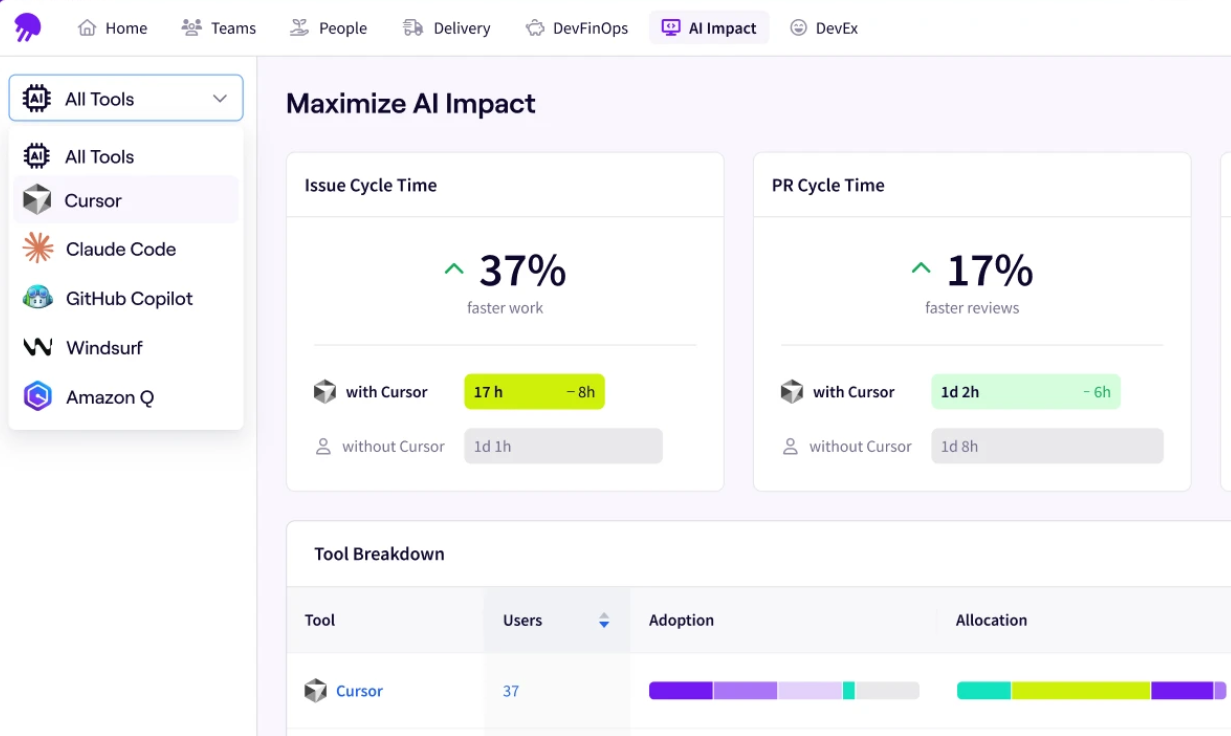
PRO TIP 💡: The Jellyfish Cursor dashboard addresses several of these limitations out of the box. It ties Cursor activity to SDLC metrics, organizes adoption data by team and segment, and gives engineering leaders a cross-tool view that includes Copilot, Claude Code, and Windsurf alongside Cursor.
How to Measure Cursor ROI Across the Engineering Lifecycle
How to Measure Cursor ROI Across the Engineering Lifecycle
Tracking Cursor ROI means following the data from adoption through productivity and into business outcomes. The Jellyfish AI Impact Framework gives engineering leaders a structured way to do that.
Stage 1 – Adoption
At this stage, you want to see how many engineers use Cursor on a regular basis and which teams have fully integrated it into their workflow.
These are the metrics that matter at this stage:
- Access percentage → how many engineers have a Cursor license
- Weekly active users → how many use it in a given week
- Frequent user percentage → how many use it three or more days per week
- AI code ratio → what share of shipped code comes from AI-assisted work
The 67% median adoption figure from the Jellyfish AI Engineering Trends Report gives a useful starting point, but it only tells you how many people use the tool. A stronger signal at this stage is the AI code ratio.
Across companies in the same dataset, 27% of shipped code is AI-assisted. Together, these numbers give engineering leaders a baseline to compare against.
The key question at this stage is whether your team is maturing past the experiment phase into consistent, integrated use.
Stage 2 – Productivity
Once adoption is there, the next question is whether it translates into measurable developer productivity gains. This is where most teams get stuck, because Cursor’s native analytics do not reach into the delivery pipeline.
You should pay attention to these metrics at this stage:
- PR throughput → are engineers merging more PRs per week
- Cycle time → does AI-assisted work move from first commit to merge faster
- Review time → are PRs with AI-generated code taking longer to code review
- Revert rate → is the quality of shipped code holding up
The Jellyfish data referenced earlier in this guide backs this up at the productivity level too. Top adopters merge significantly more PRs per engineer. But revert rates also edge up slightly at higher tiers, which is why quality metrics need to be part of the same measurement.
This is where you start to see which parts of the workflow benefit from Cursor and which ones absorb the pressure.
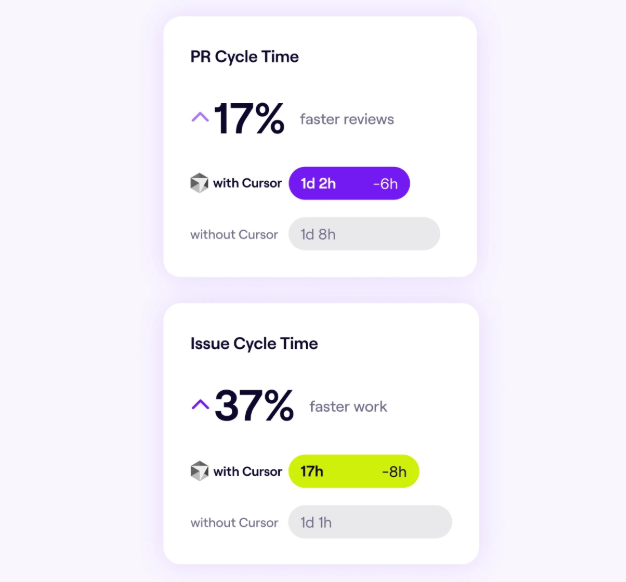
PRO TIP: The Jellyfish Cursor dashboard also lets you compare cycle time, PR velocity, and throughput for Cursor-influenced work against pre-adoption baselines. You can see the delivery impact at the team level and identify which workflows benefit most.
Stage 3 – Business Outcomes
Business outcome measurement brings the ROI conversation to a close. It answers whether Cursor reduces cost per delivery, whether teams allocate more time to high-impact work, and whether the investment holds up against the results.
Key metrics at this stage include:
- Cost per delivery outcome → what does the org spend on AI tools relative to what it ships
- Allocation shift → is engineering time moving toward growth-oriented work (new features, revenue-generating initiatives) vs. maintenance
- Tool ROI comparison → which AI models in the stack deliver the most value per dollar
No single dashboard holds all of this. You need Git data, CI/CD signals, project management context, and AI tool telemetry in the same view. The Jellyfish AI Impact Framework follows this progression and includes benchmarks at each stage.
Measuring the True Impact of Cursor AI with Jellyfish
Measuring the True Impact of Cursor AI with Jellyfish
Jellyfish is an engineering management platform that measures Cursor adoption and connects it to delivery outcomes across the full software development lifecycle.
The platform includes a Cursor-specific dashboard alongside broader AI Impact capabilities that cover everything from adoption depth to business results.
Here is what Jellyfish gives engineering leaders for Cursor specifically:
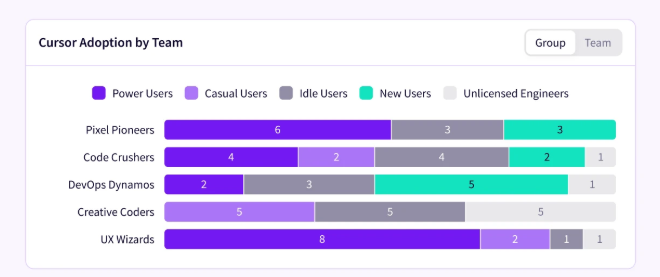
- Track adoption across teams: Jellyfish tracks who on your team uses Cursor, how frequently, and in what types of work. It organizes this data by team, role, and segment so engineering leaders can see adoption patterns across the org without relying on surveys or self-reported data.
- Measure what Cursor changes in your delivery pipeline: The platform links Cursor usage directly to SDLC metrics. You can see whether teams that use Cursor heavily merge faster, produce more throughput, and maintain code quality compared to teams that do not.
- Compare Cursor against the rest of your AI stack: Most teams use more than one AI coding assistant. Jellyfish puts Cursor data next to Copilot, Claude Code, Windsurf, and others in one dashboard. You can compare performance across tools by team, language, and workflow without pulling data from multiple sources.
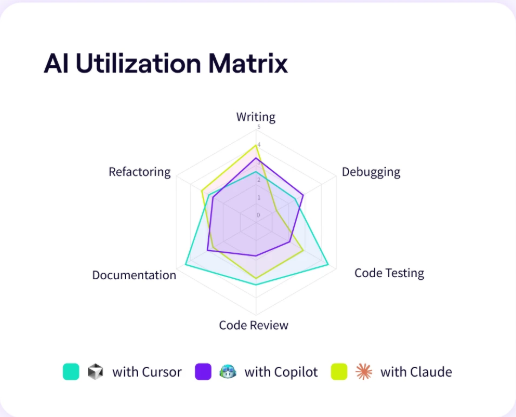
- Track AI spend alongside delivery outcomes: Jellyfish shows what you spend on Cursor and other AI tools at the team and initiative level. It ties that spend to delivery results, so budget conversations start from outcomes, not cost spreadsheets.
- Build executive-ready AI reports: The platform also builds AI impact reports for you. The auto report builder pulls from SDLC signals and organizes the data around adoption, delivery impact, and cost efficiency.
If your team uses Cursor and you need to show leadership what it delivers, Jellyfish gives you the data to make that case. Book an AI Impact demo to get started.
Cursor FAQs
Cursor FAQs
Is Cursor AI open-source?
No. Cursor is a proprietary product built by Anysphere. The editor itself builds on top of the open-source VS Code project, but Cursor’s AI features, infrastructure, and analytics layer are all closed-source.
How does Cursor impact developer onboarding?
New developers can use Cursor’s AI features to navigate unfamiliar codebases, understand existing patterns, and get up to speed faster. The editor feels familiar to anyone who has used VS Code, which keeps the learning curve low.
What is the best AI coding agent for my team?
There is no single best AI agent for every team. It depends on your tech stack, workflows, team size, and what you want artificial intelligence to help with. According to a January 2026 JetBrains survey, GitHub Copilot leads at 29% usage among developers, with Cursor and Claude Code both at 18%.
And most engineering teams now run more than one AI tool across different workflows. The best approach is to pilot a few options, measure adoption and delivery impact, and let the data guide the decision.
What is a good adoption rate for Cursor AI?
Median AI coding tool adoption across companies is 67% according to the Jellyfish AI Engineering Trends Report. A good target is to get the majority of licensed developers past the experiment phase and into regular use, meaning three or more days per week.
The specific number varies by team size, codebase, and workflow, but if your frequent-user rate is well below the median, that is a signal to look at enablement and onboarding.
Can Cursor replace other AI coding tools like GitHub Copilot or Replit?
Not necessarily. Cursor works as a standalone IDE, while Copilot runs as a Microsoft plugin inside VS Code and JetBrains.
Replit takes a different approach with a browser-based environment and its own AI agent. Most teams end up running more than one tool across different workflows.
How does Cursor use LLMs under the hood?
Cursor connects to frontier LLMs from providers like OpenAI, Anthropic, and Google. Developers can choose between models like GPT-4 and Claude depending on the task.
These models run on NVIDIA infrastructure and handle everything from autocomplete and debugging to natural language code generation.
The model you pick affects speed, accuracy, and token costs, so teams that track model-level usage data can optimize spend without cutting capability.
Is Cursor worth it for enterprise AI and SaaS engineering teams?
It depends on how you measure it. For SaaS companies, the valuation of any AI tool ties back to delivery speed, code quality, and cost per outcome.
Enterprise AI teams that get the most real-world value from Cursor tend to use it for automation of repetitive tasks like dependency upgrades, boilerplate generation, and debugging workflows.
How long does it take to see ROI?
ROI comes together over time. You can see adoption numbers almost immediately, but delivery-level signals like cycle time and throughput usually take a few sprints to show a reliable trend.
The full business case around cost efficiency and how engineering time gets allocated usually takes at least a quarter. Teams that connect Cursor data to delivery outcomes through a platform like Jellyfish can get there faster.
Does AI code generation impact change failure rates?
It can. The Jellyfish AI Engineering Trends Report found that revert rates increase slightly at higher AI adoption tiers, around 5-11% above the baseline.
At the same time, the DORA 2024 report found that a 25% increase in AI adoption correlated with a 7.2% drop in delivery stability.
That does not mean AI development tools cause failures on their own. It means teams that scale AI usage without adjusting their review, testing, and deployment processes are more likely to see quality slip.
About the author

Lauren is Senior Product Marketing Director at Jellyfish where she works closely with the product team to bring software engineering intelligence solutions to market. Prior to Jellyfish, Lauren served as Director of Product Marketing at Pluralsight.