
In this article
The hard part of managing remote engineers isn’t the “remote” part. It’s everything that used to happen automatically in an office and now needs intention. You have to build the structure that proximity used to give you for free.
Skip that work, and you end up with the usual mess. Tracking tools that feel like surveillance, expectations nobody wrote down, and developers left to figure things out alone.
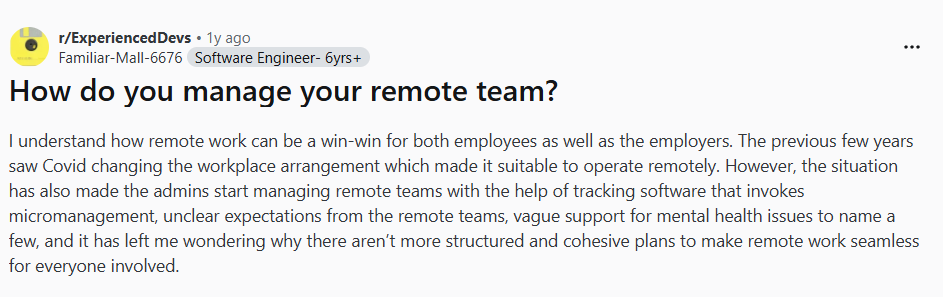
One engineering manager laid it out on Reddit, frustrated that so few companies bother to plan this stuff intentionally:
The good news is that none of this is inevitable. Teams that approach the structure intentionally can even outperform their in-office counterparts. And this guide walks through how to build that framework, step by step.
The Unique Challenges of Remote Engineering Experience
The Unique Challenges of Remote Engineering Experience
Not every remote team struggles with the same things, but there’s a lot of overlap. These are the friction points that come up again and again.
Communication Silos and Asynchronous Overload
What it looks like: Information gets stuck in private Slack threads, random docs, and one-on-one calls that nobody else can see. At the same time, developers drown in messages and notifications because every conversation happens in writing.
One remote worker on Reddit described communication challenges as “career-limiting,” saying that constant misunderstandings made it harder to advance:

Why remote makes it worse: In an office, communication happens in layers. You overhear things, catch context passively, and ask quick questions without scheduling a meeting. Remote strips all that away, so teams compensate by writing everything down and looping everyone in. The result is either too little information or way too much.
Example: A developer spends an hour searching Slack and Notion for context on a feature that a co-worker could have explained in two minutes. Or they miss a key decision because it happened in a DM thread they weren’t part of.
Tooling Friction and Development Environment Inconsistency
What it looks like: Nobody knows which tool is the source of truth for what. Decisions made in Slack don’t show up in the project tracker. Docs in Notion contradict what’s in the spec. Everything takes longer because context is fragmented.
Why remote makes it worse: Office teams can survive messy tooling because they can just ask someone. Remote development teams don’t have that shortcut. One startup founder described the chaos of managing Slack, Notion, Linear, Figma, GitHub, and more across a 15-person remote team.
As a founder of a 15-person remote startup, this hits way too close to home. We’re literally living this nightmare right now.
Our current chaos: Slack for chat, Notion for docs, Linear for tasks, Figma for design, GitHub for code, Calendly for meetings, Loom for async updates, and Google Drive for everything else. My team spends the first 30 minutes of every day just figuring out where the hell yesterday’s decisions were made.
We had a critical product decision buried in a Slack thread that never made it to our roadmap in Linear. Cost us two weeks when the dev team built the wrong feature because they never saw the updated requirements.
Example: Two developers build conflicting implementations because they pulled requirements from different sources. One used the Slack thread, the other used the ticket description. Neither was fully up to date.
Onboarding and Knowledge Sharing Gaps
What it looks like: New developers take too long to become productive, and the team can’t figure out why. Experienced engineers hoard context without meaning to, and knowledge leaves the company every time someone quits.
Why remote makes it worse: In an office, new hires pick up a lot just by being there. They overhear how decisions get made, shadow senior devs, and ask questions without scheduling anything. Remote strips that away.
Everything that used to happen passively now needs to be documented, scheduled, or recorded. Most teams don’t do that well, which is why 63% of remote workers say they felt undertrained compared to in-office peers.
Example: A new engineer joins and gets access to the repo, a Notion page with outdated docs, and a Slack channel full of conversations they weren’t part of. Their onboarding buddy is in a different time zone and usually too busy to answer questions in real-time. Two months later, they’re still pinging teammates for context that should have been written down somewhere.
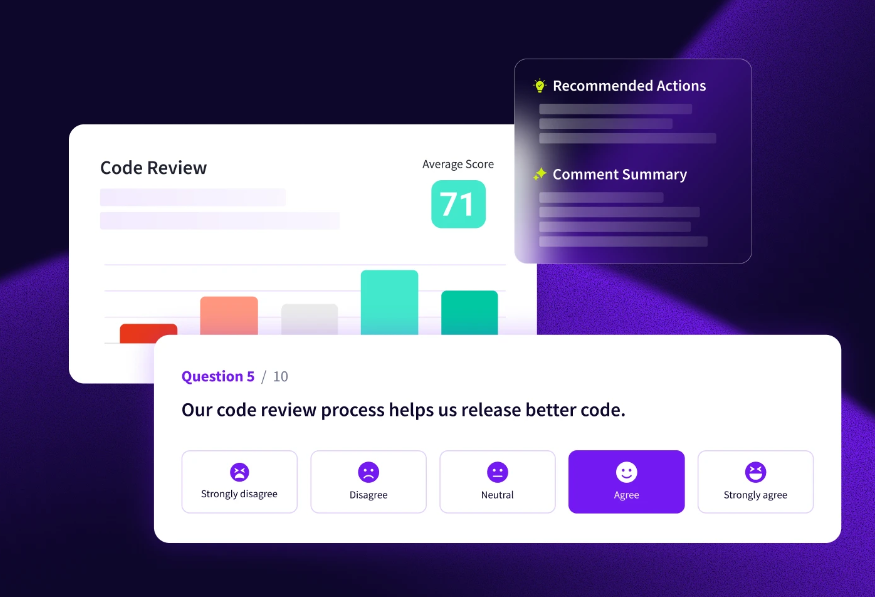
PRO TIP 💡: Jellyfish DevEx lets you segment survey results by tenure, so you can see exactly how new hires feel compared to the rest of the team. If they’re consistently rating documentation or support lower, you know where to focus.
Maintaining Culture and Preventing Burnout
What it looks like: Developers feel disconnected from their team, teamwork suffers, and the company’s mission starts to feel abstract. Work bleeds into personal time and burnout builds quietly until someone suddenly quits (or checks out completely).
Why remote makes it worse: When your team is in an office, burnout shows up physically before anyone says anything. Remote work removes those signals entirely. A developer can be completely checked out, and nobody notices for weeks because all you see is their Slack status and commit history. Here’s how this Reddit user explained it:

Example: A developer starts working longer hours because there’s no clear boundary between work and home. They stop turning their camera on, respond more slowly in Slack, and start missing standups. By the time their manager notices something is off, they’ve already been interviewing elsewhere for a month.
4 Strategies for Improving DevEx in Remote Work Environments
4 Strategies for Improving DevEx in Remote Work Environments
The good news is that you don’t need a massive overhaul to tackle these problems. Most come down to being more intentional about a few specific things.
Here’s where to focus:
Foster Transparent and Efficient Communication
The simplest rule for effective communication in remote collaboration settings is to make information accessible by default. Keep work conversations in public channels instead of DMs.
The more information stays in private threads or people’s heads, the more time the team wastes tracking it down. This advice from a Reddit thread on remote teams gets at the same idea.

Remember that remote teams communicate mostly through text, which means clarity is everything here. People can’t read your tone or see your face, so the words have to do all the work. Say what you mean, include enough context that readers don’t need to ask follow-up questions, and make longer messages easy to skim.
At the same time, more communication isn’t always better. Developers need focus time, and constant pings destroy it. Not every message needs an immediate response, and not every update needs to be a notification. Teams that communicate well also know when to leave people alone.
Some practical habits that make a difference:
- Public channels over DMs for work discussions
- Keep decisions out of Slack and in a place people can find
- Clear norms around how fast people need to respond
- Default to async and save meetings for when they’re genuinely needed
New tools won’t fix communication problems if the habits aren’t there. What matters is that the team agrees on how to communicate and follows through. That’s harder than it sounds, but it’s the most cost-effective fix you’ll find.
Standardize and Streamline Tools
Remote teams tend to accumulate tools over time. Someone brings in Notion for docs, another team starts using Confluence, tasks get tracked in both Jira and Asana (depending on who you ask), and Slack threads turn into an unofficial knowledge base.
After a while, finding information becomes its own job. The goal is to simplify this. Each type of information should have one clear home that everyone agrees on.
| Category | Source of truth | What belongs here | Not for |
| Code | GitHub, GitLab | Code, PRs, code review, technical discussions | Long-form docs, decisions |
| Tasks | Linear, Jira, Asana | Tickets, agile sprints, assignments, status updates | Specs, documentation |
| Documentation | Notion, Confluence | Specs, guides, processes, onboarding | Quick questions, status updates |
| Communication | Slack, Teams | Quick questions, daily coordination, announcements | Decisions that need to last |
| Design | Figma, Miro | Mockups, wireframes, visual feedback loops | Final specs or requirements |
| Meetings | Google Meet, Zoom | Synchronous discussion, complex topics | Things that could be async |
| Async updates | Loom, recorded video conferencing | Demos, walkthroughs, status updates | Urgent or time-sensitive info |
This kind of clarity saves hours every week. Without it, people either search endlessly or just ping a teammate because it’s faster than digging through tools.
Before adopting anything new, run through a few quick questions:
- What problem does this solve?
- Is an existing tool already handling this?
- Will the team actually use it consistently?
- Who will own and maintain it?
- What happens to the thing we’re replacing?
Tool sprawl is easy to fall into and hard to undo. Being intentional about what you adopt saves more time than any single app ever will.
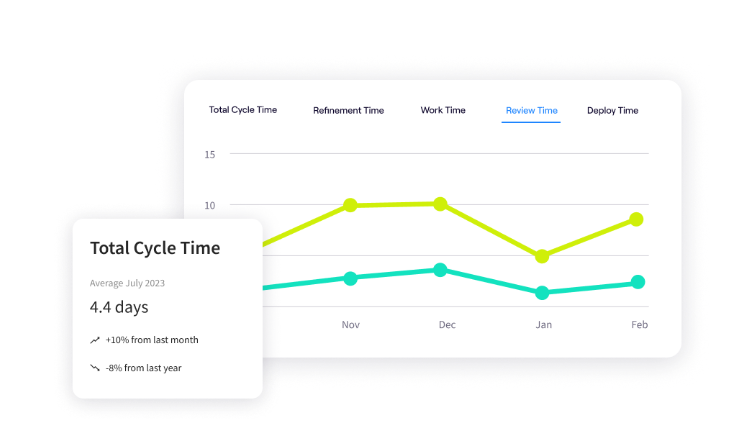
PRO TIP: Jellyfish’s Life Cycle Explorer shows where work gets stuck in your process. If you notice consistent slowdowns at handoff points between tools, that’s a clear signal your stack is too fragmented.
Build Robust Onboarding and Knowledge Sharing Practices
If a new hire can’t get up to speed without constantly pinging teammates, that’s usually a knowledge-sharing problem. Remote teams don’t have the luxury of learning through hallway conversations and overheard context, so whatever isn’t documented might as well not exist.
One commenter on Reddit made the same point:
Remote teams don’t have ‘tap the shoulder’ fallbacks or spontaneous pair programming for bad business practice. Information won’t flow without conscious effort.
Tribal knowledge sounds like “just ask Sarah” or “that’s not documented, but I can explain.” These workarounds are fine in an office, but remote teams can’t rely on them.
Onboarding is a useful diagnostic here because new hires will find your documentation problems faster than anyone. They don’t know the shortcuts or who to ask, so they feel every gap. You should act on that feedback before they adapt and stop noticing it.
A few ways to close those gaps:
- New hires should update docs while they’re learning, not weeks later when they’ve forgotten the pain points
- Use recorded walkthroughs for anything that’s easier to show than write
- Assign onboarding buddies who have time for the role
- Give people a low-friction way to say “this was missing” without awkwardness
On remote teams, knowledge sharing has to be intentional. If it’s not part of regular development workflows, it keeps getting pushed off until someone quits and takes half the context with them.
Cultivate Connection and Wellbeing
Remote work is lonely in ways that sneak up on you. The day-to-day social fabric of an office disappears, and nothing automatically replaces it. Without effort, developers end up feeling more like freelancers than part of a team.
At the same time, remote work makes it easy to overwork. The commute disappears, but so does the boundary between work and home. Developers stay online longer because there’s no natural stopping point. Burnout builds slowly until it’s already a problem.
Both of these issues are harder to spot when you’re not in the same room. When someone goes quiet, it’s hard to tell if they’re heads-down on work or slowly disengaging.
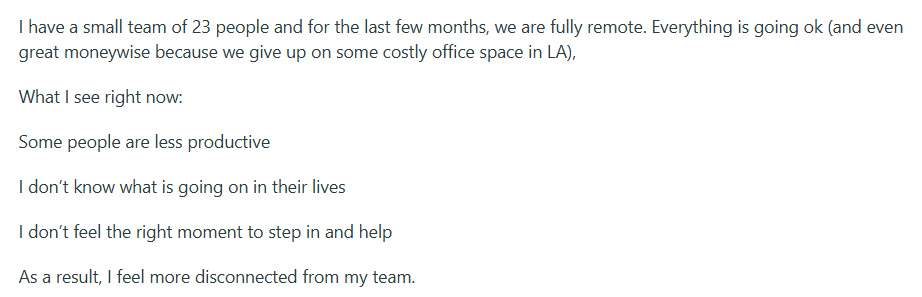
Or, when someone’s online late, you don’t know if that’s their preferred schedule or a sign they can’t switch off. The signals managers used to read in person don’t translate. One manager of a 23-person remote team described this exact feeling on Reddit:
A few things that help:
- Optional social spaces that don’t feel mandatory (casual channels, virtual team coffees, games)
- Set clear expectations around working hours and response times so people feel permission to log off
- 1:1s that make room for “how are you,” not just “what are you working o.n”
- Pay attention when someone’s behavior changes, like cameras off, shorter messages, or less participation
- Make taking PTO and logging off feel normal
None of this happens on its own. If you want a remote team that’s connected and sustainable, you have to build the systems that make it possible.
Measuring the Impact: Is Your Remote DevEx Strategy Working?
Measuring the Impact: Is Your Remote DevEx Strategy Working?
Developer experience isn’t easy to measure because some of it is quantitative and some of it is just how people feel. You need a mix of both to get the full picture.
A good approach is to track a few metrics across different categories:
| Category | What to measure | How to track it |
| Productivity | Cycle time, PR throughput, time to first commit for new hires | Git analytics, project management tools |
| Satisfaction | How developers feel about their work, tools, and team | Surveys, eNPS, 1:1 conversations |
| Collaboration | Communication health, meeting load, async vs sync balance | Calendar audits, Slack analytics, team feedback |
| Wellbeing | Burnout risk, work-life balance, sustainable pace | PTO usage, after-hours activity, turnover rates |
One number won’t tell you much on its own. High output doesn’t matter if people are miserable, and stable retention doesn’t mean people are engaged. The point is to track a few things across different areas and then look for patterns.
And don’t overcomplicate this. A quarterly survey, a few key metrics, and regular 1:1s will tell you most of what you need to know. The important part is doing something with the information. Tracking for the sake of tracking helps no one.
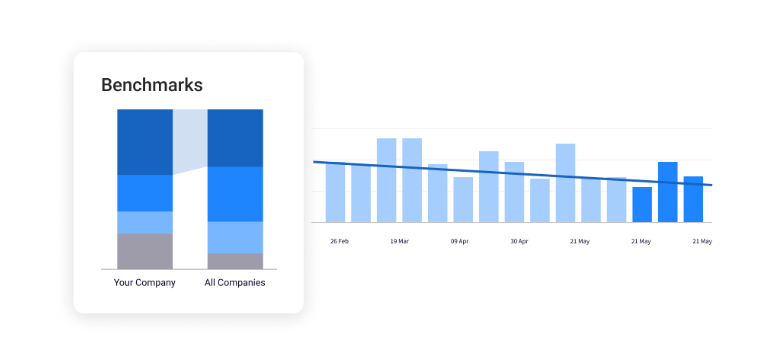
PRO TIP: Jellyfish’s Team Benchmarks let you compare your metrics against industry standards. You’ll know whether your numbers are good or just good enough.
See Your Remote Software Development Team Clearly with Jellyfish
See Your Remote Software Development Team Clearly with Jellyfish
When your engineering team is remote, you lose a lot of the ambient information you’d get in an office. You need to know where engineering time goes, what’s slowing people down, and whether your team is healthy (or just quietly burning out).
That’s difficult to do manually, especially when your team members are spread across time zones.
A software engineering management platform like Jellyfish can close this gap. It gives engineering leaders visibility into their teams and work by pulling data from the tools they already use. Remote managers get the clarity they need without piling on check-ins or watching activity logs.
Here’s what Jellyfish brings to the table:
- Developer experience surveys: Run research-backed surveys through Jellyfish DevEx to learn how developers feel about their tools, workflows, and team dynamics. You can also segment results by team, location, or tenure.
- Works with your current stack: Jellyfish integrates with GitHub, GitLab, Jira, Slack, and more to pull engineering data automatically. No timesheets, no status reports, no extra work for your team.
- Engineering metrics in one place: You can monitor DORA metrics like deployment frequency and lead time alongside cycle time, velocity, and PR throughput. Jellyfish benchmarks your performance against industry standards so you know where you stand.
- Resource allocation insights: Understand how your team’s time breaks down across product work, tech debt, and unplanned tasks. This makes it easier to have honest conversations about priorities and tradeoffs.
- Capacity planning tools: Scenario Planner lets you model tradeoffs around scope, team size, and timelines. You can plan more realistically based on historical data.
- Finds where work gets stuck: Life Cycle Explorer outlines bottlenecks at the issue level so you can see exactly where things slow down. You spot problems early instead of discovering them at the end of a sprint.
Visibility shouldn’t come at the cost of trust. Jellyfish gives remote engineering leaders the insight they need without surveillance or extra process.
Book a demo and see how it works for distributed teams.
FAQs About Remote Developer Experience
FAQs About Remote Developer Experience
How can we prevent burnout on a remote engineering team?
Burnout usually starts with blurry boundaries. People work late because there’s no commute to signal the day is over, skip breaks because no one’s watching, and slowly run out of gas.
The fix is making it okay to disconnect. Be clear about when people are expected to be available and when they’re not. Check in on how they’re doing, not just what they’re shipping. And watch for the quiet signs like someone going dark, shorter replies, or less presence in meetings.
What are the most critical tools for a good remote DevEx?
The specific tools matter less than having clear conventions around them. That said, most remote teams need a few categories covered:
- Source control and code review (GitHub, GitLab)
- Project management (Jira, Linear, Asana)
- Communication tools (Slack, Teams)
- Documentation (Notion, Confluence)
- Visibility into how engineering work flows (Jellyfish)
How do you measure developer productivity for remote teams without micromanaging?
Measure the work, not the worker. Things like cycle time, deployment frequency, and PR throughput tell you how healthy your process is without putting individuals under a microscope. Tools like Jellyfish can find these patterns without making developers feel watched.
What’s the best way to improve and automate knowledge sharing on a remote team?
Write things down and make them easy to find. That’s really the core of it. Keep documentation in one place, make it part of the workflow, and give people a low-friction way to flag when something is missing or outdated.
Learn More About Developer Experience
Learn More About Developer Experience
- Developer Experience (DevEx): The Modern Guide for 2026
- How AI is Enhancing Developer Experience and Boosting Productivity
- 4 Developer Experience Challenges (and How to Solve Them)
- 14 Best Developer Experience (DevEx) Tools Heading Into 2026
- 15 Developer Experience Best Practices for High-Performing Engineering Teams
- How to Improve Developer Experience: 16 Proven Strategies and Methods
- How To Create an Effective Developer Experience Survey
- 15 DevEx Metrics for Engineering Leaders to Consider: Because 14 Wasn’t Enough
About the author

Lauren is Senior Product Marketing Director at Jellyfish where she works closely with the product team to bring software engineering intelligence solutions to market. Prior to Jellyfish, Lauren served as Director of Product Marketing at Pluralsight.