In this article
Continuous delivery and continuous deployment run the same pipeline almost the whole way through. They split at the very end. Once your code passes every automated test, continuous delivery waits for a person to approve the release, and continuous deployment pushes it to production on its own.
That single decision controls how fast you ship, how much risk each release carries, and how your engineers spend their week. Most teams still route every release through a person before it reaches production. In Forrester’s Global DevOps Benchmark Survey, only 45% automate that final step, which keeps the majority firmly in delivery territory.
This guide covers what sets the two models apart, where each one works best, and how to read which fits your team today. The table below breaks it down at a glance:
| Continuous Delivery | Continuous Deployment | |
| Final step to production | A person approves and clicks deploy | The pipeline ships it automatically, no approval needed |
| Release pace | Fast, gated by business readiness | Continuous, as often as code merges |
| Risk profile | Lower, a manual review catches late issues | Higher, leans on automated tests and monitoring |
| Rollback | A person can hold a release before it ships | Automated and fast, no human in the path |
| What it demands | A reliable pipeline and a named approval owner | Deep test coverage, strong monitoring, fast rollback |
| Best suited for | Healthcare, finance, enterprise SaaS, strict compliance | Consumer apps, high-velocity agile teams, mature DevOps |
What is Continuous Delivery?
What is Continuous Delivery?
Continuous delivery is a software practice that keeps your code release-ready at all times, with a person making the final call on when it reaches production.
Every change runs through an automated pipeline that builds, tests, and stages it, so by the time someone decides to release, the work is already finished.
How the pipeline runs →
- A developer merges a change into the main branch.
- The pipeline builds the code and runs the full test suite automatically.
- Passing code moves to a staging environment that mirrors production.
- The release stays packaged and ready until a person approves it.
- That approval sends it to production.
Who it’s best for → Teams that value control over the exact moment a release goes live. Continuous delivery gives them automated speed up to production and a human checkpoint at the end. It fits regulated and enterprise environments, where someone needs to confirm compliance or timing first, which is why healthcare, finance, and enterprise SaaS teams favor it.
When to choose it → Pick continuous delivery when something outside the code controls your release timing. A compliance sign-off, a marketing date, a support team that needs warning, or a customer mid-migration. Your tests keep the build ready, and a person releases it when the moment is right.
Common misconception → The word “delivery” is what misleads teams. It sounds like code arriving at users on its own. In practice, continuous delivery automates everything up to production and waits for a person to approve the release. The hands-off version is continuous deployment, coming up next.
What is Continuous Deployment?
What is Continuous Deployment?
Continuous deployment is a software practice that releases every change to production automatically once it passes the pipeline’s tests. No person approves the release. The moment the code clears every automated check, it goes live to users.
How the pipeline runs →
- A developer merges a change into the main branch.
- The pipeline builds the code and runs the full test suite automatically.
- Passing code moves to a staging environment that mirrors production.
- Automated checks confirm the change is healthy.
- The pipeline releases it to production with no human intervention or approval.
Who it’s best for → Mature teams with deep test coverage, strong monitoring, and fast automated rollback. Removing the human gate only works when the pipeline catches problems that a person otherwise would. Consumer apps, high-velocity agile teams, and seasoned DevOps organizations usually run this model because they ship constantly and trust their test automation to hold the line.
Who it’s best for → Choose continuous deployment when your tests, monitoring, and rollback are strong enough to stand without a human check. Once they are, the approval step only adds delay, and dropping it lets you ship the moment code is ready.
Common misconception → A common assumption paints continuous deployment as a free-for-all, with code reaching users unchecked. In practice, the control moves earlier. Strong tests, health checks, and automated rollback do the work the human gate used to do, and they run on every change automatically.
The Role of Continuous Integration
The Role of Continuous Integration
Both models stand on the same foundation, and that foundation is continuous integration.
CI is the practice of merging changes into a shared main branch often, with every merge kicking off an automatic build and test run. It finds integration problems within minutes, while each change is still small.
What CI produces is a tested, release-ready build. The two models part ways only from there. Continuous delivery holds that build for human approval, continuous deployment process releases it automatically. Everything they share happens inside CI, and everything that separates them happens after.
One clarification worth making is that CI stops at a tested build that never reaches production by itself. The CD pipeline, in either form, decides how that build gets to users.
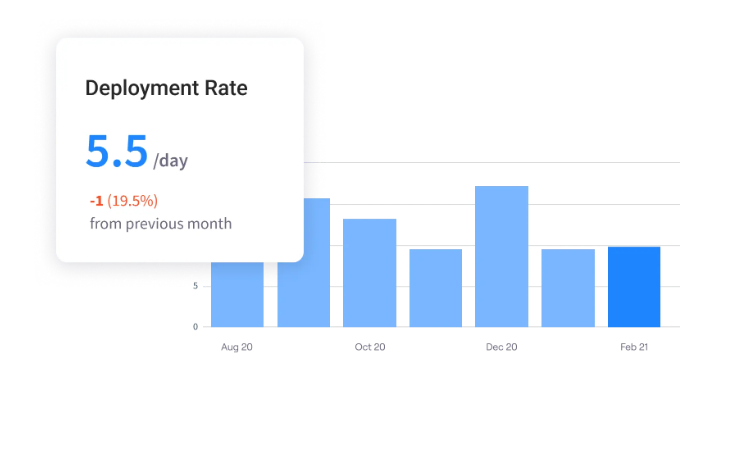
PRO TIP 💡: Strong CI produces a lot of data that most teams never look at. Jellyfish reads those signals from your CI, source control, and incident tools and reports them as DORA metrics, so the health of your pipeline becomes something you can measure and act on.
When Should You Opt for Continuous Delivery Vs. Deployment?
When Should You Opt for Continuous Delivery Vs. Deployment?
Both models work well in the right setting. The trick is matching the model to your tests, your release timing, and how much you trust your automation.
Choose continuous delivery when →
- Something outside the code decides release timing, like a compliance sign-off, a launch date, or a customer mid-migration.
- A regulated environment needs an audit trail and a named person approving each release.
- Your test coverage still has gaps you know about.
- A person needs to own the final go-live call for business or risk reasons.
- You want to batch changes and release them on a schedule that suits the team.
Choose continuous deployment when →
- Your tests, monitoring, and automated rollback are strong enough to stand without a human check.
- You release many times a day, and the approval step only adds delay.
- Nothing outside the code needs to gate a release.
- A bad change can detect itself and roll back fast, with no one in the path.
- The speed of the feedback loop matters, and you want each change in front of users the moment it passes.
Continuous delivery is where most teams start, with deployment as the step they take once the automation proves itself. Some never take it, and that is a sound call. Delivery is a complete model in its own right.
How to Move from Continuous Delivery to Continuous Deployment
How to Move from Continuous Delivery to Continuous Deployment
Continuous deployment is less a switch you flip and more a bar you clear. Before you let releases go live without approval, your pipeline needs to catch, detect, and fix problems on its own.
The four steps below get it there:
Strengthen Your Test Suite First
The approver was your last line of defense on quality. They could catch a release that looked wrong even when every check passed. Once that gate is gone, your test suite inherits the whole job, so it has to fail reliably on anything that should not reach users.
Steps to take →
- Find out where your tests are thin. Start with the paths that touch revenue, customer data, or logins, since a bad change there does the most damage.
- Add integration and end-to-end tests where unit tests leave blind spots, because most production environment failures happen between components.
- Make a failed test block the release. A red run should never reach production on its own.
- Test the failure paths too. Feed the suite bad input, timeouts, and downstream errors, and confirm it catches them.
Example → A payments team auditing its coverage found the checkout flow well tested on success, but thin on declined cards and expired sessions. They added end-to-end tests for those failure cases and wired a red run to block deployment automatically. Only once that held steady for a few weeks did they let checkout changes deploy without manual approval.
| Rule of thumb: Coverage percentage matters less than what you cover. A service can show 90% and still miss the failure paths that break in production. Before you automate a release, confirm your critical flows, like payments, auth, and data writes, have tests for their failure cases as well as their success cases. |
Make Detection Faster Than a Person
With no one reviewing each release, you find out about problems from your monitoring or from your users. You want it to be the monitoring. Set things up so a bad change shows itself within minutes, before the damage spreads.
Steps to take →
- Put health checks on every service that deploys on its own, so the pipeline knows within seconds whether a release came up healthy.
- Set up error-rate and latency alerts that trip the moment a release misbehaves, not on the next morning’s dashboard review.
- Track a few business metrics, like sign-ups or completed orders, since those reveal damage that technical checks miss.
- Route alerts to whoever is on call, with enough detail to point them at the release that caused it.
Example → A team turned on automatic deploys for its sign-up service and wired an alert to completed registrations. A release shipped a broken form validation that every technical check passed, but registrations dropped by half within three minutes. The on-call engineer saw the alert, traced it to the deploy, and rolled it back before most users hit the broken page.
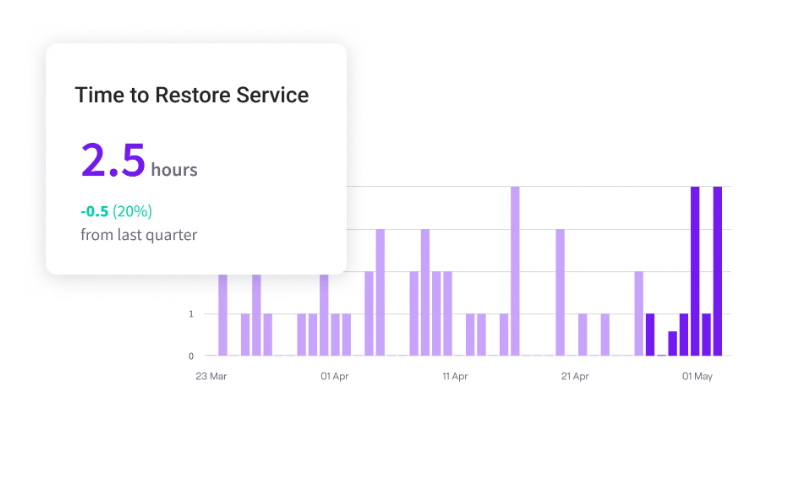
PRO TIP 💡: Once releases go out automatically, MTTR becomes one of your most important metrics. Jellyfish tracks it for you and trends it over time, so you know whether your detection and rollback are getting faster or quietly slipping.
Automate Rollback Before You Remove the Gate
A human approver could pull a release the moment it started to misbehave. Continuous deployment needs that same reflex, except automatic. And catching a bad change is only half the job. The pipeline also has to reverse it quickly, before more than a handful of users feel the impact.
Steps to take →
- Add automatic rollback that fires on a failed health check, so a bad release reverts on its own without waiting for a human.
- Roll out changes gradually with a canary, sending each release to a small slice of traffic before the rest of your users see it.
- Put new features behind flags, so you can switch one off instantly without redeploying the whole service.
Example → A team set up canary releases for its API, routing every new version to 5% of traffic first. One release passed all tests but pushed error rates up the moment real traffic hit it. The pipeline caught the spike, rolled the canary back automatically, and the other 95% of users stayed on the stable version the whole time.
Remove the Gate One Service at a Time
The first three steps built the safety net. This one takes the gate off, and the rule is to do it gradually. Start somewhere safe, watch it run without approval, and widen only as your confidence grows.
Steps to take →
- Pick a low-risk service to go first, ideally one with strong test coverage and no direct customer impact.
- Let that service deploy automatically and watch it closely for a few weeks. Check whether the detection and rollback behave the way you designed them to.
- Widen to more services once the first proves itself. Take the higher-risk and customer-facing ones only after the pattern holds.
- Keep delivery in place for any service that still needs a human gate, since some will stay there for compliance or risk reasons, and that’s fine.
Example → An internal admin tool became the first service to deploy without approval, chosen for its solid tests and zero customer exposure. After a clean month, the main API followed. The payment service kept its manual gate, since compliance still had to sign off on each release.
Make the Transition Measurable with Jellyfish
Make the Transition Measurable with Jellyfish
Notice how much of the move depends on watching the right numbers. The readiness checklist, the few weeks of close watching, and the decision to widen once a service proves itself.
None of it works if you cannot see your delivery performance clearly. A team that removes the gate without that view has no early warning on the one change most likely to surprise it.
Jellyfish is a software engineering management platform that puts your delivery performance in one place. It reads event-level data from the DevOps tools you already use, including CI, incident management, and issue tracking, and reports the four DORA metrics without manual counting or custom dashboards.
Here are the features Jellyfish brings to the table:
- DevOps metric tracking: Jellyfish reads your CI, incident, and issue data and reports the four DORA metrics automatically. Deployment frequency and lead time show the move made you faster, while change failure rate and MTTR show stability held.
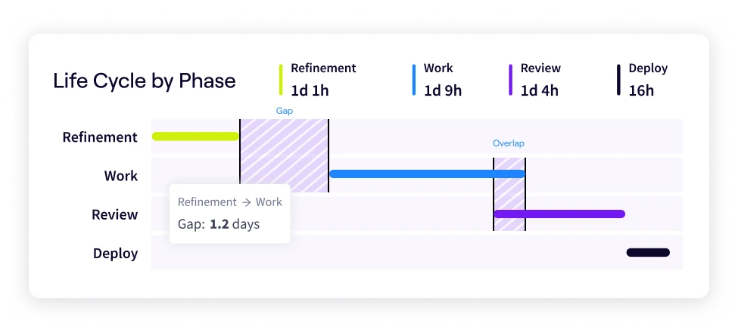
- Life Cycle Explorer: This capability shows how long work spends in each stage, from refinement through review to deployment. Before you remove the gate, it tells you whether manual approval is the real bottleneck or whether the delay starts elsewhere.
- Performance benchmarks: Jellyfish compares your delivery metrics against industry performance tiers. Continuous deployment fits teams already near the top, and the benchmark feature shows you whether you are there.
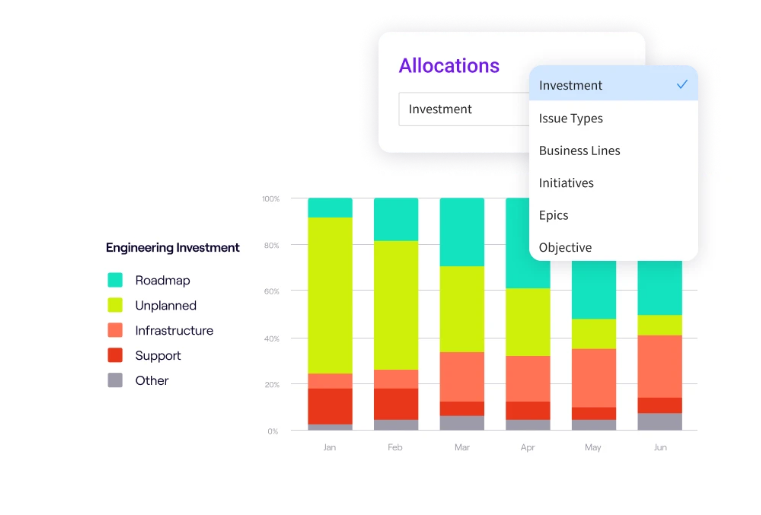
- Resource allocations: The patented allocations model breaks down what your engineers spend their time on and maps that effort to the business priorities it serves. When automating the release frees up the hours a team once lost to manual coordination, allocations show where those hours go next.
- AI Impact tracking: Jellyfish AI Impact tracks how AI coding tools like Copilot, Cursor, and Claude Code affect your delivery speed and quality. As AI pushes more changes through your pipeline, this tells you whether your automation is keeping pace or starting to strain.
- Automated platform integrations: The platform connects to the tools your pipeline already includes, from Jira and source control like GitHub and GitLab to CI tools like Jenkins and incident tools like PagerDuty. It collects the metrics from those systems on its own, with no manual counting and no one-off dashboards to maintain.
Continuous deployment rewards teams that can prove they are ready for it. Jellyfish gives you that proof, with the metrics to judge readiness before the move and the visibility to confirm it worked after.
Book a demo to see your delivery performance clearly.
FAQs
FAQs
Is continuous deployment better than continuous delivery?
No. They fit different needs, so neither wins outright.
Continuous deployment is faster, since it ships every change that passes the testing environment with no manual approval. Continuous delivery keeps a person on that final step, which matters when compliance, a launch date, or a customer migration controls the timing.
Pick deployment when your tests, monitoring, and rollback are strong enough to run without a human check. Pick delivery when something outside the code still needs to gate the release process.
Do I need to do continuous integration to do continuous deployment?
Yes. Continuous integration is the foundation on which both delivery and deployment run on.
CI builds and tests every change as it merges, which produces the tested, release-ready code that the rest of the pipeline depends on. Without it, you have nothing safe to deploy automatically, and continuous deployment would push untested changes straight to users.
What is the biggest risk of continuous deployment?
A bad change that reaches users with no one to stop it.
Without the manual gate, your tests, monitoring, and rollback are the only protection a software release gets. Gaps in test coverage are dangerous here, since a bug that slips through goes straight to production.
The fix is to build those safeguards before you remove the gate. Solid tests, fast monitoring, and automated rollback bring the risk down to a level most teams accept.
What are the benefits of continuous delivery?
Faster, safer releases that keep a person in control of timing.
The benefits of continuous delivery start with speed. An automated delivery pipeline streamlines the manual steps that once slowed software delivery, so each build reaches a release-ready state within minutes. DevOps teams spend less time on release coordination and more on the work that moves the product forward.
The model lowers risk too. Small, frequent production releases keep each change easy to test and easy to trace, and the human checkpoint gives someone a final read before end-users see anything. The model fits a range of use cases, from regulated shops to fast-moving product teams, and each one benefits from that mix of automated speed and human oversight. The steady iteration is what makes continuous delivery a safe place for most teams to start.
What does a CI/CD pipeline include?
Every stage from code commit to a tested, release-ready build.
A CI/CD pipeline starts the moment a developer pushes a change to version control. That code commit triggers an automated build, which compiles the codebase and pulls in its dependencies. From there, the testing process runs on its own. Unit checks, integration tests, and end-to-end checks all run against a testing environment that mirrors production.
This is the part of the software development practice that both models share. The workflow stays identical up to the tested build, and the key differences appear only at the final step of the deployment pipeline.
Continuous delivery holds the build for approval, and continuous deployment releases it on its own. Some teams keep a thin slice of manual testing for high-risk paths, though the goal across the whole lifecycle is to let automation carry the entire process.
How do feature flags and blue-green deployments support continuous deployment?
They give the pipeline two reliable ways to release code changes and pull them back fast.
Feature flags let a team ship code changes to production with a feature switched off, then turn it on for end-users when the timing is right. If something breaks, they flip the flag back with no fresh production deployment. Blue-green deployments take a similar approach, running two identical environments and routing traffic to the new one only once it proves healthy.
Both techniques earn their keep when no person reviews each release. They catch regressions in near real-time and roll back with no manual intervention, so a bad change or a botched bug fix never reaches your full user base. Cloud platforms like AWS support both patterns directly, which is one reason mature DevOps teams lean on them once they remove the human gate.
Can a company use both continuous delivery and continuous deployment?
Yes, and many do.
Different services carry different risks. A team can run continuous deployment on a low-risk internal tool while keeping continuous delivery on a payment service that needs a compliance sign-off before each release. Same company, two models, matched to what each service requires.
This is also the safe way to adopt deployment in the first place. You turn it on for one service, prove it works, and widen from there, so delivery and deployment run side by side for as long as that makes sense.
About the author

Lauren is Senior Product Marketing Director at Jellyfish where she works closely with the product team to bring software engineering intelligence solutions to market. Prior to Jellyfish, Lauren served as Director of Product Marketing at Pluralsight.