In this article
For most of its history, the software development lifecycle (SDLC) depended on people at every step. Engineers defined requirements, mapped out system architecture, wrote code, built test suites, and watched deployments by hand, and better tooling sped up each task without changing who did the work.
Much of that work now passes through AI agents first. As of mid-2026, 90% of professional developers used AI coding agents at work at least weekly, with 68% using them daily, according to JetBrains’ Developer Ecosystem Survey. Agents write specs, propose multi-file code changes, repair broken tests, and help triage production incidents.
The next challenge for engineering leaders is to coordinate agents across all six SDLC phases. This guide explains what agents do in each phase, how the developer’s role moves toward orchestration, and which context and review controls protect code quality.
What Is an Agentic SDLC?
What Is an Agentic SDLC?
An agentic SDLC is a software development lifecycle in which AI agents plan and complete multi-step tasks in every phase, from requirements to production operations. People set direction, provide context, and approve key decisions.
The broader term AI-driven SDLC covers any lifecycle where AI takes on a large share of the work, and some teams adopt a formal methodology such as the AI-driven development lifecycle (AI-DLC), which AWS introduced in 2025.
In AI-assisted development, a person directs each step and the tool suggests code or text. In an agentic SDLC, an agent takes a task, breaks it into steps, uses tools such as the codebase, test suites, and issue trackers, and checks its own results before handing the work back for review.
Phase-by-Phase Breakdown: How AI Agents Transform the 6 SDLC Stages
Phase-by-Phase Breakdown: How AI Agents Transform the 6 SDLC Stages
The six phases below follow the standard SDLC order, from requirements through production operations.
For each one, you’ll see where the traditional process slowed teams down, which tasks agents can take on, and where human judgment remains in charge.
Phase 1: Planning and Requirements Gathering
The traditional bottleneck: Requirements often reached engineering as a few bullet points in a ticket, with no acceptance criteria or edge cases. Developers filled in the details through follow-up meetings, and wrong assumptions sent work back for rework mid-sprint, which pushed scope and estimates off track.
What agents can handle:
- Agents can pull raw input from Slack threads, support tickets, call notes, and product briefs, and produce structured PRDs, Jira tickets, and Given-When-Then user stories.
- With access to the codebase and architecture docs, an agent can find which services a proposed feature will touch and point out requirements that conflict with existing system logic.
- Loose tickets often leave out non-functional requirements, so agents propose performance targets, security needs, and accessibility standards for the product owner to confirm.
- Before a story enters the sprint, an agent can list open questions about undefined edge cases, which gives the product owner a short checklist to answer.
- Historical velocity and similar past tickets give agents a basis for task breakdowns and estimates. Teams recalibrate those estimates over time, since agent-assisted coding changes how long some tasks take.
Example: A ticket reads “Add SSO support for enterprise accounts.” An agent with access to the codebase and customer tickets can expand it into a story that lists SAML and OIDC as separate acceptance criteria, notes the dependency on existing role-based permissions, and sets up the admin settings page as its own task. Without that preparation, the developer would likely discover those details two days into the sprint.
The human role: Product owners and tech leads review the agent’s output and add the business context it can’t infer, such as customer commitments, regulatory limits, or priorities set in a leadership meeting. They resolve the edge cases the agent marked as open and approve each story against the team’s Definition of Ready before it moves into development.
Phase 2: Design and Architecture
The traditional bottleneck: Architecture diagrams and design docs often went stale, so engineers worked from outdated information about the system. Changes could break API contracts or cross service boundaries without anyone noticing until integration testing or production, which added technical debt.
What agents can handle:
- For technology choices, agents can compare options against factors such as team skills, licensing, performance needs, and cost, and write up a summary of the trade-offs for the architect.
- From approved requirements, an agent can generate data models and API specifications that the team reviews before building starts.
- In older codebases with little documentation, agents can map how services connect and generate architecture diagrams directly from the code.
- Agents can check proposed designs against existing integrations and point out changes that would break other services or teams that depend on them.
- Agents can also write architecture decision records (ADRs), short documents that capture the options considered and the reasoning behind the final choice. Those records give future engineers and future agent sessions the context behind the design.
Example: A team plans to move order history out of its main application into a separate service. An agent maps every part of the system that uses order data and finds a reporting job and a billing export that pull from it directly. Both go into the design as dependencies with their own migration plan, and the architect decides how to keep them working during the transition.
The human role: Principal architects and senior engineers evaluate the agent’s trade-off analysis, approve how services will communicate, and make the final call on how the system is divided. They also check generated diagrams for accuracy, since diagrams built from code can miss connections that only appear while the system is running.
Phase 3: Development and Task-to-PR Workflows
The traditional bottleneck: Developers wrote most code by hand, including repetitive setup work and small changes spread across many files. Switching between tools, learning unfamiliar conventions in older code, and fixing build errors took time away from the work that needed engineering judgment.
What agents can handle:
- Coding agents such as Claude Code, Cursor, and GitHub Copilot’s coding agent can take a scoped task from a ticket, plan the changes, edit multiple files across the codebase, and open a pull request for review.
- When a build or test fails, an agent can read the error output, inspect the relevant code and logs, and attempt a fix before handing the work back.
- Through the Model Context Protocol (MCP), an open standard for connecting AI tools to other systems, agents can pull information from internal documentation, issue trackers, and databases while they work.
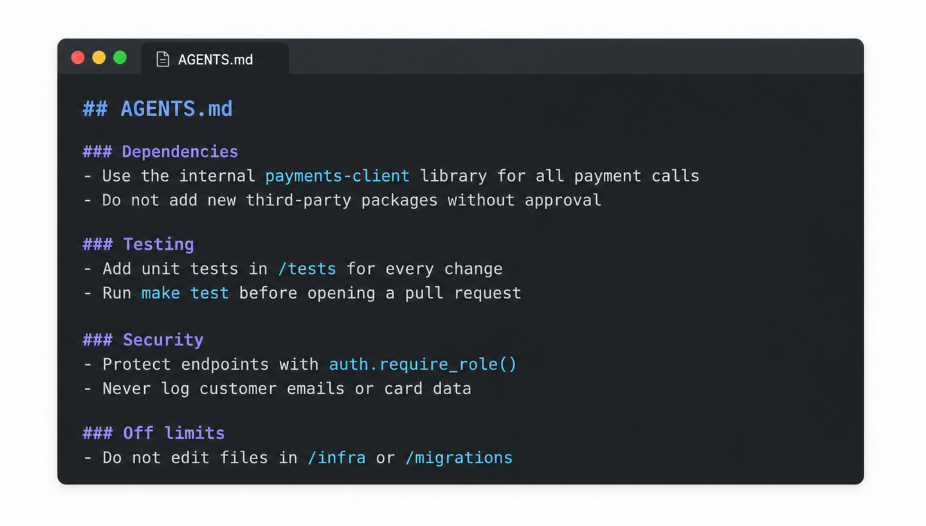
- Instruction files stored in the repository, such as AGENTS.md or CLAUDE.md, give agents the team’s coding conventions, approved libraries, and testing requirements at the start of every task.
- Some teams assign several well-defined tasks to agents at once, such as dependency upgrades or small bug fixes, while engineers focus on more complex work.
Example: An engineer assigns an agent a ticket to add a “preferred contact method” field to customer profiles. The agent updates the database model, the API, and the profile settings screen, and then executes the test suite. One test fails because an older export script expects a fixed set of fields, so the agent updates the script, confirms the tests pass, and opens a pull request that summarizes each change and the reason for it.
The human role: Engineers write clear task descriptions, set the scope, and review the agent’s plan before larger changes begin. They guide the agent when it heads in the wrong direction, verify the work locally, and review the final pull request with the same standards they apply to code written by a teammate.
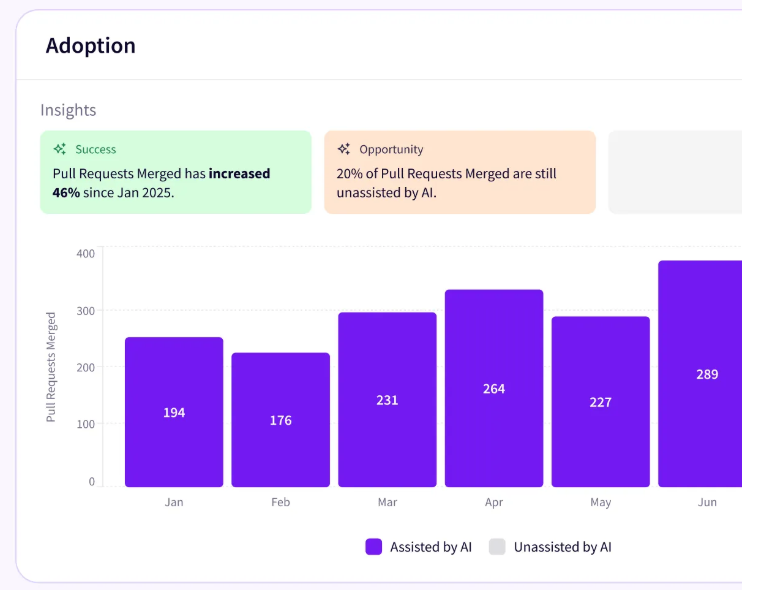
PRO TIP 💡: Before scaling coding agents, find out where teams already use them. Jellyfish Adoption Insights detects AI usage automatically from system signals and shows who uses AI, where, how, and with which tools. That baseline makes it easier to see which teams are ready for more agent work and which need support first.
Phase 4: Testing and Quality Assurance (QA)
The traditional bottleneck: Manual test writing and maintenance took up much of QA’s time, and coverage often fell behind new development. A renamed button or moved field could break a batch of tests, and slow regression cycles meant some bugs weren’t caught until close to release.
What agents can handle:
- Agents can read approved acceptance criteria and generate integration and end-to-end tests, using frameworks such as Playwright, before or alongside development.
- When a small interface change breaks a test, such as a renamed button or a moved form field, a testing agent can detect the cause and update the test script automatically.
- Exploratory testing agents can move through an application the way a user would, trying unexpected inputs and uncommon paths to find edge cases that scripted tests miss.
- For older code with little test coverage, agents can write unit tests that document current behavior, which makes future changes safer.
- Agents can also analyze unreliable tests, group failures by likely cause, and help teams separate true defects from timing or environment issues.
Example: A designer renames the “Submit order” button to “Place order,” and twelve checkout tests fail overnight. A testing agent traces every failure to the same renamed element, updates the affected tests, and notes the change in its report. The QA engineer confirms the rename was intentional before accepting the fix, since the same failure pattern could also point to a broken checkout page.
The human role: QA engineers set the overall test strategy, decide which risks need the most coverage, and review where testing is still thin. They validate the edge cases agents find and check that tests measure what the requirements call for. This step carries extra weight when an agent writes both the code and its tests, since tests based on the code alone can repeat the code’s mistakes.
Phase 5: Deployment and Release
The traditional bottleneck: Releases often depended on manual merge coordination, static checklists, and scheduled release windows that carried high risk. Senior engineers spent review time on style issues and routine checks, and slow validation pipelines delayed feedback, so problems in a release could take a while to spot and reverse.
What agents can handle:
- Before a senior engineer opens a pull request, an agent can review it for common security issues, such as those on the OWASP Top 10 list, along with coding standard violations and likely logic errors.
- During canary releases, where a new version goes to a small share of users first, agents can monitor error rates, latency, and other key metrics against a baseline.
- If those metrics cross thresholds the team set in advance, an agent can trigger a rollback and collect the logs, recent changes, and metric data that point to a likely cause.
- Agents can compile release evidence, such as test results, security scan outcomes, open issues, and change summaries, into one package for the release decision.
- When code changes, agents can update API documentation, internal wiki pages, and release notes, which the team reviews before publishing.
Example: A new version of a payments service goes to 5% of traffic. Within ten minutes, the error rate on one checkout endpoint climbs well above its normal range. The release agent rolls back the canary under a rule the team approved earlier, collects the related logs and the most recent changes to that endpoint, and posts a summary in the release channel. The on-call engineer reviews the evidence and decides whether to fix forward or hold the release.
The human role: Release managers and senior engineers review the evidence the agent assembles and give final approval for each production release. They also decide which actions agents can take on their own, such as rolling back a canary, and which actions still need a person to approve them, such as promoting a release to all users or changing production infrastructure.
Phase 6: Operations and Maintenance
The traditional bottleneck: During outages, on-call engineers searched through separate logs, traces, and metrics dashboards by hand to piece together what went wrong. That process kept mean time to recovery (MTTR) high, and alert noise, outdated runbooks, and routine maintenance work added to the load on operations teams.
What agents can handle:
- When an alert fires, a triage agent can gather logs, traces, and metrics from the affected services, compare the timing with recent deployments, and point to the change most likely responsible.
- Agents can group related alerts into a single incident, which cuts down on duplicate pages during an outage.
- By tracking trends in system health, agents can predict issues such as disk capacity limits, memory leaks, or traffic growth that will require scaling, and recommend adjustments before they cause an outage.
- Routine maintenance, such as dependency updates and security patches, can go to agents that prepare the changes as pull requests for the team to review.
- After an incident, agents can assemble a timeline and a first version of the postmortem, and update runbooks and API references so documentation keeps up with the system.
Example: At 3 AM, an alert reports rising response times on a search service. Before the on-call engineer logs in, a triage agent has collected the relevant logs, matched the slowdown to a deployment from earlier that evening, and found a new database query in that change that skips an index. The engineer reviews the agent’s summary, confirms the cause, and decides whether to roll back the deployment or apply a fix.
The human role: SREs and on-call engineers validate the root causes agents suggest, choose and carry out the fix, and decide when an incident is resolved. They also review postmortems and runbook updates, and they set the limits on which operational actions agents can take without approval.
Traditional SDLC vs. Agentic SDLC Comparison
Traditional SDLC vs. Agentic SDLC Comparison
Agents change each phase in different ways, and those changes add up to a different operating model for engineering teams.
This comparison puts the six phases side by side, followed by the wider differences in roles, quality control, and documentation:
| Traditional SDLC | Agentic SDLC | |
| Planning and requirements | Product managers write tickets and specs by hand, and teams fill in missing details through follow-up meetings and Slack threads. | Agents organize raw input into structured tickets and user stories, list open questions, and point out conflicts with existing features before the sprint starts. |
| Design and architecture | Architects create diagrams and specs manually, and documentation often goes stale as the code changes. | Agents map existing systems from the code, generate data models and API specifications, and write trade-off summaries and decision records for architects to review. |
| Development | Developers write most code by hand, including repetitive setup work and small changes across many files. | Coding agents take scoped tasks from tickets, edit multiple files, attempt fixes when builds fail, and open pull requests for review. |
| Testing and QA | QA teams write and maintain tests by hand, and regression testing often trails new feature work. | Agents generate tests from acceptance criteria, repair tests broken by small interface changes, and explore applications to find untested edge cases. |
| Deployment and release | Releases depend on manual merge coordination, static checklists, and scheduled release windows. | Agents pre-review pull requests, monitor canary releases, roll back under rules the team sets in advance, and update documentation and release notes. |
| Operations and maintenance | On-call engineers search logs, traces, and dashboards by hand to find the cause of an outage. | Agents group related alerts, match incidents to recent changes, predict capacity issues, and prepare routine maintenance as pull requests. |
| Developer role | Author who writes, tests, and debugs most code directly | Orchestrator who defines tasks, provides context, and validates agent output |
| Main constraint | Time needed to write code and tests | Time and attention needed to review and validate agent output |
| Source of context | Knowledge held by individual engineers and scattered documentation | Instruction files in the repository, connected internal systems, and current documentation that agents read at the start of each task |
| Quality control | Manual review and testing, often concentrated late in the cycle | Automated checks throughout each phase, with human approval at key decision points |
| Documentation | Updated by hand, usually after the fact, and often out of date | Updated alongside code changes, with people reviewing before publishing |
| Feedback speed | Days or weeks between a change and clear results | Minutes or hours for many routine changes |
A note on this comparison → Many teams won’t fit so neatly into either column. Agent adoption usually happens one phase at a time, so a team might use coding agents daily while planning and operations stay mostly manual.
The Context Gap: Why Unmanaged AI Agents Fail in the Enterprise
The Context Gap: Why Unmanaged AI Agents Fail in the Enterprise
An AI agent can know React, Kubernetes, and OAuth well and still know very little about how a specific company builds software. It won’t know which libraries the security team has restricted, which service owns a workflow, or why the team rejected a particular architecture last year.
In Stack Overflow’s 2024 Developer Survey, 63% of developers said AI tools lack the context needed to understand their organization’s codebase, internal architecture, and institutional knowledge.
What is the context gap → The context gap is the difference between what an AI agent knows about software development in general and what it knows about how a specific company’s systems, standards, and processes work.
Here are some of the most common problems that come from missing context:
- Agents may add third-party libraries that the security team hasn’t approved.
- They can write new code for functions that already exist in the codebase.
- Generated code may ignore internal rules for authentication or handling customer data.
- Without internal API documentation, agents make assumptions about how those APIs work.
- Code can meet the ticket’s requirements and still break a business rule the agent didn’t know about.
- Agents may suggest approaches the team has already tried and rejected, because they can’t see past design decisions.
Context won’t prevent every mistake, but it’s one of the few factors fully within a team’s control. Without it, agent-written code often needs rework, and reviewers spend more time on each pull request looking for problems an experienced engineer would have avoided from the start.
Teams usually combine two approaches to give agents the context they need:
- Instruction files in the repository: Files such as AGENTS.md, CLAUDE.md, or Cursor rules tell agents which libraries to use, how to structure tests, and which directories to leave alone. Because these files are part of version control, teams review and update them the same way they review code.
- Connections through MCP: The Model Context Protocol gives agents a standard way to query internal documentation, issue trackers, architecture decision records, and data catalogs during a task. Each connection also grants access to data, which worries many larger organizations. In Sonar’s 2026 State of Code Developer Survey, 61% of developers at companies with more than 1,000 employees said they were concerned about exposure of sensitive company or customer data. Teams manage that risk by limiting every connection to the data an agent needs.
For reference, here’s a simplified example of an AGENTS.md file.
Context reduces mistakes, and clear boundaries determine how much agents can do without a person involved. Many teams sort SDLC activities into three tiers:
| Tier | Examples | Human involvement |
| Human decision | Architecture trade-offs, investment priorities, production release approvals | A person makes and owns the decision |
| AI assist | Requirements expansion, test generation, PR summaries | AI produces the first version, and a person reviews and edits it |
| AI automate | CI checks, regression test runs, dependency scans | Tasks execute automatically, with monitoring and alerts for exceptions |
Teams can move tasks to a different tier as they learn where agents perform well and where they still need close supervision. Even so, agents can produce code faster than engineers can review it, which puts more pressure on the review process.
Keep in mind → A task’s tier can vary by system. Automated dependency updates might be fine for an internal tool and still need human review for a payments service.
Human-In-the-Loop Validation and Quality Gates
Human-In-the-Loop Validation and Quality Gates
More capable agents mean more pull requests, larger changes, and more decisions for engineers to check. The 2025 DORA report links higher AI adoption to faster software delivery, but it also links it to more delivery instability. Human oversight has to scale with that output, or quality problems reach production more often.
Many teams feel this first as review debt, a growing backlog of agent work that waits for human approval. The longer the queue, the more tempting it becomes to skim changes and approve them quickly. Trust is also an issue, since 46% of developers in Stack Overflow’s 2025 Developer Survey said they distrust the accuracy of AI output, which leads many reviewers to go through agent code line by line.
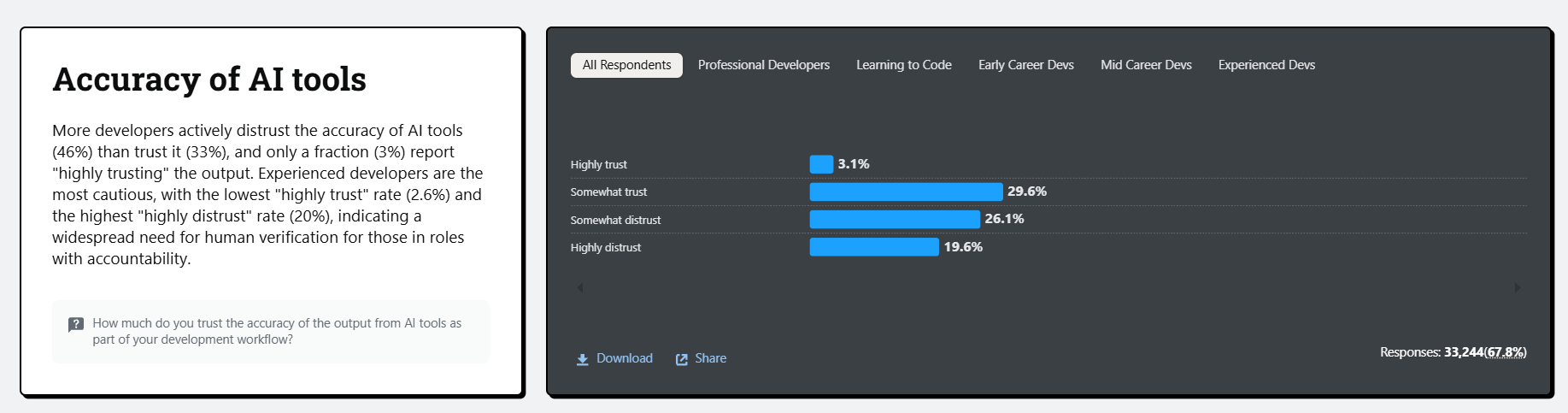
(Source: Stack Overflow)
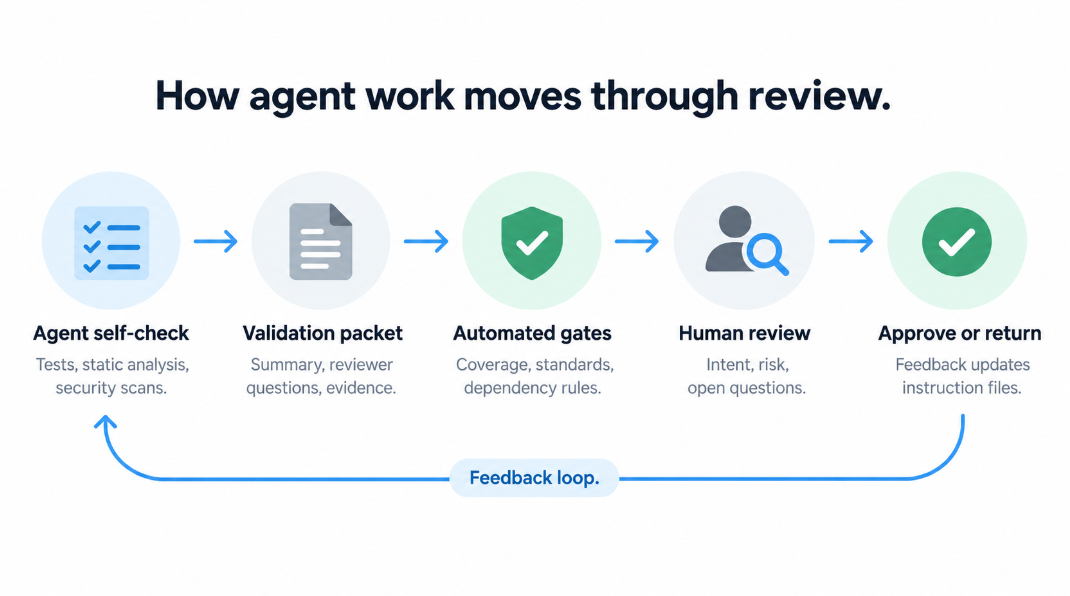
A more sustainable approach moves human attention from every line of code to the intent, risk, and evidence behind a change. Many teams follow a review flow along these lines:
- The agent checks its own work. Before it opens a pull request, the agent executes tests, static analysis, and security scans, and fixes what it can.
- The agent assembles a validation packet. The packet summarizes what the change does and how it affects the wider system, along with targeted questions about assumptions and edge cases for the reviewer to answer. It also includes evidence such as test coverage, static analysis results, and output from a test environment.
- Automated gates confirm the basics. CI checks verify coverage thresholds, coding standards, and dependency rules, so reviewers don’t spend time on them.
- A reviewer validates intent and risk. The engineer reads the packet first, answers the open questions, and reviews the highest-risk parts of the change in detail.
- The reviewer approves or sends it back. Feedback goes back to the agent, and recurring problems become new rules in the team’s instruction files.
Quality gates at the start and end of development make that flow more reliable. Agents can check work against both gates automatically, and people decide what happens with work that doesn’t pass.
The Definition of Ready (DoR) keeps unclear work out of development. A story is ready when:
- Acceptance criteria are written in a testable format, such as Given-When-Then
- Known edge cases and non-functional requirements, such as performance and security, are documented
- Dependencies on other teams or services are identified, and an owner is available to answer open questions
The Definition of Done (DoD) keeps unfinished work out of production. A change is done when:
- The code meets every acceptance criterion and passes all tests and coverage thresholds
- Security scans show no unresolved high-severity issues
- Documentation is updated, and a person has reviewed and approved the change
Keep in mind → The cost of a problem grows with each phase it passes through. During planning, a missing requirement is usually a quick fix. By QA, it can mean reworking several files, and in production, it can mean an incident response and a postmortem.
Together, a structured review flow and clear quality gates let teams take advantage of agent speed while keeping people in charge of what reaches production. Agents handle the routine checks, and engineers spend their review time on the decisions that need their judgment.
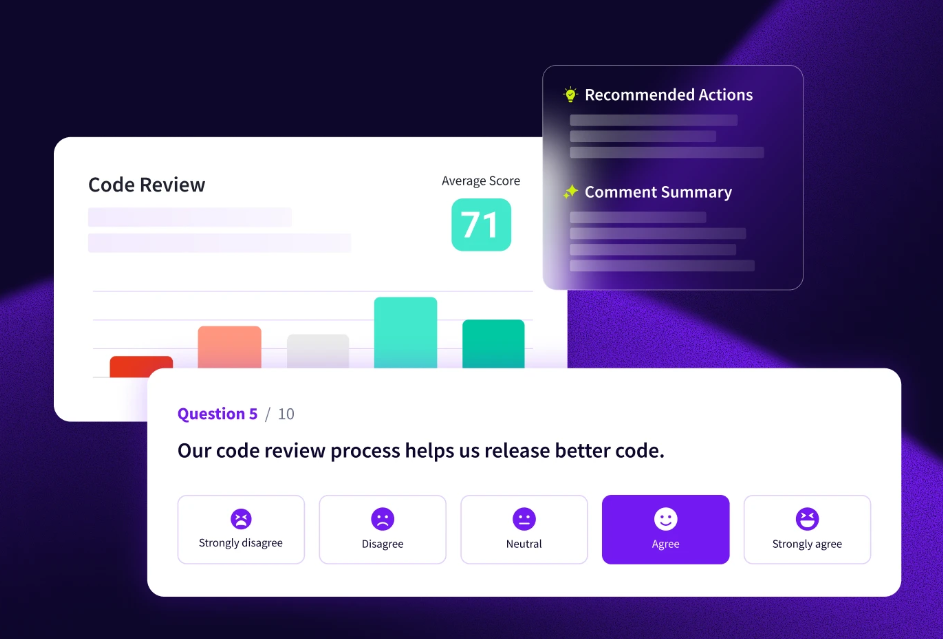
PRO TIP 💡: Trust in agent output varies from team to team, and system data alone may not show it. Jellyfish DevEx gives developers a structured way to report what affects their productivity through surveys. Comparing those results with review data helps leaders find where low confidence in AI tools slows reviews down.
Orchestrating the Agentic Pipeline with Engineering Intelligence
Orchestrating the Agentic Pipeline with Engineering Intelligence
More AI adoption means more code moving through the pipeline. According to Jellyfish’s AI Engineering Trends data, top AI adopters merge about 1.7x as many pull requests per engineer as companies with low adoption.
To see whether that output speeds up software delivery or creates delays in review and QA, engineering leaders need visibility into each stage of the SDLC.
That’s the view Jellyfish gives engineering leaders. Jellyfish is a software engineering intelligence (SEI) platform that combines data from code repositories, issue trackers, CI/CD tools, and AI coding tools into one picture of how work moves from planning to production.
It measures how teams adopt and use assistants and agents such as GitHub Copilot, Cursor, Claude Code, and Devin, what those tools cost, and how they affect delivery outcomes.
Several Jellyfish capabilities connect directly to the practices in this guide:
- Impact Insights: Impact Insights maps AI usage to throughput, quality, and delivery speed using SDLC data. Leaders can compare teams with different levels of AI adoption and see whether faster code generation leads to faster, more reliable releases.
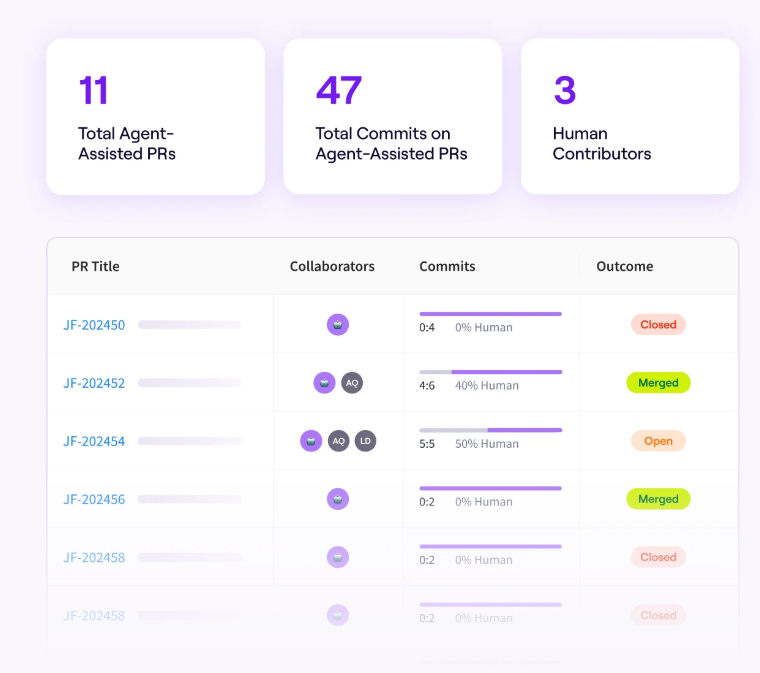
- Workflow Optimization: This view shows how AI affects writing, review, testing, and collaboration, including agent pull requests, contribution splits between humans and agents, and merge outcomes. Code quality metrics and developer feedback are combined with that system data, so teams can see which human-agent workflows produce the best results.
- Life Cycle Explorer: Each stage of development gets its own trend data, including where issues wait between steps. When agent output starts to pile up in review, the delay shows up clearly, along with the outliers that caused it.
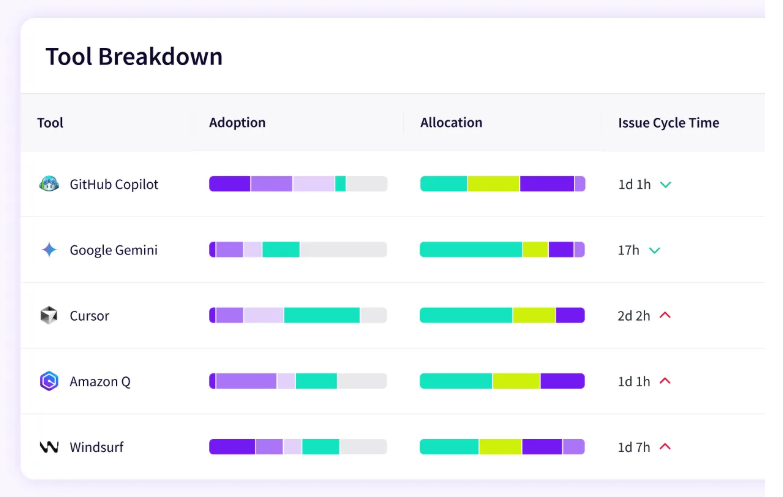
- Vendor Comparison: Most agentic SDLCs use several AI tools at once, and Vendor Comparison measures them all with the same vendor-neutral model. Budget decisions can then follow evidence from the team’s own data.
- AI Token Cost Management: Spend and token usage are broken down by tool, team, or initiative. As agents take on more multi-step work, this view helps leaders prevent cost overruns and see where AI spending creates measurable value.
- Resource Allocations: Jellyfish calculates how engineering effort is split across work categories, product lines, and initiatives, using data from the tools teams already work in. That makes it clear whether time saved by agents goes toward roadmap work or gets absorbed elsewhere.
Moving to an agentic SDLC is a gradual process, and clear data makes each step easier to plan and evaluate. Book an AI Impact demo to see how Jellyfish supports engineering teams through that change.
FAQs
FAQs
What is an AI-driven SDLC?
An AI-driven SDLC is a software development lifecycle in which AI tools and agents take on work in every phase, from requirements analysis and project planning to testing, deployment, and operations.
It builds on generative AI (GenAI), which uses large language models (LLMs) and natural language processing (NLP) to understand plain-language requests and produce code, documentation, and tests.
Agentic AI goes a step further. Agents can plan multi-step tasks, use tools, and check their own results with less direction from a person.
How do autonomous agents differ from coding assistants inside IDEs?
Most coding assistants built into IDEs started with code completion, which suggests the next line or block as a developer types. That form of AI-assisted development keeps the developer in control of every change.
Autonomous agents work across the full repository. They can:
- Take a task from a ticket and plan the changes
- Handle code refactoring across many files
- Start debugging on their own when a build fails
- Open a pull request once the work is ready for review
Some developers also use agents for vibe coding, where they describe what they want in plain language and accept the output with little review.
That approach can work for prototypes, and production code still needs the review flows and quality gates covered earlier in this guide.
How do AI agents improve CI/CD pipelines and code quality?
In continuous integration, agents can review each pull request before a person does. Common checks include:
- Coding standard violations
- Automated bug detection
- Scans for security vulnerabilities, such as those on the OWASP Top 10 list
That early screening supports code review, since routine issues get cleared first and reviewers can focus on design and business logic. Across CI/CD pipelines, agents can also repair broken tests and monitor new releases for problems.
What role does GenAI play in DevOps after deployment?
In DevOps, GenAI helps teams manage systems after release. Agents use anomaly detection to spot unusual patterns in logs and metrics, and predictive analytics to forecast capacity needs before they cause an outage.
This kind of predictive maintenance supports risk management, since teams can handle problems early.
During an incident, agents can match the issue to a recent deployment and suggest a fix for the on-call engineer to review.
About the author

Lauren is Senior Product Marketing Director at Jellyfish where she works closely with the product team to bring software engineering intelligence solutions to market. Prior to Jellyfish, Lauren served as Director of Product Marketing at Pluralsight.