In this article
The economics of legacy IT have quietly inverted at most enterprises. Aging on-premise systems now consume 60 to 80% of IT budgets, and nearly 80% of organizations say those systems are getting in the way of digital transformation.
The instinct is to fix it all at once with a full rewrite, but big-bang replacements in enterprise environments have a long track record of failure.
A gradual, DevOps-driven approach is the safer path. It breaks monolithic architecture down in stages, keeps the business running through the transition, and starts compressing time-to-market within the first few releases.
This guide walks through how to plan that move from current-state assessment through pilot selection, tooling, sequencing, and the cultural changes that have to happen alongside the technical work.
Phase 1: Building the Business Case for Modernization
Phase 1: Building the Business Case for Modernization
Every modernization program competes for budget with revenue-generating initiatives. The business case has to give leadership a reason to choose this one.
A solid business case works in four parts:
- Cost of the status quo – what staying on legacy costs each quarter
- Cost of the transition – what the transition itself costs to execute well
- Financial returns – the financial gains leadership can model
- Strategic returns – the business moves that open up after the transition
Developers in legacy environments spend up to 42% of their working time on rework and defect remediation, according to research in the American Journal of Interdisciplinary Innovations and Research. That number rarely shows up in the IT budget line for “legacy maintenance,” but it’s the cost most worth quantifying.
The other side of the model is what the transition gives back. DevOps modernization programs have been shown to cut deployment lead times by around 50% and infrastructure costs by close to 47% within the first year. Pair those with secondary metrics tied to business outcomes:
- Faster time to market on revenue-generating features
- Lower mean time to recovery from outages
- Reduced contractor and vendor support spend
- Less talent risk on aging stacks
Transition cost is the part most teams underestimate. Include tooling licenses, pilot team backfill, training, consulting if you’re using it, and overhead for running legacy and modern stacks in parallel. That parallel state usually runs 18 to 36 months at enterprise scale.
Example → Capital One ran an eight-year program to exit eight on-premises data centers and rebuild 80% of its 2,000 applications cloud-native. The bank now reports a 50% drop in transaction errors, 70% better disaster recovery time, and development environment provisioning that went from three months to minutes. Most enterprises won’t run a program at that scope, but the outcome categories are the right ones to model.
| Common reasons modernization business cases get rejected →
➢ The case reports returns in engineering terms (DORA scores, deployment frequency) that don’t map to a financial model. ➢ The transition cost shows up as a lump sum, with no detail on when spend occurs across the program. ➢ The case has no clear answer to what happens if the program waits another 18 months. ➢ The case frames developer productivity gains as headcount savings, which weakens engineering buy-in. ➢ The case presents a single total cost with no component breakdown. |
Phase 2: Auditing the Damage and Establishing Baselines
Phase 2: Auditing the Damage and Establishing Baselines
The audit is the only window the program gets to capture what the current state looks like before any of it starts changing. It covers four dimensions:
- Technical inventory – applications, infrastructure, and dependencies running today
- Delivery baseline – how fast and reliably the engineering org ships
- Operational cost baseline – what each application costs to keep running
- Risk and compliance baseline – security posture, regulatory exposure, single points of failure
Each dimension has a defined set of metrics and a usual home for the data:
| Dimension | What to measure | Where to find the data |
| Technical inventory | Application list, dependencies, hosting, last update, business owner | CMDB, cloud consoles, license tools, team lead interviews |
| Delivery baseline | Deployment frequency, lead time, change failure rate, MTTR | CI/CD tooling, ticketing systems, incident management |
| Operational cost | Infrastructure spend, licensing, support contracts, engineering hours | Finance systems, procurement records, time tracking |
| Risk and compliance | Open security findings, audit history, SPOFs, end-of-life versions | Security tooling, GRC platforms, vendor contracts |
Most audits start with the technical inventory because everything else hangs off it. Shadow IT, retired-but-still-running services, undocumented integrations, and batch jobs only one engineer knows how to maintain almost always come out during a thorough sweep. The output is a list of every application in scope, each with a business owner, dependencies, and hosting environment.
That inventory becomes the spine for the rest of the audit. Cost data attaches to it (infrastructure, licensing, support, and the engineering hours each application consumes), and so do the risk and compliance findings (open vulnerabilities, end-of-life versions, single points of failure).
You should also capture the four DORA metrics per team or application as the delivery baseline. Org-wide averages hide the variance that defines a transition, where one team’s profile can be ten times better than another’s.
| Minimum viable audit deliverables →
➢ Application inventory with owner, dependencies, hosting, and last meaningful update ➢ DORA baseline per team or application ➢ Cost-per-application breakdown across infrastructure, licensing, support, and engineering hours ➢ Risk register with open security findings, end-of-life versions, and single points of failure ➢ A documented assumption log for anything the audit couldn’t confirm |
Phase 3: Rebuilding the Culture and Organizing Platform Teams
Phase 3: Rebuilding the Culture and Organizing Platform Teams
Most modernization programs reorganize around Team Topologies, the engineering org design model developed by Matthew Skelton and Manuel Pais. It defines four team types, each with a specific role in software delivery:
- Stream-aligned teams own end-to-end delivery for a single valuable stream like a product, capability, or user journey, with no dependence on handoffs from other teams
- Platform teams build the internal infrastructure that stream-aligned teams consume as a service, from CI/CD pipelines to observability tooling
- Enabling teams help stream-aligned teams adopt new practices, frameworks, or technologies during periods of change
- Complicated-subsystem teams own components that require deep specialist expertise the average stream-aligned team can’t carry
In a legacy-to-DevOps transition, the platform team carries most of the structural weight. It owns the modernized infrastructure every other team builds on, which means the quality of its work determines what delivery will look like across the org.
Platform team responsibilities typically include:
- CI/CD pipelines and deployment automation
- Observability tooling and standards
- Security guardrails and compliance controls
- Golden paths and internal developer platforms
- Self-service infrastructure provisioning
Example → Netflix’s Paved Road model is the canonical reference for how a platform team operates at scale. The platform org builds a curated set of DevOps tools, frameworks, and standards that handle deployment, observability, service discovery, and runtime concerns for the rest of the engineering org. Teams can use alternatives, but they take on the maintenance burden when they do. The voluntary model works because the paved road is easier than rolling your own.
The Netflix model works because the culture around it does. Engineers can pick their own tools, but they’re the ones on the pager when something breaks.
For a legacy-to-DevOps transition, three cultural shifts matter most:
- Engineering owns production code end-to-end. On-call rotations, pager duty, and incident response move from a separate ops team into the engineering org.
- Failures become a source of learning. Blameless postmortems let teams pull patterns from incidents without making engineers defensive about what went wrong.
- Platform adoption is opt-in. Teams can use the central tooling or pick alternatives, and the ones who go their own way carry the maintenance burden that comes with it.
These changes take time and won’t take hold in a single planning cycle. The team structure and the cultural side have to move together, since neither one carries the program’s goals on its own.
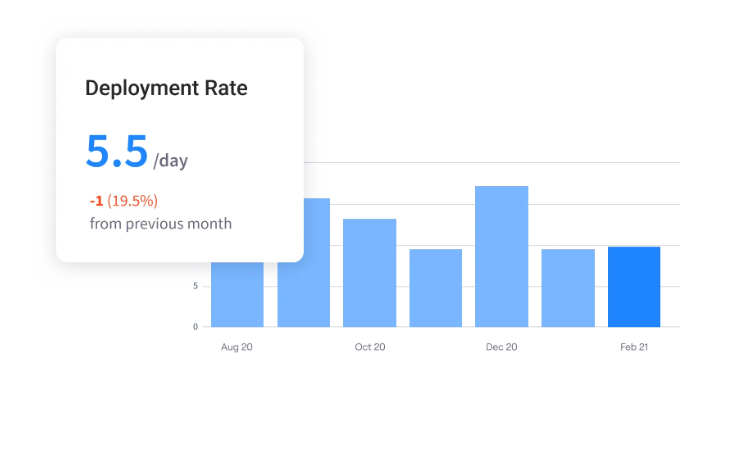
PRO TIP 💡: The voluntary adoption model only works if teams that use the platform ship faster than teams that don’t. Jellyfish tracks DORA metrics per team, which gives platform leaders the data to compare adopters against non-adopters and prove the paved road is delivering on its promise.
Phase 4: Using Proven Architectural Modernization Patterns
Phase 4: Using Proven Architectural Modernization Patterns
Modernizing the estate means working through the audit application by application and picking the right approach for each. Five approaches cover almost everything you’ll need:
- Strangler fig: Build new functionality alongside the monolith, route traffic to it gradually, and decommission the old code when the migration is complete. Highest business continuity, slowest pace, lowest risk per step.
- Branch by abstraction: Add an abstraction in front of the legacy code, then move implementations behind it one at a time. Useful when the legacy code has no clean external interface to replace.
- Replatform: Move the application to modern infrastructure with minimal code changes. The fastest way to capture infrastructure cost savings, though it doesn’t touch the application’s underlying technical debt.
- Rebuild: Full rewrite of an application or component. Highest risk, sometimes the only viable choice when the code is unmaintainable or the business logic has moved on from what the system was built for.
- Retire: Remove the application entirely. Most audits turn up applications no one would notice going away, and these are the highest-ROI work in the program.
Most programs map each application in the audit to the approach that fits it best, using a small number of signals to make the call quickly. Picking one approach and applying it uniformly across the estate rarely works.
A short reference for which signal usually points to which approach:
| Audit signal | Recommended pattern |
| Large monolith with clear domain boundaries inside | Strangler fig |
| Legacy code with no clean external interfaces | Branch by abstraction |
| Application functions well, infrastructure is the bottleneck | Replatform |
| Code is unmaintainable, business logic has changed significantly | Rebuild |
| Application has no clear business owner or usage signal | Retire |
Teams that start with the easiest application in the audit build their routing, observability, and rollback muscle before they take on the harder work. Programs that lead with the most critical or most visible application spend their risk budget before the team has practiced the approach, and the first setback often slows the program down or stops it.
Example → Shopify took the modular monolith path for its Ruby on Rails platform. The team organized the codebase into clearly bounded modules (“components”) that could evolve independently while staying inside one deployable. The architecture handled 1M+ requests per second during a Black Friday peak, which makes the case that a well-modularized monolith can perform at scale without a microservices rewrite.
Most programs end with two or three approaches doing the bulk of the work and a long tail of retired applications cleaning up the rest of the estate.
Phase 5: Properly Implementing Automation Around Legacy Constraints
Phase 5: Properly Implementing Automation Around Legacy Constraints
Applying CI/CD, testing, IaC, and GitOps to legacy systems is harder than applying them to greenfield code. The systems weren’t built for automation, and most of the work in this phase is figuring out how to introduce it without rewriting everything first.
These are the constraints and the workarounds that hold up across most programs:
| Legacy constraint | Workaround the program standardizes |
| Legacy code with no test seams | Characterization tests against current behavior, written before any refactoring starts |
| Manual deployment runbooks | Wrap manual steps with scripts, then promote scripts into the CI/CD pipeline incrementally |
| Existing database deployment processes (schema migrations, stored procedures) | Pipeline integrates with the current deployment scripts, with replacement scoped as separate work |
| Brownfield infrastructure with no IaC coverage | Import existing resources into Terraform state, accept partial coverage early and expand from there |
| ITSM tickets as the only change record | Pair ITSM with git as the source of truth, then transition ITSM into an audit trail for git-driven changes |
The workarounds aren’t elegant, and they’re not meant to be. They exist to get automation in place against the systems the program has today, with the option to clean them up once the modernization is further along.
Example → Etsy moved its PHP monolith from slow manual releases to continuous deployment running 50+ times per day without rewriting the application. The team built an internal deployment tool (Deployinator), added automated tests against existing code paths, and instrumented the system enough that bad deploys could be rolled back quickly. The legacy constraints stayed in place, while the automation got built to work around them.
Automation that works against legacy systems as they are is the practical bar to clear in this phase. Elegance comes later, or doesn’t, depending on how much of the legacy estate eventually gets replaced.
What not to automate → Some legacy systems aren’t worth the automation effort. The program saves time by skipping:
- Applications scheduled for retirement inside the next 12 months
- Systems where the cost of building test seams exceeds the cost of the current manual process
- One-off batch jobs that run quarterly or less frequently
- Vendor systems where automation would void support contracts
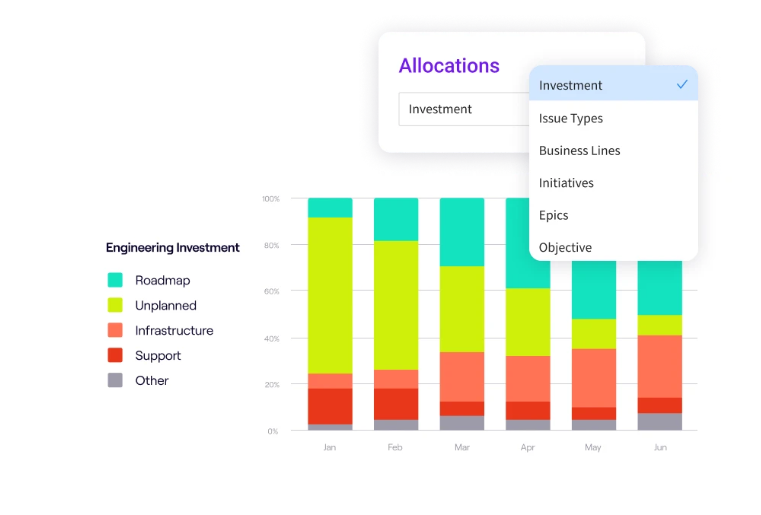
PRO TIP 💡 : Standardizing automation workarounds is platform team work, not stream-aligned team work. Jellyfish’s allocation tracking shows how platform team capacity splits between platform development work and support or unplanned requests, which is what tells program leaders whether the team has the bandwidth to keep building these standards.
Phase 6: Managing Operational Risk and Continuous Technical Debt
Phase 6: Managing Operational Risk and Continuous Technical Debt
Modernization programs run for two to three years at enterprise scale. Most of the work in this phase is keeping the program running without losing leadership support or burning out the team carrying it.
Most of the operational risk concentrates in four areas:
- Parallel-state failures: Incidents during the transition often involve both stacks at once, and neither team owns them cleanly by default. The mitigation is assigning explicit on-call and runbook ownership for the parallel state.
- Regression risk in legacy code: Changes to legacy code during the transition usually create defects that don’t show up until the modern stack picks up the same logic. Most programs freeze changes to legacy code scheduled for replacement to avoid this.
- Leadership patience: Quarterly reviews measure progress against the projections from the original business case. Setting realistic baselines at the start of the program keeps the reporting honest as the work continues.
- Platform team burnout: The platform team carries the most operational load through the transition, which makes it the easiest team to lose. Capping its incident load, protecting its roadmap from emergency work, and rotating responsibilities are standard mitigations.
And modernization doesn’t stop debt accumulation. Within 18 to 24 months, the modernized stack will develop enough of its own debt to slow velocity, which is why the platform team needs an active debt management practice from day one.
The basics of an active debt management practice come down to these few parts:
- A fixed share of engineering capacity allocated to debt work each quarter (typically 15 to 20%)
- Debt work tracked in the team’s main backlog under the same prioritization rules as everything else
- Debt tied to specific business outcomes where possible (this debt slows lead time by X, this debt blocks feature Y)
- The debt backlog reviewed on the same schedule as the feature backlog
The transition itself has an end date, but the operational discipline and debt management practice that hold the modernized stack together don’t. Both have to be in place before the program closes out.
| Defining program completion → A modernization program is functionally complete when the original business case targets are met, the platform team’s operational load is below the level it was before the program started, and the debt management practice has run for at least two quarterly cycles without losing capacity allocation. Most enterprise programs reach this in year three. |
Bring Visibility to Every Phase of the Transition with Jellyfish
Bring Visibility to Every Phase of the Transition with Jellyfish
A legacy-to-DevOps transition runs for two to three years. Engineering leaders carrying the program need to measure progress, allocate capacity, and report honestly to leadership through every quarterly review. And each of those depends on accurate data from across the engineering toolchain.
Jellyfish is a software engineering intelligence platform built for that visibility. It pulls from the existing toolchain and converts the data into the operational view that a modernization program needs.
For a legacy-to-DevOps transition specifically, four Jellyfish capabilities map directly to the work this article covered:
- Engineering investment allocation: Jellyfish tracks how engineering capacity splits across maintenance, technical debt, modernization, and feature work, by team and initiative. The same data feeds the business case at the start of the program and protects the debt allocation throughout it.
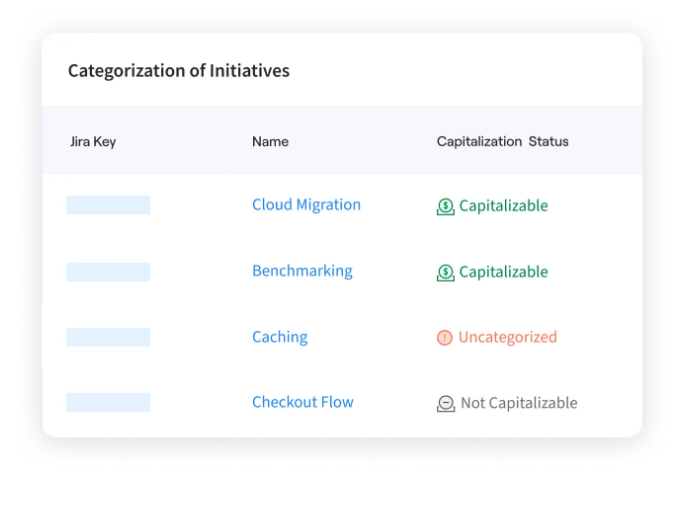
- Software capitalization automation: Most engineering orgs track R&D hours for software capitalization manually, which is one of the more painful finance workstreams in a multi-year program. The same data Jellyfish already collects feeds the capitalization reporting automatically, with no separate time entry from engineers.
- Capacity planning: Scenario modeling shows how engineering capacity holds up against the program’s roadmap, including the staffing model for the platform team carrying the most operational load. Program leaders can test trade-offs between modernization scope, feature delivery, and team headcount before committing to a quarter.
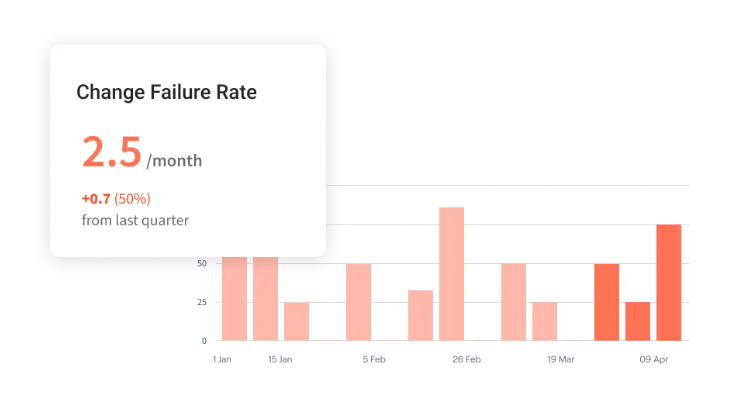
- DORA metric tracking across the program: The platform reads deployment frequency, lead time, change failure rate, and MTTR from the existing CI/CD and incident toolchain. It produces the team- and application-level breakdowns the audit baseline needs.
- Board-level engineering reporting: Pre-built dashboards present engineering investment, delivery performance, and roadmap alignment in formats designed for board and C-suite review. The same data and views carry across quarterly reviews without manual rebuilding.
A legacy-to-DevOps transition is a multi-year program with too many moving parts to manage on intuition. Jellyfish makes every phase of it measurable.
Book a demo to see how the platform fits into a modernization program already in motion.
FAQs
What is the strangler fig pattern in DevOps?
The strangler fig pattern is a modern DevOps migration approach where teams replace a legacy system one component at a time. Traffic moves from the old system to new components as each piece is built and verified, with the legacy code retired once the migration is complete.
The approach reduces risk compared to a single large rewrite because each component can be tested and rolled back independently.
Which open-source tools support a DevOps transition?
Most modernization programs build their toolchain from open-source projects with strong community support:
- Jenkins and GitLab handle continuous integration and continuous delivery workflows
- Ansible covers configuration management across servers
- Docker packages applications for consistent deployment across environments
- Prometheus and Grafana provide the observability stack for production monitoring
Teams often add GitHub for source control if they’re not on GitLab. And plenty of platform teams standardize on three to five tools and avoid building a custom stack from scratch.
How does cloud computing support legacy modernization?
Cloud computing gives modernization programs the elasticity and API-driven infrastructure that legacy data centers can’t match. AWS, Azure, and Google Cloud all provide the building blocks for scalability and modern IT infrastructure, with managed services that reduce the operational load on platform teams.
The benefits compound through every iteration of the lifecycle. Continuous integration and continuous delivery pipelines run faster, downtime drops as auto-scaling absorbs traffic spikes, and DevSecOps controls plug directly into cloud-native services. Most enterprises also see infrastructure cost optimization within the first year of migration.
How do DevOps practices break down silos between development and operations teams?
Legacy environments separate development from operations through handoffs, tickets, and queue-based workflows. DevOps practices and methodologies remove those handoffs by making engineering teams own the full software development lifecycle, from code through deployment to production support.
The cultural shift to DevOps principles takes longer than the tooling change. Most enterprises hit skill gaps when developers take on operational responsibilities for the first time, and the platform team typically runs hands-on enablement sessions to close the silos between operations teams and engineering.
How does infrastructure as code help legacy systems?
Infrastructure as code defines the configuration of an environment as files in version control rather than as manual setup steps in a runbook.
For legacy applications, that means environments become reproducible in real-time, configuration changes get tracked, and recovery from outages no longer depends on the engineer who originally configured the system.
Can you containerize a monolithic application?
Yes, a monolith can run in a container.
Teams package the application, its runtime, and its dependencies into a single image that runs on modern orchestration platforms like Kubernetes.
The application stays monolithic from a code perspective, but the deployment, scaling, and infrastructure management benefits of containers apply immediately.
How much of the IT budget should go toward technical debt?
There’s no universal benchmark, but a 15 to 20% allocation of engineering capacity to debt work each quarter is common practice at enterprises that manage technical debt actively.
The range comes from practitioner consensus across companies like Google, Spotify, and Atlassian, not from a single published study.
About the author

Lauren is Senior Product Marketing Director at Jellyfish where she works closely with the product team to bring software engineering intelligence solutions to market. Prior to Jellyfish, Lauren served as Director of Product Marketing at Pluralsight.