In this article
There are two questions engineering leaders need to answer about Claude Code. The first is whether it’s being used. The second is whether it’s making a difference.
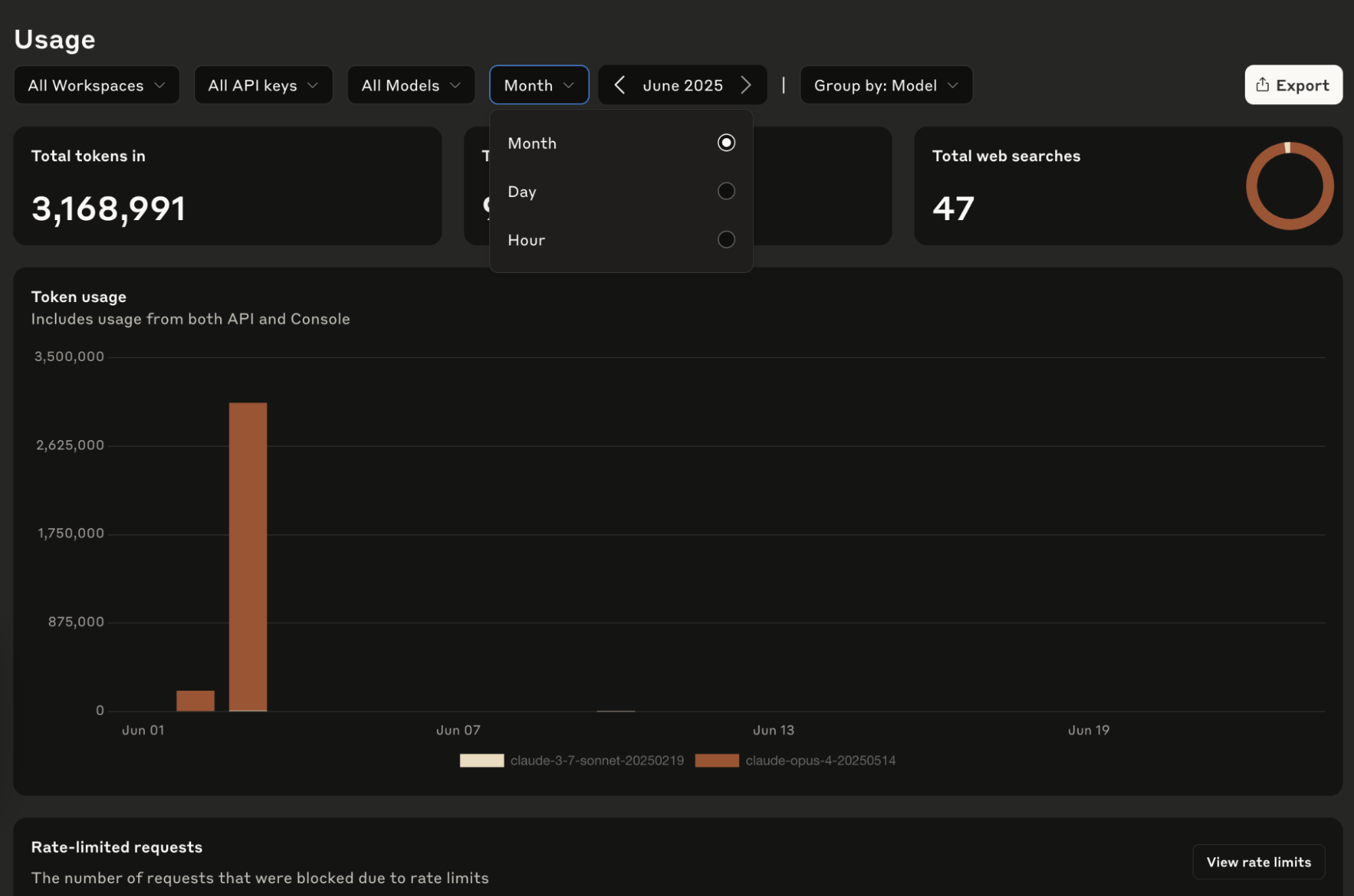
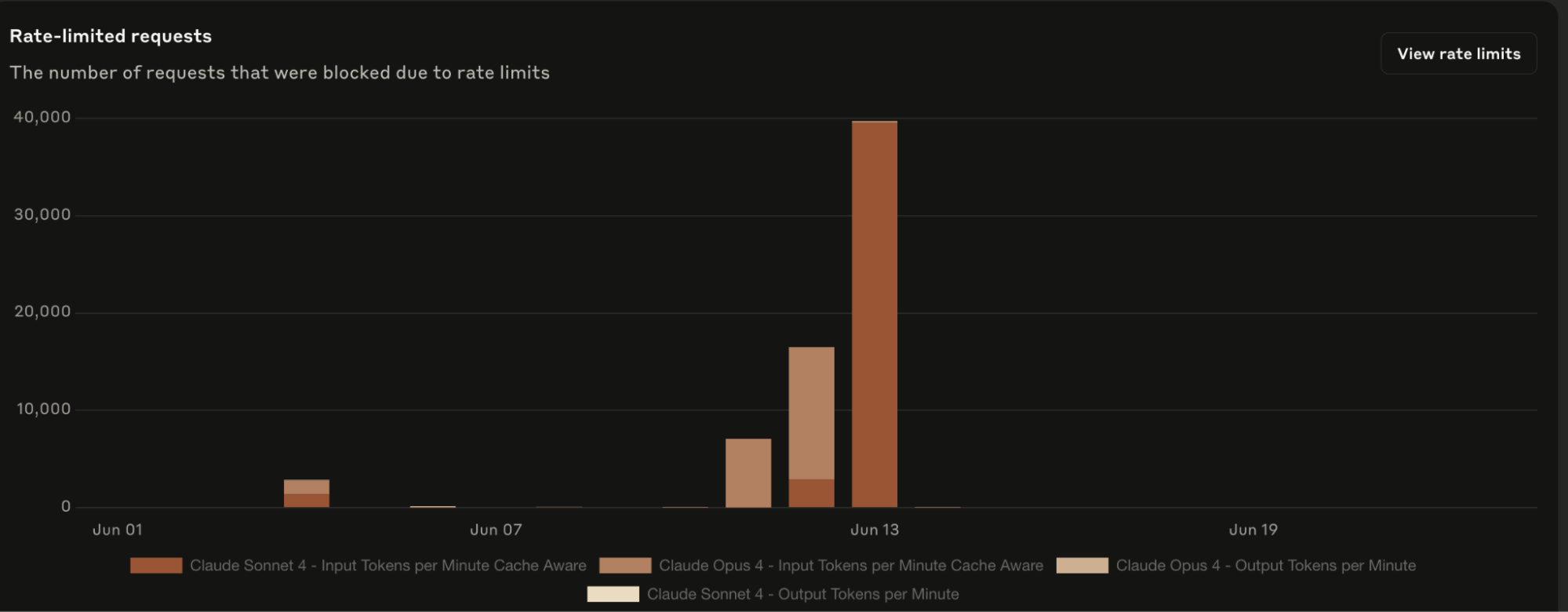
The Anthropic Console answers the first question well. It gives you visibility into active users, token consumption, acceptance rates, model usage, and overall spend. You can see how the tool is being engaged with across your org.
The second question is whether any of that usage is translating into something the business can actually see.
Faster delivery. Shorter cycle times. Higher deployment frequency. More features shipped per engineer per quarter. These are the outcomes that determine whether a six-figure annual AI tooling investment is a competitive advantage or a sunk cost.
Unfortunately, they are entirely outside the scope of what the native analytics were built to measure.
Closing the gap between these two questions is what this guide is about. We’ll cover what the native analytics actually measure, where they fall short, and what it takes to build the complete picture that holds up in a budget conversation.
Overview of Claude Code Usage Analytics
Overview of Claude Code Usage Analytics
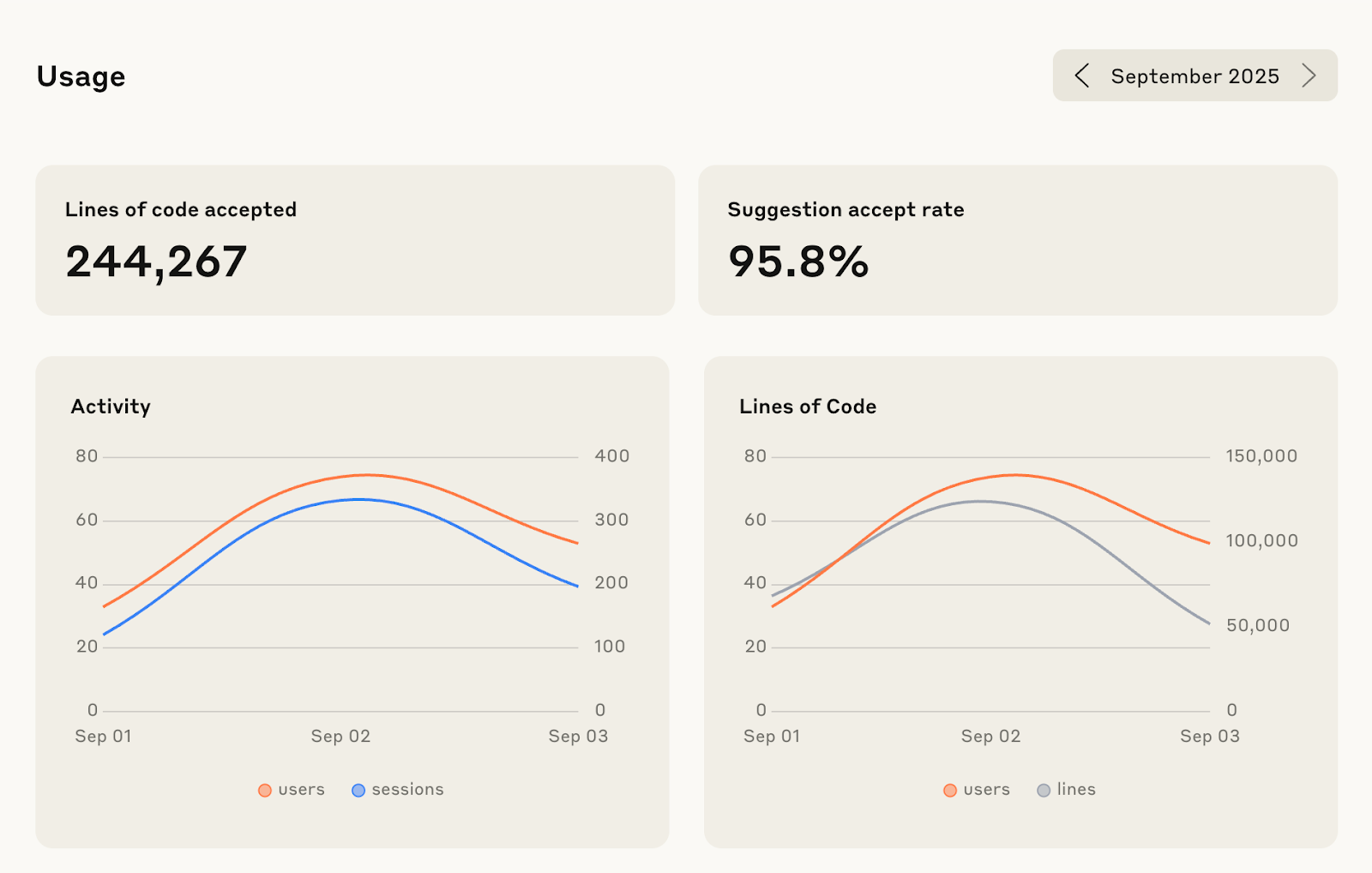
Claude Code usage analytics is Anthropic’s built-in reporting system for tracking how developers and engineering teams use Claude Code across their workflows.
It provides visibility into key usage data such as active users, coding sessions, lines of code added or accepted, tool usage, token consumption, model usage, and estimated costs across the organization.
This helps engineering leaders understand adoption patterns, monitor spending, and identify how Claude Code is being used across teams and repositories.
Its main purpose is to help organizations measure operational usage—i.e., who is using Claude Code, how often, and at what cost—while providing a foundation for evaluating whether AI-assisted development is improving engineering workflows.
| 🪼 Jellyfish notes: The analytics are primarily available to admins and owners on Team and Enterprise plans through the Claude Console, usage APIs, GitHub integrations, and observability tools like OpenTelemetry exports. |
What are Software Engineering Analytics?
Read nowHow Claude Code Analytics Work
How Claude Code Analytics Work
Before you can evaluate what Claude Code’s analytics are telling you (or missing) it helps to understand the infrastructure underneath them.
The metrics in your console are the output of an aggregation and telemetry pipeline with specific design choices that directly affect what you can and can’t do with the data.
Data aggregation and reporting freshness
This is the most important structural fact to understand before anything else, because it shapes every limitation that follows.
Activity data (token consumption, active sessions, usage by model, and accepted edits) in the Anthropic Console is aggregated on a daily cadence and typically appears with up to a one-hour delay.
This means the analytics API and dashboard are useful for understanding patterns and trends, but not for immediate operational monitoring.
For example, if you’re trying to catch a spike in token consumption before it becomes a billing problem, or monitor usage patterns as they’re happening during a sprint, the native analytics won’t help you.
| 🪼 Jellyfish notes: For teams that need real-time visibility (e.g., cost monitoring, incident detection) this requires a separate setup via OpenTelemetry export into a backend like Prometheus or Grafana. The native dashboard wasn’t designed for that use case. |
Telemetry collection and local tracking
Claude Code gathers usage data through telemetry generated during developer interactions inside the CLI and connected workflows.
This includes operational signals such as session activity, tool invocation patterns, model usage, prompt execution behavior, and accepted or rejected code actions.
For example, when a developer uses Claude to edit a file, generate tests, refactor code, or interact with a tool like Edit or NotebookEdit, those activities contribute to usage reporting.
This creates a measurable record of how developers are actually using Claude Code beyond simple login counts.
| 🪼Jellyfish notes: Telemetry coverage depends on where Claude is being used. Usage tracked through Anthropic’s first-party environment is much more visible than activity happening through third-party infrastructure. |
Related → 22 Key DevOps Metrics for Tracking Development Success
Data retention and policies
On policies, teams need to understand what Claude is collecting, how long that data is stored, and whether prompts or source code are being used to train models.
Anthropic’s enterprise policies are designed to address this concern. By default, customer code and prompts are not used to train models unless the organization explicitly opts in. This is especially important for teams handling proprietary codebases, regulated environments, or sensitive customer infrastructure.
In terms of retention, when on Enterprise plans, Claude Code retains activity data for 30 days. And on Team plans, the window is shorter.
The implication of this is the limited usage history available for analysis. Thirty days is enough to see weekly usage trends and monitor recent adoption patterns. But it’s not enough to do quarter-over-quarter comparison, or build a meaningful pre/post adoption baseline.
| 🪼 Jellyfish notes: If you want historical data beyond the retention window, you need to build your own export pipeline and maintain that store yourself. |
GitHub integration (Beta)
The GitHub integration allows organizations to correlate Claude Code sessions with commits, pull requests, merged changes, and broader repository activity.
For example, teams can compare pull request throughput between engineers actively using Claude and those who are not. They can analyze whether AI-assisted workflows reduce time-to-merge, increase deployment frequency, or improve review efficiency.
| 🪼 Jellyfish notes: GitHub correlation shows workflow impact, but it does not automatically explain whether output quality improved, whether code churn increased, or whether business delivery actually accelerated. |
Measuring the Impact of Generative AI Coding Assistants with Data
Read nowWhat Claude Code Measures
What Claude Code Measures
Productivity and activity metrics
The Console tracks two headline activity signals:
- Lines of code added or removed by Claude.
- Active sessions across your repo.
Lines of code is the metric that tends to get cited most in internal rollout updates. It’s also the metric most likely to be misread.
A high lines-of-code number tells you Claude Code is generating output. It doesn’t tell you whether that output shipped, passed review, introduced regressions, or moved any feature closer to production.
Active sessions is a utilisation signal. It tells you the tool is open and being interacted with. A developer can rack up active sessions while spending most of that time rejecting suggestions or iterating on prompts that aren’t producing useful output.
Both metrics show the tool being used. And while that’s a necessary starting point, it’s not a productivity measurement.
Recommended → The Modern Approach to Measuring Developer Productivity
Tool accept rate
This is Claude Code’s equivalent of GitHub Copilot’s acceptance rate, but more granular. Rather than a single org-wide acceptance percentage, Claude Code breaks accept rate down by specific tool type: Edit, NotebookEdit, and others depending on your setup.
That granularity is genuinely useful for understanding where Claude Code is fitting developers’ workflows and where it isn’t.
For example, a low accept rate on Edit suggestions for a particular team might signal a context problem, a codebase complexity issue, or simply that the tool isn’t well-suited to that team’s primary language or project type.
What it doesn’t tell you is the same thing GitHub Copilot’s acceptance rate doesn’t tell you: a developer accepting 70% of Claude Code’s suggestions can have identical cycle time to a developer accepting 15%.
Acceptance rate measures tool engagement. It doesn’t measure whether that engagement is translating into faster, higher-quality delivery.
How to Monitor GitHub Copilot Usage Across Your Engineering Team
Read nowCost and token tracking
This is the metric cluster where Claude Code’s native analytics are strongest. It’s also where engineering leaders are most at risk of drawing the wrong conclusion.
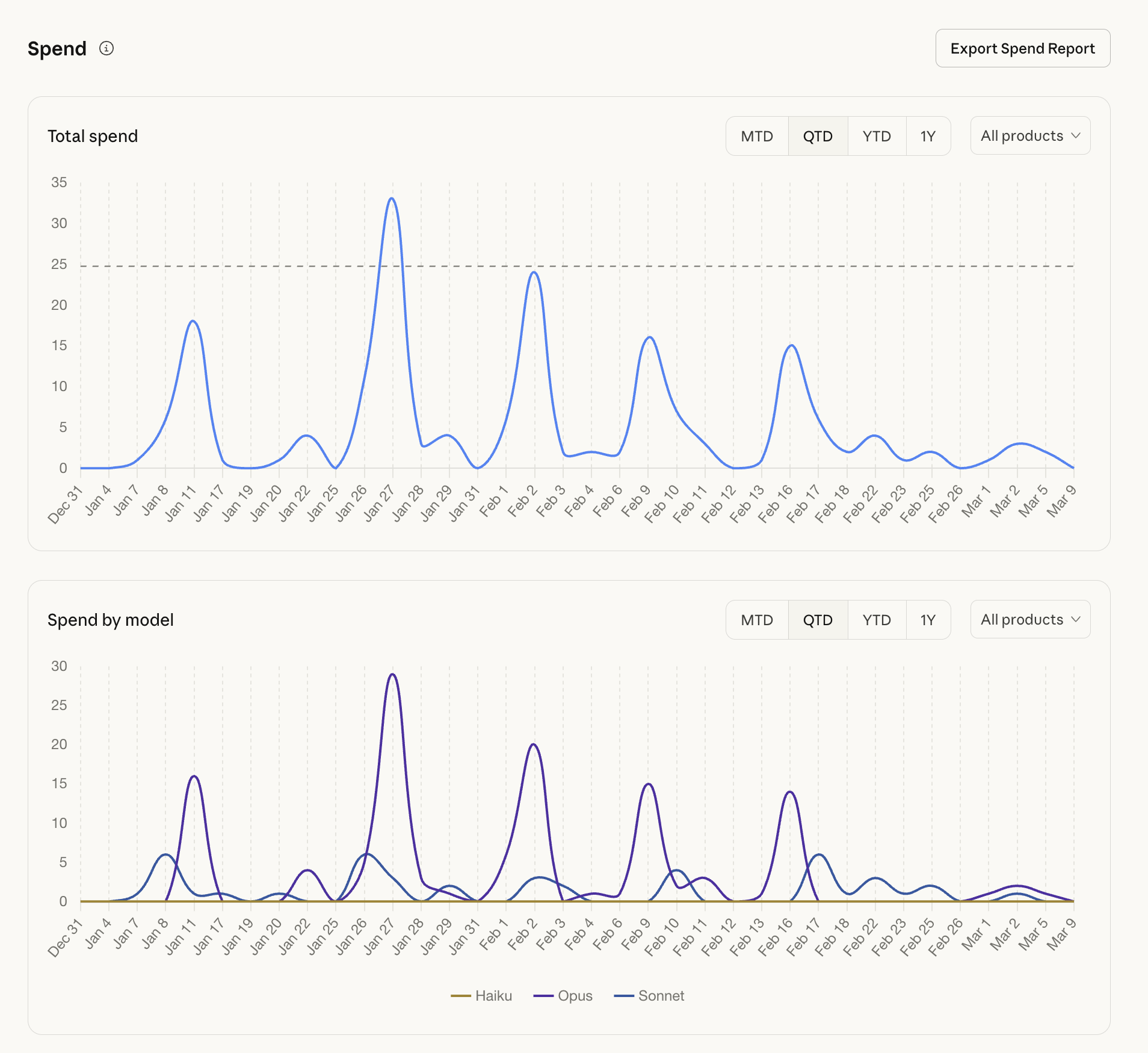
The Console breaks down token consumption by input tokens, output tokens, and cache reads, across specific models.
Sonnet and Opus usage are tracked separately, costs are calculated per model, and the data is granular enough to do meaningful budget forecasting. If you’re trying to understand what you’re spending and on what, this is genuinely useful data.
The trap is treating token volume as a productivity signal. In fact, many organizations underestimate how expensive context inefficiency becomes at scale.
For example, overloaded Model Context Protocol (MCP) environments, excessive tool definitions, or unnecessary prompt repetition can inflate token usage without improving output quality.
But the token data doesn’t distinguish between any of these scenarios.
The 26 Most Valuable Engineering KPIs & Metrics (2026 Update)
Read nowGitHub contribution metrics (Beta)
This is the most promising metric cluster in the native analytics suite. And that’s because it’s the one that tries to bridge usage data and engineering output.
When the GitHub integration is active, it correlates Claude Code session activity with pull requests merged, giving you a comparative view of engineering velocity with and without AI-assisted workflows.
To a certain extent, this starts to answer the ROI question. However, two things to hold clearly when using this data.
First, it’s still in beta and the correlation is directional. It assumes that high-Claude-Code-usage developers are associated with more PRs merged. But it doesn’t show whether Claude Code caused that, or whether those developers were already high performers.
Second, PRs merged is one signal in a longer delivery chain. It doesn’t capture how long those PRs sat in review before merging, what their change failure rate looked like post-deployment, or whether the features they contained actually shipped to users on schedule.
| 🪼 What’s notably absent
Across all four metric clusters, the pattern shows that the data is usage-facing and cost-facing. What’s absent entirely is delivery-facing data.
These are the metrics that translate to business outcomes, and none of them are in Claude Code’s native analytics perimeter. In Anthropic’s defense, Claude Code can show adjacent engineering activity, like commits and PRs, and the team says these can help organizations “understand impact on development workflows [*].” But that still does not equal delivery measurement. To get cycle time, deployment frequency, or roadmap delivery, you’d need to connect Claude Code usage data with tools like GitHub/GitLab, Jira/Linear, CI/CD, incident/release systems, or an engineering intelligence platform like Jellyfish. |
Jellyfish AI Impact
Claude Code Changed How Your Team Works. Now Change How You Measure It.
Jellyfish Shows You How4 Ways to Track Claude Code Usage
4 Ways to Track Claude Code Usage
There are several ways to track Claude Code usage, depending on what you want to measure. Some methods are useful for high-level visibility. Others are better for individual developers, cost control, or deeper engineering observability.
The important thing is to know what each method is good for, because no single tracking option gives you the full picture on its own.
1. The Anthropic Console dashboard
This is the default starting point for most engineering leaders. It’s a visual analytics dashboard accessible to owners and admins on Team and Enterprise plans.
What you get is a high-level org-wide snapshot showing active users over time, lines of code accepted, token consumption by model, and estimated costs.
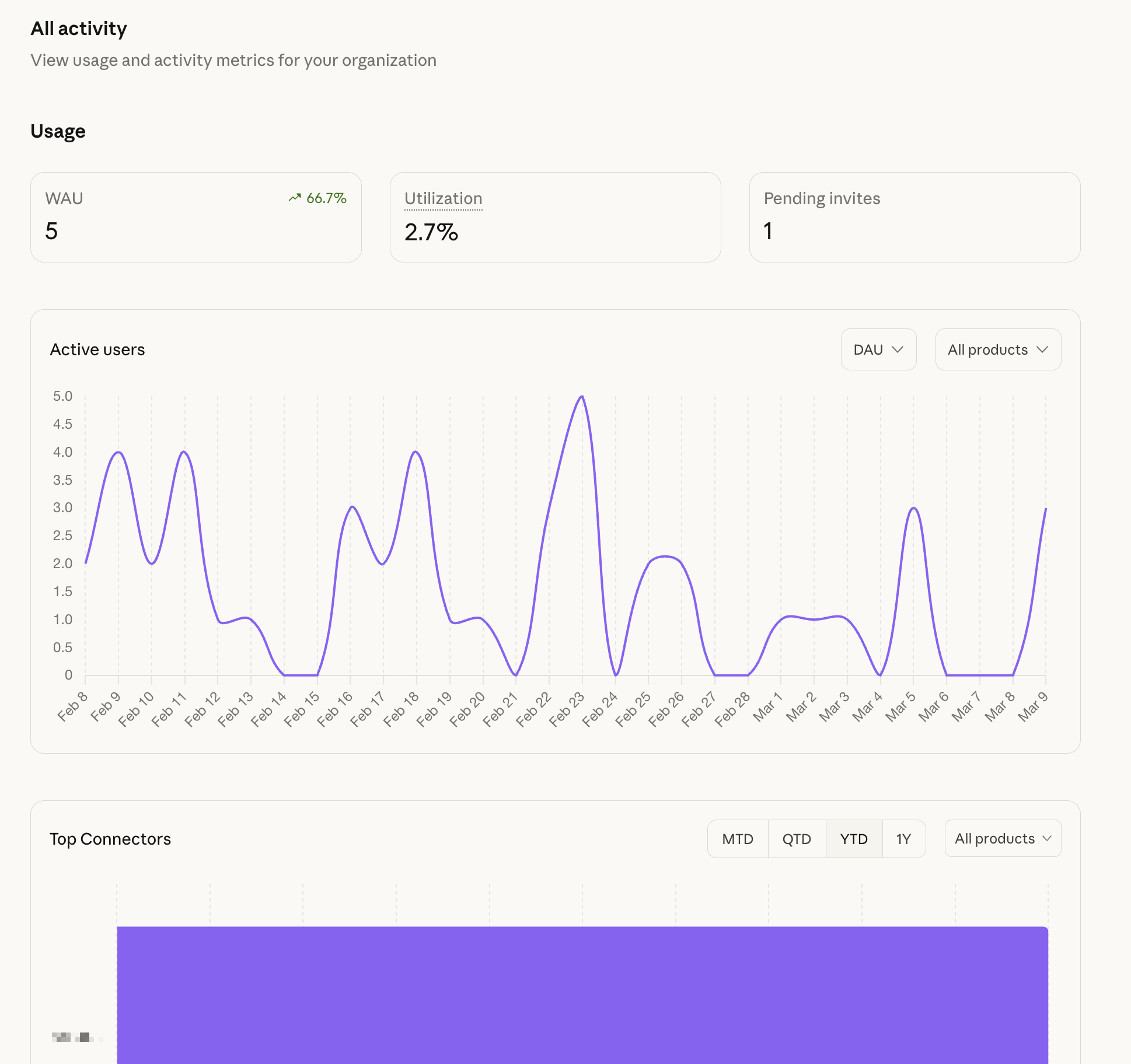
It’s the quickest way to answer basic adoption questions and the most accessible view for anyone who doesn’t want to touch an API or a CLI.
However, it’s not enough for proving ROI. The Console surfaces org-wide aggregates by default, which means you’re looking at averages across your entire engineering org unless you do additional work to filter the data.
🪼 Verdict
|
2. The /context slash command
Inside an active Claude Code session, developers can run /context directly in the CLI to get a real-time breakdown of their current token usage. It shows input, output, cache reads, active MCP tools, and how much of their context window is occupied.
For example, a developer may not realize that a large file, multiple loaded tools, or several MCP servers are consuming a significant portion of the context window before any meaningful coding work begins. Running /context can help them see what is taking up space and make better decisions about what to include or remove.
However, this method is mostly useful for developers because it helps optimize their sessions. But it produces nothing an engineering leader can use.
There’s no aggregation, cross-team visibility, or historical record. A developer running /context generates a snapshot of their own session that exists in that moment and nowhere else.
🪼 Verdict
|
3. Open-source CLI tools
Two tools get mentioned most often in this space. There’s ccusage, available via npm, and the Claude Code Usage Monitor, a Python-based tool designed to help developers predict when they’ll hit their 5-hour usage limits in real time.
- ccusage parses local JSON cache files to generate historical usage reports at the individual level.
- For a developer who wants to understand their own usage patterns over time it’s a useful tool that goes deeper than the /context
- The Claude Code Usage Monitor takes a different angle, focusing on predicting limit exhaustion in real time so developers can pace their usage or plan around resets.
Both are developer-facing by design. Neither aggregates across a team or produces output that belongs in a leadership report or a budget conversation.
🪼 Verdict
|
4. OpenTelemetry and developer observability tools
This is the most powerful access method and the most demanding to set up.
By configuring environment variables in your Claude Code deployment, you can export operational telemetry directly to standard observability backends like Prometheus, Grafana, or any OTel-compatible backend.
Unlike the daily-aggregated Console, OpenTelemetry gives you live data streams you can alert on, and retain for as long as your backend supports.
But there’s a significant tradeoff to this. Building and maintaining a custom OpenTelemetry pipeline requires dedicated platform engineering capacity. You have to take on ongoing infrastructure ownership such as schema maintenance, backend integration, alert tuning, and pipeline reliability.
For organisations that already have a mature observability stack and the engineering bandwidth to extend it, the investment is justified. For most mid-sized engineering orgs, it’s a substantial overhead for a system that still only produces technical observability data.
Which is the deeper point. Even a well-built OpenTelemetry pipeline gives you better Claude Code usage data but not delivery data.
Cycle time, deployment frequency, feature throughput — none of that flows through Claude Code’s telemetry regardless of how you access it. You’d have a real-time view of token consumption and session activity, and you’d still need a separate layer to connect it to engineering outcomes.
🪼 Verdict
|

Get a unified view of how AI shapes work
Jellyfish makes it easy to integrate your full AI tech stack
See all integrations →
Limitations of Claude Code Usage Analytics
Limitations of Claude Code Usage Analytics
No analytics for individual Pro and Max plans
One of the first limitations is access itself. Claude Code usage analytics are primarily available on Team and Enterprise plans, which means individual Pro and Max users do not get the same level of reporting visibility.
Developers using Claude personally may be able to check local usage and session details, but organization-wide dashboards, admin reporting, and deeper analytics require a business-tier environment.
This creates an immediate gap for companies testing adoption through individual subscriptions before rolling out enterprise access.
Leadership may assume they can evaluate ROI during these early experiments, but without centralized reporting, they are mostly relying on anecdotal feedback rather than measurable usage patterns.
There is no reliable way to compare adoption across teams, monitor spend centrally, or understand whether usage is concentrated among a few developers.
Blind spots across Bedrock and Vertex deployments
Many enterprise teams do not run all AI workflows directly through Anthropic’s first-party environment. Instead, they may use Claude through platforms like Amazon Bedrock or Google Vertex AI because of procurement policies, cloud strategy, compliance requirements, or infrastructure preferences.
The problem is that Claude Code’s native analytics primarily track activity happening through Anthropic’s own endpoints.
That means usage happening through Bedrock or Vertex may not appear fully—or at all—inside the standard reporting environment. As a result, leadership ends up with fragmented visibility.
One team may appear highly active because they use first-party Claude access, while another team using Claude heavily through Bedrock looks invisible in the dashboard.
This creates false conclusions. Executives may assume adoption is low, spending is controlled, or one team is outperforming another when the real issue is incomplete reporting coverage.
No real-time API data
Daily aggregation with up to a one-hour delay means the native analytics system was not designed for real-time monitoring.
For most routine reporting use cases such as weekly adoption reviews, monthly cost summaries, quarterly business reports—this is fine. The data is timely enough.
Where it breaks down is in two specific scenarios:
- Cost control: Token consumption can spike quickly. For example, an automated workflow, or a sudden surge in usage during a product crunch can generate substantial unexpected costs before daily aggregation catches up. Without real-time visibility, your first signal that something has gone wrong is often a billing alert, not a usage alert.
- Rollout monitoring: When you’re actively deploying Claude Code to a new team or cohort, you want to see the adoption signal as it’s happening. Daily aggregates compress that signal into a summary that arrives after the moment when you could have acted on it.
Both scenarios require OpenTelemetry export to address. That’s a viable path, but it’s a significant infrastructure investment for a problem that arguably shouldn’t require custom platform engineering to solve.
Context pollution from MCP servers
MCP servers extend Claude Code’s capabilities by connecting it to external tools, data sources, and workflows. The more MCP servers you connect, the more context Claude Code loads at the start of each session.
And that context loading consumes tokens before a developer has written a single line of code or accepted a single suggestion.
But that creates a bigger problem. If a developer has five MCP servers connected and the tool definitions for those servers consume a meaningful portion of their context window on every session, the token consumption data is inflated by infrastructure overhead that has nothing to do with actual productivity.
A team with heavy MCP usage will show higher token consumption than a team doing equivalent work with fewer integrations. Worse, the native analytics gives no clean way to distinguish productive token usage from overhead.
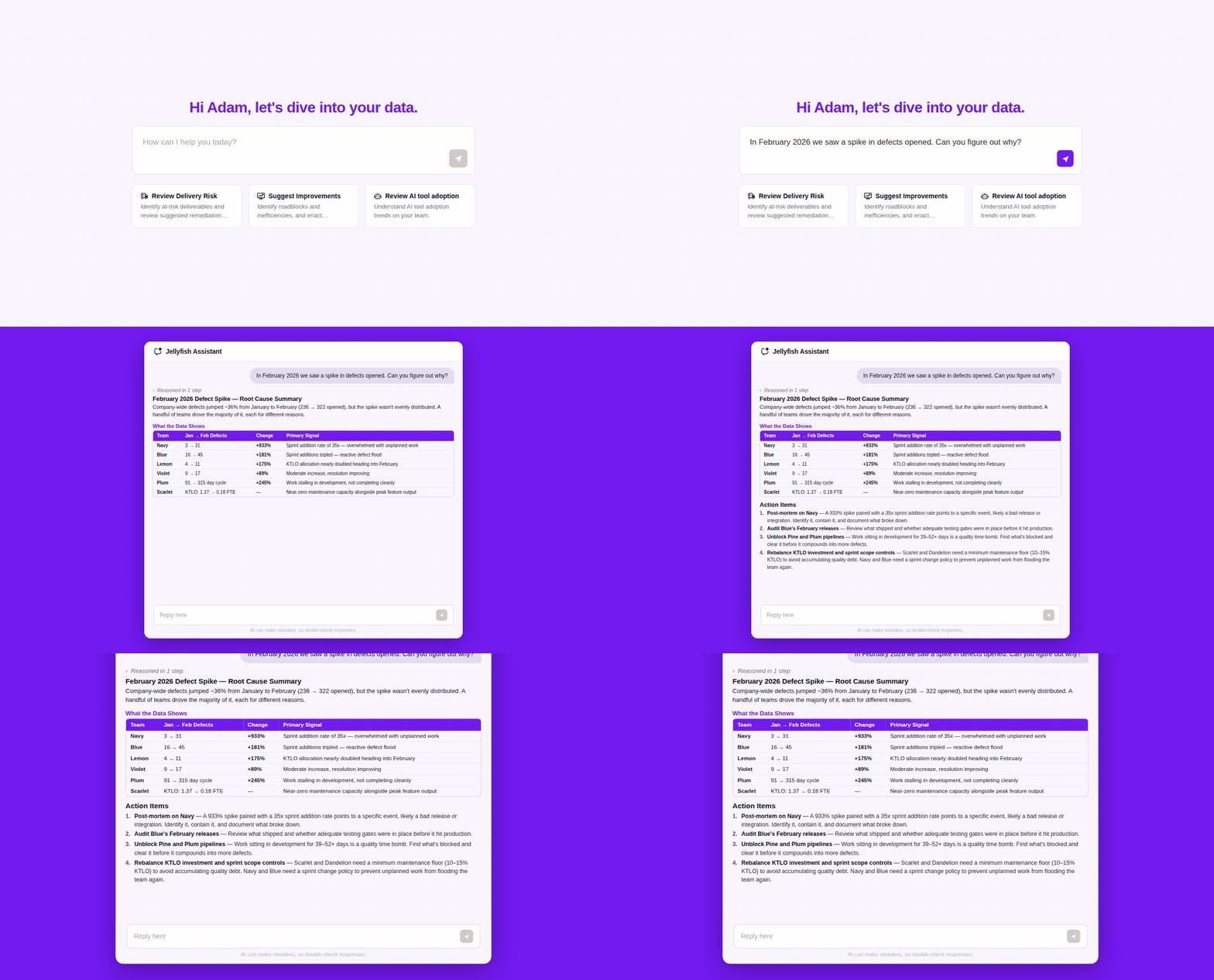
| Jellyfish Assistant is your AI-powered guide that proactively surfaces insights and delivers trusted answers based on your org’s context.
Discover how top engineering teams use Jellyfish to get proactive insights and guidance to improve R&D efficiency. |
Connecting Claude Code Analytics to Business Outcomes
Connecting Claude Code Analytics to Business Outcomes
Everything we covered up until now points to the same underlying problem:
- Claude Code generates real usage data.
- Engineering org generates real delivery data.
But there’s no native connection between the two. We have data in two systems that don’t talk to each other by default.
Why manual correlation breaks down
The instinct most engineering leaders have when they first hit this problem is to try to build the bridge manually.
For example, export token data from the Console, pull cycle time from Jira, drop both into a spreadsheet, and see if the correlation is there.
This approach works, but it’s unscalable. The moment you need to do this analysis across multiple teams, multiple quarters, different adoption cohorts, the manual approach becomes too complex.
Someone has to own the exports, maintain the schema, reconcile the time windows, and rebuild the analysis every time leadership asks a follow-up question.
What the connection needs to look like
Closing the gap between Claude Code usage data and engineering delivery outcomes requires four things happening in the same system, continuously, without manual intervention.
Usage must be directly connected to delivery outcomes
Knowing that a team has high Claude Code acceptance rates is useful, but it only becomes meaningful when that usage can be tied to measurable delivery improvements.
Leaders need to see whether the teams using Claude most effectively are also improving pull request velocity, reducing cycle time, increasing deployment frequency, and lowering change failure rates.
The goal is not to compare two separate reports and assume there is a relationship. The system should show clearly where Claude usage is highest, what delivery outcomes changed, and how those improvements hold over time.
Visibility must exist at the team level
Company-wide numbers often hide the real story. A strong average can be created by one or two high-performing teams while the rest of the organization struggles with poor adoption or weak delivery outcomes.
Engineering leaders need to compare high-adoption teams against low-adoption teams during the same period to understand where Claude is creating measurable value and where rollout strategy needs adjustment.
Recommended → GitHub Copilot ROI: How to Measure Team Adoption and Productivity
Historical data must extend beyond short retention windows
Leadership decisions around budget approvals, enterprise renewals, and rollout expansion depend on trend analysis.
Teams need to compare pre-adoption baselines with post-adoption performance, review quarter-over-quarter engineering improvements, and understand how usage patterns and delivery outcomes evolve over time.
Native analytics may show recent activity, but they are not designed to preserve the full historical context needed for strategic decision-making.
Without that continuity, every ROI conversation starts from zero, forcing teams to rebuild the same justification repeatedly.
The data must translate into business language leadership understands
Engineering teams naturally look at pull request throughput, review speed, and deployment frequency. Executives care about different outcomes.
- A CFO wants to understand cost per deployment and output per engineer.
- A CEO wants to see whether feature delivery is accelerating and whether time-to-market is improving.
The same Claude Code usage data must be able to support both conversations.
If engineering leaders have to manually explain the connection between token spend and business outcomes every time budget planning begins, the investment becomes harder to defend.
A strong measurement system should make that translation automatic, turning technical usage signals into clear operational and financial value.
What are DORA metrics? And Why Are They So Important?
Read nowMeasure Claude Code Usage & Impact Across the SDLC with Jellyfish
Measure Claude Code Usage & Impact Across the SDLC with Jellyfish
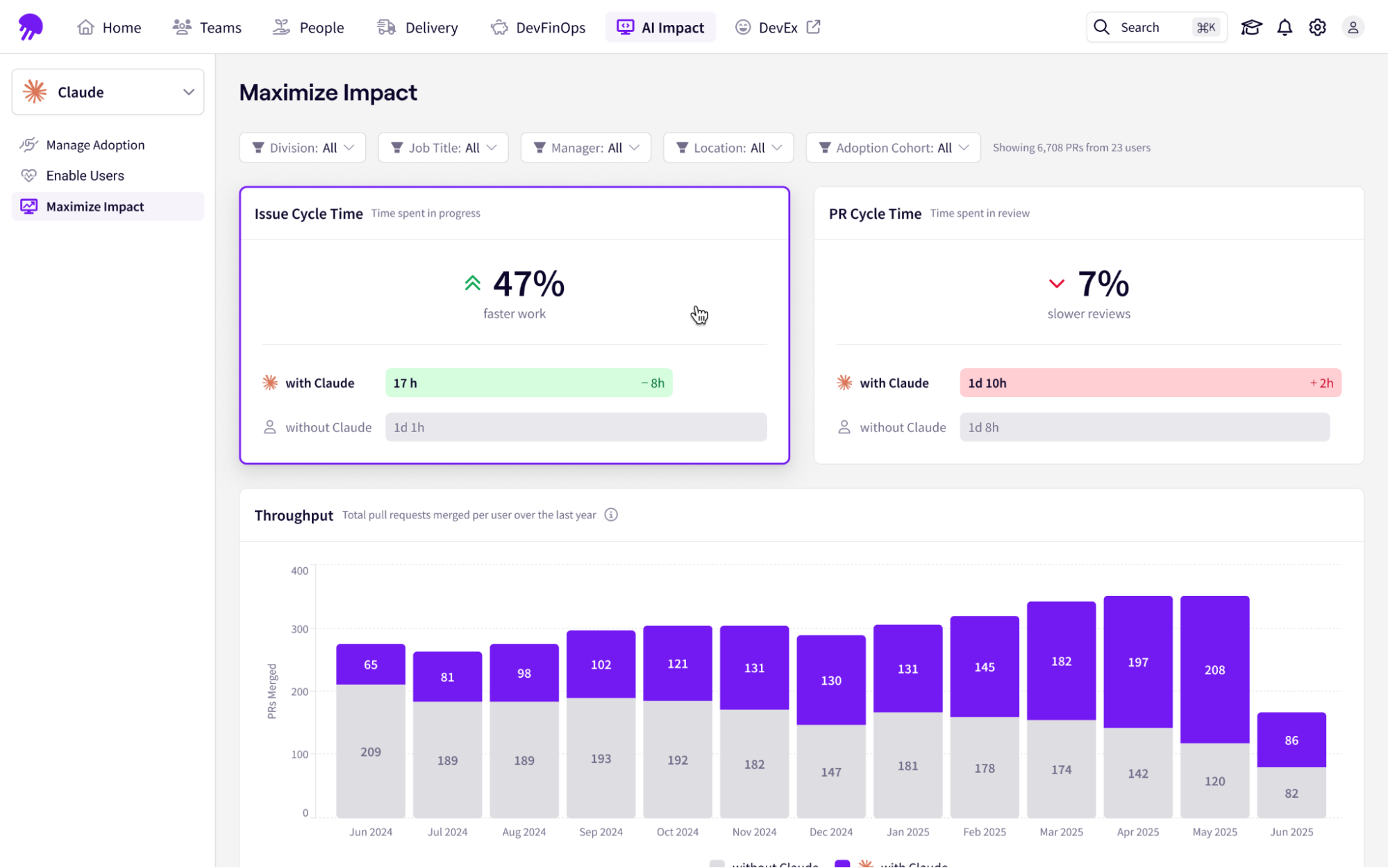
Jellyfish connects Claude Code telemetry directly to your issue trackers, repositories, and CI/CD pipeline, giving you a single view that answers the questions the Console can’t.
This helps you:
- Connect activity to delivery: Link Claude Code’s telemetry natively to Jira and your codebase so you can see whether Copilot adoption is accelerating feature delivery and business value.
- Monitor downstream quality in real time: Track PR merge times and change failure rates continuously alongside Claude Code usage data. This way, you can spot immediately if increased code generation is creating review bottlenecks or introducing quality issues downstream.
- Automate your benchmarks: Instead of rebuilding an ROI analysis every quarter, Jellyfish continuously compares cycle time and throughput across teams at different Claude Code adoption levels.
- Validate where the value is actually landing: Ensure the productivity gains from high-adoption teams are being redirected toward strategic roadmap work
Jellyfish has helped our leaders gain insights into engineering details that were previously unavailable. The ability to view insights at the portfolio level or drill into any level of the taxonomy is very powerful.
Ellen Yudt, VP, Engineering & Technology PMO
Read customer story → How Blue Yonder saves 20 hours monthly on engineering cost capitalization.
Most Claude Code ROI Conversations Stall Here.
Yours Doesn’t Have To. See why engineering leaders love Jellyfish.
Get a DemoAbout the author

Lauren is Senior Product Marketing Director at Jellyfish where she works closely with the product team to bring software engineering intelligence solutions to market. Prior to Jellyfish, Lauren served as Director of Product Marketing at Pluralsight.