In this article
A new backend engineer joins your company and picks up her first ticket. The code takes a day, but getting it deployed takes two weeks.
She’s hunting down the right CI template, asking around in Slack for staging credentials, and debugging a Kubernetes config she didn’t write. Half her time goes to digging through outdated wikis and copying YAML from old repos.
This is what golden paths are for. A golden path is a standardized, opinionated route for common developer tasks. You centralize tooling decision-making once, so developers don’t have to figure it out every time.
In this guide, we’ll explain what golden paths are, the benefits they bring to your organization, how to build them so developers genuinely want to use them, and how to track whether they’re working.
What is a Golden Path?
What is a Golden Path?
A golden path is a recommended, standardized way for developers to complete common tasks like spinning up services, configuring CI/CD, or deploying to production.
It bundles together the templates, tooling, configurations, and best practices your team has already vetted, so developers don’t have to figure it out themselves.
Here’s what that looks like in practice. This diagram shows how a golden path fits within an internal developer platform (IDP), connecting templates, documentation, and deployment into a single flow.
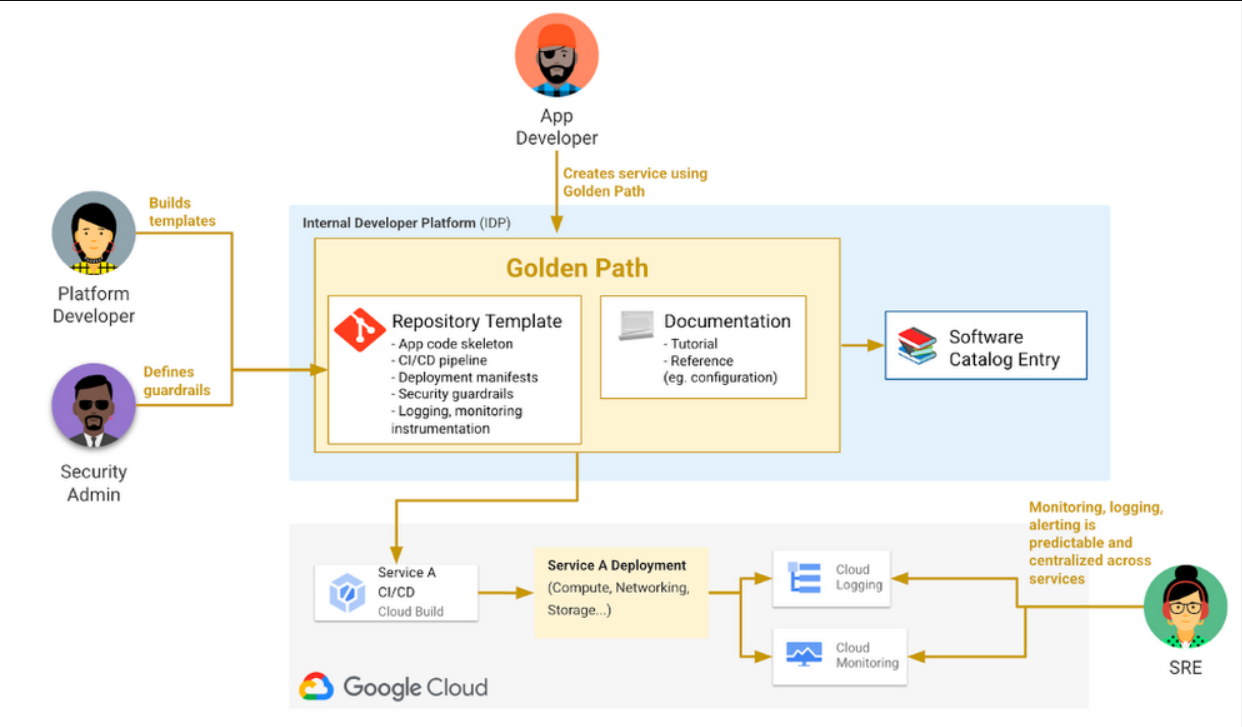
(Source: Google)
The simplest analogy is cooking, where a golden path is like a tested recipe. Sure, you can freestyle if you want, but the recipe gets you to a good meal faster and with fewer mistakes.
One thing worth clarifying is that a golden path is NOT a mandate. Developers can go off-path when they need to. The goal is to make the paved route so good that most people choose it on their own.
Origin of the Concept
The concept started at Spotify. As the company grew, their culture of autonomous teams led to what they called “rumour-driven development” – the only way to figure out how to do something was to ask a colleague who might know. Golden paths were their solution.
Since then, the idea has spread. Netflix uses the term “paved road.” Other organizations call them “well-lit paths” or “happy paths.” Different names, same principle.
Per Spotify, the name itself is likely borrowed from Frank Herbert’s Children of Dune, where it refers to a single guided route through a complex future. Fitting, given what most developers face when onboarding to a new codebase.
The Core Benefits of Golden Paths
Done right, golden paths benefit developers, platform teams, and the organization as a whole. These are the core advantages:
- Faster onboarding: New developers stop losing their first few weeks to setup confusion. A golden path gives them one clear route from laptop to first commit.
- Less cognitive load: Tooling decisions no longer eat into focus time. Developer productivity goes up when engineers spend energy on work that moves the needle, not on figuring out which CI template to use.
- Consistent standards across development teams: Every team follows a similar structure for builds and deploys. This helps streamline project transitions, contributions to unfamiliar codebases, and troubleshooting problems you didn’t create.
- Fewer repetitive questions for platform engineering teams: When the path is well-documented and self-service, developers stop asking the same setup questions over and over. Platform engineers get their time back.
- Lower risk of misconfigurations: The path includes security settings, observability, and compliance rules by default, so teams optimize for security without extra effort. Developers can’t accidentally skip them because they’re already there.
Here’s how one engineer on Reddit shared their experience implementing golden paths at a previous company:
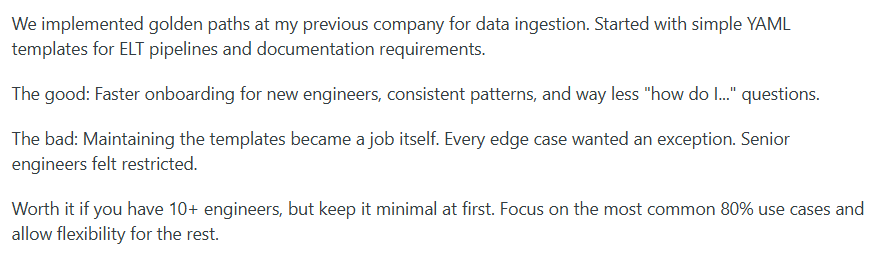
The wins are real, but so are the tradeoffs. Getting the balance right matters more than getting everything built on day one.
What a Golden Path Looks Like in Practice
Without a golden path: Engineers are on their own. They clone an old repo that looks close enough, rip out the business logic, and hope the CI config and API integrations still work. They spend a day figuring out how to get credentials for the staging environment.
Then, they copy observability settings from another team’s service and tweak them until the dashboards stop throwing errors. A week later, they’re finally ready to write the code they were hired to write.
With a golden path: The developer runs a single CLI command or clicks through a self-service developer portal. A new repo appears with the folder structure already set up, a working end-to-end CI/CD pipeline attached, and observability baked in. The service is deployable to staging from day one. Documentation tells them exactly where to go next. They skip the archaeology and start building.
Who is a Golden Path for?
Who is a Golden Path for?
The value of a golden path depends on where you sit. There are two sides to consider:
For Application Developers (the Customers)
Application developers are the customers of a golden path. They’re the ones using it day to day to build and deploy. Golden paths are especially valuable for:
- New hires: They get productive faster without relying on tribal knowledge. A clear path beats weeks of asking around and piecing things together.
- Developers switching teams: When every team member follows a similar structure, moving between projects doesn’t mean starting from scratch. The patterns stay familiar.
- Developers working across the stack: A frontend engineer who needs to touch infrastructure doesn’t have to become an infrastructure expert. The golden path provides enough guardrails to move safely.
- Veterans who’ve solved these problems before: They don’t want to redo the same setup work at every new company. A golden path lets them skip to the interesting parts.
For the Organization (the Providers)
The organization (usually a platform team) builds and maintains the golden path. They’re responsible for tooling, infrastructure, and developer experience at scale. Golden paths are particularly valuable for:
- Platform, DevOps, and SRE teams fielding the same questions repeatedly: A self-service path handles the common cases, so engineers stop answering the same setup questions every week. They reclaim time for higher-leverage work.
- Organizations scaling quickly: Scaling fast without golden paths leads to a dozen different ways of doing the same thing. The path keeps everyone moving in the same direction.
- Security and compliance teams: Security and compliance requirements are built into the default. Teams stay compliant without extra effort or follow-up audits.
- Engineering leadership tracking consistency: Golden paths give leadership insights into how teams operate. It’s easier to track consistency when everyone starts from the same foundation.
The Golden Path Maturity Model
The Golden Path Maturity Model
Golden paths can go wrong in predictable ways. These four principles help avoid the most common pitfalls and set the path up for long-term success:
Principle 1: It Must Be Optional (Voluntary)
What it means: The path is a default, not a rule. Developers use it when it fits their needs and step off when it doesn’t, without having to ask for permission or justification.
Why it matters: People push back against mandates, even reasonable ones. When the golden path is optional but clearly the easiest route, developers adopt it because they want to, not because they have to.
Common mistakes:
- Making the path so rigid that developers can’t deviate even when they have a legitimate technical reason to do so
- Assuming developers who go off-path are doing something wrong rather than responding to a real limitation
- Creating a culture where going off-path feels risky, so developers either force-fit bad solutions or hide what they’re doing
- Building a path that covers only the happy case and forces developers off-road for anything slightly non-standard
- Treating “optional” as “you’re on your own,” so developers who deviate lose access to documentation, tooling, and help
Practical example: A team realizes their new microservice has performance constraints that don’t fit the default deployment blueprint. A good golden path lets them change that one piece without abandoning the rest. They keep the parts that work and replace only what doesn’t.
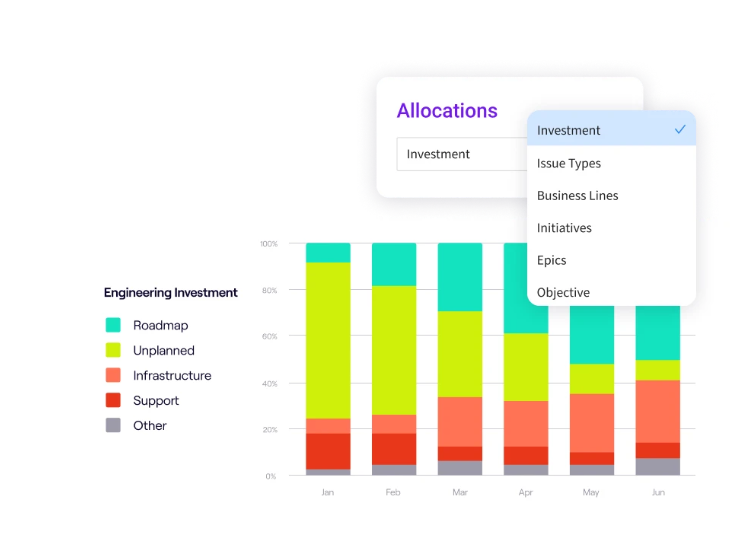
PRO TIP: Jellyfish tracks how engineering time is allocated across projects and work categories. If developers are spending more time on unplanned workloads or veering outside your standard frameworks, the allocation data will show it. That’s an early signal that something about the path might need adjusting.
Principle 2: It Must Be Transparent (Not a Black Box)
What it means: Developers should be able to see what the golden path does under the hood. The abstractions make things easier, but they shouldn’t hide how things work.
Why it matters: Developers don’t trust what they can’t see. When something fails, they need to understand what went wrong and why, not file a ticket and hope for the best.
Common mistakes:
- Wrapping so much automation around the path that developers have no idea what’s happening when they use it
- Providing no documentation on the underlying tooling, so developers can’t troubleshoot when things go wrong
- Creating a path that hides all complexity until something breaks, then offers no clues about what went wrong
- Assuming developers don’t need to understand the path because “it just works.”
Practical example: A deployment fails midway, and the developer needs to figure out why. On a black-box path, they’d open a ticket and wait. On a transparent path, they can trace the failure back to the exact step and command, and then fix it without outside help.
Principle 3: It Must Be Extensible (Allow Off-Roading)
What it means: A golden path covers the common cases, but it will never cover all of them. Developers need a way to extend or modify the path when their situation doesn’t fit the default.
Why it matters: No path can anticipate every use case. If developers can’t extend it when something new comes up, they’ll abandon it entirely rather than try to make it work.
Common mistakes:
- Making the path all-or-nothing, so developers who need one adjustment end up rebuilding everything
- Leaving extensibility as a roadmap item while developers hit limitations in the present
- Giving developers no safe way to add new functions without risking the stability of what already works
- Restricting configurations to the point where developers need platform team help for even minor tweaks
- Believing the path will handle everything and ignoring the edge cases that inevitably show up
Practical example: A team wants to run a custom security scan that isn’t part of the default setup. With an extensible golden path, they slot it into the existing pipeline as a new step. They don’t have to rebuild the pipeline or maintain a separate fork.
Principle 4: It Must Be Customizable (Within Reason)
What it means: Developers should be able to tweak the path to fit their specific needs without rebuilding it from the ground up. But customization needs boundaries, or every team ends up with its own version, and the shared path stops being shared.
Why it matters: If developers can’t adjust anything, they’ll leave the path over small differences. If they can adjust everything, you lose the consistency that made the path valuable.
Common mistakes:
- Giving teams so much flexibility that the golden path splinters into dozens of variations
- Offering no customization at all, so developers fork the path the moment they need something slightly different
- Failing to define which parts of the path are meant to be customized and which should stay consistent
- Watching good customizations pile up across teams without ever pulling the useful ones back into the default
- Treating all customization tickets as edge cases instead of signals that the default might need to evolve
Practical example: A team’s service handles larger payloads than most, so the default memory allocation doesn’t work. A well-designed path exposes that setting as a parameter they can adjust. They make the change in one place and move on without forking the template.
Golden Path Best Practices
Golden Path Best Practices
The principles above define what makes a golden path work. But these best practices help you put them into action without learning everything the hard way.
When to Build Your First Path
Not every organization needs a golden path right away. A small team with a handful of developers can often move fast without one. But as you grow, the cracks start to show.
These are some of the common signals that it’s time to build your first path:
- New hires usually take weeks to get productive because they’re stuck figuring out tooling
- Different teams handle the same problems in different ways, and no one knows which approach is the right one
- The same setup questions land in Slack every week, and platform engineers lose hours to support they shouldn’t need to give
- Developers piece together config files from past projects because there’s no clear starting point
- Institutional knowledge depends on a few key people, and their departure creates gaps no one can fill
If several of these sound familiar, you’re probably ready.
Before you start building, make sure you have the basics in place. You need stable tooling, enough teams to make standardization worthwhile, and a clear picture of what the path should cover.
If your infrastructure is still changing week to week or you only have a few developers, a golden path will cost more to maintain than it gives back. The right time is when the pain is obvious, and the organization is ready to act on it.
How to Choose and Build Your First Path
Start with something that’s both painful and common. Spinning up a new cloud-native service or setting up CI/CD are typical first candidates. Don’t try to boil the ocean. Start narrow, prove the value, and expand from there.
Above all else, don’t build the path in a silo. The platform team should co-develop the path with at least one customer team from the start. Developers who will use the path should have a hand in shaping it.
Platform teams that skip this step end up with something that looks right but feels wrong to the people it’s meant to serve. Collaboration isn’t optional here.
Your first version doesn’t need to do everything. You can start with the basics:
- A service template with a sensible folder structure and sane defaults
- A CI/CD pipeline that works from day one without extra configuration
- Built-in observability so services are visible from the start
- A getting-started guide that tells developers exactly where to go next
- Environment configuration that works across local, staging, and production
- Sensible security defaults so teams don’t have to think about the basics
Don’t try to make v1 perfect. A simple version that works is easier to iterate on than a complex one that tries to cover every single edge case.
Get the path in front of developers as soon as it’s usable. Watch where they get stuck, ask what’s confusing, and listen to what they wish was different. Early feedback helps you fix problems while they’re still small. The first version won’t be perfect, and that’s fine.
How to Maintain and Drive Adoption
Use a shared responsibility model. The platform team should own core maintenance, versioning, and reliability. But they shouldn’t be the only ones contributing.
Treat it like an internal open-source project. Accept contributions from other teams, review them seriously, and merge what makes sense. This shares the maintenance burden and gives developers a sense of ownership over the path they use every day.
Also, make sure to treat documentation as a first-class product. The golden path tutorial is some of the most important documentation in your company. It should be a clear, step-by-step guide that mirrors the actual path.
A few things to keep in mind:
- If the documentation is long and complex, that’s a sign the path itself needs simplifying
- Test the docs with real developers to make sure they work as expected
- Assume the reader knows nothing about your internal setup and write for day-one clarity
- Include troubleshooting steps for the most common failure points
- Treat every support question as a sign that something in the docs could be clearer
New hires are your best source of honest feedback. They haven’t developed blind spots yet and don’t know the workarounds. If the golden path works, onboarding should be smooth. If it doesn’t, new developers will feel it first. When they ask a question that the path should have answered, that’s a gap worth closing.
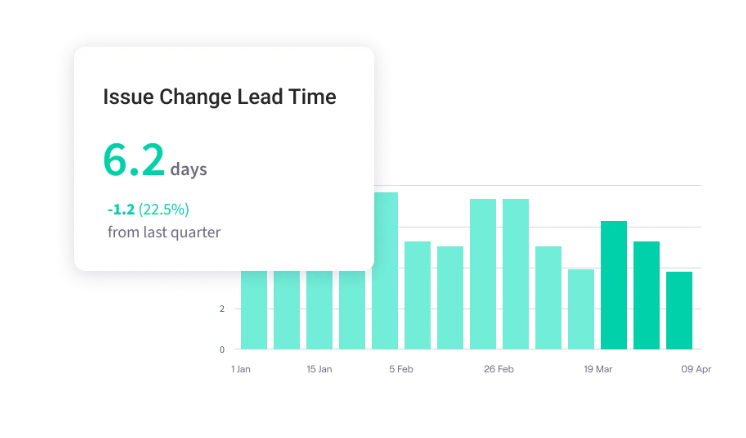
PRO TIP: Jellyfish tracks metrics like cycle time and deployment frequency over time. You can see whether your golden path is actually making teams faster, or whether the gains have plateaued and it’s time to iterate.
Measuring the Success of Your Golden Paths
Measuring the Success of Your Golden Paths
A golden path needs the same rigor as any internal product. You need data to understand whether developers are using it, whether it’s saving time, and whether it’s worth the effort your team puts into maintaining it.
Your measurement strategy should focus on three areas:
- Adoption metrics: This is often the clearest signal. Track how many new services get built on the golden path versus off-road. If developers aren’t choosing it voluntarily, the path isn’t tackling the right pain points. If they’re using it but stepping off often, something is too rigid or missing.
- Developer satisfaction metrics: Developers can use a path and still resent it. Survey them, talk to them, and pay attention to what they complain about. That feedback shapes your roadmap.
- Engineering efficiency metrics: This ties the path to outcomes leadership cares about. Track time from new hire to first deploy, time to spin up a service, and cycle time for features. A good path should move all of these in the right direction.
| Category | What to track | What it tells you | Warning signs |
| Adoption | % of services on path, adoption over time, adoption by team | Whether developers are choosing the path voluntarily | Low adoption, frequent off-roading |
| Satisfaction | NPS, survey scores, interview feedback | How developers feel about using the path | Frustration, confusion, low scores |
| Efficiency | Time to first deploy, service creation time, cycle time, support tickets | Whether the path is making teams faster | No improvement, rising support requests |
The numbers point you in the right direction, but they won’t explain everything. When something looks off, talk to developers. They’ll tell you what the dashboard can’t.
How Jellyfish Proves the Value of Your Golden Path
How Jellyfish Proves the Value of Your Golden Path
So you’ve built a golden path. Developers seem happier, and onboarding feels faster. But “seems” and “feels” won’t get you very far in a budget meeting. Sooner or later, you’ll need to show the receipts.
Jellyfish helps you do exactly that. It’s an engineering management platform that connects data from GitHub, Jira, Slack, and your CI/CD tools.
The platform tracks time allocation, delivery metrics, and developer experience in one place, so you can see what’s working and what isn’t without building custom reports.
Here’s exactly what Jellyfish brings to the table:
- Resource allocation and time tracking: Jellyfish tracks how engineers allocate their time across priorities without timesheets or manual tagging. You see exactly how hours are split between roadmap work, technical debt, and bug fixes.
- Built-in DORA metrics tracking: Jellyfish pulls DORA metrics directly from your CI/CD and incident management tools. You get deployment frequency, lead time, change failure rate, and mean time to recovery without building anything yourself.
- Developer experience insights: The platform also tracks developer sentiment alongside performance metrics. You get real-time insights into what’s slowing engineers down and whether changes you’ve made are having the impact you intended.
- Performance benchmarking across organizations: Jellyfish benchmarks your team’s performance against peer organizations on a percentile basis. You get context for your numbers instead of wondering whether they’re good or bad.
- Integration with your existing stack: Jellyfish plugs into your existing stack and starts pulling data immediately. No new workflows for engineers, no manual entry, no extra overhead.
- Lifecycle bottleneck analysis: Jellyfish pinpoints where work gets stuck in your software development lifecycle. You can find friction in code review, QA, deployment, or anywhere else before it becomes a bigger problem.
If you’re going to invest in a golden path, you might as well know if it’s working. Jellyfish tells you. Book a demo and see how it fits into your stack.
Learn More About Platform Engineering
Learn More About Platform Engineering
- The Complete Guide to Platform Engineering
- Platform as a Product: The Foundation for Successful Platform Engineering
- When to Adopt Platform Engineering: 8 Signs Your Team is Ready
- Platform Engineering vs. DevOps: What’s the Difference?
- How to Build a Platform Engineering Team: Key Roles, Structure, and Strategy
- Understanding The Platform Engineering Maturity Model
- Best 14 Platform Engineering Tools Heading Into 2026
- 8 Benefits of Platform Engineering for Software Development Teams
- 17 Platform Engineering Metrics to Measure Success and ROI
- 9 Platform Engineering Anti-Patterns That Kill Adoption
- The Top Platform Engineering Skills Every Engineering Leader Must Master
- 11 Platform Engineering Best Practices for Building a Scalable IDP
- What is an Internal Developer Platform (IDP)?
About the author

Lauren is Senior Product Marketing Director at Jellyfish where she works closely with the product team to bring software engineering intelligence solutions to market. Prior to Jellyfish, Lauren served as Director of Product Marketing at Pluralsight.