
In this article
Developers spend a surprising amount of their day not writing code. They’re switching between tools, searching through documentation, writing the same boilerplate for the hundredth time, or waiting on code reviews.
These friction points have pushed developer experience to the top of the agenda for engineering leaders trying to help their teams do more meaningful work.
And this isn’t just about morale. Better developer experience correlates with roughly 20% higher retention and a 33% better chance of hitting business goals.
AI has the potential to smooth out a lot of these rough edges. Yes, it can help teams move faster, but it can also take the edge off the tedious parts of the job.
Below, we’ll look at how AI is changing the way developers work, where it’s making a major difference, and how organizations are weaving it into their processes.
How AI Directly Improves the Core DevEx
How AI Directly Improves the Core DevEx
AI fits into the developer workflow in several places, and the benefits vary depending on where you look.
Some improvements are straightforward time-savers, while others are more about reducing the cognitive strain that comes with modern software development:
Reducing Cognitive Load
The DevEx friction: Developers hold a lot in their heads at once – system architecture, edge cases, code patterns, dependencies, and more. Every interruption forces them to rebuild that mental context from scratch, and research shows it takes around 23 minutes to fully regain focus after a single disruption.
How AI can help: AI can handle some of that mental load. Code suggestions, inline documentation, and context-aware completions mean developers don’t have to keep as much in their heads. In a GitHub survey of 2,000 developers, 60–70% said generative AI made it easier to understand unfamiliar code. That’s one less thing to puzzle through on their own.

(Source: GitHub)
Example: Instead of tabbing over to docs or searching Slack for how a function was used elsewhere, a developer can get that context from an AI assistant without leaving their editor. One less reason to break focus.
Enhancing Flow State
The DevEx friction: Flow state is where developers do their best work, but it’s hard to reach and easy to lose. Research suggests the average developer gets just one uninterrupted 2-hour session per day, and we already learned that even a brief interruption can take over 20 minutes to recover from.
How AI can help: AI coding tools can help developers stay in flow by handling the small tasks that would normally pull them out. Instead of stopping to look up syntax, search for documentation, or write boilerplate, developers can keep moving. McKinsey found that developers using AI tools were more than twice as likely to report reaching a flow state at work.
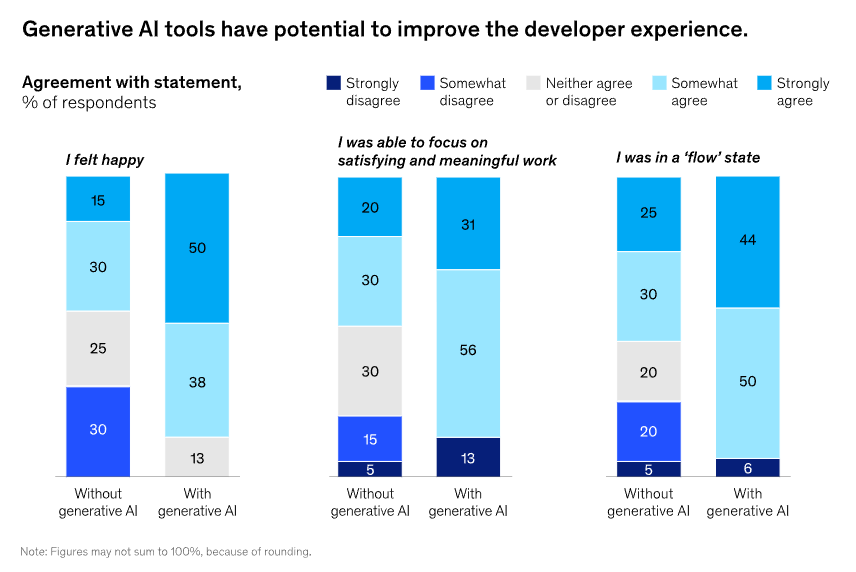
(Source: McKinsey)
Example: A developer building a new feature doesn’t have to pause and context-switch every time they hit a gap in their knowledge. An AI assistant can fill in the blanks without breaking their momentum, whether that’s generating a test or explaining an unfamiliar function.
The Result: Measurable Productivity Gains
The DevEx friction: Productivity in software development has always been hard to pin down. Lines of code don’t capture quality, and shipping faster doesn’t mean much if the work has to be redone.
How AI can help: McKinsey found that generative AI cut development time by 10–12% on medium to complex tasks. Other studies show even larger gains, with developers coding up to 55% faster in some cases. The numbers vary, but the direction is consistent.
Example: Boilerplate that used to take a developer an hour can be generated in seconds. The team still owns the output, but no one’s spending their afternoon on the mechanical parts.
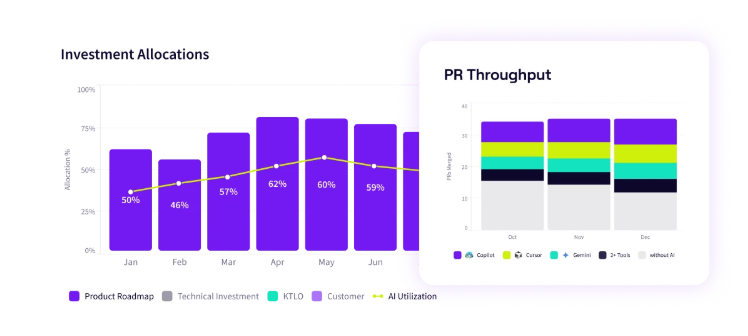
PRO TIP 💡: Don’t rely on gut feel to measure AI’s impact. Jellyfish tracks how AI tool adoption affects real delivery outcomes, so you can see whether those developer productivity gains are showing up in the work your team ships.
AI Transforming Workflows Across the SDLC
AI Transforming Workflows Across the SDLC
The productivity gains from AI don’t come from a single tool or feature. They’re spread across the development lifecycle, and show up in different ways depending on the stage of work:
AI-Assisted vs. Autonomous Development
AI development tools exist on a spectrum. On the assistive end are copilots, and they offer suggestions as you type, autocomplete functions, and answer questions in a chat window. The developer decides what to use and what to skip.
On the other end are autonomous agents. Give them a goal, and they’ll plan the steps, write code across multiple files, run tests, and debug without much hand-holding. The developer’s role looks more like directing and reviewing than hands-on coding.
Many teams are still closer to the assisted end. A Stack Overflow survey found that roughly 77% of developers don’t use AI for whole-app generation at work. They’re using it incrementally, for completions and quick answers. Human judgment is still very much in the loop.
Autonomous capabilities are improving, though. Tools like Cursor’s agent mode and Devin are getting better at handling tasks independently (e.g., scaffolding new features, running migrations, repetitive refactors). It’s still early, but the direction is clear.
AI in Coding and Quality Assurance
Most of the attention goes to how AI helps write code, including completions, suggestions, and boilerplate. But it’s proving just as useful on the quality assurance side.
Code reviews are a good example. AI can generate clear pull request descriptions, flag potential issues, and reduce the back-and-forth that slows reviews down. Some studies show this can save up to 19.3 hours on review time and increase change approval rates by 15%.
What’s interesting is how developers use that time. Jellyfish research found that developers using AI tend to write longer, more comprehensive review comments. Rather than just speeding through, they’re reinvesting the saved time into more thorough feedback. The process gets faster, and the quality of reviews goes up.
AI in DevOps and Operations
Much of DevOps involves repetitive tasks that don’t need constant human oversight. AI can now manage things like pipeline optimization and deployment monitoring on its own, stepping aside only when a decision needs to be made.
What’s more interesting is the move toward self-healing systems. AI finds problems early and can often handle them automatically, before anyone needs to get involved. That drastically changes how much time teams spend on incidents.
When asked where AI would have the most impact, 60% of DevOps practitioners said testing. That’s more than any other part of the development lifecycle, and a good indicator of where the pain is.
PRO TIP 💡: If testing is where DevOps practitioners see the most potential, you should know how AI is affecting your testing workflows specifically. Jellyfish tracks AI adoption across the development lifecycle so you can see where it’s making an impact.

AI in Security and DevSecOps
AI is also helping security teams in practical ways. Teams can now run vulnerability scans automatically throughout development instead of doing manual reviews at the end. When they find security issues earlier, they’re much easier (and cheaper) to manage.
The financial case is strong. IBM found that organizations using AI and automation in security save an average of $1.9 million per breach compared to those that don’t.
There’s a flip side, though. When developers use AI to generate code, they don’t always understand exactly what it produced. This can introduce vulnerabilities that slip through because no one caught them.
Security teams now have to deal with code being written faster than ever, and they need tools that can keep up with that pace.
The New Developer Skillset: Guiding AI for High-Impact Work
The New Developer Skillset: Guiding AI for High-Impact Work
The work of software development is changing as AI handles more of the mechanical parts. Developers still need to write code, but they also need to know how to prompt AI tools, evaluate what they produce, and spend their energy on the parts of the job that benefit most from human thinking.
The Developer as the Essential Human-in-the-Loop
AI can handle a lot of the mechanical coding, but someone still needs to define what needs to be built, review what gets produced, and make sure it fits into the larger system.
One developer on Reddit described the change this way:
This is what the human-in-the-loop role looks like in practice. Developers spend more time on planning, quality assurance, and strategic decisions. The technical work still happens, but AI does more of the execution while developers focus on direction and verification.
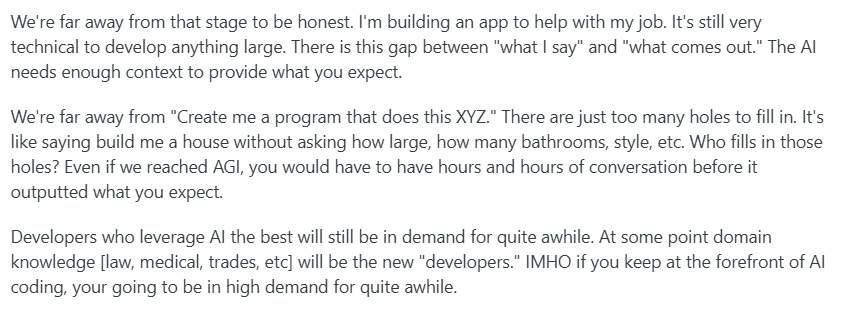
That said, we’re not at the point where developers can just describe what they want and get a working application. Another developer put it bluntly:

Developers still need strong technical knowledge to make this work. They have to understand what the AI produces, recognize when it makes mistakes, and handle the parts it can’t figure out. The developers who can bridge that gap will still be valuable because someone still needs to know how software works.
Key Responsibilities in an AI-Powered Workflow
Working with AI means developers handle different kinds of tasks than they used to. The responsibilities fall into a few categories:
- Setting direction and context: Developers need to define what needs to be built, explain requirements, and provide enough background about how it fits into the existing system. AI needs this framing to produce anything useful.
- Testing and edge cases: Developers need to write tests for AI-generated code and think through scenarios the AI system didn’t consider. AI tends to handle the happy path but misses edge cases.
- Reviewing and validating output: Developers have to verify that what AI produces is correct, secure, and appropriate for the context. AI can generate code, but it takes a person to judge whether it’s the right solution.
- Integration and system-level thinking: Someone has to make sure that the pieces fit together and work within the larger architecture. AI agents can handle individual tasks, but doesn’t maintain a view of the whole system.
- Fixing and refining: AI output often needs corrections. Developers have to spot errors and handle cases the AI didn’t account for. You need both technical skill and experience for this.
That last point about fixing and refining is especially important. Here’s how one developer on Reddit explained the current state of AI tools:
AI cannot replace mid/above developers, not yet. It frequently forgets the context, even for a tiny application with 3 classes. You can remind it, but almost every time the output is going to be different… and needs a massive amount of fixing, which mostly an experienced person can handle properly.
Now, after you take care of that, you’re not going to let AI touch it again… you get the point. What it can do, however, is become a good (not great, yet) force multiplier.
The takeaway is that AI amplifies what developers can do, but someone still needs to be in the driver’s seat. The work has changed, but the need for skilled developers hasn’t gone away.
Setting Architectural Constraints
One of the most important parts of working with AI is setting architectural boundaries before the coding even starts.
Yes, AI can write functional code, but it won’t know your team’s patterns, your performance needs, or how different parts of the system need to interact.
Performing Critical Code Reviews
Code reviews matter more when AI is writing the code. Developers need to check not just whether it works, but whether it fits the architectural vision.
Key things to look for:
- Does the AI code follow established patterns and conventions?
- Will it scale as the system grows?
- Are there hidden dependencies that will cause problems later?
- Does it introduce security vulnerabilities or performance issues?
- Is it maintainable by other developers on the team?
AI can produce code that passes tests but violates architectural principles. A function might work in isolation, but create tight coupling that makes future changes harder.
Someone who understands the system architecture needs to evaluate whether the AI’s solution is the right one, not just a working one.
Creating AI-Friendly Documentation
AI models work better when they have clear documentation to reference. This means developers need to document not just what the code does, but why architectural decisions were made.
For example, effective documentation for AI might include:
- Architectural decision records explaining key choices
- Code patterns and conventions the team follows
- Examples of correct implementations
- Common pitfalls and what to avoid
- Context about system constraints and trade-offs
The documentation serves a dual purpose – it helps AI tools produce better output and helps human developers understand the codebase faster.
Strategic Implications for Engineering Leaders
Strategic Implications for Engineering Leaders
Individual developers can adapt to AI tools on their own timeline, but that’s not the case with engineering leaders.
They have to make decisions about budgets, hiring, training, and team structure now, even though the technology is still evolving and nobody knows exactly where it’s headed.
Here are some areas that stand out:
Adapting Processes for AI Integration
Current state: Most engineering teams are using AI tools in an ad hoc way where individual developers experiment with code assistants, but there’s no standardized approach.
Code review processes, testing protocols, and deployment pipelines weren’t built with AI-generated code in mind. But other companies are taking a more controlled path, as one developer explained:

Future state: Teams will have formal workflows that account for AI at every stage. Code reviews will include specific checks for AI-generated code, documentation will be structured to train AI tools, and processes will define when AI should (and shouldn’t) be used.
How to bridge:
- Define guidelines for when developers should use AI tools and when they should write code manually, based on task complexity and risk
- Update code review checklists to include AI-specific concerns like context loss, architectural fit, and over-reliance on generated patterns
- Create documentation standards that make it easier for AI to understand your system’s constraints and conventions
- Set up monitoring to track where AI-generated code causes issues in production, and use that data to improve your integration strategy
Investing in Training and Upskilling
Current state: Most developers are learning AI tools on their own through trial and error. Companies haven’t built formal training programs because the tools are evolving too quickly, and nobody’s sure what skills will matter in six months.
Future state: AI literacy will be a standard part of developer onboarding and ongoing training. Teams will have internal experts who can teach proper prompting, code review for AI output, and when to use or avoid these tools.
How to bridge:
- Start with hands-on workshops where developers practice using AI tools on real work tasks, so they learn what works in your specific context
- Ask developers who are already effective with AI tools to share techniques with the team through demos or pair programming sessions
- Create internal documentation that outlines what your team has learned about using AI, including common pitfalls and best practices specific to your codebase
- Build time into sprints for developers to experiment with AI tools on low-risk tasks and share what they discover with the team
- Set up mentorship pairings where developers experienced with AI tools work alongside those who are still learning, especially during code reviews
Measuring What Matters in an AI-Driven World
Current state: Engineering leaders are tracking traditional productivity metrics that weren’t designed for AI-assisted work. Lines of code and story points might increase, but they don’t tell you if the code is better or if developers are spending more time cleaning up what AI generates.
Future state: Teams will measure AI success through quality indicators and developer experience metrics. This includes tracking defect rates in AI-generated code, how many revisions it needs, and whether developers report having more time for meaningful work.
How to bridge:
- Track defect rates and production incidents for AI-generated code separately from human-written code to understand where quality issues come from
- Measure developer satisfaction and cognitive load through regular surveys (since AI should reduce frustration and mental overhead if it’s working well)
- Monitor how much time developers spend reviewing and fixing AI output versus writing new code
- Look at code review feedback patterns to see if AI-generated code needs more back-and-forth or gets approved faster than manually written code
- Track which tasks or features consistently need heavy AI output revision and use that data to adjust where you apply AI versus where human-first coding makes more sense.
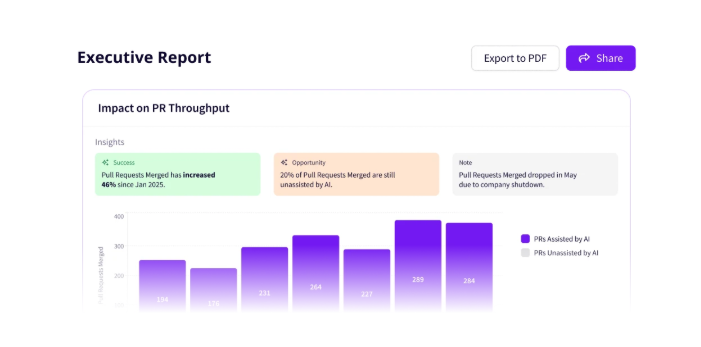
PRO TIP 💡: You don’t have to build these measurement methodologies from scratch. Jellyfish tracks AI adoption and ties it to delivery and quality metrics automatically, so you can see what’s working without adding more work for your team.
Elevating DevEx in the Age of AI
Elevating DevEx in the Age of AI
What artificial intelligence improves most is the texture of developer work. The repetitive tasks take less time, and the frustrating interruptions happen less often. Developers get to spend more of their day on the challenging, interesting work that drew them to the job in the first place.
This is a common sentiment among developers using AI:
AI will replace software engineers who only copy-paste from Stack Overflow. LLMs will most probably not replace high-quality software engineers who find solutions to bottlenecks or understand the design of things.
AI can help in the way wizards and code generators help remove the need for writing over and over the same boilerplate code or in generating a gazillion unit tests starting from the cases needed to be tested in real-time.
The tools aren’t perfect and probably won’t be for a while. Developers still need to review AI output carefully, understand what it got wrong, and know when to skip it entirely. But even with those limitations, most developers who use AI tools don’t want to go back.
And yes, while the productivity benefits are there, engineering leaders should think bigger. AI gives developers more time for work that matters. Whether they use that time well depends on how the organization supports them.
We’re still in the early stages. The tools will improve, the workflows will stabilize, and the best practices will become clearer. For now, the best approach is to experiment carefully, learn from what works, and stay honest about what doesn’t.
See the Real Impact of AI on Your Developer Experience with Jellyfish
See the Real Impact of AI on Your Developer Experience with Jellyfish
Most engineering leaders have rolled out AI tools and heard positive feedback from developers, but they don’t have a reliable way to see whether those tools are truly improving delivery or code quality across the organization.
Jellyfish can help. It’s a software engineering management platform that gives engineering leaders a clear view of how their teams operate.
With AI Impact, you can track AI tool adoption across teams and see how it affects delivery speed and code quality. You see which AI tools improve outcomes and which ones your teams could do without.
Here are just some of the things you’ll get:
- AI adoption insights: You can see who uses which AI tools and how often across your entire organization. Jellyfish pulls this data automatically, so there’s no manual tracking involved.
- Impact measurement: The platform connects AI usage to delivery metrics like throughput, cycle time, and code quality. You can tell whether AI is improving the work or just increasing the volume of code that needs review.
- Multi-tool comparison: Jellyfish is vendor-agnostic, so you can compare tools like GitHub Copilot, Cursor, and Claude in one consistent framework. This helps you decide which tools are worth the investment.
- Developer experience surveys: Jellyfish DevEx combines research-backed surveys with system data to outline friction points in your workflows. You can correlate developer sentiment with real-world performance metrics.
- AI spend visibility: Track spend by tool, team, or initiative to understand where your AI investments create value. This prevents budget overruns and helps you double down on what works.
AI tools can improve developer experience, but only if you know what’s working and what isn’t. Jellyfish gives you that clarity.
Schedule an AI impact demo to see how it fits your organization.
FAQs
FAQs
How is AI’s impact on DevEx different from just boosting productivity?
Productivity is about output, while the developer experience is about how the work feels.
AI can help with both, but they’re not the same thing. A developer might ship more code but still feel frustrated if they’re spending hours fixing AI-generated mistakes. The goal is less friction and more time on meaningful work, not just higher numbers.
Will relying on AI make my developers less skilled over time?
Not necessarily. AI handles the boilerplate and routine patterns, which frees developers to focus on harder problems. That’s where skills grow.
The risk comes when developers stop thinking critically about AI output. As long as they stay involved in reviewing and understanding the code, they’ll keep learning.
What’s the single most important first step to improve DevEx using AI?
Start by understanding where developers lose time today. Talk to your team, run a quick survey, or look at your workflow data. Once you know the biggest friction points, you can pick AI tools that can handle them.
Learn More About Developer Experience
Learn More About Developer Experience
- Developer Experience (DevEx): The Modern Guide for 2026
- 4 Developer Experience Challenges (and How to Solve Them)
- How to Improve Developer Experience for Remote Engineering Teams
- 14 Best Developer Experience (DevEx) Tools Heading Into 2026
- 15 Developer Experience Best Practices for High-Performing Engineering Teams
- How to Improve Developer Experience: 16 Proven Strategies and Methods
- How To Create an Effective Developer Experience Survey
- 15 DevEx Metrics for Engineering Leaders to Consider: Because 14 Wasn’t Enough
About the author

Lauren is Senior Product Marketing Director at Jellyfish where she works closely with the product team to bring software engineering intelligence solutions to market. Prior to Jellyfish, Lauren served as Director of Product Marketing at Pluralsight.