In this article
Your developers are bleeding time. Access requests, environment provisioning, answers about tooling – every small task becomes a ticket, a thread, or a tap on someone’s shoulder.
Meanwhile, the backlog keeps piling up.
None of this shows up in a single sprint, but it compounds. Developers hop between a dozen tools just to ship one feature, while onboarding stretches into weeks. Your most experienced people gradually burn out on infrastructure busywork.
You see it in posts like this one, from a small team on Reddit:

An internal developer platform (IDP) offers a way out. It gives developers a single, self-service layer to access everything they need (environments, deployments, services, documentation) without filing tickets or hunting down tribal knowledge.
If you’ve been hearing this term thrown around and wondering whether it applies to your situation, you’re in the right place. This guide breaks down what an IDP is, how it works, and how to tell if your team needs one.
Why Now? The Driving Forces Behind IDPs
Why Now? The Driving Forces Behind IDPs
A few years ago, a small DevOps team could keep up with most engineering organizations. They wrote scripts, managed deployments, and fielded questions. The setup was simple enough that it worked.
Today, that’s no longer the case. The list of things engineering teams now manage only keeps growing:
- Microservices architectures with dozens or hundreds of services
- Kubernetes and the complexity that comes with container orchestration
- Multi-cloud environments across AWS and other cloud providers, each with different APIs, security models, and deployment workflows
- A sprawling toolchain of CI/CD pipelines, observability platforms, security scanners, service meshes, and secrets managers
According to a Solo.io survey, 85% of enterprise companies now manage complex applications with microservices. Someone has to manage all of it, and in most organizations, that someone is DevOps.
The problem is that DevOps doesn’t scale linearly. When you double the number of developers, you don’t just double the number of infrastructure requests. You also multiply the coordination overhead, the edge cases, and the “quick questions” that eat up half a day.
Atlassian’s 2024 State of Developer Experience report found that 69% of developers lose eight or more hours every week to inefficiencies. That time usually goes to waiting on environments, wrestling with unfamiliar tools, and hunting for documentation that may or may not exist.
And none of this is happening in a vacuum. The pressure to ship faster hasn’t slowed down. Security and compliance needs keep expanding, while engineering leaders are expected to do more with fewer people. At some point, that equation stops working.
Gartner predicts that by 2026, 80% of large engineering organizations will have dedicated platform engineering teams. That’s up from 45% in 2022. The old model of DevOps fielding infrastructure requests like a service desk simply can’t keep pace anymore.
Organizations now need a model where developers can access standardized, secure infrastructure on their own, without filing tickets for every environment or deployment.
And that’s the gap an IDP is designed to fill.
How an IDP Works: Core Components and Functionality’
How an IDP Works: Core Components and Functionality’
There’s no single product you can buy off the shelf and call it an IDP. It’s a set of integrated components that work together to give developers self-service access to the infrastructure, tools, and information they need.
Here’s what that typically looks like under the hood:
Developer Portal (Internal Developer Portal)
What it is: A developer portal is the front door to your IDP. It’s a centralized interface where developers can discover services, access documentation, provision resources, and find everything they need to do their work without asking someone else.
Why it matters: Developers shouldn’t have to know who to ask or where to look to get basic information. A portal gives everyone the same entry point to services, docs, and tooling. That said, portals only work if developers use them. As one commenter on Reddit explained it:

How it works in practice: Say a developer needs to spin up a new service. Instead of pinging three people and digging through outdated wiki pages, they open the portal, find the service template, and deploy it themselves. What used to take a day takes thirty minutes.
Automation Engine
What it is: An automation engine handles the behind-the-scenes workloads of provisioning, deployment, and orchestration. It’s what makes self-service possible without manual intervention.
Why it matters: Self-service means nothing if someone still has to manually run scripts on the backend. The automation engine removes that bottleneck because it handles infrastructure tasks programmatically, at scale, and without human intervention.
How it works in practice: A developer wants a new staging environment through the portal. The automation engine picks up that request, provisions the infrastructure using Terraform (or other IaC tools), configures networking and secrets, sets up monitoring, and notifies the developer when it’s ready. This all happens without anyone touching a terminal.
Software Templates (Golden Paths / Blueprints)
What it is: Software templates are reusable, pre-configured starting points for creating new services, apps, or infrastructure components. They encode your organization’s best practices so developers don’t have to figure out the “right way” from scratch every time.
Why it matters: When every team builds things differently, you end up with sprawl that’s hard to maintain and secure. Templates solve this by making the right way the easy way. Just remember that templates come with tradeoffs. One engineer on Reddit shared their experience:
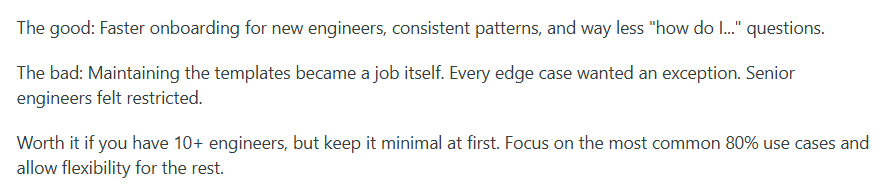
How it works in practice: A developer needs to create a new microservice. Instead of copying an old repository and stripping out what they don’t need, they select a template from the portal, answer a few prompts, and get a ready-to-go service with CI/CD, logging, dependencies, and security controls already configured.
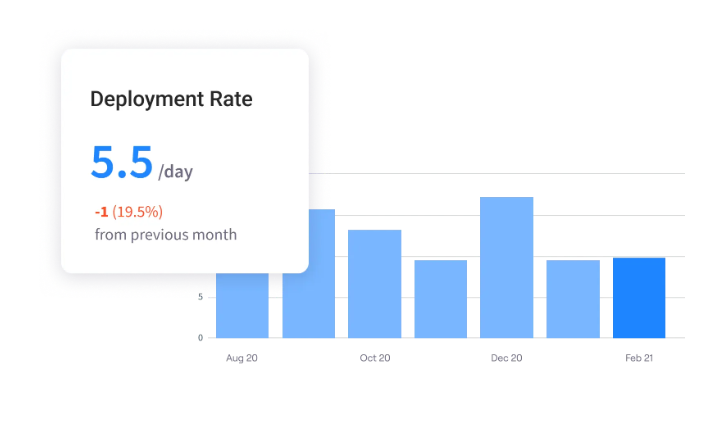
PRO TIP 💡: Templates should speed things up, but assumptions aren’t proof. Jellyfish tracks delivery metrics across software development teams so you can compare performance between groups using your standardized paths and those doing things their own way.
Integrated CI/CD Pipelines
What it is: These are the automated workflows that build, test, and deploy code whenever changes are pushed. An IDP integrates them directly into the developer experience, so pipelines are standardized across teams and ready to use from day one.
Why it matters: Homegrown pipelines are hard to maintain and easy to misconfigure. Standardized CI/CD through the IDP means fewer surprises in production, easier rollback when issues come up, and less time spent debugging deployment issues
How it works in practice: When a developer creates a new service from a template, the CI/CD pipeline is already configured. They push their first commit, and the pipeline runs tests, builds the artifact, and deploys it to a dev environment. Shipping to production follows the same flow with added approvals and checks.
Access Control (RBAC)
What it is: Role-based access control determines who can do what within the IDP. It assigns permissions based on roles (developer, team lead, platform admin), so people get access to what they need without opening the door to everything.
Why it matters: You can’t hand everyone the keys to production. RBAC balances developer freedom with the control you need to stay secure and compliant.
How it works in practice: When a developer joins a team, their role determines what they can do from day one. They can create services and deploy to dev, but production deployments need extra approval. If they move to a platform team later, their permissions update accordingly.
Integrations & Extensibility
What it is: This is how an IDP fits into your broader ecosystem. Integrations plug into tools you’re already running, and extensibility lets you customize or expand the platform without waiting on a vendor roadmap.
Why it matters: No one is starting from zero. Your teams have tools they rely on, and an IDP that doesn’t integrate with them only creates more friction. It’s a point that comes up often when teams evaluate platforms. In one Reddit discussion about portal selection:
The most important part of the portal side is that it has continuous integrations with other products that you use, and that you don’t need to write web components on your own (so I would also drop Cortex).
How it works in practice: A developer merges a pull request in Git (via GitHub or GitLab), which triggers a deployment pipeline that runs in the IDP. When the deployment finishes, a notification posts to Slack, and metrics flow into Datadog. The IDP orchestrates it all without a developer having to touch five different tools.
The Benefits of Implementing an IDP
The Benefits of Implementing an IDP
An IDP isn’t a quick win. It takes time, resources, and organizational buy-in to build properly. That said, the organizations that commit to it tend to see major improvements in how their teams work and ship software:
- Improved developer retention: A better developer experience makes engineers more likely to stay. Atlassian’s 2024 State of Developer Experience report found that 63% of developers consider developer experience a key factor in deciding whether to remain at their current job.
- Lower change failure rates: Standardized templates and automated pipelines reduce the risk of misconfigurations and deployment errors. According to the DevOps Benchmarking Study 2023, 89% of companies using an IDP report a change failure rate below 15%, compared to 75% of those without one.
- Reduced cognitive load: Developers don’t need to understand every layer of the infrastructure stack or chase down tribal knowledge. The IDP handles the complexity behind the scenes and gives developers only what they need to get their work done.
- Shorter release cycles: When developers can provision what they need and deploy through standardized pipelines, with better scalability as teams grow. According to Google, 71% of organizations with mature platform engineering practices have accelerated their time to market (versus 28% of those still early in adoption).
- Faster developer onboarding: According to GitLab, 44% of organizations take more than two months to fully onboard new developers. An IDP shortens that timeline by putting environments, documentation, and tooling in one place from day one.
When Do You Need an IDP? Key Signals to Pay Attention to
When Do You Need an IDP? Key Signals to Pay Attention to
An IDP isn’t the right fit for every team. If you’re a small engineering org with a simple stack, the overhead of building and maintaining a platform might not pay off yet.
But when things start getting more complex, the cracks tend to show up in predictable places. The more of these you recognize, the stronger the case for investing in a platform:
| Signal | Rarely | Sometimes | Often |
| DevOps is a bottleneck for developer requests | ○ | ○ | ○ |
| Onboarding new developers takes weeks or longer | ○ | ○ | ○ |
| Developers build their own workarounds and shadow tooling | ○ | ○ | ○ |
| Environments are inconsistent across teams | ○ | ○ | ○ |
| The same questions get asked repeatedly with no clear answers | ○ | ○ | ○ |
| Deployments require manual steps or tribal knowledge | ○ | ○ | ○ |
| No one knows who owns which service | ○ | ○ | ○ |
| Security and compliance are applied inconsistently | ○ | ○ | ○ |
If you’re checking “Often” for three or more of these, it’s worth exploring whether an IDP could help. One or two might be manageable with development process improvements.
But when you’re seeing several at once, the problem usually isn’t something a new tool or a better wiki can solve.
Building vs. Buying: Choosing Your IDP Strategy
Building vs. Buying: Choosing Your IDP Strategy
There’s no one-size-fits-all answer to whether you should build or buy your IDP. The right path depends on a mix of factors – your team’s capacity, your timeline, how custom your stack is, and what tradeoffs you’re willing to accept.
This table can help you figure out which direction makes more sense for your situation:
| Factor | Leans toward build | Leans toward buy |
| Platform team capacity | Dedicated team with IDP experience | Small or no dedicated platform team |
| Timeline | Can invest 12+ months before full value | Need results in weeks or months |
| Infrastructure complexity | Highly custom stack, unique requirements | Standard cloud-native setup |
| Budget | Lower upfront cost, higher ongoing investment | Higher upfront cost, lower maintenance burden |
| Customization needs | Deep control over every layer | Comfortable working within product boundaries |
| Compliance requirements | Strict or unusual requirements that off-the-shelf tools don’t cover | Standard security and compliance needs |
| Maintenance appetite | Willing to own upgrades, integrations, and support | Prefer to offload maintenance to a vendor |
If most of your answers fall on the left side, building (or at least assembling from open-source components) is probably the better fit. If they fall on the right side, a commercial solution will likely get you to value faster with less overhead.
That said, most organizations land somewhere in the middle. A common approach is to start with a foundation, either a commercial product or an open-source framework like Backstage, and build custom integrations on top.
The point isn’t to be philosophically consistent. It’s to get to something useful as quickly as possible.
Key Considerations for Selecting an IDP
Key Considerations for Selecting an IDP
Choosing an IDP is a long-term decision, so it’s worth slowing down and evaluating your options carefully. The right platform depends on your stack, your team, and how much flexibility you need.
Here’s what to look for:
- Integration with your existing toolchain: The platform should work with the tools your teams already use, whether that’s GitHub, GitLab, Kubernetes, Terraform, or your CI/CD system. If it requires ripping out and replacing core infrastructure, adoption will be an uphill battle.
- Developer experience: A platform packed with functionality means nothing if developers avoid using it. Look for clean interfaces, solid documentation, and workflows that feel intuitive. Involve developers early in the evaluation and let their feedback guide the decision.
- Security and compliance: Make sure security and compliance are native to the platform. That means role-based access control, audit trails, and enforceable policies from day one. If you’re in a regulated industry, check out whether it fits your requirements without heavy customization.
- Vendor support and community: Evaluate the support options available, whether that’s vendor support for commercial tools or community forums for open-source projects. Look at documentation quality, response times, and how active the ecosystem is. A healthy community means more plugins, faster answers, and fewer dead ends.
- Extensibility: Your needs will evolve. The platform should support custom plugins, integrations, and workflows so you can adapt it over time without starting from scratch. Ask how other organizations have extended the internal platform and what that process looks like in practice.
- Total cost of ownership: Don’t stop at licensing costs. Factor in how long implementation will take, what ongoing maintenance looks like, and how much internal engineering time the platform will need. A lower sticker price doesn’t mean much if it takes twice the effort to keep running.
No platform will score perfectly across all of these areas. What matters is being clear about your priorities and where you have flexibility. Get a shortlist together, pilot with a few teams, and collect honest feedback before committing.
5 Popular IDP Solutions to Consider
5 Popular IDP Solutions to Consider
There are more IDP options available now than ever before. Some are open-source and highly customizable, others are commercial products that prioritize speed and ease of use.
These five are a good starting point for your evaluation:
- Backstage is an open-source framework created by Spotify and now maintained by the CNCF. It gives you the building blocks for a developer portal, but it’s not the simplest to customize and maintain. A good fit if you have a platform team and want full control over the end result.
- Port offers a no-code approach to building developer portals. Teams can configure workflows and software catalog views without writing code, which makes it faster to deploy and easier to iterate on. Works well for companies that want results quickly without a large platform team.
- Cortex is a commercial platform centered on service catalog and engineering intelligence. Its scorecards give teams a way to track service health, ownership, and standards compliance.
- Humanitec approaches the IDP problem from the orchestration angle. Instead of starting with a portal, it focuses on managing environments and configurations dynamically. It’s a strong fit for teams that want to standardize golden paths.
- OpsLevel helps organizations track who owns what and how mature their services are. Its campaigns feature makes it easier to roll out standards and improvements across teams. Works well for organizations that want to bring consistency to a fragmented service ecosystem.
The table below breaks down how these platforms compare across a few key dimensions.
| Platform | Type | Best for | Key feature |
| Backstage | Open-source | Organizations that want full customization | Highly extensible plugin ecosystem |
| Port | Commercial | Teams that need fast time to value | No-code portal builder |
| Cortex | Commercial | Service catalog and ownership visibility | Scorecards for service health |
| Humanitec | Commercial | Platform orchestration and golden paths | Dynamic configuration management |
| OpsLevel | Commercial | Service ownership and maturity tracking | Checks and campaigns for standards |
This list isn’t exhaustive, and the right fit depends on your specific needs. Pilot a few, involve your developers, and see what works in practice.
Best Practices for Successful IDP Implementation
Best Practices for Successful IDP Implementation
Most IDP failures aren’t caused by bad technology. They happen because teams try to do too much too fast, skip the product work, or treat the platform as a side project.
The teams that get it right tend to have a few things in common:
Start Narrow, Expand Later
Ambition is what kills most IDP projects. Teams take on too much, move too slow, and then never ship anything useful. The better path is to start small.
Start with a single pain point. Something visible and manageable, like slow environment provisioning or inconsistent CI/CD pipelines. Whatever it is, make that your entire focus for version one.
Build a minimal version that handles that one problem and ship it to one team. Not a polished product, but something functional enough to be useful. Then, watch how developers use it. That feedback becomes your roadmap for version two.
Expanding scope is easy once you’ve earned trust. But if you spend six months building in isolation and launch something nobody wants, you may not get a second chance.
PRO TIP 💡: Gut feel is a bad way to prioritize. Jellyfish tracks resource allocation across your teams, so you can see where developers lose the most time. Start there, and you’ll have a baseline to prove impact when you’re ready to expand.

Treat Your Developers as Customers
An IDP is a product, even if it never leaves your organization. The developers who use it are your customers, and their experience should drive what you build. When you internalize that, you can build for their needs, not for what’s technically fun or architecturally impressive.
This means doing the same things you’d do for any product. Talk to your users, understand their pain points before you write any code, and find out what workarounds they’ve already built. Then build for those problems first.
A few ways to put this into practice:
- Interview developers early and often
- Pay attention to where they slow down or get stuck
- Prioritize what makes their day-to-day easier
- Treat workarounds as clues about what’s broken
You also have to accept that adoption is earned, not mandated. If developers aren’t using the platform, the problem isn’t them. It’s the platform. Something about the experience isn’t working. Ask them about it – it could be anything from a clunky UX to unclear documentation.
Staff It Like a Product Team
If your platform team is all engineers, you’ll probably end up with a platform that works well technically but struggles with everything else.
Someone has to own the roadmap. Someone needs to write docs and think about onboarding. Those jobs matter as much as the code.
The best platform teams include a mix of roles:
| Role | Focus |
| Product manager | Owns priorities, roadmap, and trade-offs based on user needs |
| Platform engineers | Build and maintain the platform infrastructure |
| Developer advocate or DX lead | Focuses on adoption, onboarding, and developer feedback |
| Technical writer | Keeps documentation clear, complete, and up to date |
Not every organization can staff all of these roles from day one. That’s fine. What matters is that someone is accountable for each area, even if one person wears multiple hats.
Remember that you can’t build a serious platform on borrowed time. If it’s always the thing that gets pushed aside, it will never earn developer trust. Staff it properly, protect the team’s time, and let them own decisions.
Measure and Iterate Continuously
A platform can look successful on paper and still be failing in practice. High registration numbers don’t mean much if developers try it once and go back to their old workflows.
Here’s what’s worth paying attention to:
| Metric type | What to track | Why it matters |
| Adoption | Active users, feature usage, repeat usage | Shows whether developers find the platform useful enough to come back |
| Efficiency | Time to provision environments, time to first deploy, and onboarding time | Measures whether the platform actually saves time |
| Satisfaction | Developer surveys, NPS, qualitative feedback | Captures experience issues that numbers alone won’t show |
| Stability | Deployment success rate, change failure rate, and incidents tied to the platform | Tracks whether the platform is reliable enough to trust |
Avoid vanity metrics that look good but don’t tell you much. The total number of users sounds impressive until you realize half of them tried the platform once and never came back.
Build a rhythm around this. Look at the numbers monthly and talk to devs regularly. Pay attention to what they complain about and what they keep asking for. And if something is working well, figure out how to double down on it.
Measuring the Impact of Your IDP with Jellyfish
Measuring the Impact of Your IDP with Jellyfish
You built the platform. You rolled it out. Developers seem happier. But “seem” isn’t a metric. And when it comes time to justify the investment or ask for more resources, you need something concrete.
This is where engineering intelligence tools come in. They give you a way to track how the IDP affects developer productivity, software delivery speed, and developer experience over time.
Jellyfish is a software engineering intelligence platform that shows you what’s happening across your engineering organization. It integrates with your existing tools and outlines insights about team performance, time allocation, and whether your investments are paying off.
- DORA metrics without the setup work: Jellyfish automatically calculates deployment frequency, lead time, change failure rate, and mean time to recovery from your existing CI/CD data. You get the industry-standard benchmarks without building custom dashboards.
- Visibility into where engineering effort goes: See how time splits across planned roadmap work, technical debt, support requests, and unplanned firefighting. This helps you understand whether your IDP is reducing toil or if teams are still buried in low-value work.
- Developer experience insights: Jellyfish combines productivity data with developer sentiment surveys to show the full picture. You can spot workflow friction, find burnout risks, and track whether platform improvements truly make developers happier.
- AI tool impact measurement: Understand how tools like GitHub Copilot and Amazon Q Developer affect your team’s velocity. Jellyfish tracks adoption, usage patterns, and ROI so you can invest confidently in what works.
- Seamless integration with your existing stack: Jellyfish connects to Jira, GitHub, GitLab, Azure DevOps, Slack, and dozens of other tools. You get a unified view without changing how your teams already work.
Platform engineering is a long-term investment, and Jellyfish helps you track whether it’s paying off and where to double down.
If you’re ready to back up your IDP with real data, book a demo.
FAQs
FAQs
What is the difference between an Internal Developer Platform (IDP) and a Developer Portal?
A developer portal is the UI layer. It includes service catalogs, documentation, and self-service forms.
An IDP includes the portal but also covers the backend – infrastructure automation, deployment pipelines, golden paths, and environment management.
Simply put, the portal is one piece of the platform, not the whole thing.
What is the difference between an IDP and traditional DevOps?
DevOps is the philosophy, while an IDP is the implementation.
Instead of developers depending on a DevOps team for every environment or deployment, the platform lets them handle it themselves through standardized, automated workflows.
What is the relationship between Platform Engineering and an IDP?
Platform engineering is the practice, the team, and the mindset, while the IDP is what that practice produces. A platform engineering team treats the IDP like a product.
They research what developers need, decide what to build, ship improvements over time, and measure whether the platform is truly helping. Without platform engineering, an IDP is practically just a collection of tools.
Is an IDP only useful for Kubernetes or cloud-native applications?
No. Kubernetes and cloud-native environments are common use cases, but an IDP can support and streamline any infrastructure.
If your developers need to provision resources, deploy code, or access services, an IDP can help regardless of whether you run on Kubernetes, VMs, bare metal, or a mix of all three. The value comes from standardization and self-service capabilities, not from any specific technology underneath.
How does an IDP optimize developer experience (DevEx)?
Developers lose hours every week to things that have nothing to do with writing code. This includes waiting for environments, searching for documentation, and figuring out how to deploy.
An IDP consolidates all of that into one place with clear paths and self-service tools. The result is less cognitive load, fewer interruptions, and a faster feedback loop from code to production.
Learn More About Platform Engineering
Learn More About Platform Engineering
- The Complete Guide to Platform Engineering
- Platform as a Product: The Foundation for Successful Platform Engineering
- When to Adopt Platform Engineering: 8 Signs Your Team is Ready
- Platform Engineering vs. DevOps: What’s the Difference?
- How to Build a Platform Engineering Team: Key Roles, Structure, and Strategy
- Understanding The Platform Engineering Maturity Model
- How to Build Golden Paths Your Developers Will Actually Use
- Best 14 Platform Engineering Tools Heading Into 2026
- 8 Benefits of Platform Engineering for Software Development Teams
- 17 Platform Engineering Metrics to Measure Success and ROI
- 9 Platform Engineering Anti-Patterns That Kill Adoption
- The Top Platform Engineering Skills Every Engineering Leader Must Master
- 11 Platform Engineering Best Practices for Building a Scalable IDP
About the author

Lauren is Senior Product Marketing Director at Jellyfish where she works closely with the product team to bring software engineering intelligence solutions to market. Prior to Jellyfish, Lauren served as Director of Product Marketing at Pluralsight.