In this article
A few years ago, platform engineering was still finding its footing. Now, Gartner expects 80% of large software orgs to have platform teams by 2026 – and there’s no shortage of tools to choose from.
If you’re building or scaling a platform team, you’re probably trying to figure out which tools are worth your time and which ones you can skip.
The interest isn’t just top-down from leadership either. Engineers and platform teams are actively searching for answers. A quick look at Reddit shows how often this question comes up.
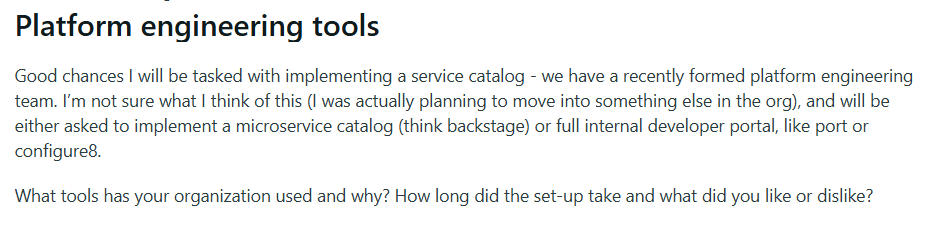
The problem is that the space keeps moving. New options keep coming up, existing ones keep expanding, and what counts as “best in class” changes year over year.
This article breaks down the platform engineering tools worth paying attention to as we head into 2026. We’ll look at what they do, who they’re built for, and why they’ve earned a spot on the list.
What are Platform Engineering Tools?
What are Platform Engineering Tools?
Platform engineering tools are software products that help platform teams create, manage, and scale internal developer platforms.
They cover a range of functions – from infrastructure orchestration and environment management to developer portals and self-service workflows.
These tools exist because most engineering orgs hit a point where developers spend too much time waiting on environments, access, or infrastructure support.
Platform teams take this on, and the tooling helps them handle it at scale. Done right, developers can self-serve and move faster without depending on anyone else.
Types of Platform Engineering Tools
Types of Platform Engineering Tools
There’s no single tool that does everything platform teams need. Most teams end up with a stack that covers a few different areas.
Here’s a breakdown of the main types and what they’re built to do:
Infrastructure Provisioning & Management
What it does: Infrastructure provisioning and management tools give teams a way to define infrastructure as code and manage it programmatically. They’re used to create, configure, and maintain cloud resources, such as virtual machines, databases, and networking components.
Who it’s for: These tools are a good fit for teams that manage infrastructure across multiple environments or cloud providers. They’re especially useful when provisioning needs to be repeatable or handed off to other teams through self-service.
Key features to look for:
- Support for multiple cloud providers and hybrid environments, so you’re not locked into one vendor
- Declarative configuration that lets you define the desired state rather than scripting every single step
- State management and drift detection to track what’s deployed and spot unplanned changes
- Role-based access controls and policy enforcement to keep provisioning secure and compliant
- Modular and reusable components so teams can build on proven templates
Example tools: Terraform is still the most widely adopted option here, with OpenTofu becoming more popular as an open-source alternative. Pulumi is popular with teams that prefer writing infrastructure in familiar programming languages. For AWS-heavy shops, AWS CDK is worth a look.
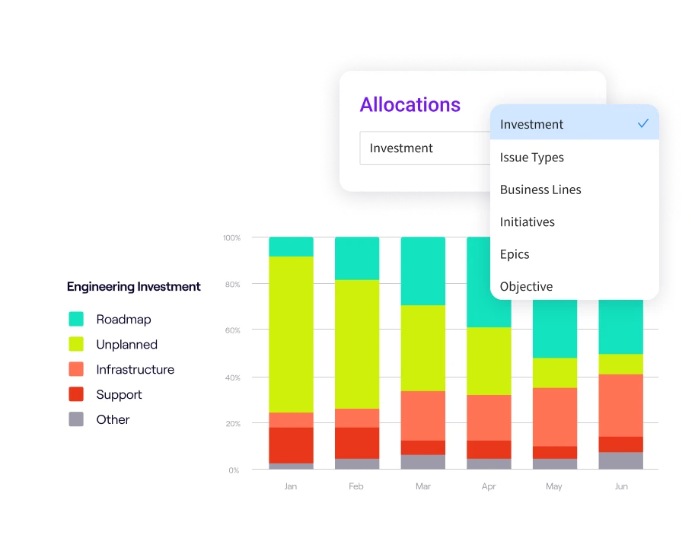
PRO TIP: Better provisioning tools should free up engineering time. Jellyfish Resource Allocations shows how effort splits across roadmap work, maintenance, and infrastructure tasks. Track it over time to see if your new tooling is truly reducing the infrastructure burden.
Containerization & Orchestration
What it does: Containerization and orchestration tools package applications into containers and manage how those containers run at scale. They take care of scheduling, scaling, networking, and availability, so teams can deploy without worrying about the underlying infrastructure.
Who it’s for: They’re a good fit for teams running microservices or apps that need to scale based on traffic. Also useful for organizations that want dev, staging, and production environments to behave the same way.
Key features to look for:
- Automated scheduling and placement to distribute workloads across available resources
- Service discovery and load balancing so containers can find and communicate with each other reliably
- Support for rolling updates and rollbacks to deploy changes without downtime
- Strong networking and security policies to control traffic between services and limit exposure
- Self-healing capabilities that restart failed containers and replace unhealthy nodes automatically
Example tools: Kubernetes is the standard for orchestration at this point, with most major cloud providers offering managed versions like EKS, GKE, and AKS. Docker is usually the go-to for containerization itself. Many teams stick with Kubernetes because it brings a level of stability they can’t easily achieve on their own. Here’s how one Reddit engineer put it:

CI/CD Pipelines
What it does: CI/CD pipeline tools automate the process of building, testing, and deploying code. They let teams ship changes faster by running tests automatically and pushing updates to production without manual steps.
Who it’s for: Any team tired of manual builds and deployments will benefit here. They’re particularly valuable for orgs with multiple apps or services that need a consistent, repeatable release process.
Key features to look for:
- Easy integration with your source control system, so pipelines trigger automatically on commits or pull requests
- Built-in testing stages for unit tests, integration tests, and security scans before deployment
- Clear visibility into pipeline status with logs, notifications, and failure alerts
- Flexible configuration that lets you define pipelines as code and version them alongside your app
- Support for multiple environments so you can promote builds from staging to production with confidence
Example tools: GitHub Actions is a popular choice for teams already using GitHub, while GitLab CI/CD brings similar tight integration for GitLab users. Jenkins is still widely used for teams that need heavy customization.
Developer Portals / IDP Interfaces
What it does: Developer portals act as the main interface between developers and the internal platform. They bring together service catalogs, documentation, templates, and self-service actions in one place.
Who it’s for: These tools make sense for orgs where developers waste time hunting for information across wikis, repos, and Slack threads. They’re especially useful when you have a lot of internal services and want to make onboarding and day-to-day work smoother.
Key features to look for:
- Service catalog that shows what’s running, who owns it, and how to use it
- Integration with your existing tools so the portal pulls data from Git, CI/CD, cloud providers, and monitoring systems
- Self-service workflows that let developers spin up resources or request access without filing tickets
- Search and discovery features so developers can find what they need fast
- Customizable UI and plugins so you can tailor the experience to how your org works
Example tools: Backstage, originally built by Spotify, is the most widely adopted open-source option and has a large plugin ecosystem. Port and Cortex are popular commercial alternatives that offer more out-of-the-box functionality and managed hosting.
One thing engineers often point out, though, is that Backstage works differently from most IDPs. It’s more of a framework than a ready-made portal, which means teams need the skills and capacity to extend it.

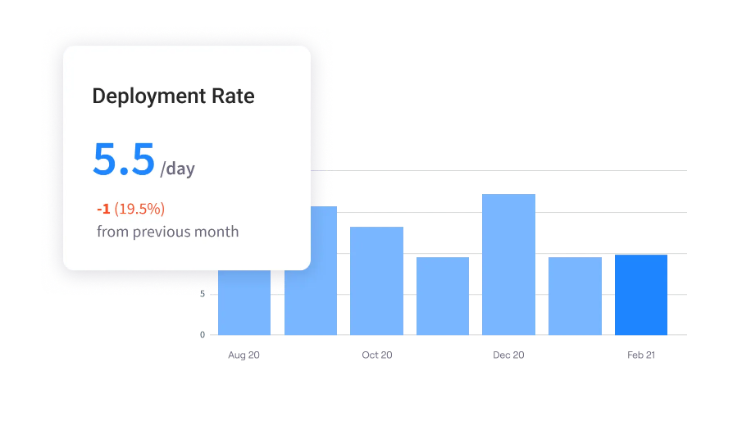
PRO TIP: Don’t assume your portal is working. Use Jellyfish to measure DORA metrics before and after launch. If deployment frequency and lead time stay flat, your portal might need rethinking.
Observability & Monitoring
What it does: Observability and monitoring tools let teams see inside their running systems. They pull together logs and traces so engineers can spot anomalies, investigate incidents, and understand how services are performing.
Who it’s for: These tools fit teams responsible for keeping production systems healthy and fast. They’re also useful in environments with multiple services where problems can originate anywhere in the stack.
Key features to look for:
- Unified collection of logs, metrics, and traces so you’re not jumping between separate tools to understand a pain point
- Dashboards and visualizations that make it easy to see system health at a glance
- Real-time alerting with configurable thresholds so the right people know when something breaks
- Easy integration with your infrastructure, containers, and application frameworks
- Distributed tracing to follow requests across services and pinpoint where things slow down or fail
Example tools: Datadog covers the full stack (logs, metrics, and APM) and is a common choice for teams that prefer a single vendor. For tracing specifically, Honeycomb and Jaeger are both well-regarded.
Platform Orchestration / Management
What it does: Platform orchestration and management tools sit on top of your existing stack and coordinate how everything works together. They handle workflows like provisioning, deployments, and configuration changes across multiple tools and services.
Who it’s for: These tools fit orgs with a maturing platform that’s become hard to manage as separate pieces. Common for teams that want to unify how infrastructure, deployments, and policies work across the stack.
Key features to look for:
- Ability to define and apply standards across teams and services without slowing people down
- Workflow automation for common tasks, like onboarding new services or updating configurations
- Self-service options that let teams get what they need without waiting on platform engineers
- Governance controls for managing permissions, policies, and compliance rules at scale
Example tools: Humanitec is a well-known option purpose-built for platform orchestration with a focus on standardizing deployments. There’s also Kratix, which takes an open-source, Kubernetes-native approach to building platforms as a product.
What to Look for in a Platform Engineering Tool?
What to Look for in a Platform Engineering Tool?
Features matter, but they’re only part of the picture. How a tool fits into your workflow, scales with your team, and integrates with your existing stack matters just as much.
Here’s what to look for:
Abstraction Capabilities
Why it matters: The whole point of platform engineering is to abstract away complexity so developers can move faster. If a tool doesn’t abstract well, your team ends up doing the same manual work with extra steps.
Questions to ask:
- Can a developer use this without knowing what’s happening under the hood?
- Does it let you build templates or golden paths that teams can grab and go?
- How much do developers need to configure themselves versus what’s handled for them?
- Can you adjust how much gets abstracted depending on the team or situation?
- Does it simplify things without boxing people in when they need more control?
- If your standards change, how painful is it to update the abstractions?
Self-Service Functionality
Why it matters: Self-service lets developers get what they need without waiting on the platform team. Without it, you end up with a ticket queue that defeats the purpose of having a platform in the first place.
Questions to ask:
- Can developers provision what they need without involving the platform team?
- What actions are available through self-service versus what still need manual intervention?
- Is the self-service experience intuitive enough that people will use it without hand-holding?
- Can you control what’s available for self-service based on team, project, or environment?
- How easy is it to add new self-service workflows as your platform changes?
Integration and Extensibility
Why it matters: No tool works in isolation. If it doesn’t integrate with what you already use or let you extend it when needed, you’re either stuck or building workarounds.
Questions to ask:
- Does it integrate with the tools your team already relies on out of the box?
- How much work does it take to connect it to something that isn’t natively supported?
- Can you build custom plugins, scripts, or extensions when you need something specific?
- Is there an active ecosystem or community building integrations you can lean on?
- Does it use open standards or APIs that make future integrations easier?
Automation and Orchestration Features
Why it matters: Manual work doesn’t scale. The more a tool can automate and orchestrate, the more your platform team can support without burning out.
Questions to ask:
- What tasks can be automated out of the box versus what needs custom setup?
- Can you define workflows that chain multiple steps or tools together?
- How does it handle failures mid-workflow – does it retry, roll back, or just stop?
- Is it easy to adjust automations as your processes change over time?
- Can workflows be triggered by events, schedules, or manual input depending on what you need?
PRO TIP 💡: More automation should mean less toil. You can use Jellyfish to track how much time your team spends on unplanned work and firefighting before and after bringing new automations. If the numbers don’t improve, something’s not working.
Governance and Security
Why it matters: Giving developers more freedom doesn’t mean giving up control. Good governance and security features let you set boundaries without slowing people down.
Questions to ask:
- Can you define and enforce policies across teams and environments from one place?
- Does it support role-based access so people only touch what they’re supposed to?
- How does it handle audit trails – can you see who did what and when?
- Does it integrate with your existing security and compliance tools?
- Can you set up automated checks that block non-compliant changes before they happen?
- How granular are the controls – can you tune policies for different teams, projects, or risk levels?
Scalability and Reliability
Why it matters: A tool that works for 10 developers might fall apart at 100. You need something that scales with your org and stays reliable as usage grows.
Questions to ask:
- How does it perform as the number of users, services, or workloads increases?
- Is there documented evidence of it running reliably at orgs similar to your size or larger?
- What does the architecture look like – are there any obvious bottlenecks or single points of failure?
- How does it handle failures – does it recover gracefully or need manual intervention?
- Can you run it in a highly available setup if uptime is a major selling point for your team?
- What’s the track record on outages or major bugs, and how transparent is the vendor about them?
Community and Support
Why it matters: Tools don’t exist in a vacuum. Good community and support mean you’re not the first person handling every problem, and someone’s probably already figured it out.
Questions to ask:
- Is there an active community where people share solutions, plugins, or advice?
- How responsive is the vendor’s support team, and what channels can you reach them through?
- Are there enough real-world examples and discussions to learn from when you hit edge cases?
- How often does the tool get updated, and does the team communicate openly about the roadmap?
- Are there community-built integrations or extensions you can lean on?
- If the tool is open source, how healthy is the contributor base – is it just one company or a broader group?
Best Platform Engineering Tools for 2026 & Beyond
Best Platform Engineering Tools for 2026 & Beyond
The platform engineering space has plenty of options, and sorting through them takes time. The list below covers the tools that are getting the most attention from platform engineering teams right now.
For each one, we’ll look at what it does, where it fits, and what makes it worth considering.
1. Kubernetes
Best for: Teams running containers in production that need reliable orchestration across clusters and development environments.
Kubernetes is an open-source container orchestration platform originally developed by Google and now maintained by the Cloud Native Computing Foundation (CNCF).
It automates the deployment, scaling, and management of containerized applications across clusters of machines.
Key features
- Automated scaling that adjusts your application up and down based on CPU usage or custom metrics
- Self-healing that restarts crashed containers, replaces pods, and reattaches storage in response to failures
- Service discovery and load balancing that exposes containers via DNS or IP and distributes network traffic to keep deployments stable
- Storage orchestration that automatically mounts storage systems of your choice (including local storage and public cloud providers)
- Secret and configuration management for storing and managing sensitive information like passwords and OAuth tokens
Pricing
Kubernetes is open source and free. If you self-host, you pay for the underlying infrastructure.
Most development teams use managed services – Amazon EKS charges $0.10 per hour per cluster (about $72/month), while Google GKE charges the same but offers a free tier for one Autopilot or zonal cluster. Azure AKS has no control plane fee, and you only pay for compute, storage, and networking.
What developers like about Kubernetes
It is a highly scalable container management application that works across various infrastructures, which provides portability and hybrid cloud deployments.
Another good feature of Kubernetes is self-healing, which allows it to automatically restart failed containers and replace the faulty ones.
– G2 Review, Divyanshu A.
2. Docker
Best for: Developers who want consistent environments from local development through production without dependency headaches.
Docker is an open-source containerization platform that lets you build, ship, and run applications in isolated environments called containers.
It includes Docker Engine for running containers, Docker Hub for storing and sharing images, and Docker Desktop for local software development on Mac and Windows.
Key features
- Containers package code and dependencies together so apps run the same way in development, testing, and production
- Images act as lightweight templates you can version, share, and reuse across projects
- Docker Hub provides access to millions of pre-built images you can pull and build on
- Docker Compose lets you define and run multi-container applications with a single configuration file
- Containers start in seconds and use fewer resources than virtual machines since they share the host OS kernel
- Works across Linux, Windows, and macOS with strong integration into CI/CD pipelines
Pricing
Docker Personal is free and includes Docker Desktop, Docker Hub (100 pulls/hour), and one private repo.
Paid plans include Docker Pro at $9/month (annual) for individual developers, Docker Team at $15/user/month (annual) for up to 100 users, and Docker Business at $24/user/month with SSO, SCIM, enhanced container isolation, and enterprise security features.
What developers like about Docker
Docker offers platform-independent code deployment, making it a versatile choice for various environments. Installing Docker is straightforward on any operating system, and it is widely accessible to users everywhere. It supports nearly all front-end and back-end programming languages, which adds to its flexibility.
Containers can operate independently, and dependencies between them can be easily configured through the command line interface or Docker Compose.
– G2 Review, Ranu S.
3. Terraform
Best for: Platform and DevOps teams who want to define infrastructure as code and manage it through version control like any other codebase.
Terraform is an infrastructure-as-code tool that lets you define, provision, and manage cloud resources using declarative configuration files. The open-source CLI handles provisioning, while HCP Terraform provides collaboration, remote state, and policy enforcement for teams.
Key features
- Declarative configuration language (HCL) that describes your desired infrastructure state
- Support for over 3,000 providers, so you can manage AWS, Azure, GCP, Kubernetes, and hundreds of other services from one tool
- Execution plans that preview changes before applying them, so you know exactly what Terraform will create, change, or destroy
- Version control integration so you can review, approve, and audit infrastructure changes like application code
Pricing
The Terraform CLI is free to use. HCP Terraform offers a free tier for up to 500 managed resources, which includes remote execution, VCS integration, SSO, and policy enforcement.
Terraform Enterprise is self-hosted with custom pricing for companies that need advanced security, compliance, and no resource limits.
What developers like about Terraform
It supports all major public and private clouds, including AWS, Azure, GCP and VMware.It maintains a state file that serves as a crucial component of its functionality.
The state file is responsible for tracking and managing the current state of deployed resources, and it aids Terraform in understanding the necessary changes required to achieve the desired state.
– G2 Review, Jay J.
4. Crossplane
Best for: Kubernetes-native teams that want to manage cloud infrastructure using the same APIs, tools, and workflows they already use for applications.
Crossplane extends Kubernetes so you can provision and manage cloud resources (databases, networks, storage) using the same declarative YAML and kubectl commands you use for applications. It’s open source, vendor-neutral, and backed by the CNCF.
Key features
- Uses Kubernetes CRDs and kubectl to manage cloud resources like databases, storage, and networking
- Compositions let platform teams build reusable blueprints that bundle multiple resources into a single, simplified API
- Works across multiple cloud providers from a single control plane, so you can manage AWS, Azure, and GCP resources together
- Integrates natively with GitOps workflows like ArgoCD and Flux for version-controlled infrastructure changes
Pricing
Crossplane is free and open source. There’s no paid version, and you run it on your own Kubernetes cluster at no licensing cost.
What developers like about Crossplane
Crossplane is helping in treating infrastructure and application as the same citizen, and extending it without you needing to develop your own controllers and without worrying about the need to learn a new language just by remaining on Kubernetes semantics.
– User review from Reddit
5. GitLab CI/CD
Best for: Teams that want version control, CI/CD, security scanning, and project management in a single tool instead of stitching together multiple services.
GitLab CI/CD is the built-in automation engine for GitLab’s DevSecOps platform that handles everything from build and test to deployment and security scanning. GitLab offers it as both a hosted SaaS and self-managed option, with the core open source and paid tiers for enterprise features.
Key features
- Built-in security scanning (SAST, DAST, container scanning, secret detection) runs directly in your pipeline
- Auto DevOps can generate a complete CI/CD pipeline automatically based on your project’s language and framework
- Runners execute jobs on Linux, Windows, macOS, or Kubernetes (use GitLab’s hosted runners or bring your own)
- You can merge request pipelines and run tests on proposed changes before they hit your main branch
- Parallel job execution and multi-stage pipelines let you build, test, and deploy in whatever order makes sense
Pricing
GitLab Free includes 400 compute minutes per month on shared runners. Premium costs $29/user/month (billed annually) and includes 10,000 compute minutes.
Ultimate costs $99/user/month (billed annually) with 50,000 compute minutes plus advanced security and compliance features. You can use your own runners on any plan at no extra cost.
What developers like about GitLab CI/CD
The CI/CD pipeline system is solid once you get it running. The YAML config gives you good control, and the built-in runners work well for most projects.
Issue tracking integrates nicely with merge requests. You can link branches to issues automatically, which keeps things organized.
– G2 Review, Sujal S.
6. Jenkins
Best for: Organizations that want full control over their CI/CD environment and have the DevOps capacity to manage it.
Jenkins is a free, open-source automation server that has been a staple of CI/CD for over a decade. It’s self-hosted, endlessly customizable through plugins, and runs on any platform that supports Java.
Key features
- Pipeline as code lets you define your entire build, test, and deploy workflow in a Jenkinsfile stored with your source code
- Over 1,800 plugins integrate Jenkins with virtually any tool, platform, or multi-cloud provider
- Distributed builds across multiple machines let you scale workloads and run jobs at the same time
- Works with any language, framework, or platform (Jenkins doesn’t care what you’re building)
- An active community and years of documentation make it easier to find answers when things break
Pricing
Jenkins is completely free and open source. You pay nothing for the software, only for the infrastructure you run it on.
What developers like about Jenkins
Jenkins offers unmatched flexibility and extensibility, allowing us to automate builds, tests, and deployments across all environments.
Its vast ecosystem of plugins lets us integrate with countless tools, while pipelines as code deliver transparency and control for CI/CD processes.
– G2 Review, Aman Kumar M.
7. Spacelift
Best for: Companies looking for a Terraform Cloud alternative with more predictable pricing and support for other IaC frameworks.
Spacelift is an infrastructure management platform built to orchestrate multiple IaC tools from a single control plane. It’s a commercial product available as SaaS or self-hosted, with a focus on governance, automation, and developer self-service.
Key features
- Supports Terraform, OpenTofu, Terragrunt, Pulumi, Ansible, CloudFormation, and Kubernetes from one platform
- Policy-as-code with Open Policy Agent lets you enforce governance, compliance, and security rules across all deployments
- Stack dependencies let you chain deployments across multiple IaC stacks and share outputs between them
- Self-service infrastructure with guardrails lets developers provision resources without waiting on platform teams
- Private workers run in your own environment for teams with strict security or compliance rules
Pricing
Free tier includes 2 users and 1 public worker. Starter is $399/month for up to 10 users and 2 public workers. Starter+, Business, and Enterprise tiers have custom pricing based on users, private workers, and features needed.
What developers like about Spacelift
I love how Spacelift allows our small team to efficiently manage a large number of stacks, enabling us to configure and manage our infrastructure in a clean and sensible way.
The simplicity of configuring Terraform through Spacelift is particularly impressive, as it streamlines our process and allows us to manage infrastructure dependencies smoothly. I appreciate the systematic and repeatable way it facilitates the rollout of applications and infrastructure, which is crucial for maintaining our operations.
– G2 Review, Rohit S.
8. Backstage
Best for: Software engineering orgs that want to give developers self-service access to templates, docs, and service information without building a portal from scratch.
Backstage is an open-source framework for building internal developer portals, created by Spotify and donated to CNCF. It provides a centralized software catalog, project templates, and a documentation system that platform teams can customize and extend with plugins.
Key features
- Software catalog tracks all services, libraries, APIs, and data pipelines with ownership and dependency information in one place
- Software templates let developers spin up new projects that follow your org’s standards and best practices in minutes
- TechDocs keeps documentation alongside code as Markdown files, so docs stay current and discoverable
- Plugin architecture with 200+ community plugins for tools like Kubernetes, GitHub, Jenkins, and ArgoCD
- Search works across the catalog, documentation, and any integrated tools to help developers find what they need fast
Pricing
Backstage is free and open source. Self-hosting requires dedicated engineering resources for setup and maintenance.
Spotify also offers Portal, a managed SaaS version that went GA in October 2025 with custom pricing.
What developers like about Backstage
I used it to help our small dev shop spin up. Mostly for templates. Users filled in a form for whatever they were trying to do (ex web app) and it spun up the repo, added workflows, set up pre-commit and code owners, spun up a quick start infrastructure (Terraform), and seeded some quick start code. After spin up, it’s handy for organising your monitoring and observability by application.
– User review from Reddit
9. Port
Best for: Engineering orgs that need a turnkey developer portal with scorecards, self-service capabilities, and real-time catalog data but don’t want to maintain Backstage
Port is a commercial SaaS platform for building internal developer portals with no-code configuration. It combines a customizable software catalog, developer self-service actions, scorecards, and workflow automation into one product that platform teams can set up in minutes.
Key features
- Flexible blueprints let you model any asset in your stack, from microservices and environments to databases and cloud resources
- Self-service actions let developers provision resources and run day-2 operations without filing tickets
- Scorecards track engineering standards like production readiness, security compliance, and DORA metrics across your catalog
- Integrations pull real-time data from Kubernetes, GitHub, Terraform, CI/CD tools, and cloud providers into a single interface
- Role-based access control gives fine-grained permissions over who can see and do what across the portal
Pricing
Free tier supports up to 15 users and 10,000 entities with no time limit, while the Startup plan is $30/user/month for orgs up to 50 developers.
Enterprise pricing is custom and includes multi-workspace support, data locality, and single-tenant deployment options.
What developers like about Port
I like the flexibility to define our own data models and mappings. This really makes the possibilities with Port endless and has allowed us to build some pretty helpful dashboards.
– G2 Review, Anonymous user.
10. Cortex
Best for: Large teams that need a managed developer portal with strong scorecards and AI-assisted service discovery out of the box.
Cortex is a commercial internal developer portal that helps engineering teams manage microservices, track ownership, and apply best practices through scorecards and automation.
It uses AI to auto-discover services and ownership, and integrates with 60+ tools to give teams a centralized view of service health, DORA metrics, and compliance.
Key features
- AI-powered catalog discovery automatically maps services, teams, and ownership so you can launch your portal faster
- Scorecards track production readiness, security compliance, DORA metrics, and custom standards across all services
- Service catalog centralizes ownership, documentation, dependencies, and metadata to replace spreadsheets and tribal knowledge
- 60+ pre-built integrations connect to CI/CD, monitoring, cloud providers, and other tools in your stack
- The developer homepage outlines tasks, alerts, and scorecard vulnerabilities in one view, so engineers know what needs attention
Pricing
No public pricing. Cortex works with sales to build custom packages based on your team’s needs. You can also procure through AWS and Azure marketplaces.
What developers like about Cortex
It was easy to use, flexible to our needs, and scaling was not difficult. Developers found it easy to use.
– G2 Review, Pratik D.
11. OpsLevel
Best for: Teams that want a low-maintenance developer portal where the catalog updates itself, and scorecards keep services on track.
OpsLevel is a commercial internal developer portal that automates service cataloging and helps teams enforce engineering standards through scorecards, campaigns, and self-service actions.
It also connects to your existing tools like GitHub, Kubernetes, and cloud providers to build and maintain an always-up-to-date software catalog without manual effort.
Key features
- AI-powered catalog engine finds services from Git, Kubernetes, CI/CD, and cloud providers, then fills gaps with generated descriptions and ownership
- Scorecards and rubrics let you define service maturity levels and track health against security and compliance standards
- Self-service actions and templates let developers spin up new services or run operational tasks without waiting on platform teams
- 40+ integrations with tools like Datadog, PagerDuty, Slack, and AWS bring all your service data into one place
Pricing
Pricing is based on the number of developers and is available on request. OpsLevel only has custom quotes based on team size, support level, and deployment options (including self-hosted and single tenancy).
What developers like about OpsLevel
OpsLevel provides real-time insights into the health and performance of services, enabling teams to proactively identify and address issues before they escalate. It links all (most) of the tools we use to provide a single place to overview the health of our systems.
– G2 Review, Anonymous user.
12. Humanitec
Best for: Organizations that want a backend orchestration layer for their IDP that works with their existing Terraform, CI/CD, and cloud setup (without a full rebuild).
Humanitec is the platform orchestrator that powers internal developer platforms for enterprises ranging from scale-ups to Fortune 100s
It works with your existing IaC tools like Terraform and integrates with any CI/CD pipeline, cloud provider, or container orchestrator to standardize how resources get built and deployed.
Key features
- Platform Orchestrator dynamically generates app and infrastructure configurations for every deployment based on rules you define
- Score, an open-source workload specification (now a CNCF Sandbox project), lets developers describe what their workloads need without knowing the underlying infrastructure
- Works with existing IaC tools like Terraform, OpenTofu, Pulumi, and Crossplane, so you don’t have to rip and replace your current setup
- RBAC and governance controls let platform teams enforce standards while developers self-serve resources through API, CLI, or portal
- Environment management lets teams spin up consistent dev, staging, and production environments with a single command
Pricing
There are three available plans:
- Teams: €1,999/month for 5 users, 1 project with up to 5 environments, and email support.
- Pro: €4,999/month for 50 users with RBAC, sandbox organization, and monthly office hours with a platform architect.
- Enterprise: Custom pricing for large teams with premium support, SAML, and audit logs.
Users can save 10% with annual billing, and there’s a free trial available.
What developers like about Humanitec
Public user reviews for Humanitec are hard to come by. Sites like G2, Capterra, and Reddit don’t have much in the way of independent feedback.
The testimonials that do exist live mostly on Humanitec’s website and focus on reduced ops overhead and faster time to production. A hands-on trial is probably the best way to evaluate it.
13. Qovery
Best for: Startups and mid-size companies that need fast, repeatable deployments with on-demand preview environments but don’t want to hire a dedicated DevOps team.
Qovery is a DevOps automation platform that gives you a PaaS-like experience on top of your own cloud infrastructure.
It handles Kubernetes and environment management so developers can deploy without touching infrastructure, while platform teams keep full control over their AWS, GCP, or Azure accounts.
Key features
- Deploys to your own cloud account (AWS, GCP, Azure, Scaleway) so you keep full control and avoid vendor lock-in
- Auto-deploy triggers deployments when you push code to connected Git repositories
- Environment cloning lets you replicate full environments, including databases and services in seconds
- Built-in observability with logs, engineering metrics, and RDS monitoring helps you troubleshoot without jumping to cloud consoles
- RBAC, audit logs, and compliance features support SOC 2 and HIPAA requirements out of the box
Pricing
Qovery has four plans that scale based on the number of users, managed clusters, and deployment minutes you need:
- User: $299/month for 2 users, 1 managed cluster, and 1,000 deployment minutes.
- Team: $899/month for 10 users, 2 managed clusters, and 5,000 deployment minutes.
- Business: $2,099/month for 30 users, 3 managed clusters, 10,000 deployment minutes, and SLA support.
- Enterprise: Custom pricing with on-premise deployment, custom users, clusters, and dedicated support.
You can start with a free trial to test things out.
What developers like about Qovery
Qovery makes it super simple to deploy applications to Kubernetes. With a friendly UI, it’s easy to get up and running quickly.
We are a big fan of their environment clone functionality, which allows us to easily deploy temporary environments for application testing and demo environments. Customer support is friendly and responsive!
– G2 Review, Kyle F.
14. Prometheus
Best for: Platform and SRE teams that need to collect metrics and set up alerts for Kubernetes clusters and cloud-native apps.
Prometheus is a free monitoring tool that collects numbers (like CPU usage, request counts, error rates) from your apps and servers, stores them over time, and lets you build dashboards and alerts. It’s the most popular monitoring choice for Kubernetes environments.
Key features
- Labels let you tag metrics with dimensions like service name, environment, or region, so you can filter and group data however you need
- PromQL query language helps you slice, aggregate, and analyze your metrics for dashboards and alerts
- Service discovery automatically finds what to monitor in Kubernetes, AWS, and other environments without manual config updates
- Alertmanager groups related alerts together, avoids duplicate notifications, and routes them to Slack, PagerDuty, email, or other channels
- 150+ exporters collect metrics from databases, queues, servers, and custom apps across most programming languages
Pricing
The platform is free and open source. You run it on your own infrastructure.
If you want a managed version with less operational work, AWS, Google Cloud, and Azure all offer hosted Prometheus services.
What developers like about Prometheus
Prometheus excels in real-time monitoring and alerting for cloud-native and containerized environments. It’s highly efficient, easy to deploy, and integrates smoothly with popular tools like Grafana and Kubernetes.
– G2 Review, Anonymous user.
How to Choose the Right Tool for Your Needs
How to Choose the Right Tool for Your Needs
The fastest way to pick the right platform engineering tools is to work backwards from what’s slowing your team down. If developers wait days for environments, that’s a different problem than your platform team drowning in repetitive tickets.
Once you know what’s broken, you can match it to the right category of tool. Next, cut the list down by asking a few practical questions:
- Are you running Kubernetes, or is that still on the roadmap?
- Do you have dedicated platform engineers, or is this a side job for your DevOps team?
- What’s your budget – open source only, or is there room for commercial tooling?
What’s already in your stack that new tools need to integrate with?
These questions alone will help you quickly rule out tools that don’t fit.
You’ll also need to consider the build vs. buy decision. Open-source tools like Backstage and Crossplane give you full control and no licensing fees, but you’ll spend engineering time setting them up and keeping them running.
On the other hand, commercial platforms like Port, Cortex, or Humanitec cost money upfront but get you to value faster. The right choice depends on your team’s capacity and timeline.
Here’s how the tradeoffs break down:
| Open source | Commercial | |
| Cost | Free to use, but needs engineering time to set up and maintain | Licensing fees, but faster setup and vendor support |
| Flexibility | Highly customizable, you control everything | More opinionated, less room to customize |
| Time to value | Weeks to months, depending on complexity | Days to weeks for most setups |
| Best for | Teams with platform engineering capacity and specific requirements | Teams that need to move fast or lack dedicated platform resources |
Before you go all in, pilot with a team on a real project. Pick one or two tools that made it through your filters, run them for a few weeks, and get honest feedback from the developers using them. The best tool on paper is worthless if your team won’t adopt it.
Measuring the Success of Your Platform with Jellyfish
Measuring the Success of Your Platform with Jellyfish
Platform engineering is only as good as its outcomes. You can have the cleanest golden paths and the slickest portal, but if developers aren’t using them or shipping faster, something’s off. And the blind spot is almost always measurement.
That visibility gap is exactly what Jellyfish was built to fill.
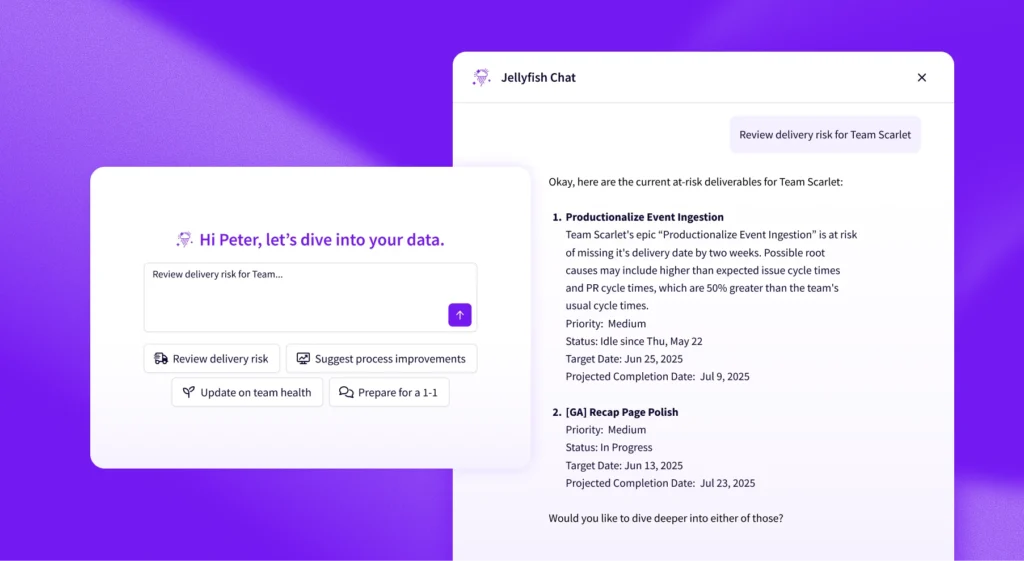
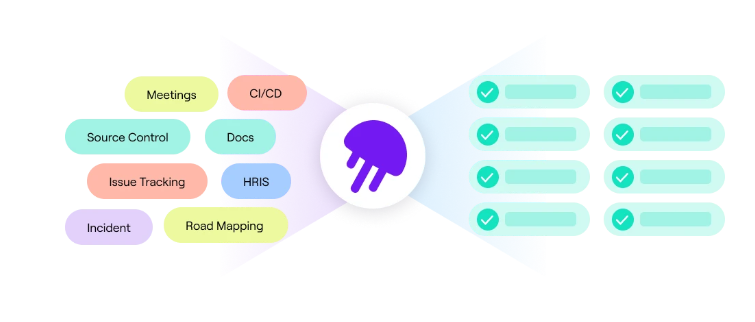
Jellyfish is an engineering management platform that aggregates data from tools like Jira, GitHub, and GitLab to show how engineering teams operate. For platform teams specifically, it helps you measure whether your IDP investments are paying off.
Some of the key features include:
- DORA metrics tracking: Teams can measure deployment frequency, lead time, change failure rate, and mean time to recovery across your teams. You can then compare these numbers before and after platform adoption to see if your tools are making continuous delivery faster.
- Resource allocation insights: Get a clear, end-to-end breakdown of how teams split their time between product work, maintenance, and everything else. Useful for proving your self-service tools are working or figuring out why they’re not.
- DevEx surveys: You can run DevEx surveys built by industry researchers to capture how engineers feel about their tools, development processes, and workflows. Then, break down results by team or role to find out where your platform is helping and where it’s creating friction.
- Software delivery management: Monitor deliverables across teams and get early warnings when something’s falling behind. You’ll know which projects need attention before someone has to ask.
- Engineering tool integrations: Pulls data from Jira, GitHub, GitLab, CI pipelines, and incident tools without anyone changing how they work. You get a unified view without building custom dashboards or stitching together spreadsheets.
At the end of the day, your platform is only as good as the results it delivers. Jellyfish helps you measure those results and course-correct when something isn’t working.
Book a demo to see how it works.
FAQs
FAQs
What’s the difference between platform engineering tools and an IDP?
Platform engineering tools are the individual pieces – things like Terraform for infrastructure, Argo CD for deployments, or Backstage for a developer portal.
An IDP (Internal Developer Platform) is what you get when you combine those tools into a unified system that developers can interact with.
Simply put, the tools are the building blocks, while the IDP is the finished product.
Do I need all these tools to do platform engineering?
No. Most teams start with two or three tools that handle their biggest pain points, and then expand over time. Trying to adopt everything at once is a fast way to overwhelm your team and slow down actual progress.
How do platform engineering tools optimize developer experience (DevEx)?
The short answer is less waiting, fewer tickets, and more autonomy. Good platform tools let developers provision what they need without chasing down the DevOps team.
They also standardize workflows, so developers don’t waste time figuring out how to deploy to a new environment or debug infrastructure they’ve never seen before.
Can I use open-source tools exclusively for platform engineering?
Yes – plenty of teams build their entire platform on open-source tools like Terraform, Backstage, Argo CD, and Prometheus.
The trade-off is time. You’ll spend more engineering hours on setup, integration, and ongoing maintenance than you would with commercial alternatives.
If you have the capacity and want full control, open source works. If you need to move fast with a small team, commercial tools might save you months.
How does platform engineering relate to DevOps/SRE?
DevOps is the mindset, SRE is the discipline, and platform engineering is the product that supports both.
Instead of DevOps engineers handling every deployment request or SREs firefighting preventable issues, platform teams build internal tools that automate the routine tasks.
Learn More About Platform Engineering
Learn More About Platform Engineering
- The Complete Guide to Platform Engineering
- Platform as a Product: The Foundation for Successful Platform Engineering
- When to Adopt Platform Engineering: 8 Signs Your Team is Ready
- Platform Engineering vs. DevOps: What’s the Difference?
- How to Build a Platform Engineering Team: Key Roles, Structure, and Strategy
- Understanding The Platform Engineering Maturity Model
- How to Build Golden Paths Your Developers Will Actually Use
- 8 Benefits of Platform Engineering for Software Development Teams
- 17 Platform Engineering Metrics to Measure Success and ROI
- 9 Platform Engineering Anti-Patterns That Kill Adoption
- The Top Platform Engineering Skills Every Engineering Leader Must Master
- 11 Platform Engineering Best Practices for Building a Scalable IDP
- What is an Internal Developer Platform (IDP)?
About the author

Lauren is Senior Product Marketing Director at Jellyfish where she works closely with the product team to bring software engineering intelligence solutions to market. Prior to Jellyfish, Lauren served as Director of Product Marketing at Pluralsight.