In this article
Internal platforms are expensive bets. Leadership approves the budget, platform teams build for months, and the company expects major returns.
But too often, the return is a platform nobody uses and months of work that produced zero value.
And the problem is usually strategic, not technical. Platform teams think like infrastructure engineers when they need to think like product managers.
Even experienced DevOps professionals wrestle with this shift. On forums like Reddit, teams debate what platform engineering even means in practice.
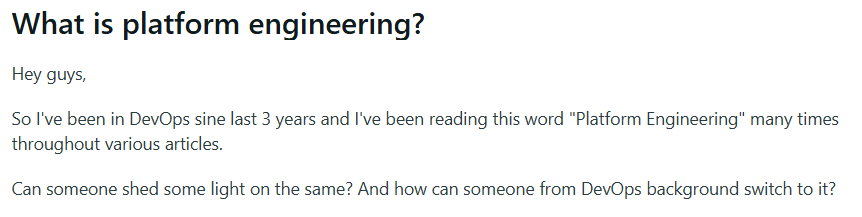
Here’s what it means – platform as a product treats your internal infrastructure like a SaaS product. Developers are customers, adoption is your north star, and you build what they need, not what seems technically complete.
This article walks through what platform as a product means in practice and how to apply it to your platform engineering work.
Defining Platform as a Product (PaaP)
Defining Platform as a Product (PaaP)
Platform as a product (PaaP) means treating your internal developer platform the same way a product company treats software it sells to customers.
Your platform has users (developers), and your job is to understand what they need, build something they want to use, and continuously improve it based on how they use it.
Platform teams usually work the same way infrastructure teams do. Define the technical needs, build to spec, and measure whether the system functions correctly.
Product teams do the opposite. You figure out what problems developers face, build solutions that fit how they work, and track whether they choose to use what you made.
Here are the three main pillars of platform as a product:
- Developers are your customers, not just users: You need to understand their problems, preferences, and workflows the same way a SaaS provider understands its market. This means regular conversations, observing how they work, and prioritizing their experience over technical elegance.
- Value is measured by adoption, not features: A platform with 50 capabilities that 20% of developers use is less valuable than a platform with 10 capabilities that 80% of developers use daily. Your metrics should track usage, satisfaction, and whether the platform helps developers ship faster.
- You iterate based on user needs, not technical roadmaps: Product teams adjust priorities based on what users need most. Platform teams should do the same. If developers struggle with debugging in your platform, that takes priority over a new integration you think would be “cool”.
This approach has roots going back years. It grew from years of watching expensive internal platforms fail because teams built them like infrastructure. For example, Thoughtworks started advocating for customer-facing product management principles in internal platforms back in 2017.
Evan Bottcher expanded on this in 2018, arguing that platforms need to be compelling, not mandatory. Matthew Skelton and Manuel Pais later codified these ideas in Team Topologies and defined how platform teams should provide self-service capabilities that accelerate other teams.
The 3 Foundational Principles of an Effective Platform (And How to Uphold Them)
The 3 Foundational Principles of an Effective Platform (And How to Uphold Them)
Platform success usually comes down to three core principles. They’re simple to understand but need deliberate work to uphold.
Here’s how to think about each one.
1. It Must Be Compelling (Voluntary, Not Mandated)
What it means: Your platform should win on merit. If developers use it only because alternatives are blocked or leadership mandates it, you don’t have a product.
You have a compliance checkbox that developers will resent and work around when possible. One developer on Reddit nailed why mandates backfire:
One thing I notice over and over again is a lack of empathy in any startup department in corporate. People must consider not just how it makes their lives easier (if it even does that) but how it impacts others downstream. Too many vertical silos and no communication.
Why it matters: Mandated platforms create resentment and workarounds. Developers will find ways around tools that slow them down or create friction, even if leadership says they’re required.
How to uphold it in practice:
- Make the platform easier than alternatives. If provisioning a database through your platform takes 10 clicks and 3 approval workflows, but developers can spin one up in AWS in 2 minutes, they’ll skip your platform.
- Let developers opt out when it makes sense. Some teams have specific needs that your platform doesn’t serve well. Rather than forcing them onto the platform anyway, let them use alternatives and learn from what they build.
- Treat low adoption as a signal. If teams aren’t using a feature, find out why. Poor documentation, slow performance, or workflow mismatches all point to fixable problems.
- Compete on developer experience. Developers compare your platform to external tools they use. If your internal platform feels clunky compared to tools like Vercel or Render, they’ll resent using it.
2. It Must Be Self-Service
What it means: Developers should be able to use your platform without having to file tickets or ask for help. Self-service means they can provision resources, deploy code, access documentation, and troubleshoot issues on their own. The platform handles the complexity, so developers don’t have to wait on platform teams or ops.
Why it matters: Tickets and approval workflows kill momentum. When developers need to wait hours or days for someone to provision infrastructure or grant access, they lose context and waste time. In fact, a CloudBees study found that the highest-ranking objective of platform engineering for organizations is self-service for developers (29%).
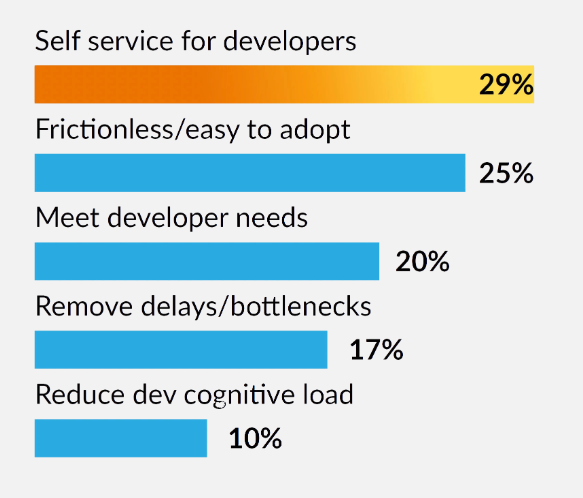
(Source: CloudBees)
How to uphold it in practice:
- Automate common tasks end-to-end. Developers shouldn’t need to file tickets for database provisioning, environment setup, or access requests. Build workflows that handle these tasks from start to finish without human intervention.
- Provide clear documentation at the point of need. Embed docs, examples, and troubleshooting guides directly in the platform interface. Developers shouldn’t have to hunt through wikis or Slack channels to figure out how something works.
- Design for discoverability. Developers should be able to find features and understand what they do without training sessions. Clear navigation, sensible defaults, and inline help reduce the learning curve.
- Make errors actionable and specific. When something fails, tell developers what went wrong and how to fix it. Generic error messages force developers to ask for help and unnecessarily waste time.
3. It Must Be Accessible
What it means: Developers need to find, understand, and use your platform without specialized training or deep technical knowledge of how it works under the hood. Accessible platforms have clear documentation, intuitive interfaces, and onboarding that gets people productive quickly.
Why it matters: Inaccessible platforms create knowledge silos where only a few people know how to use them properly. New developers spend weeks learning the platform when they should be contributing to their teams. The learning curve becomes a barrier to productivity.
How to uphold it in practice:
- Create clear, task-based documentation. Developers should find guides organized around what they need to do, like “deploy a microservice” or “set up a staging environment.” Reference documentation matters, but most developers start with tasks.
- Provide working examples and templates. A template repository or example configuration gets developers started faster than documentation alone. They can copy, modify, and learn as they go.
- Offer multiple entry points for different skill levels. Beginners might need a web UI with guided workflows. Advanced users might want a CLI or API. Support both so everyone can work in their preferred way.
- Provide built-in help and troubleshooting. When developers get stuck, they should find help within the platform. Contextual hints, error explanations, and diagnostic tools keep them moving without asking for support.
Common Anti-Patterns That Cause Platforms to Fail
Common Anti-Patterns That Cause Platforms to Fail
Even teams that understand platform as product principles can fall into common traps. Recognize these anti-patterns early, and you can course-correct before they damage adoption:
Thinking “Our Users Are Just Like Us”
Platform teams assume developers work the same way they do and have the same technical knowledge. They build interfaces and workflows that make sense to infrastructure engineers but confuse application developers.
What problems it creates:
- Developers need platform team help for tasks that should be self-service because the UI assumes expert knowledge
- Documentation assumes too much background knowledge and skips steps that seem obvious to experts
- The platform offers powerful customization options that developers don’t need, while missing simple defaults they do
How to avoid it:
- Interview developers about what slows them down before deciding what to build
- Shadow developers for a day to see how they work and where your platform fits in
- Recruit beta testers from teams that have never used your platform before
Mandating Adoption
Platform teams force adoption through top-down mandates and policy changes. Leadership declares the platform mandatory, removes access to competing tools, or makes platform usage part of performance evaluations.
The dysfunction this creates is pretty clear. One developer shared their experience with forced adoption:
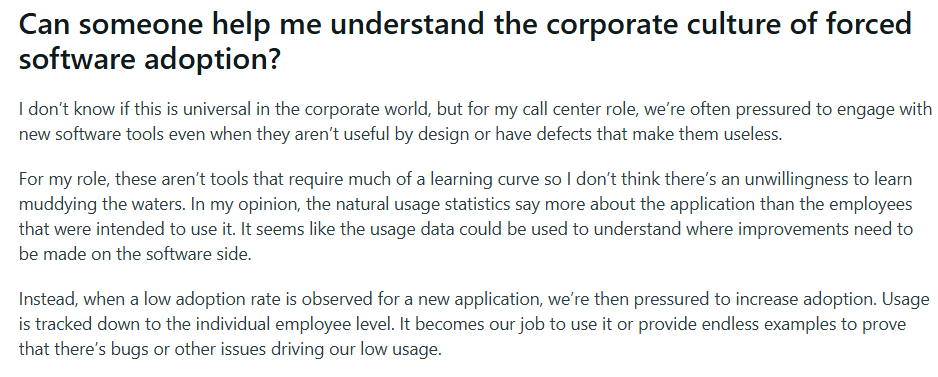
What problems it creates:
- Developers view the platform as bureaucracy imposed from above rather than a helpful tool
- The feedback loop breaks because low usage would signal problems, but mandates inflate the numbers
- Teams build unofficial tools and processes that duplicate platform capabilities badly
How to avoid it:
- Remove mandates if they exist, and see which features developers keep using
- Create escape hatches for edge cases where the platform doesn’t fit
- Ask developers why they use the platform and listen for “because I have to” answers
Structuring Teams by Technology
Platform teams organize around technical components like “the Kubernetes team,” “the CI/CD team,” or “the monitoring team.” Each team owns a specific technology stack and builds features within its domain.
Developers need to work with multiple platform teams to accomplish a single task because responsibilities are split along technical boundaries rather than user workflows.
What problems it creates:
- No single team owns the end-to-end developer experience or feels responsible for it
- Platform teams optimize their individual technologies without considering how developers use them together
- Developers juggle multiple contacts and processes to complete simple workflows that span technologies
How to avoid it:
- Organize platform teams around developer journeys like “deployment” or “environment management”
- Structure teams to own user-facing capabilities that might span multiple technologies
- Make teams responsible for complete workflows from start to finish
Assuming Every Problem Is Technical
When developers don’t use a feature, the team assumes it needs better performance, more capabilities, or tighter integration.
Teams focus exclusively on building and fixing technical components and ignore documentation gaps, confusing workflows, unclear value propositions, or poor communication about what the platform does.
What problems it creates:
- Teams spend months optimizing performance when the actual problem is that developers don’t understand what the feature does
- Support requests pile up for problems that better documentation or UI design would prevent
- Developers can’t find clear examples or guides, so they build their own solutions instead
How to avoid it:
- Invest in documentation, examples, and onboarding materials with the same rigor as code
- Measure how long it takes developers to understand what your platform does and accomplish their first task
- Assign someone ownership of the onboarding experience who can work across technical and communication needs
PRO TIP 💡: Use Jellyfish DevEx surveys to spot non-technical blockers. Developers might say the platform is “slow” when they mean the error messages are confusing or the docs are scattered. Match their feedback to delivery metrics to prioritize the right fixes.
Implementing Platform as a Product: 5 Key Steps
Implementing Platform as a Product: 5 Key Steps
Principles are useful, but you need a starting point. Here’s how to begin applying platform as a product thinking:
1. Assign a Dedicated Platform Product Manager
Platform teams without dedicated product ownership build what seems technically interesting or what the loudest stakeholder asks for. Engineers are great at solving technical problems, but product decisions need different skills.
A platform PM figures out what developers need and makes sure the team builds it. They talk to users constantly, understand their pain points, and translate feedback into priorities. They say no to features that seem interesting but don’t solve major problems. Engineers handle the how, while the PM handles the what and why.
Platform product managers usually handle these few key areas:
- Run ongoing user research: Talk to developers regularly about their workflows, frustrations, and needs. They also run surveys, schedule feedback sessions, and observe how people use the platform.
- Advocate for user experience: Push for better documentation, clearer onboarding, improved error messages, and workflow simplification. Fight for the unglamorous work that makes platforms easier to use.
- Own the product roadmap and prioritization: Decide what gets built based on what helps developers most, not what sounds technically interesting or what executives ask for.
- Set and monitor the right metrics: Measure things like adoption, user satisfaction, time for developers to get productive, and whether the platform makes them faster.
- Coordinate across teams: Work with security, compliance, infrastructure, and application development teams to balance requirements. Translate between technical and business stakeholders.
You have three main options for staffing platform product management. Each approach has clear tradeoffs depending on your team’s maturity, budget, and existing talent.
<td”>You have a senior engineer who’s already thinking about user needs and adoption
| Approach | Pros | Cons | Best When |
| Hire an external PM | Brings product discipline and fresh perspective
Knows how to do user research and roadmap planning |
Needs time to learn your tech stack and organization
May struggle with technical depth |
You need strong product skills and have a budget for a dedicated hire |
| Promote from within | Understands your systems and culture
Has credibility with software engineering teams |
May lack formal product training
It can be hard to shift the mindset from engineering to product |
You have an engineer interested in product work who communicates well with end users |
| Train an engineer | Deep technical knowledge
Already knows the platform and developers |
Takes time away from technical work
May resist “non-technical” activities like user research |
Most platform teams start with option two or three. You don’t need someone with “Product Manager” on their resume.
What you need is someone who cares about users, can prioritize ruthlessly, and will do the unglamorous work of talking to developers and improving documentation.
2. Define Your Mission
A platform mission is a clear statement of who you serve, what problems you solve for them, and what you won’t try to do. It helps you prioritize ruthlessly and make consistent tradeoff decisions.
These are some of the key elements every platform mission should include:
- Your primary users: Be specific about who the platform serves. “Developers” is too broad. “Application developers deploying microservices” or “data scientists running ML workloads” gives you focus.
- The value you deliver: Describe how you make developers better at their jobs. Do you help them ship faster? Remove tedious work? Make their code more reliable? Choose one main benefit.
- What you don’t do: Boundaries help as much as goals. State what falls outside your scope so you can decline requests that don’t fit your purpose.
- How you measure success: Decide how you’ll know the platform works. Will you track adoption numbers? Developer satisfaction scores? Time saved per deployment?
The point is, your mission statement should clearly articulate your focus and boundaries. It won’t make every decision obvious, but it gives you a framework for explaining why you say yes or no.
3. Do Your Research (Understand Your Customers)
Most platform teams build what makes sense to them and hope developers agree. The problem is that developers work differently from what platform engineers expect.
Research tells you what exactly slows people down, which features sit stale, and where your platform brings friction. Here’s how this Reddit user put it:

You can research developer needs through multiple approaches. Use a mix of these methods to get a complete picture:
- Developer interviews: Schedule regular one-on-one conversations with developers who use your platform and those who don’t. Ask about their workflow, pain points, and what slows them down. Listen more than you talk.
- Observation and shadowing: Watch developers work for a few hours. See which tools they use, where they get stuck, and what workarounds they’ve built. People often can’t articulate their workflow accurately, but observation shows you the truth.
- Surveys: Use surveys to get feedback at scale and measure satisfaction across your user base. Keep surveys short and focused on specific topics. Survey fatigue is real, so save surveys for questions that need broad input.
- Support tickets and Slack questions: Review the questions developers ask and the problems they report. Patterns in support tickets might reveal documentation gaps, confusing workflows, and features that don’t work as expected.
- Feedback sessions and office hours: Hold regular open sessions where developers can share feedback, ask questions, or demo problems they face. Some developers are more likely to share honest feedback in casual conversations than in formal surveys.
Research can’t be a one-time event that gets checked off a list. Connect with developers weekly, run deeper interviews monthly, and send surveys quarterly.
If you research once and build for months without checking back in, you’ll lose touch with what developers need.
4. Build Your Thinnest Viable Platform (TVP)
The thinnest viable platform (TVP) comes from Team Topologies, and the idea is to build only what developers need to complete a core workflow end-to-end.
TVP is different from a typical MVP. An MVP proves a concept works, while a TVP provides a complete experience for a narrow use case.
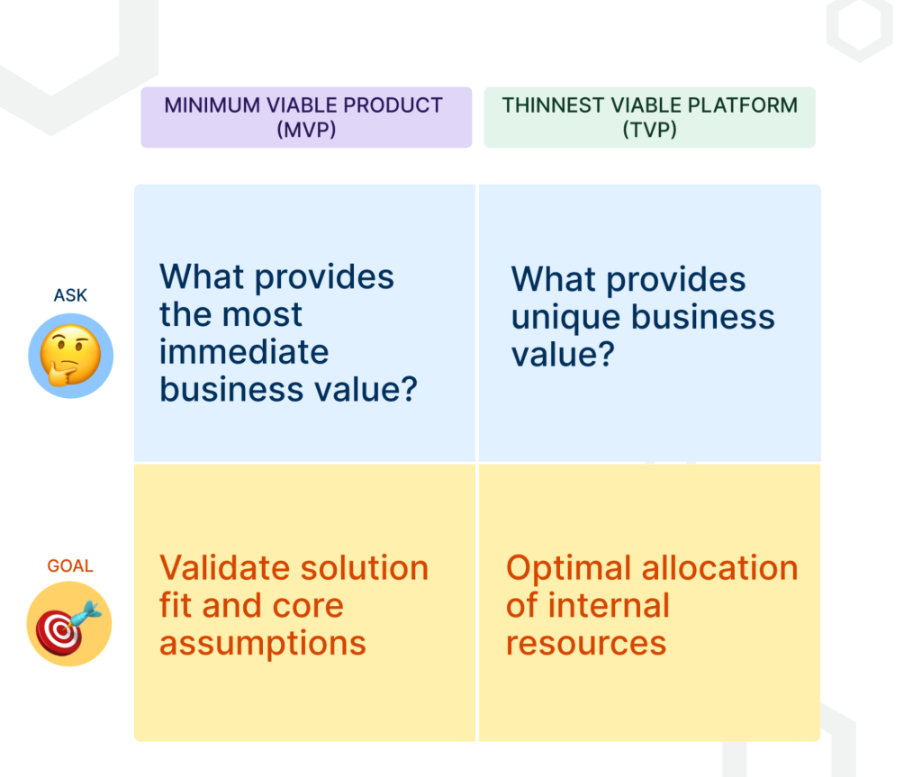
(Source: Mia Platform)
Developers should be able to use your thin platform to deploy a service, provision infrastructure, or complete whatever workflow you’re supporting.
A thin platform gets feedback into your hands quickly. You learn what developers need and where they struggle before investing months in the wrong features.
You can use these questions to decide what belongs in your thin platform:
- What’s the one workflow you’re solving for? Pick the single most important task developers need to complete. Deployment? Environment setup? Data access?
- What’s already available that you can use? Look at existing tools before building. Can you integrate Git, leverage cloud APIs, or wrap existing services?
- What absolutely blocks the workflow if missing? If you remove this capability, can developers still finish the task? If yes, cut it.
- Can this wait until v2? Advanced features, edge cases, and optimizations can come later. Focus on what makes the basic path work.
- Would developers rather have this fast or feature-rich? Speed to value beats comprehensive capabilities when you’re starting.
Use these filters to keep your scope tight. A thin platform that solves one problem completely beats a bloated platform that solves ten problems halfway. Start small, prove value, and then expand based on what developers need next.
5. Market Your Platform
You build something useful, deploy it, maybe send one announcement email, and expect adoption to follow. It doesn’t work that way.
Developers are busy, focused on their own work, and don’t actively search for new internal tools. If they don’t know your platform exists or see why it matters to them, they won’t use it.
You can usually market your platform in three different ways. Use the right approach for what you’re trying to accomplish:
| Approach | How to do it | When to use it |
| Educational | Create tutorials, quick-start guides, demo videos, and workshops that focus on specific tasks.
Show developers “how to deploy your first service in 10 minutes” rather than explain your technical architecture. |
When developers don’t understand what the platform does or how to start. Important for new features and bringing new users on board. |
| Promotional | Send announcement emails, post Slack updates, present at team meetings, and write internal blog posts.
Outline benefits (“provision infrastructure in 5 minutes instead of 2 days”) over features. |
When you launch new features, reach teams who haven’t adopted yet, or need to maintain visibility across the organization. |
| Support-Based | Hold regular office hours, staff a responsive Slack channel, and help developers when they get stuck.
When you solve someone’s problem, ask if you can share the solution to help others. |
Use this approach constantly to demonstrate that the platform team stays engaged. Creates chances to teach developers about features they don’t know exist. |
Just remember that marketing your platform takes consistent effort, not one big launch. Developers need to hear about your platform multiple times before they try it.
If possible, mix educational content, promotional updates, and visible support to keep your platform on their radar and make adoption feel easy.
Key Benefits of Product-Led Platforms
Key Benefits of Product-Led Platforms
You’ve done the research, built your thin platform, and started treating developers like customers. Here’s what typically changes when you commit to this approach:
Enhanced Developer Experience (DevEx)
Product-focused platforms create better developer experiences. Currently, 50% of developers lose over 10 hours each week to workflow problems and inefficiencies.
Platforms built with product principles fix this. They offer fast feedback, clear documentation, and workflows that match how developers work. The result is higher productivity and developers who want to use your platform.
Accelerated Value Delivery
71% of companies with mature platform engineering report major improvements in how fast they ship to market. The difference comes from removing obstacles between the idea and production.
No more waiting days for infrastructure or weeks for approvals. Teams ship features faster, test ideas quicker, and respond to market changes immediately.
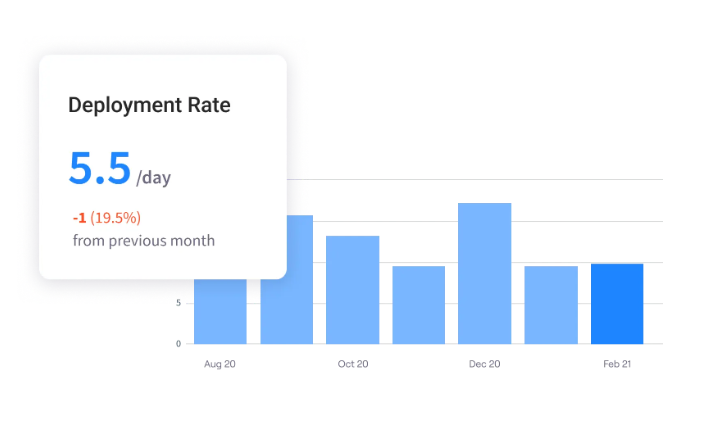
PRO TIP 💡: Use Jellyfish to measure DORA metrics and stop arguing about platform value. See whether teams using your platform deploy faster and ship more reliably than those who don’t.
Stronger Security and Standardization
The platform handles security controls, compliance requirements, and best practices automatically. There are no checklists to remember or approved patterns to research.
Developers report fewer bugs and improved application stability as major advantages of standardized platform engineering. Security teams trust the process, and developers move faster.
Real-World Value and Cost Savings
Build a platform developers love, and the savings follow. At least, that’s what both Spotify and Rabobank experienced when they treated platforms like products.
To be specific, Spotify built Cost Insights, a plugin for their Backstage developer portal, to show engineers where cloud money went. It made it easier to understand cloud spending and optimize their resource decisions. Early wins freed up millions in annual cloud costs, which were enough to fund 25 platform engineering teams.
Rabobank took a different approach to measure platform value. The bank standardized its development platform into reusable “building blocks” that teams could subscribe to instead of building everything from scratch.
The platform team tracked time savings for each building block and found that even a component that saved just 10 minutes per week per team added up fast. Across 150+ development teams, the platform returned nearly 25,000 person-hours annually.
How to Measure Your Platform's True Impact
How to Measure Your Platform’s True Impact
You need to know whether developers use your platform, if it makes their work easier, and whether it speeds up delivery. Without these answers, you might be perfecting a platform nobody wants.
These six categories below give you the complete picture – from whether developers open your platform to whether executives see ROI.
| Metric category | What to measure | Why it matters |
| Platform adoption | Number of active users or teams
Usage of specific capabilities Adoption rate across departments |
Shows whether developers choose your platform.
Low adoption means problems with value, usability, or awareness. |
| Developer satisfaction | Developer Net Promoter Score (NPS)
Quarterly satisfaction surveys Qualitative feedback from interviews Support ticket sentiment |
Reveals how developers feel about your platform.
Dissatisfied users abandon the platform or build workarounds. |
| Platform reliability | Platform uptime and availability
Response time and performance Number of support issues raised |
Unreliable platforms lose trust quickly. Developers won’t depend on platforms that break frequently or respond slowly. |
| Developer productivity | Time to provision resources
Deployment frequency Time spent on toil vs. feature work |
Proves that the platform makes developers more effective.
Productivity gains justify platform investment and show tangible value to leadership. |
| Business impact | Cycle time (idea to production)
Team velocity for users vs. non-users Cost savings from automation initiatives |
Connects platform value to business outcomes.
Executives care about speed, cost, and risk. These metrics speak their language. |
| Platform team health | Roadmap delivery rate
Feature request backlog size Platform team velocity |
Sustainable platforms need healthy teams. Burned-out teams can’t maintain quality or innovate.
These metrics prevent the platform team from collapsing. |
You won’t hit targets immediately, and that’s fine. What matters is the direction things move. If adoption grows but satisfaction drops, you’re scaling too fast without fixing core problems.
If developers love the platform but productivity stays flat, something deeper blocks their work. Use the data to spot problems early and validate that your fixes work.
How Jellyfish Can Help
How Jellyfish Can Help
Product-led platforms need product-level measurement. You need to track who uses your platform, whether they like it, if it speeds up delivery, and what it costs.
The problem is that this data is usually scattered across Git, Jira, CI/CD systems, and survey responses that nobody has time to analyze.
That’s where Jellyfish steps in. Jellyfish is an engineering management platform that helps platform teams measure developer experience, track adoption, and prove platform ROI.
It pulls data from your existing tools like Jira, GitHub, and CI/CD systems to give you a complete picture of how your platform performs and where it needs improvement.
With Jellyfish, you can:
- Use DORA metrics to demonstrate platform impact: Track how platform users perform on deployment speed, lead time, and incident rates compared to teams without the platform. Then, compare results to industry benchmarks to validate performance improvements.
- Map developer time allocation across your org: See the split between strategic work and operational overhead, like infrastructure management and incident response. Pinpoint where platform self-service would bring the biggest wins.
- Understand how AI coding tools perform in your environment: See whether assistants like Copilot or Cursor actually speed up developers using your platform. Then, compare results across tools to guide your AI spending.
- Automate software capitalization without timesheets: Build audit-compliant reports from actual development activity instead of asking engineers to estimate hours. Finance gets reliable numbers, and developers stay focused on code.
- Track platform adoption across teams: See who uses your platform, which capabilities they adopt, and where usage stalls. You’ll also notice trends over time to understand what works and where developers need more support or clearer documentation.
- Collect feedback directly from developers using surveys: Ask specific questions about their platform experience and link answers to performance metrics. Focus improvements on complaints that correlate with real productivity drops.
All the metrics you need are sitting in the tools you use every day. Jellyfish stitches them together and tells you what to do about it.
Book a demo and find out if your platform as a product strategy is working.
Platform as a Product FAQs
Platform as a Product FAQs
What’s the difference between building a platform as a product and just building an internal tool?
An internal tool solves one problem and you move on, while a platform as a product keeps evolving because you listen to how developers use it.
You track whether people choose your platform, ask what frustrates them, and improve based on their feedback.
Is the platform-as-a-product approach only for large enterprises?
No. Small teams benefit from product thinking even more because they can’t afford to build platforms nobody uses. A five-person team can apply product thinking just as well as a 500-person engineering org.
How is a platform team different from a traditional DevOps or SRE team?
Traditional DevOps and SRE teams operate infrastructure and respond to issues, while platform teams treat developers as customers and build self-service tools.
Instead of handling deployment requests, they create platforms where developers deploy on their own. The work changes from “do it for them” to “make it easy for them to do it themselves.”
The article mentions that many platforms fail. What’s the number one reason for failure?
Platform teams don’t treat developers as customers. They build infrastructure that makes technical sense but doesn’t match how developers work and what the “customer needs” are.
The platform becomes another obstacle instead of a shortcut. Developers avoid it, adoption tanks, and the platform becomes expensive shelf-ware that nobody uses.
Our organization doesn’t have a dedicated Platform Product Manager. Where do we start?
Start with someone who cares about developer experience and can dedicate time to the platform. An engineer with product sense works better than no one at all.
Have them talk to developers weekly, track what slows teams down, and prioritize the biggest pain points. You can formalize the role later once the platform proves value.
Learn More About Platform Engineering
Learn More About Platform Engineering
- The Complete Guide to Platform Engineering
- When to Adopt Platform Engineering: 8 Signs Your Team is Ready
- Platform Engineering vs. DevOps: What’s the Difference?
- How to Build a Platform Engineering Team: Key Roles, Structure, and Strategy
- Understanding The Platform Engineering Maturity Model
- How to Build Golden Paths Your Developers Will Actually Use
- Best 14 Platform Engineering Tools Heading Into 2026
- 8 Benefits of Platform Engineering for Software Development Teams
- 17 Platform Engineering Metrics to Measure Success and ROI
- 9 Platform Engineering Anti-Patterns That Kill Adoption
- The Top Platform Engineering Skills Every Engineering Leader Must Master
- 11 Platform Engineering Best Practices for Building a Scalable IDP
- What is an Internal Developer Platform (IDP)?
About the author

Lauren is Senior Product Marketing Director at Jellyfish where she works closely with the product team to bring software engineering intelligence solutions to market. Prior to Jellyfish, Lauren served as Director of Product Marketing at Pluralsight.